
Cloud web applications are frequently targeted by attackers using techniques like SQL injection, cross-site scripting (XSS), and malicious HTTP requests. To protect web applications in the cloud, organizations often deploy Web Application Firewalls (WAF) in front of their applications.
In this hands-on lab, I built a secure Azure web architecture using Azure Application Gateway with Web Application Firewall (WAF v2) to protect a backend web application from common web attacks.
This lab aligns with concepts covered in the AZ-500: Microsoft Azure Security Engineer certification.
Lab Architecture Overview
In this architecture, all incoming internet traffic is inspected by the Web Application Firewall before reaching the backend application.
Architecture Flow:
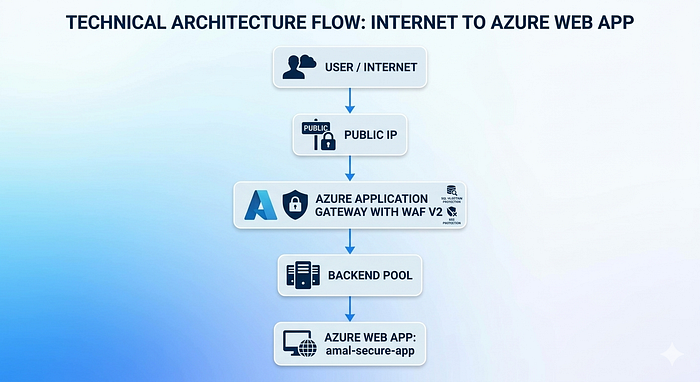
Architecture Diagram

Technologies Used
The following Azure services were used in this security lab:
⚙️ Microsoft Azure
⚙️ Azure Application Gateway (WAF v2)
⚙️ Azure Web Application Firewall Policy
⚙️ Azure Virtual Network
⚙️ Azure App Service
⚙️ OWASP Core Rule Set
⚙️ Azure Application Insights
Step 1 — Create Resource Group
The first step is to create a Resource Group to organize all Azure resources used in this lab.
Resource Group Name:
AZ500-Security-Lab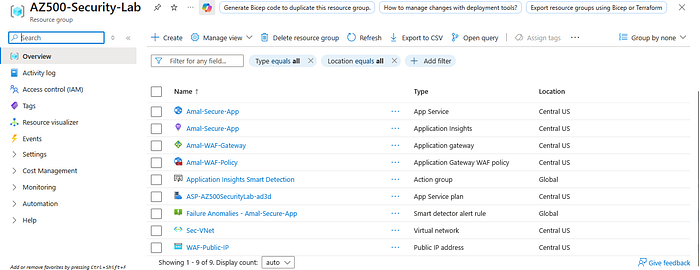
Step 2 — Create Virtual Network and Subnets
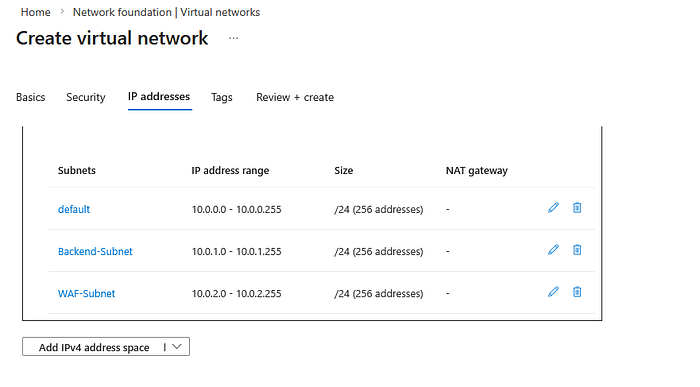
Next, create a Virtual Network with multiple subnets to support secure network segmentation.
Example network configuration:
Address Space
 10.0.0.0/16
Subnets
Default Subnet → 10.0.0.0/24
Backend Subnet → 10.0.1.0/24
WAF Subnet → 10.0.2.0/24
This architecture ensures that traffic must pass through the WAF layer before reaching the backend web application.
Step 3 — Deploy Azure Web App
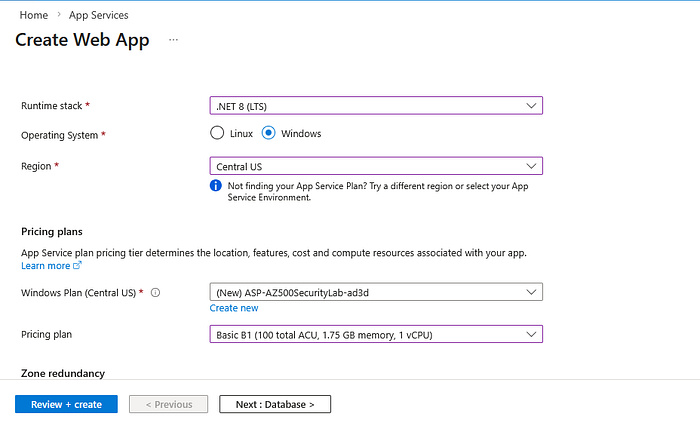
A sample web application is deployed using Azure App Service. This web application will act as the backend application that the Application Gateway will forward traffic to.
Runtime examples:
- .NET
- Node.js
- PHP
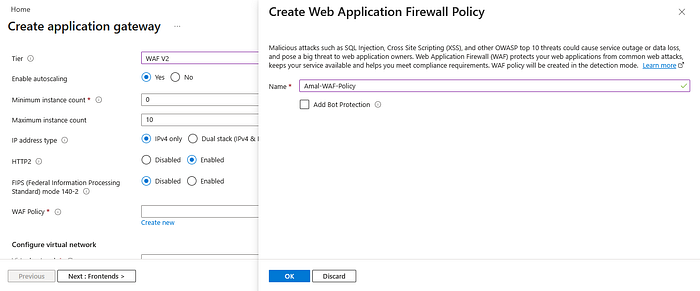
Step 4 — Create Web Application Firewall Policy
The next step is to create a Web Application Firewall Policy.
Configuration includes:
Mode: Prevention
OWASP Core Rule Set enabled
The WAF policy helps protect the web application against:
- SQL Injection
- Cross-Site Scripting (XSS)
- Malicious requests
- OWASP Top 10 threats
Step 5 — Deploy Azure Application Gateway
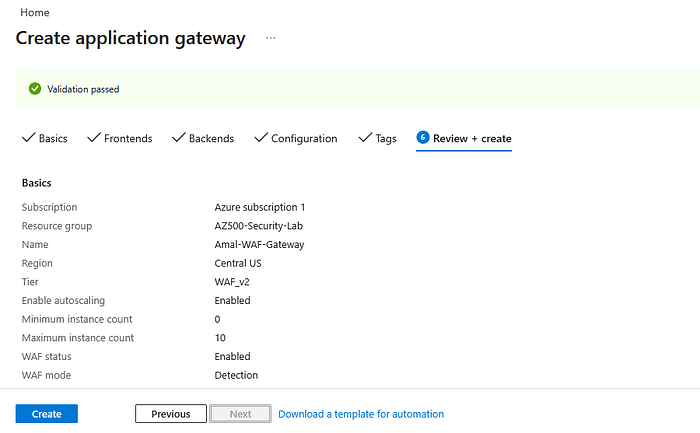
Azure Application Gateway acts as the secure entry point for incoming web traffic.
Configuration example:
Tier: WAF v2
Autoscaling enabled
Public IP attached
Once deployed, the Application Gateway will inspect all incoming traffic using the configured WAF policy.
Step 6 — Configure Backend Pool
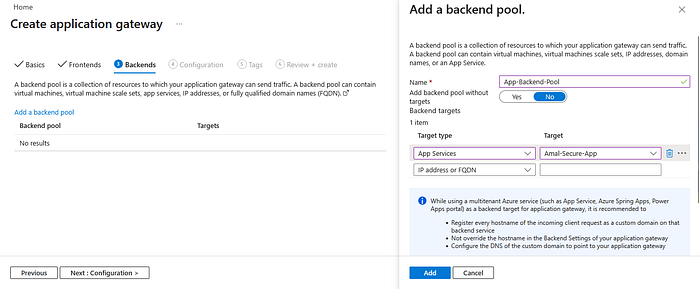
A backend pool is configured to connect the Application Gateway with the Azure Web App.
This allows the gateway to route incoming traffic to the backend application.
Step 7 — Configure Backend Settings
Backend HTTP settings define how traffic should be forwarded to the backend server.
Example configuration:
Protocol: HTTP
Port: 80
Cookie affinity: Disabled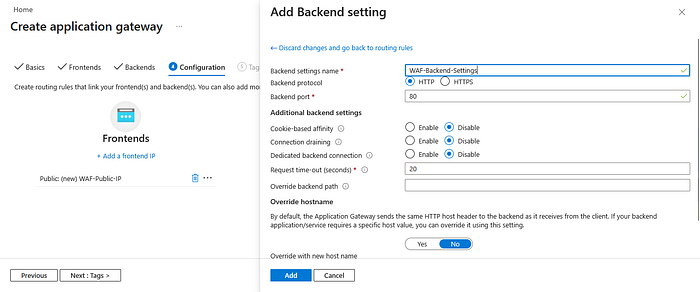
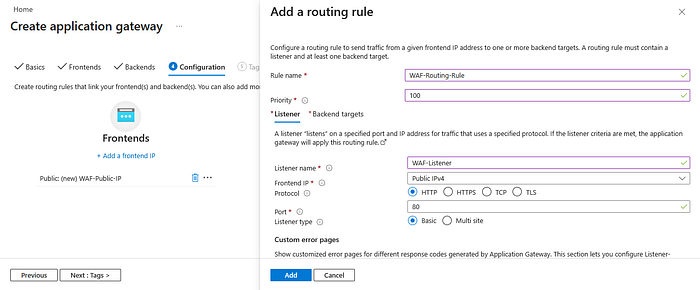
Step 8 — Configure Routing Rules
Routing rules are used to connect:
- Listener
- Backend pool
- Backend HTTP settings
This ensures that incoming requests are correctly routed to the backend application.
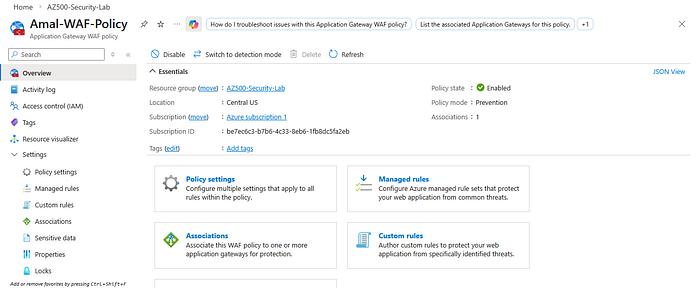
Step 9 — Enable WAF Prevention Mode
To actively block malicious traffic, the WAF should be configured in Prevention Mode.
This allows the firewall to detect and block malicious requests before they reach the application.
📷 Insert Image Here
Security Testing
To test the Web Application Firewall, a simulated SQL injection attack was attempted.
Example payload:
?id=' OR 1=1 -Result:
403 Forbidden
This confirms that the WAF successfully blocked the malicious request before it reached the backend web application.

Key Security Benefits
Using Azure Application Gateway with WAF provides several important security benefits:
- Protects web applications from OWASP Top 10 threats
- Filters malicious traffic before it reaches backend services
- Provides centralized security control for web applications
- Improves overall cloud security posture
Final Thoughts
Web applications are one of the most common attack surfaces in modern cloud environments. Implementing a Web Application Firewall helps organizations protect applications from common web-based attacks.
This hands-on lab demonstrates how Azure Application Gateway and WAF can be used to build a secure cloud web architecture.
Projects like this are helping me deepen my understanding of Azure security architecture as I continue preparing for the AZ-500 certification.
Connect With Me
GitHub https://github.com/AmalUBasnayake
LinkedIn https://www.linkedin.com/in/amal-udayanga-basnayake