
In this room, you'll learn what active reconnaissance means and use tools like web browsers, ping, traceroute, telnet, and netcat to actively interact with target systems and gather information by directly communicating with them.
Active reconnaissance requires direct engagement with the target. Think of it like you check the locks on the doors and windows, among other potential entry points.

Examples of active reconnaissance activities include:
- Connecting to one of the company servers such as HTTP, FTP, and SMTP.
- Calling the company in an attempt to get information (social engineering).
- Entering company premises pretending to be a repairman.
🌐 Task 2: Web Browser
A web browser is often the first tool used during active reconnaissance.
Using browser Developer Tools, we can:
- Inspect HTML source code
- Analyze JavaScript files
- View hidden comments
- Monitor network requests
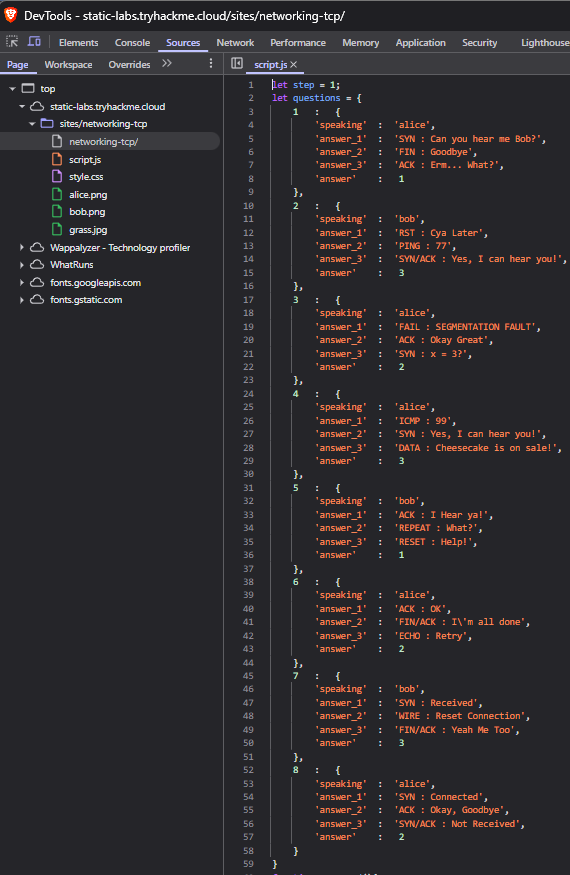
Q2.1: Browse to the following website and ensure that you have opened your Developer Tools on AttackBox Firefox, or the browser on your computer. Using the Developer Tools, figure out the total number of questions.
➡️ Answer: 8
📡 Task 3: Ping
Ping uses ICMP Echo Requests to check whether a host is reachable and measure network latency.
It helps determine:
- If a host is alive
- Round-trip time
- Packet loss
💡Use the "man Ping" command on a Linux system to consult ping's manual pages.
Q3.1: Which option would you use to set the size of the data carried by the ICMP echo request?
➡️ Answer: -s
Q3.2: What is the size of the ICMP header (in bytes)?
➡️ Answer: 8
Q3.3: Does MS Windows Firewall block ping requests by default? (Y/N)
➡️ Answer: Y
Q3.4: Deploy the VM for this task and using the AttackBox terminal, issue the command ping -c 10 MACHINE_IP. How many ping replies did you get back?
➡️ Answer: 10
🧭 Task 4: Traceroute
Traceroute is used to discover the network path packets take to reach a destination.
It works by incrementing the TTL (Time To Live) value and recording each hop along the way.
Traceroute A
user@AttackBox$ traceroute tryhackme.com
traceroute to tryhackme.com (172.67.69.208), 30 hops max, 60 byte packets
 1  ec2-3-248-240-5.eu-west-1.compute.amazonaws.com (3.248.240.5)  2.663 ms * ec2-3-248-240-13.eu-west-1.compute.amazonaws.com (3.248.240.13)  7.468 ms
 2  100.66.8.86 (100.66.8.86)  43.231 ms 100.65.21.64 (100.65.21.64)  18.886 ms 100.65.22.160 (100.65.22.160)  14.556 ms
 3  * 100.66.16.176 (100.66.16.176)  8.006 ms *
 4  100.66.11.34 (100.66.11.34)  17.401 ms 100.66.10.14 (100.66.10.14)  23.614 ms 100.66.19.236 (100.66.19.236)  17.524 ms
 5  100.66.7.35 (100.66.7.35)  12.808 ms 100.66.6.109 (100.66.6.109)  14.791 ms *
 6  100.65.14.131 (100.65.14.131)  1.026 ms 100.66.5.189 (100.66.5.189)  19.246 ms 100.66.5.243 (100.66.5.243)  19.805 ms
 7  100.65.13.143 (100.65.13.143)  14.254 ms 100.95.18.131 (100.95.18.131)  0.944 ms 100.95.18.129 (100.95.18.129)  0.778 ms
 8  100.95.2.143 (100.95.2.143)  0.680 ms 100.100.4.46 (100.100.4.46)  1.392 ms 100.95.18.143 (100.95.18.143)  0.878 ms
 9  100.100.20.76 (100.100.20.76)  7.819 ms 100.92.11.36 (100.92.11.36)  18.669 ms 100.100.20.26 (100.100.20.26)  0.842 ms
10  100.92.11.112 (100.92.11.112)  17.852 ms * 100.92.11.158 (100.92.11.158)  16.687 ms
11  100.92.211.82 (100.92.211.82)  19.713 ms 100.92.0.126 (100.92.0.126)  18.603 ms 52.93.112.182 (52.93.112.182)  17.738 ms
12  99.83.69.207 (99.83.69.207)  17.603 ms  15.827 ms  17.351 ms
13  100.92.9.83 (100.92.9.83)  17.894 ms 100.92.79.136 (100.92.79.136)  21.250 ms 100.92.9.118 (100.92.9.118)  18.166 ms
14  172.67.69.208 (172.67.69.208)  17.976 ms  16.945 ms 100.92.9.3 (100.92.9.3)  17.709 ms
Traceroute B
user@AttackBox$ traceroute tryhackme.com
traceroute to tryhackme.com (104.26.11.229), 30 hops max, 60 byte packets
 1  ec2-79-125-1-9.eu-west-1.compute.amazonaws.com (79.125.1.9)  1.475 ms * ec2-3-248-240-31.eu-west-1.compute.amazonaws.com (3.248.240.31)  9.456 ms
 2  100.65.20.160 (100.65.20.160)  16.575 ms 100.66.8.226 (100.66.8.226)  23.241 ms 100.65.23.192 (100.65.23.192)  22.267 ms
 3  100.66.16.50 (100.66.16.50)  2.777 ms 100.66.11.34 (100.66.11.34)  22.288 ms 100.66.16.28 (100.66.16.28)  4.421 ms
 4  100.66.6.47 (100.66.6.47)  17.264 ms 100.66.7.161 (100.66.7.161)  39.562 ms 100.66.10.198 (100.66.10.198)  15.958 ms
 5  100.66.5.123 (100.66.5.123)  20.099 ms 100.66.7.239 (100.66.7.239)  19.253 ms 100.66.5.59 (100.66.5.59)  15.397 ms
 6  * 100.66.5.223 (100.66.5.223)  16.172 ms 100.65.15.135 (100.65.15.135)  0.424 ms
 7  100.65.12.135 (100.65.12.135)  0.390 ms 100.65.12.15 (100.65.12.15)  1.045 ms 100.65.14.15 (100.65.14.15)  1.036 ms
 8  100.100.4.16 (100.100.4.16)  0.482 ms 100.100.20.122 (100.100.20.122)  0.795 ms 100.95.2.143 (100.95.2.143)  0.827 ms
 9  100.100.20.86 (100.100.20.86)  0.442 ms 100.100.4.78 (100.100.4.78)  0.347 ms 100.100.20.20 (100.100.20.20)  1.388 ms
10  100.92.212.20 (100.92.212.20)  11.611 ms 100.92.11.54 (100.92.11.54)  12.675 ms 100.92.11.56 (100.92.11.56)  10.835 ms
11  100.92.6.52 (100.92.6.52)  11.427 ms 100.92.6.50 (100.92.6.50)  11.033 ms 100.92.210.50 (100.92.210.50)  10.551 ms
12  100.92.210.139 (100.92.210.139)  10.026 ms 100.92.6.13 (100.92.6.13)  14.586 ms 100.92.210.69 (100.92.210.69)  12.032 ms
13  100.92.79.12 (100.92.79.12)  12.011 ms 100.92.79.68 (100.92.79.68)  11.318 ms 100.92.80.84 (100.92.80.84)  10.496 ms
14  100.92.9.27 (100.92.9.27)  11.354 ms 100.92.80.31 (100.92.80.31)  13.000 ms 52.93.135.125 (52.93.135.125)  11.412 ms
15  150.222.241.85 (150.222.241.85)  9.660 ms 52.93.135.81 (52.93.135.81)  10.941 ms 150.222.241.87 (150.222.241.87)  16.543 ms
16  100.92.228.102 (100.92.228.102)  15.168 ms 100.92.227.41 (100.92.227.41)  10.134 ms 100.92.227.52 (100.92.227.52)  11.756 ms
17  100.92.232.111 (100.92.232.111)  10.589 ms 100.92.231.69 (100.92.231.69)  16.664 ms 100.92.232.37 (100.92.232.37)  13.089 ms
18  100.91.205.140 (100.91.205.140)  11.551 ms 100.91.201.62 (100.91.201.62)  10.246 ms 100.91.201.36 (100.91.201.36)  11.368 ms
19  100.91.205.79 (100.91.205.79)  11.112 ms 100.91.205.83 (100.91.205.83)  11.040 ms 100.91.205.33 (100.91.205.33)  10.114 ms
20  100.91.211.45 (100.91.211.45)  9.486 ms 100.91.211.79 (100.91.211.79)  13.693 ms 100.91.211.47 (100.91.211.47)  13.619 ms
21  100.100.6.81 (100.100.6.81)  11.522 ms 100.100.68.70 (100.100.68.70)  10.181 ms 100.100.6.21 (100.100.6.21)  11.687 ms
22  100.100.65.131 (100.100.65.131)  10.371 ms 100.100.92.6 (100.100.92.6)  10.939 ms 100.100.65.70 (100.100.65.70)  23.703 ms
23  100.100.2.74 (100.100.2.74)  15.317 ms 100.100.66.17 (100.100.66.17)  11.492 ms 100.100.88.67 (100.100.88.67)  35.312 ms
24  100.100.16.16 (100.100.16.16)  19.155 ms 100.100.16.28 (100.100.16.28)  19.147 ms 100.100.2.68 (100.100.2.68)  13.718 ms
25  99.83.89.19 (99.83.89.19)  28.929 ms *  21.790 ms
26  104.26.11.229 (104.26.11.229)  11.070 ms  11.058 ms  11.982 ms
Q4.1: In Traceroute A, what is the IP address of the last router/hop before reaching tryhackme.com?
➡️ Answer: 172.67.69.208
Q4.2: In Traceroute B, what is the IP address of the last router/hop before reaching tryhackme.com?
➡️ Answer: 104.26.11.229
Q4.3: In Traceroute B, how many routers are between the two systems?
➡️ Answer: 26
🔐 Task 5: Telnet
Telnet allows us to connect to open TCP ports and interact with running services.
It is commonly used for banner grabbing to identify:
- Service name
- Software version
telnet <TARGET_IP> 80
Trying MACHINE_IP...
Connected to MACHINE_IP.
Escape character is '^]'.
GET / HTTP/1.1
host: telnet

HTTP/1.1 200 OK
Server: Apache/2.4.61
Q5.1: What is the name of the running server?
➡️ Answer: Apache
Q5.2: What is the version of the running server (on port 80 of the VM)?
➡️ Answer: 2.4.61
🧰 Task 6: Netcat
Netcat (nc) is a powerful networking utility often referred to as the Swiss Army Knife of networking.
It allows us to read and write data across network connections using TCP or UDP.
In this task, we use Netcat to connect to a service and perform banner grabbing.
nc <TARGET_IP> 21Q6.1: What is the version of the running server?
➡️ Answer: 0.17
Summary of Concepts
Active reconnaissance involves sending packets or connecting to services.
These actions can be logged, detected, or blocked by the target.
Tools like web browsers, ping, traceroute, telnet, and netcat are essential for active recon.