Imagine you're a regular employee at a company. Your HR account has one permission: editing your work email. That's it. The HR system has locked you out of everything else. The "Add People" button? Hidden. The "Remove People" button? Gone. The UI is doing exactly what it's supposed to.
Now imagine that none of that actually matters.
That's what I found while testing example.com, an HR and workforce management platform. Two separate vulnerabilities, both critical, both stemming from the exact same root cause — and together, they could let someone with nothing more than "edit work email" access either wipe out an entire company's workforce or silently plant a rogue admin account with full access to payroll, PII, and financial records.
The illusion of security
Both bugs are rooted in something called "UI-only access control." The idea: if a user can't see the button, they can't use the feature. For most users, this works fine. But any attacker with a web proxy like Burp Suite — a free, widely used tool — can step outside the UI entirely and talk to the backend directly.
The frontend at example.com was hiding the right buttons. The backend, however, wasn't checking who was asking before saying yes.
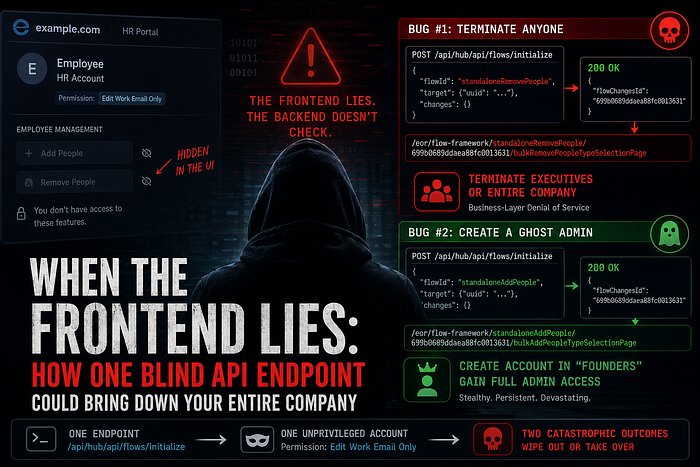
Bug #1: Terminating anyone — including the people who own the company
The attacker account used here has a single permission: edit work email. No HR access. No management rights. The "Remove People" button is invisible in the UI. Everything looks locked down.
Until you bypass the UI entirely.
When an authorized HR manager clicks "Remove People," the browser sends a POST request to /api/hub/api/flows/initialize with a flowId of standaloneRemovePeople. The server creates a termination session and returns a session ID. That's the normal flow.
The problem: the server never verified whether the person making that request was allowed to terminate anyone.
Here's the raw request I sent with the unprivileged account:
POST /api/hub/api/flows/initialize HTTP/2
Host: app.example.com
User-Agent: Mozilla/5.0 (Windows NT 10.0; Win64; x64; rv:147.0) Gecko/20100101 Firefox/147.0
Accept: application/json, text/plain, */*
Content-Type: application/json
Authorization: Bearer <unprivileged_token>
Role: <role_id>
Company: <company_id>
Requestedaccesslevel: ADMIN

{
    "flowId": "standaloneRemovePeople",
    "target": {
        "uuid": "standaloneRemovePeople_cd696c3f-ed4a-4c0c-ab18-500130a0a2f6"
    },
    "changes": {},
    "onCompleteRedirectUrl": "",
    "onSaveAndExitUrl": ""
}
The server didn't blink. It returned:
{"flowChangesId":"699b0689ddaea88fc001363That flowChangesId is all you need. Plug it into the following URL:
https://app.example.com/eor/flow-framework/standaloneRemovePeople/699b0689ddaea88fc0013631/bulkRemovePeopleTypeSelectionPageOpen that in your browser while logged in as the unprivileged account — the one that can only edit a work email — and you're inside the full termination interface. No error. No redirect. Full access.
From there, the options are severe:
- Search for any executive or Super Admin and terminate them, immediately revoking all their access
- Use the bulk-remove option to terminate the entire company roster in a single action
This isn't just an access control issue. It's a complete business-layer denial of service. Payroll halts. IT access revokes. If the organization has automated offboarding workflows, this cascades into data deletion and email account deactivation. The legitimate owners of the example.com tenant could find themselves locked out of their own system — terminated by someone whose only supposed capability was updating an email address.
Bug #2: Creating a ghost admin from thin air
The second vulnerability is the mirror image of the first — and in some ways, quieter and more dangerous.
Same endpoint. Same missing permission check. Same unprivileged "edit work email" account. But this time, the flowId is standaloneAddPeople.
POST /api/hub/api/flows/initialize HTTP/2
Host: app.example.com
Authorization: Bearer <unprivileged_token>
Role: <role_id>
Company: <company_id>
Content-Type: application/json

{
    "flowId": "standaloneAddPeople",
    "target": {
        "uuid": "standaloneAddPeople_541393bb-8122-451f-bdd1-6edce370d309"
    },
    "changes": {},
    "onCompleteRedirectUrl": "",
    "onSaveAndExitUrl": ""
}
Same successful response:
{"flowChangesId":"699b0689ddaea88fc0013631"}Construct the onboarding URL:
https://app.example.com/eor/flow-framework/standaloneAddPeople/699b0689ddaea88fc0013631/bulkAddPeopleTypeSelectionPageNow you're inside the employee onboarding interface. You fill out a name, a work email, the usual fields. Then comes the department dropdown.
example.com lets organizations create custom departments — "Founders," "IT Admins," "Finance," "HR." Those departments carry the permissions configured for them. Select "Founders," complete the onboarding, then log in with the new account's credentials. You now have full administrative access across the organization's workspace — not by cracking anything, but by filling out an HR form you were never supposed to reach.
The risk profile here is different from the first bug. The termination attack is loud — someone will notice immediately. This one is silent. A ghost account assigned to a legitimate-looking department can sit undetected for weeks, exfiltrating payroll data, reading employee PII, monitoring financial records. Persistence is built right in.
The same endpoint, twice
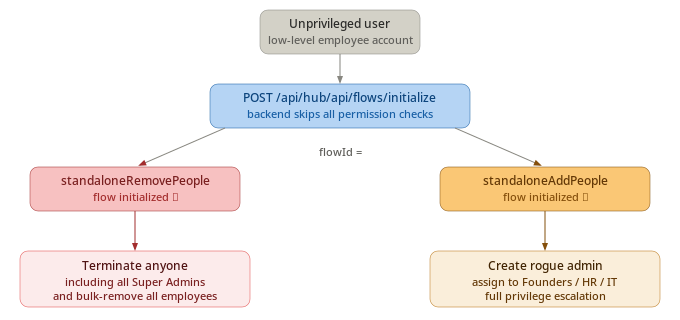
What makes these two findings especially notable is that they share an identical root cause. Both attacks go through /api/hub/api/flows/initialize. Both succeed because the server processes the request without verifying that the caller's token actually authorizes the requested flow.
The attack path is clean: one endpoint, two catastrophic outcomes, depending entirely on which flowId you supply. This is the kind of logic flaw that's easy to miss during development — especially when the UI correctly enforces restrictions and everything looks right from the front.
Why this keeps happening
This class of vulnerability — Broken Function Level Authorization, or business logic bypass — rarely shows up in automated scanners. It requires actually understanding what the application is supposed to do, then asking: what happens if I call this directly, without going through the interface?
The principle here is foundational: never trust the client. Hiding a button is not the same as enforcing an access rule. Any endpoint that can be called must validate, server-side, whether the caller holds the right permission for that specific action — every time, unconditionally.
The fix follows the same pattern for both bugs:
- Before processing any
flowId,/api/hub/api/flows/initializemust look up the requesting user's role and confirm they hold the required permission (terminate_employee,hire_employee, or equivalent). If not, return403 Forbiddenand stop. - For the account provisioning bug: even if a user has hire permissions, the backend must separately verify they're authorized to assign the selected department — preventing someone from creating an account with higher privileges than their own.