

It is almost never a careless developer. It is a boundary that quietly moved.
A founder on LinkedIn realized last week that AI videos circulating online had been generated on his account. A Gemini API key had leaked. By the time he noticed, his monthly spend cap was almost maxed out.
The replies under his post were full of similar stories.
A team in Mexico woke up to a 82,000 dollar bill in 48 hours, against a normal monthly spend of 180 dollars. A solo developer went to bed with a 10 dollar budget alert and woke up 25,672 dollars in debt to Google Cloud. Different countries, different stacks, the same shape.
If you scroll through r/googlecloud right now, you will find a steady stream of these. The comments under every one of them follow the same arc: shock, then how did this happen, then a long fight with billing support.
The interesting question is not "why are developers being careless".
It is why this exact failure mode is spiking in 2026, after a decade of mostly being fine.
The boundary that moved
For more than ten years, Google told developers that certain API keys were safe to embed in client-side code. Maps keys, Firebase config, public analytics. The model was straightforward: these credentials authenticated the app, not the user, and you locked them down with referrer restrictions and quotas. Putting them in your JavaScript was not just allowed — it was the documented path.
Then Gemini arrived.
Security researchers at Truffle Security published a writeup with a headline that summarises the entire situation: Google API keys weren't secrets. But then Gemini changed the rules. In plain terms: the same key formats Google told us for years were safe to expose can now authenticate to Gemini and start spending money on your account.
Nothing about the keys changed. The boundary did.
This is the part that matters for engineers. A credential that was correctly classified as "public" in 2022 — embedded in production code, committed to repos, surfaced through DevTools by design — became a high-value secret in 2026 because the surface it could touch was quietly expanded.
Nobody got an email.
This is also why so many of these stories end with the developer saying "we didn't find an obvious mistake". They are not lying. The mistake was structural, made years before the leak, by someone who was following the documentation that existed at the time.
The other half: a framework that helps you do it wrong
The cloud side moved without telling anyone. The framework side has a quieter but related trap.
In Next.js, any environment variable prefixed with NEXT_PUBLIC_ is, by design, inlined into the JavaScript bundle that ships to the browser. The official docs are explicit about this. It is not "public but hidden". It is "this value will be in the client".
The prefix is a convenience, not a safety feature. It exists so frontend code can read public values like a Google Maps client key or a Stripe publishable key. It does the opposite of hiding a secret — it announces that the value will be shipped to every visitor.
But here is what I keep seeing in real codebases:
// client component
await fetch("https://api.provider.com/v1/chat", {
  headers: {
    Authorization: `Bearer ${process.env.NEXT_PUBLIC_AI_KEY}`
  }
})
This is a working request. It compiles. It runs. It returns a real response from the AI provider.
It is also leaking the key to anyone who opens DevTools.
The reason this pattern is everywhere now is the same reason AI features are everywhere now: the model can generate this snippet correctly in three seconds. It looks like the code in every quickstart guide. It works locally on the first try.
The only thing missing is the architectural question: where is this code allowed to run?
The fix is boring, and that is the point
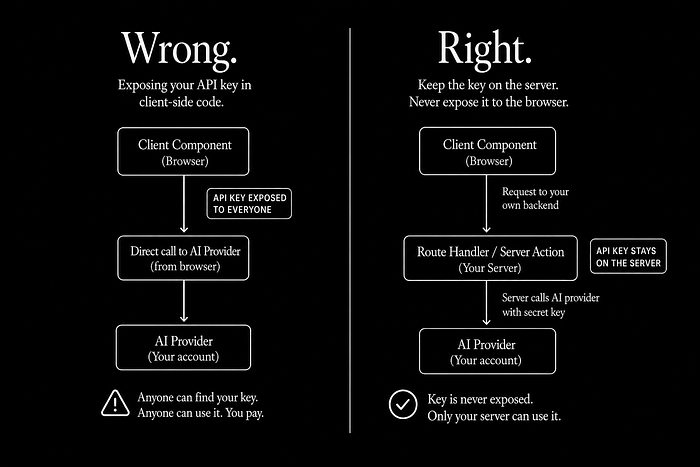
The safer pattern has been around forever. It is not novel, it is not clever, and there is no library to install.
Client component
  ↓
Route Handler          ← your server-side code
  ↓
Server reads the secret from a non-NEXT_PUBLIC_ env var
  ↓
Provider call happens server-side
  ↓
Client only gets the response
In Next.js terms: the fetch to the AI provider lives in a route.ts or a server action. The key is read from a regular env var with no NEXT_PUBLIC_ prefix. The browser never sees it.
The actual code looks like this. Server side:
// app/api/chat/route.ts
import { NextResponse } from "next/server"
export async function POST(req: Request) {
  const body = await req.json()
  const res = await fetch("https://api.provider.com/v1/chat", {
    method: "POST",
    headers: {
      // Read from a server-only env var — no NEXT_PUBLIC_ prefix.
      Authorization: `Bearer ${process.env.AI_PROVIDER_KEY}`,
      "Content-Type": "application/json"
    },
    body: JSON.stringify(body)
  })
  const data = await res.json()
  return NextResponse.json(data)
}
Client side:
// client component
const res = await fetch("/api/chat", {
  method: "POST",
  headers: { "Content-Type": "application/json" },
  body: JSON.stringify({ prompt })
})
That is the entire fix. One layer of indirection. The key never reaches the browser. As a bonus, you now have a place to add rate limiting, request logging, user authentication, and per-user spend caps — things you cannot do when the client is talking to the provider directly.
Why AI assistants make this worse, not better
I want to be careful here, because this is the part that sounds like a hot take but is actually the most important one.
The model is not the problem. The model can write the server-side version perfectly if you ask for it. The problem is that the model will also write the client-side version perfectly if you ask for that, and the two versions look almost identical to a tired developer at 11pm shipping a feature.
// looks fine
await fetch("https://api.provider.com/v1/chat", {
  headers: { Authorization: `Bearer ${process.env.NEXT_PUBLIC_AI_KEY}` }
})
// also looks fine
await fetch("/api/chat", {
  method: "POST",
  body: JSON.stringify({ prompt })
})
Same shape. Same number of lines. The first one ships your key to every visitor. The second one does not.
The model cannot tell you which one is correct, because correctness depends on where the file lives, what runtime the framework will compile it for, and what your trust boundary is. None of that is in the prompt. None of that is in the snippet.
AI assistants compress the time from idea to working code. They do not compress the time it takes to think about architecture. If anything, they widen the gap — because now the working code lands on your screen before you have had a chance to think about whether it should.
This is the actual engineering skill that is becoming more valuable, not less, as AI gets better at writing code: knowing which questions the model is not asking on your behalf.
A short checklist before you ship AI features
If you are adding an AI provider to a web app this month, run through this:
- Is the API key in any file that ends up in the client bundle? Build the app and grep the output. If the key is there, it is public.
- Is the key prefixed with
NEXT_PUBLIC_,VITE_,REACT_APP_, or anything else that exposes it to the browser? If yes, treat it as already leaked. - Is the provider call happening from the browser directly? If yes, move it behind a route handler.
- Do you have a spend cap set on the provider account, separate from your project budget? Provider-side caps stop the bleeding faster than billing alerts.
- Do you have a rate limit on your endpoint, not just the provider's? A leaked endpoint is also a problem, even if the key stays server-side.
- Are you using the same key in dev and prod? Separate them — the dev one will end up in a screenshot or a public repo eventually.
None of this is novel. All of it gets skipped when the feature ships at 11pm.
The boundary, not the blame
The thing I find most uncomfortable about every one of these leak stories is the tone of the response. Comment sections fill up with people saying "this is what happens when you don't know what you're doing", which is both unkind and wrong. Most of the developers in these threads are competent. Some of them are senior. They followed documentation that was correct at the time they read it.
The boundary moved. The docs took a while to catch up. The framework provided a convenience prefix that does not mean what its name suggests. The AI assistant wrote code that worked locally. And the bill arrived before any of that became visible.
The lesson is not "be more careful". The lesson is that "where does this code run, and what does it have access to" is not a question the toolchain is going to ask for you. It is the part you own.
Before I add any AI API to a product now, I check one thing first:
Can this key ever reach the browser?
If the answer is yes, the architecture is already wrong.
Have you run into one of these AI provider bill stories — either your own or one you watched a friend go through? I am collecting patterns. If you have a story you can share without naming the project, leave a comment.
I write about AI-native full stack engineering, production systems, and the boundary between model and infrastructure. Follow if that is your thing.