
As more and more projects require external data stored in files, the most convenient way is to place these files on Oracle Cloud Infrastructure (OCI) Object Storage. This cloud storage service is tightly integrated with all cloud databases and other cloud services. End users can access the object storage location directly via the cloud console to place their files, or you can give them access via another interface. Oracle APEX can be used to build such a graphical user interface to upload files from a web browser.
This is a fragment of an example that can be studied as a hands-on lab using the following link: RAG example with Oracle AI Vector Search.
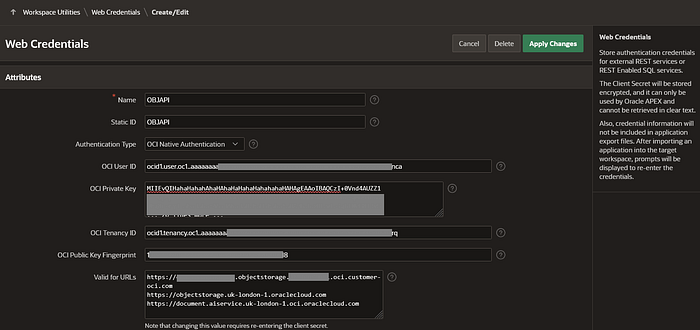
For this graphical interface for uploading files built in Oracle APEX, create the credentials necessary to access the Oracle Object Storage service in the APEX workspace. Navigate to App Builder > Workspace Utilities > Web Credentials.
The details used to create the credentials were retrieved from the OCI cloud console. Please use the values from your tenancy, not the ones in this example, except for Static ID and Authentication Type.
The first two links in the last group of attributes, Valid for URLs, are used to access OCI Object Storage, and the last one is for OCI Document Understanding, an AI service.
Name: OBJAPI Static ID: OBJAPI Authentication Type: OCI Native Authentication OCI User ID:
ocid1.user.oc1..aaaaaaaat2x6ry4xsb6m5-this-is-my-user-hahahaahahahab2bvcjqOCI Private Key:
MIIEvQIHahaHahahAhaHAhaHaHahaHahahahaHAHAgEAAoIBAQCzI+0Vnd4AUZZ1
Z35Qp0p58oCCHahaHahahAhaHAhaHaHahaHahahahaHAHhahHGtkDKZYqMD6ThOa
Whg8rBnyIHahaHahahAhaHAhaHaHahaHahahahaHAHhaha4Uvw1e3qhEWPH8l3vB
… 20 lines more …
/OAkRHahaHahahAhaHAhaHaHahaHahahahaHAHhahahahahhaLXXr4e1LrX40wbX
P0uKHahaHahahAhaHAhaHaHahaHahahahaHAHhahahahahHAHJ2v/1mIGy+pOt3S
ZmkxgWIvS6B0ixYjuSHAvzU=
OCI Tenancy ID:
ocid1.tenancy.oc1..aaaaaaaa6aea6xvr6-this-is-my-tenancy-aahhahaahaa4opc3fib2aOCI Public Key Fingerprint:
25:0h:57:07:2h:55:0h:10:6h:h6:ha:06:h1:9h:32:9hValid for URLs:
https://<TENANCY_NAME>.objectstorage.<TENANCY_REGION>.oci.customer-oci.com
https://objectstorage.<TENANCY_REGION>.oraclecloud.com
https://document.aiservice.<TENANCY_REGION>.oci.oraclecloud.com
It is good practice to store some attributes of uploaded files in the database. The table OBJSDOCS will be used to track files uploaded to the Object Storage bucket. Feel free to add any metadata you consider important.
-- Object Storage files uploaded in application bucket DBAI-bucket
CREATE TABLE OBJSDOCS
(ID NUMBER(9) GENERATED BY DEFAULT ON NULL AS IDENTITY (CACHE 5) PRIMARY KEY,
FILE_NAME VARCHAR2(250 CHAR) NOT NULL ENABLE,
CREATED DATE NOT NULL ENABLE,
CREATED_BY NUMBER(9) NOT NULL ENABLE,
CONSTRAINT OBJSDOCS_USER_ID_FK FOREIGN KEY (CREATED_BY)
  REFERENCES APPUSER(ID) ON DELETE CASCADE);
You can analyze and see this code in action on Page 200 of the hands-on lab example application.
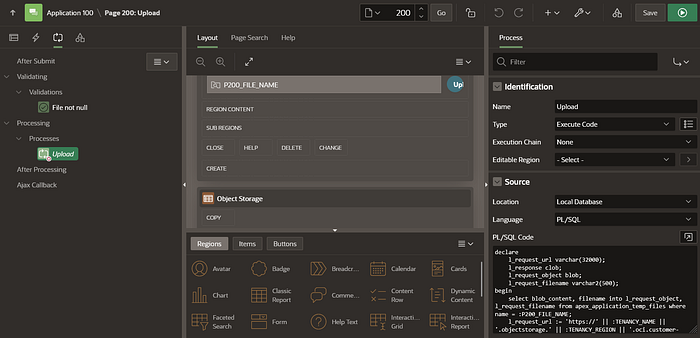
The PL/SQL code for the process execution is simple.
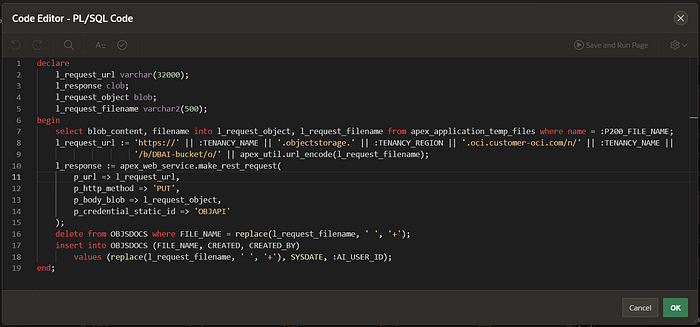
declare
    l_request_url varchar(32000);
    l_response clob;
    l_request_object blob;
    l_request_filename varchar2(500);
begin
    select blob_content, filename into l_request_object,
           l_request_filename from apex_application_temp_files
      where name = :P200_FILE_NAME;
    l_request_url := 'https://' || :TENANCY_NAME || '.objectstorage.' ||
                     :TENANCY_REGION || '.oci.customer-oci.com/n/' ||
                     :TENANCY_NAME || '/b/' || :BUCKET_NAME || '/o/' ||
                     apex_util.url_encode(l_request_filename);
    l_response := apex_web_service.make_rest_request(
        p_url => l_request_url,
        p_http_method => 'PUT',
        p_body_blob => l_request_object,
        p_credential_static_id => 'OBJAPI'
    );
    delete from OBJSDOCS
      where FILE_NAME = replace(l_request_filename, ' ', '+');
    insert into OBJSDOCS (FILE_NAME, CREATED, CREATED_BY)
      values (replace(l_request_filename, ' ', '+'), SYSDATE, :AI_USER_ID);
end;
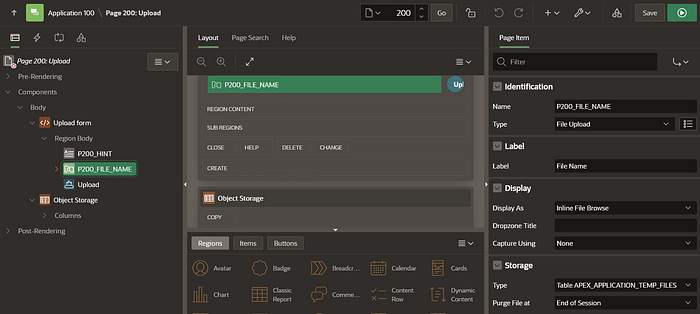
As you can see from the code, the binary content and the name of the file are retrieved from the File Upload page item on the APEX Page 200.
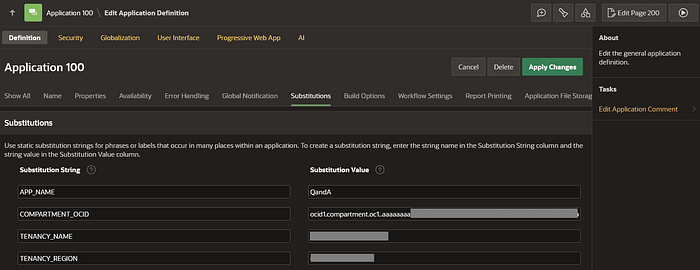
The request URL used in the REST request is constructed using substitution attributes specified in the application definition under Shared Components > Application Definition.
The REST API call uses the OBJAPI Web Credentials created at the beginning of this example.
After the API call response, the table OBJSDOCS is updated with the metadata we want to track from the uploaded file details. By default, all spaces (' ') in the file name are replaced with plus signs ('+'), and the same will be done in the file name stored in the OBJSDOCS table.
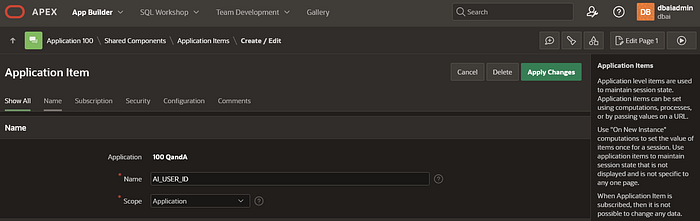
Use the application item AI_USER_ID, defined in Shared Components > Application Items, to track the user who performed the file upload operation using the user ID.
It is possible to create the credentials necessary to access the Oracle Object Storage service as an object in the database schema. These credentials use the OCI Auth tokens.
-- creates OCI token credential
DBMS_CLOUD.create_credential(
  credential_name => 'OBJS_CREDENTIAL',
  username => 'YourOCIusername', -- OCI token username. Use the format 'IdentityDomain/YourOCIusername'
  password => '6h[H9h)h}hA.23hAha0H'); -- OCI token password
Use this query to retrieve the files uploaded to the OCI Object Storage bucket.
select * from
  dbms_cloud.list_objects('OBJS_CREDENTIAL',
    'https://<TENANCY_NAME>.objectstorage.<TENANCY_REGION>.oci.customer-oci.com/n/<TENANCY_NAME>/b/<BUCKET_NAME>/o/');
Sample output:
OBJECT_NAME                       BYTES   CHECKSUM                         CREATED LAST_MODIFIED
Oracle_Partitioning.docx          168369  cb5449023e82f4f4241bd918127b1e91 -       22-JUN-25 07.19.49.894000 PM +00:00
JSON_Performance_V1.pdf           2660328 518fccabc1765a2582c1f7fb7abac6ae -       23-JUN-25 12.27.18.327000 PM +00:00
19c+Oracle+QoS+Management+TWP.pdf 1919485 0bb56646fee2e08f6ba069f2452238bb -       29-MAY-25 10.41.49.376000 AM +00:00
In conclusion, you can use OCI Object Storage to keep files that can be easily accessed by database services via multiple APIs. These files can be uploaded using a custom graphical user interface that you can build in Oracle APEX.