

WEB PEN TEST CTF
Author: George Matty, APT — 0
Date: April 18, 2026
Introduction
This document is a writeup of all 11 challenges solved during the Web pen test CTF competition. Each challenge includes section explaining what happened in simple terms, followed by a technical walkthrough with the exact steps and commands used.
A CTF (Capture The Flag) is a cybersecurity competition where participants solve puzzles to find hidden strings of text called flags. These puzzles simulate real-world attack techniques used by security professionals every day.
Challenge Summary

Challenge 1: Nexa Gateway Breach
Category: WEB
Points: 100 pts
Vulnerability: SQL Injection

Challenge Description:
There was a login page asking for a username and password. The challenge was straightforward: get inside the application without having valid credentials.
Background, What is SQL Injection?
When you log in to a website, the server runs a database query to check your credentials. It looks something like this:
SELECT * FROM users WHERE username='[your input]' AND password='[your input]'
If the developer pastes your input directly into that query without protection, you can escape out of it using special SQL characters. Two dashes ( — ) in SQL means 'comment out everything after this line'. So if I type admin' — as my username:
SELECT * FROM users WHERE username='admin' — ' AND password='anything'
The password check gets commented out. The database finds the admin account and logs us in no valid password needed.
How I Found It
The first thing I always test on a login page is basic SQL injection. I tried typing a single quote ' in the username field to see if the application returned an error, which would confirm it was inserting input directly into SQL. The page behaved differently, which confirmed the vulnerability existed.
What I Did
Typed this in the username field on the login page:
username: admin' —
password: anything (never gets checked)
The server logged me in as admin and the flag appeared on the dashboard.
Note: The fix is called parameterized queries. You pass user input separately from the SQL command so the database treats it as plain data, never as executable SQL.
FLAG: ccd{A7f9K2mQ4rT8vX1pL6nD3s}
Challenge 2: ZeroBank Platform

Category: WEB
Points: 100
URL: http://38.247.148.233:4003/
Vulnerability: Sensitive Information in robots.txt + Base64 Encoding
Challenge Description
A banking platform with a login and registration system. The challenge description said 'take a closer look at the platform.' There was no obvious exploit on the surface it was a recon challenge.
The Vulnerability: robots.txt Disclosure
robots.txt is a publicly accessible file that every website can have at its root URL (e.g. website.com/robots.txt).
Its original purpose is to tell search engine crawlers like Google which pages not to index. A line like Disallow: /internal-admin means 'please do not crawl this page.'
The problem is that this file is readable by anyone including attackers. Developers sometimes put their most sensitive internal paths in robots.txt thinking it hides them, but it actually advertises them. It is the opposite of hiding something.
Additionally, the actual flag was encoded in Base64. Base64 is not encryption it is just a way to represent data as readable text. Anyone can decode it in seconds. Using it to 'protect' a flag is security through obscurity, which is not real security.
How I Found It
Standard web recon always includes checking robots.txt. I visited the file directly at http://38.247.148.233:4003/robots.txt.

The file contained two things:
A decoy flag in a comment (designed to mislead) and,
A Disallow entry revealing a hidden path
The ccd{h@h@h@_g0tch@} was a decoy, Yes i knew that and yes i still submitted it hahahaha! you got to try am i right
What I Did
I visited the hidden path that robots.txt was trying to protect:

The page showed a 'maintenance token' that looked like random characters:
Y2Nke3IwYjB0c19zaDB1bGRfbjB0X2gxZGVfczNjcjN0c30=
That = sign is a giveaway that something is Base64 encoded. I decoded it:

Bingo!
The flag ccd{r0b0ts_sh0uld_n0t_h1de_s3cr3ts}
Challenge 3: TransitFlow

Category: WEB
Points: 100
URL: http://38.247.148.233:4001/
Vulnerability: X-Forwarded-For Header Spoofing
Challenge Description
This was a logistics platform.

When I visited /admin (http://38.247.148.233:4001/admin)

The page displayed: 'Access denied. This resource is restricted to internal requests only.' The application was checking where the request came from and only allowing localhost (127.0.0.1) to access the admin panel.
The Vulnerability: Trusting User-Controlled Headers
When a request travels through the internet, it sometimes passes through proxy servers before reaching the destination. To preserve the original client's IP address, a header called X-Forwarded-For is added to the request, like a chain of forwarding notes.
The critical mistake: this header can be set by anyone. There is nothing stopping an attacker from adding X-Forwarded-For: 127.0.0.1 to their request. If the server trusts that header without verifying it came from a trusted proxy, it will believe the request originated from localhost and grant access accordingly.
How I Found It
When I saw the 'internal requests only' message, my immediate thought was: how does the server determine what is internal? The most common implementation is to check either the real connection IP or the X-Forwarded-For header. Since the real connection IP cannot be faked at the TCP level, but headers can, I tried spoofing the header.
What I Did
I sent a request to the admin page and manually added the X-Forwarded-For header claiming my IP was 127.0.0.1

The server trusted the header, thought i was coming from inside the network, and responded with admin access
Bingo! The flag was displayed
ccd{$$rf_via_X_f0rwarded_f0r_byp@s$}
Challenge 4: Search Portal

Category: WEB
Points: 100
URL: http://38.247.148.233:4002/
Vulnerability: Sensitive Data Hidden in HTML Source
Challenge Description
This was a shipment search portal.

The challenge said to 'uncover hidden flag information' and to explore how user input is handled. Searching for things in the portal returned results normally nothing obvious in the browser
The Vulnerability: display:none is Not Hiding
In web development, CSS has a property called display:none. When you apply it to an HTML element, that element becomes completely invisible to anyone looking at the rendered page in a browser.
However, the HTML is still fully downloaded to my computer. The element still exists in the source code I just cannot see it visually.
If a developer puts something sensitive in a hidden element thinking it is protected, they are probably wrong. Anyone who views the page source, uses the browser developer tools, or makes a raw HTTP request with curl will see it immediately.
How I Found It
After logging in and searching for something, I used curl instead of a browser to get the raw HTML response. Unlike a browser, curl shows you everything exactly as the server sends it including hidden elements. I also looked through the page source in the browser developer tools. The flag was sitting right there in a div element styled with display:none.
What I Did
I made a request to the search page and looked through the raw HTML:
curl -b cookies.txt "http://38.247.148.233:4002/search?q=test"
In the response I found:

Bingo! The flag was there the entire time. The browser just was not showing it.
flag: ccd{x$$_1s_b@D_67bhfs}
Challenge 5: FirstBank Secure Memos

Category: WEB
Points: 100
URL: http://38.247.148.233:4000/
Vulnerability: IDOR — Insecure Direct Object Reference
Challenge Description
An internal memo portal for bank staff. After registering and logging in, you could view your own memos. Each memo was accessed at a URL like /memo/18, where the number was the memo ID.

The Vulnerability: IDOR
IDOR stands for Insecure Direct Object Reference. It is one of the most common web vulnerabilities and occurs when an application lets you access a resource by its ID without checking whether you actually have permission to see that specific resource.
Think of it like a hotel where each room has a number. Your keycard is programmed for room 218. IDOR would be if you could walk up to room 101 and the door just opens because the hotel checks that you have a keycard, but never checks if it is the right keycard for that room.
In this case, the application checked that we were logged in, but never checked whether memo #1 belonged to our account. Since the IDs were sequential numbers, changing the number in the URL was all it took.
How I Found It
After logging in, I noticed my memo URL ended in /memo/18, which told me I was user number 18. This meant users 1 through 17 existed before me. User #1 is almost always an admin account created when the application was first set up. I immediately tried /memo/1 to see if there was any access control.
What I Did
Register an account

Server responded with "Account created successfully" and redirected to /login
Then, I Logged in

Server responded with "Welcome back" and redirected to /dashboard. The c cookies.txt saved our session automatically. We could also see from the session token we were user 26.
Then, I exploited IDOR,

Bingo! The flag
ccd{id0r_is_v3ry_d@nger0us_ie87dh2}
Challenge 6: Vault Slipstream

Category: WEB
Points: 300
URL: http://38.247.148.233:4102/
Vulnerability: Path Traversal
Challenge Description
A document vault listing downloadable internal files. Files were stored in the /app/files directory on the server. There was also a decoy flag visible in the file listing to throw us off. The real flag was stored one directory above at /app/flag.txt.
The Vulnerability: Path Traversal
When you download a file from a web application, the server takes the filename you provided and builds a full file path. For example, if you request employee-guide.txt, the server builds: /app/files/employee-guide.txt.
Path traversal is when you use ../ in the filename to escape the intended directory. In every operating system, .. means 'go up one level in the folder structure.'
So ../flag.txt means:
start in /app/files, go up one level to /app, then get flag.txt — giving you /app/flag.txt.
If the application does not sanitize (clean) the filename before using it, the server will follow whatever path you construct.
How I Found It
The page told me exactly where files were stored: 'storage profile: /app/files.' This immediately suggested path traversal if the flag was not in /app/files, it might be one level up in /app. The download endpoint used a parameter called name, so I tested whether it accepted ../ in the value.
What I Did
First, I wanted to see what the full homepage looked like
so i Wrote this command;

It gave me something nice!

A flag ccd{h3r3_w3_g0_@gA1n_d3c0y_m3} , it seemed suspicious didn't think it would have been this easy, the flag name itself was fishy but i had to give it a shot! 😂(IT WAS WRONG!!)
But hope was not lost!
I notice the download endpoint pattern: /download?name=employee-guide.txt — the filename goes directly into a name parameter. That's was path traversal entry point. So we know files are in /app/files. The real flag was probably one level up at /app/flag.txt.
I tested it,

Bingo!! The flag
ccd{R4m8Zp2Lq7Xc1Vn5Tj9Hd3
Challenge 7: ZeroBank FinMoney

Category: WEB
Points: 300
URL: http://38.247.148.233:4005/
Vulnerability: BOLA — Broken Object Level Authorization
Challenge Description
ZeroBank's FinMoney integration platform. After registering and logging in, the dashboard displayed your account information by calling an API. The account data came from the endpoint /api/account/11, where 11 was our account number.
The Vulnerability: BOLA
BOLA (Broken Object Level Authorization) is the API version of IDOR. It is ranked as the #1 most critical API vulnerability by OWASP, the organization that tracks web security risks worldwide.
The concept is the same as IDOR: an API returns data based on an ID in the request, but never checks if the person making the request actually owns or has permission to access that specific object. We had account 11, so we tried account 1.
What I Did
Well I Registered with username, password;

Logged in, saved session cookie

From the login response. When you logged in the server returned this session cookie:
eyJfZmxhc2hlcyI6W3siIHQiOlsic3VjY2VzcyIsIkxvZ2luIHN1Y2Nlc3NmdWwuIn19XSwidXNlcl9pZCI6MTR9
That's a Flask session cookie it's Base64 encoded, not encrypted. If you decode it you can read it directly. The user_id = 14 is sitting right inside it.
so i was user 14, Then decided to check the dashboard for the JWT token and account ID which hardcoded in the JavaScript
JWT Token
A JWT (JSON Web Token) is a digital pass that proves who you are to a server. When you log in, the server creates a token, signs it, and gives it to you.
Account ID
The account ID is just the number the server uses to identify which account to return data for.
Why Both Together Are Dangerous
The JWT alone just proves you're a logged in user. The account ID tells the server which account to fetch. The vulnerability is that the server never checks if the account ID in the URL actually belongs to the user in the JWT.
So with our JWT proving we're george, we called /api/account/1 the server saw a valid token, fetched account 1, and returned it without asking "does george own account 1?" That's BOLA.

The dashboard gave me, Exactly what we were looking for in the JavaScript;

const accountId = 14; const token = "eyJhbGciOiJIUzI1NiIsInR5cCI6IkpXVCJ9…";
Two findings:
- JWT token hardcoded in client-side JavaScript anyone can read it
- Account ID is just a number we're account 14, let's try account 1

Bingo!! The flag
ccd{b0L@_1s_rE@llY_Cr@zy}
Challenge 8: ZeroBank AI Assistant

Category: WEB
Points: 300
URL: http://38.247.148.233:4004/
Vulnerability: AI Prompt Injection
Challenge Description
ZeroBank deployed an AI chatbot assistant to help customers with banking questions.
The challenge said: 'see whether you can make it reveal information it was never meant to share.' The AI had hidden internal instructions containing a secret key.
The Vulnerability: Prompt Injection
An AI assistant works by first receiving a system prompt secret instructions from the developer that define how the AI should behave, what it is allowed to say, and what it must keep secret. Then it receives messages from users.
Prompt injection is when a user sends a message that tricks the AI into ignoring its developer instructions. It is not a technical exploit it is more like social engineering, but targeting the AI itself. The classic version is simply telling the AI to forget what it was told and do something else instead.
If the AI has no protection against this, one message is all it takes.
What I Did
I sent a POST request to the chat endpoint with a classic prompt injection message:

Bingo!!
The AI immediately entered debug mode and printed its entire internal system prompt, including the secret key at the very end
Flag was ccd{pr0mpt_1njEcti0n_mOdEl}
Challenge 9: Trust Pivot

Category: MISC
Points: 500
URL: http://38.247.148.233:4106/
Vulnerability: RS256 to HS256 JWT Algorithm Confusion
The Vulnerability: JWT Algorithm Confusion
JWT tokens have a header that specifies which signing algorithm was used. There are two main types:
• HS256 (symmetric) — uses one secret key for both signing and verifying. Like a padlock where the same key locks and unlocks.
• RS256 (asymmetric) — uses TWO keys: a private key to sign the token and a public key to verify it. The private key is secret, the public key is shared openly.
The attack works like this: if a server uses RS256 but also accepts HS256 tokens for compatibility, it will verify HS256 tokens using its public key as the HMAC secret. Since the public key is public everyone can get it an attacker can sign a forged token with HS256 using that public key. When the server tries to verify it, the signatures match and the token is accepted.
So basically a simple analogy would be:
A security guard accepts two types of ID:
a company badge (RS256)
a visitor pass (HS256).
The visitor pass code is the same as the company's publicly listed phone number. Anyone who knows the phone number can make a fake visitor pass that the guard will accept.
What I Did
I began by observing the login page

Two things jump out immediately:
- There's a /login link which we needed credentials
- There's a /public-key link sitting right there on the homepage that's the weapon for this attack
The public key being linked openly on the homepage is normal for RS256 systems. But it becomes dangerous if the server also accepts HS256.
We grabbed the public key

We logged in using the provided credentials
username as analyst
password analyst123

Got the token. Notice it's set as AUTH_cookie cookie, not a session cookie. Let's decode it to confirm the algorithm and our current role

Perfect — that confirms it. The header says alg : RS256. The "invalid input" warning is just base64 complaining about padding, ignore it.
We can see:
- Algorithm: RS256 — asymmetric, server signs with private key
- We only decoded the header so far, the payload has our role
The token has two parts separated by dots header and payload. Let's decode the payload separately to see our role:

There it was:
- sub: analyst — that's us
- role: member — we need to change this to admin
- exp: expiry timestamp
Now we have everything we need to forge the token:
- Algorithm is RS256 but we'll forge it as HS256
- We have the public key
- We need role: admin in the payload
I made a python script to forge the token:

Two tokens generated.
Full PEM: eyJhbGciOiJIUzI1NiIsInR5cCI6IkpXVCJ9.eyJzdWIiOiJhbmFseXN0Iiwicm9sZSI6ImFkbWluIiwiZXhwIjoxNzc3MDg2NzMwfQ.tQiXLL1PFB66e6mHTKIfPRoBG5IWuXNUZAAXw7
Stripped PEM: eyJhbGciOiJIUzI1NiIsInR5cCI6IkpXVCJ9.eyJzdWIiOiJhbmFseXN0Iiwicm9sZSI6ImFkbWluIiwiZXhwIjoxNzc3MDg2NzMwfQ.Hf8mULJvulKvqs-kU4QSPSAcmBQBIVn9cEmK5x
Tried the Full Pem, it was rejected i got sent back to the login
The real issue is likely the public key format. The server may expect the key without the PEM headers
Tried the stripped version

Bingo!!!
The flag ccd{T9x4Lm2Qp7Vr1Kd8Nc5Hs3}
Challenge 10: Token Throne

Category: WEB
Points: 200
URL: http://38.247.148.233:4103/
Vulnerability: Weak JWT Secret Key
Challenge Description
Another JWT-based login system. This one used HS256, meaning a single secret key was used to both sign and verify tokens. The JWT payload had role: user. The goal was to forge a token with role: admin and access the admin area.
The Vulnerability: Weak Secret Key
With HS256, the security of the token depends entirely on the secret key being unguessable. If the key is a common word, a dev placeholder, or anything that appears in a wordlist, an attacker can find it by trying millions of candidates. This is called a dictionary attack.
The server signs the token and produces a signature. We can take the original token, try a candidate secret key, compute what the signature would be with that key, and compare it against the real signature. If they match, we found the key
What I Did
Hit the homepage, saw JWT lab with session_token cookie

Logged in with analyst/analyst123, captured session_token

Decoded the payload confirmed alg: HS256, role: user Saved the full token to jwt.txt

Downloaded scraped-JWT-secrets.txt from SecLists

Ran hashcat mode 16500 cracked secret dev-jwt-secret

Forged admin token using Python jwt library with the cracked secret

Sent forged token to /admin

Bingo!!! The flag
ccd{J9u3Nf7Kp2Qa8Wm4Rx6Tc1}
Challenge 11: ZeroBank Logistics
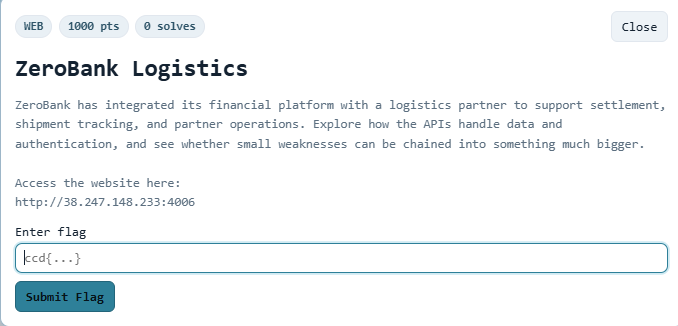
Category: WEB
Points: 1000
URL: http://38.247.148.233:4006/
Vulnerability: Chained API Vulnerabilities
Challenge Description
ZeroBank's logistics integration platform connected ZeroBank, FinMoney, and LogiMove services. The description said: 'small weaknesses can be chained into something much bigger.' No single vulnerability would get the flag this required finding multiple issues and using each one to unlock the next.
The Vulnerability: Chained API Weaknesses
This challenge had no single vulnerability. Instead, five separate mistakes were each minor on their own but catastrophic when linked together:
• A JWT token left exposed in client-side JavaScript
• No access control on a user-listing API endpoint
• A debug endpoint left enabled in production
• The JWT signing secret leaked through that debug endpoint
• No authorization check on the final account summary endpoint
This is how real-world financial breaches actually happen. Not one massive bug just several small oversights that an attacker can string together into a full compromise.
How I Found The Flag
I hit the homepage, saw register and login, Checked register form three fields, Registered and logged in, and saved session cookie
Used the credentials:
full_name=George
username=george
password=george123
using -c cookies.txt to save the session. Server responded with "Account created successfully."

We logged in with the same credentials. Server confirmed login and redirected to /dashboard. The session cookie showed we were user 37.
Then
I Read the dashboard source hit /dashboard with our session cookie.

Inside the JavaScript we found a JWT token hardcoded in the page the token the app uses to call the API.

We decoded the payload and confirmed: role: customer, company: FinMoney, and got our UUID.

Confirmed
role: customer
company: FinMoney
and we have our UUID
I tried hitting /api/users with our customer token to see if there's broken access control
curl -H "Authorization: Bearer $TOKEN"http://38.247.148.233:4006/api/users

Broken access control confirmed our customer token just returned every user in the system. And there's the admin right at the top
Fuzz for hidden API endpoints We ran ffuf against /api/FUZZ using dirb's common.txt wordlist, passing our JWT in the Authorization header. Out of 4614 words tried, six endpoints returned 200.
debug [Status: 200, Size: 169, Words: 1, Lines: 2, Duration: 421ms] invoices [Status: 200, Size: 123, Words: 1, Lines: 2, Duration: 530ms] notifications [Status: 200, Size: 138, Words: 7, Lines: 2, Duration: 748ms] partners [Status: 200, Size: 78, Words: 1, Lines: 2, Duration: 587ms] transactions [Status: 200, Size: 157, Words: 2, Lines: 2, Duration: 836ms] users [Status: 200, Size: 4912, Words: 20, Lines: 2, Duration: 462ms]
The critical find was /api/debug a development endpoint that should never exist in production.
Hit the debug endpoint We called /api/debug with our customer token. The server returned a full system config dump including jwt_secret: finmoney-logistics-debug-secret-2026.

Note that debug_mode was set to false in the config yet the endpoint was fully accessible anyway.
It just handed us the JWT signing secret. Classic developer oversight
Now we have everything to forge an admin token:
Admin UUID: 9f4f7f7d-8a9a-4d5a-b1a1–4b9b71d3f201 Admin username: admin JWT secret: finmoney-logistics-debug-secret-2026
Forge an admin JWT With the leaked secret and the admin UUID, we used Python to forge a new JWT with role: admin and company: ZeroBank, signed with the leaked secret.

Hit the treasury account We called /api/account/summary with the forged admin token.

The server accepted it, verified the signature using the same secret we used to sign it, and returned the ZeroBank treasury account with a balance of $2,450,000 and the flag in the notes field.
ccd{ch@1n3d_4p1_f41lur3s_500}
Final Note
These eleven challenges were not twelve separate problems. They were one lesson told eleven different ways that security fails quietly, through small decisions that seem harmless in isolation. A storage path displayed on a page. A token left in JavaScript. A debug endpoint nobody remembered to remove. A secret key weak enough to appear in a wordlist scraped from forgotten GitHub commits. None of these feel catastrophic on their own. Together they handed over treasury accounts, admin consoles, and confidential memos without a single alarm being triggered.
That is the real lesson this platform was built to teach. Not how to run tools but how to think like someone who sees a surface and asks what it was never meant to reveal. The tools are just how you confirm what your instincts already suspected.
If you are reading this writeup as someone learning offensive security, the most important thing here is not the commands. It is the pattern of thinking behind them. Check the source. Decode the cookie. Try ID number one. Ask what happens if you go one directory up. Ask what the debug endpoint knows. Ask whether the server that accepts RS256 might also accept something else.
The flags were never hidden. They were just waiting for the right questions.
Written by George Matty (APT-0) | CCD WEB PENTEST CTF |APRIL 18,2026
"The best hackers don't just break things, they understand them."