
Introduction
Hey there! 👋 In this writeup, I'm going to walk you through my journey solving the Broken Authentication Skill Assessment from HackTheBox
Academy. This challenge was all about exploiting multiple authentication vulnerabilities to gain unauthorized access — and I did it without any provided credentials.
What made this challenge interesting is that it required chaining multiple vulnerabilities together. No single exploit would get you the flag — you needed to combine user enumeration, password brute forcing, and authentication bypass techniques.
Let's dive in!
Challenge Overview
Target: Web Application with Login Portal Given: Nothing! No usernames, no passwords, no hints Goal: Compromise the application and retrieve the flag Skills Tested: User Enumeration, Brute Force, Response Manipulation
Step 1: Testing for User Enumeration
The first thing I did was explore the login page. I wanted to see how the application behaves when I submit invalid credentials.
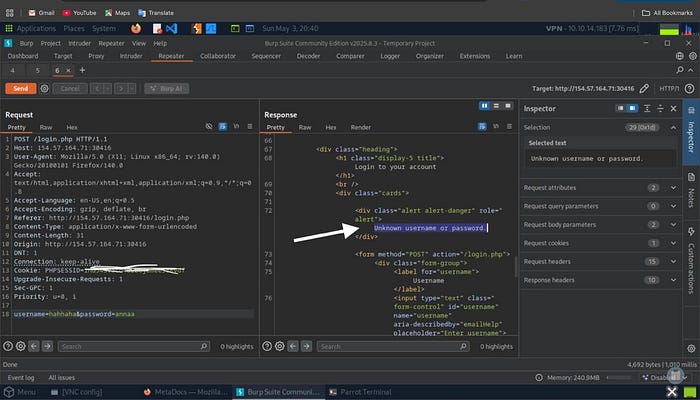
I entered completely random credentials:
- Username:
hahaha - Password:
annaa
Response from server:
Unknown username or passwordInteresting! This specific error message tells me the application is checking the username first, then the password. This is a classic user enumeration vulnerability.
Why This Matters
When an application returns different error messages for:
- Invalid username → "Unknown username or password"
- Valid username but wrong password → Different message
…it allows attackers to build a list of valid usernames to target. This is the first piece of the puzzle.
Step 2: User Enumeration Attack
Now that I confirmed the vulnerability exists, it's time to enumerate valid usernames using ffuf (Fast Web Fuzzer).
The Command
ffuf -w /opt/useful/seclists/Usernames/xato-net-10-million-usernames.txt \
     -u http://TARGET_IP:PORT/login.php \
     -X POST \
     -H "Content-Type: application/x-www-form-urlencoded" \
     -d "username=FUZZ&password=invalid" \
     -fr "Unknown username or password"
Breaking it down:
-w: Wordlist with 10 million common usernames-u: Target login endpoint-X POST: HTTP method-d "username=FUZZ&password=invalid": POST data (FUZZ gets replaced with wordlist entries)-fr "Unknown username or password": Filter out this response (show only different responses)
Results
gxxxs [Status: 200, Size: 4344, Words: 680, Lines: 91]✅ Valid user found: gxxxxs
The response size (4344 bytes) is much larger than the "Unknown user" response, confirming this username exists in the system.
Step 3: Confirming the Username
Before moving to password attacks, I verified the username manually:
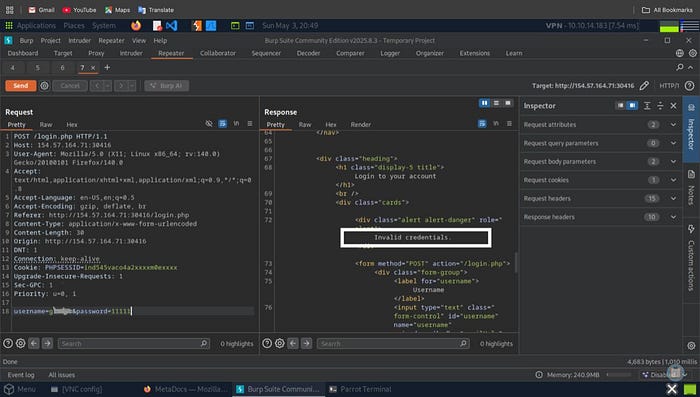
I tried logging in as gxxxxs with a random password (11111) and got:
Invalid credentials.Perfect! This is a different error message than "Unknown username or password", confirming that:
- ✅
gxxxxsis a valid username - ❌ The password is wrong
Time to crack the password!
Step 4: Password Brute Force — The Smart Way
The Problem
The classic rockyou.txt wordlist has 14+ million passwords. Brute-forcing all of them would take forever and likely trigger rate limiting or account lockouts.
The Solution: Filter by Password Policy
I noticed that when testing invalid credentials, the application likely enforces a password policy. Most modern applications require:
- Minimum length (usually 8–12 characters)
- Mix of uppercase and lowercase letters
- At least one number
- Sometimes special characters
I filtered rockyou.txt to only include passwords matching these criteria:
grep '[[:upper:]]' /opt/useful/seclists/Passwords/Leaked-Databases/rockyou.txt | \
grep '[[:lower:]]' | \
grep '[[:digit:]]' | \
grep -E '.{10}' > custom_wordlist.txt
What this does:
grep '[[:upper:]]'- Must contain uppercase lettergrep '[[:lower:]]'- Must contain lowercase lettergrep '[[:digit:]]'- Must contain a digitgrep -E '.{10}'- Minimum 10 characters long
Result: 14,000,000 passwords → ~150,000 passwords (99% reduction! 🚀)
The Attack
ffuf -w custom_wordlist.txt \
     -u http://TARGET_IP:PORT/login.php \
     -X POST \
     -H "Content-Type: application/x-www-form-urlencoded" \
     -d "username=gxxxxs&password=FUZZ" \
     -fr "Invalid credentials"
Results
dWXXXXXXXX13 [Status: 302, Size: 0, Duration: 656ms]✅ Password cracked! gxxxxs:dWXXXXXXXX13
(I've redacted the actual password to prevent spoiling the challenge for others)
Step 5: The 2FA Roadblock
Excited about finding valid credentials, I logged in and… hit a wall:
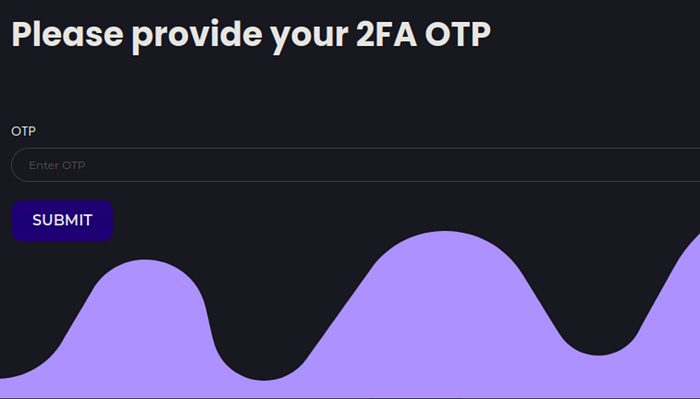
Please provide your 2FA OTP
The application is asking for a Two-Factor Authentication code.
My Thought Process
At this point, I had a few options:
- Brute force the OTP — But I don't know if it's 4 digits (10,000 combinations) or 6 digits (1,000,000 combinations)
- Try to bypass the OTP check — More realistic approach
Then I remembered a technique from the module: Authentication Bypass via Direct Access.
Step 6: Understanding the Vulnerability
Many poorly-implemented authentication systems make this critical mistake:
// Vulnerable PHP code
if (!$_SESSION['2fa_verified']) {
    header("Location: /2fa.php");
    // ❌ Missing exit; statement!
}
// This code still executes!
echo "<h1>Welcome to your profile!</h1>";
echo "Flag: HTB{...}";
The Problem:
- The server sends an HTTP
302 Foundredirect to/2fa.php - BUT the script continues executing and renders the protected page
- The response body contains the protected content
- Browsers automatically follow the redirect, hiding the content
- BUT we can intercept and modify the response!
Step 7: Burp Suite Response Manipulation
Setting Up the Attack
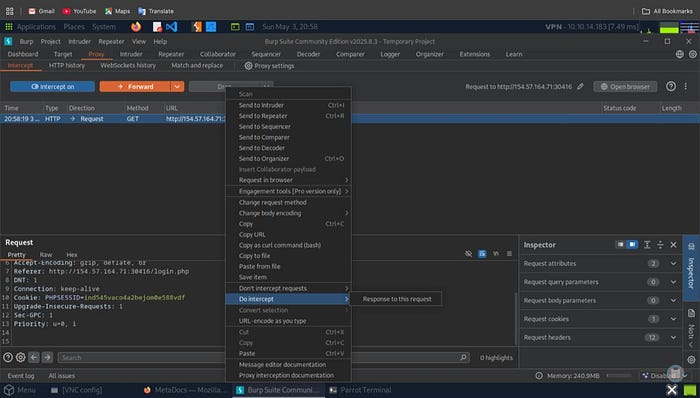
I configured Burp Suite to intercept the server's response (not just the request):
Steps:
- Enable Burp Proxy
- In Proxy → HTTP History, find the request to
/profile.php - Right-click → Do Intercept → Response to this request
This tells Burp to intercept the response coming back from the server.
The Magic Modification
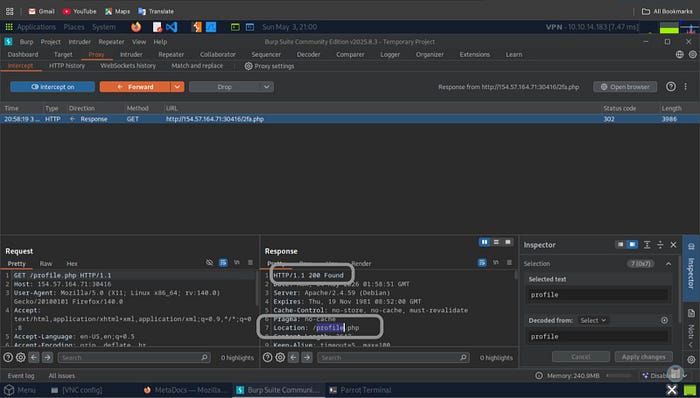
When I tried to access /profile.php, the server responded with:
Original Response:
HTTP/1.1 302 Found
Location: /2fa.php
Content-Length: 3986
[Protected page HTML content here]
Notice the Status Code: 302 and the redirect to /2fa.php in the Location header.
I intercepted this response and made a simple but powerful change:
Modified Response:
HTTP/1.1 200 OK
Location: /profile.php
Content-Length: 3647
[Protected page HTML content here]
Changes:
- ✅ Changed
HTTP/1.1 302 Found→HTTP/1.1 200 OK - ✅ Changed
Location: /2fa.php→Location: /profile.php
By changing the status code to 200 OK, I'm telling the browser: "This is a successful response, render the content!"
The Result
After clicking Forward in Burp Suite, the browser rendered the profile page:
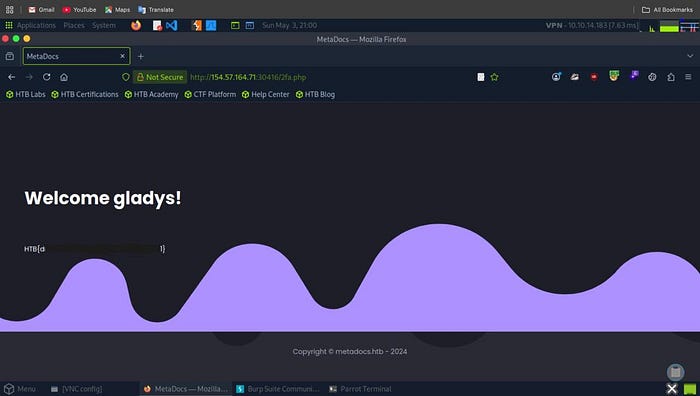
Welcome gxxxxs!
HTB{d86XXXXXXXXXXXXXXXXXX}🎯 Flag captured!
(I've redacted part of the flag to prevent spoiling the challenge)
Complete Attack Chain
Let me summarize the full exploitation path:
1. User Enumeration
   ↓
   Discovered username: gxxxxs
   ↓
2. Password Policy Analysis
   ↓
   Filtered rockyou.txt (14M → 150K passwords)
   ↓
3. Password Brute Force
   ↓
   Found password: dWXXXXXXXX13
   ↓
4. Login Attempt
   ↓
   Hit 2FA barrier
   ↓
5. Direct Access Test
   ↓
   Found 302 redirect vulnerability
   ↓
6. Response Manipulation
   ↓
   Modified 302 → 200 in Burp Suite
   ↓
7. Access Granted
   ↓
   🎯 FLAG CAPTURED!
Vulnerability Analysis
This application had three critical security flaws:
1. User Enumeration (CWE-204)
Vulnerable Behavior:
Invalid username: "Unknown username or password"
Valid username:   "Invalid credentials"
Secure Implementation:
ANY login failure: "Invalid username or password"2. Weak Password Requirements
Even though the app enforced a password policy, it still accepted passwords from breach databases (rockyou.txt). This means users could set passwords like Password123 that are technically "strong" but already compromised.
Better Approach:
- Check passwords against HaveIBeenPwned API
- Reject any password found in breach databases
- Enforce higher entropy requirements
3. Missing exit; After Redirect (CWE-698)
Vulnerable Code:
if (!$_SESSION['2fa_verified']) {
    header("Location: /2fa.php");
    // Script continues executing!
}
// Protected content gets rendered
include('profile_content.php');
Secure Code:
if (!$_SESSION['2fa_verified']) {
    header("Location: /2fa.php");
    exit; // ✅ CRITICAL!
}
// Now safe - only executes if 2FA verified
include('profile_content.php');
Defense Recommendations
For Development Teams:
✅ Always use exit; after header() redirects in PHP
// ✅ CORRECT
header("Location: /login.php");
exit;
// ❌ VULNERABLE
header("Location: /login.php");
// Code continues...
✅ Implement consistent error messages
// Don't reveal which field is wrong
echo "Invalid username or password";
✅ Add rate limiting
// Max 5 login attempts per IP per minute
if ($failed_attempts > 5) {
    sleep(5); // Slow down attacker
    // Or implement account lockout
}
✅ Validate sessions on every protected page
session_start();
if (!isset($_SESSION['user_id']) || !$_SESSION['2fa_verified']) {
    header("Location: /login.php");
    exit;
}
✅ Check passwords against breach databases
// Use HaveIBeenPwned API
if (password_in_breach_database($password)) {
    return "This password has been compromised in a data breach";
}
Key Lessons Learned
1. Small vulnerabilities compound
None of these vulnerabilities alone would have been critical, but chaining them together led to complete authentication bypass.
2. Never trust client-side redirects for access control
Just because you send a 302 redirect doesn't mean the content is protected. Always validate on the server.
3. Error messages leak information
Even subtle differences in error messages can enable enumeration attacks.
4. Password policies ≠ Password security
A password can meet complexity requirements but still be in a breach database.
5. Defense in depth is essential
If the app had any one of these defenses, the attack would have failed:
- Generic error messages
- Rate limiting
- Proper session validation
- Password breach checking
Tools Used
Tool Purpose Key Commands ffuf Web fuzzing for enumeration and brute force ffuf -w wordlist.txt -u URL -d data -fr filter grep Filtering wordlists by patterns grep '[[:upper:]]' file.txt Burp Suite HTTP interception and modification Proxy → Intercept → Modify Response SecLists Pre-built attack wordlists /usr/share/seclists/
Conclusion
This challenge perfectly demonstrates why secure coding practices are non-negotiable. The developer probably thought:
❌ "A redirect is good enough for access control" ❌ "Users won't notice different error messages" ❌ "Password policies make passwords secure"
But as we've seen, each of these assumptions created a vulnerability that could be exploited.
The real takeaway? Security is not about implementing one strong defense — it's about layering multiple defensesso that when one fails, others still protect the system.
Thanks for reading! I hope this writeup helped you understand how seemingly small security flaws can be chained together for maximum impact.
Happy Hacking! 🔐
Tags: #CyberSecurity #HackTheBox #WebSecurity #PenetrationTesting #BrokenAuthentication #BugBounty #EthicalHacking #OWASP