In the world of Single Page Applications (SPAs), efficiency is king. Frameworks like Vue.js are incredibly smart about resource management. If you navigate from Product A to Product B, and both share the same component, Vue often won't destroy and recreate that component — it simply updates the props.
This behavior is great for performance, but if you aren't careful, it leaves behind "ghosts" — stale data from the previous view that can wreak havoc on your backend and your business.
Here is the story of a bug we recently squashed, how it happened, and why understanding the "Component Reuse" edge case is vital for preventing business damage.
The Scenario: A Product Configurator
Imagine we have an e-commerce shop selling custom manufactured parts. Some parts allow you to configure a Width, while others do not.
We have a component, let's call it <DimensionConfigurator />.
The Simplified Code
Here is a stripped-down version of the component logic. It looks innocent enough:
<template>
  <form @submit.prevent="submitOrder">
    <!-- Only show the input if the product supports width -->
    <div v-if="product.allowsWidth">
      <label>Width:</label>
      <input v-model="formState.width" type="number" />
    </div>

    <button type="submit">Order</button>
  </form>
</template>

<script>
export default {
  props: ['product'],
  data() {
    return {
      formState: {
        width: 0, // Default state
        height: 0
      }
    };
  },
  created() {
    // Initialize data when component is born
    this.initializeDefaults();
  },
  methods: {
    submitOrder() {
      const payload = {};

      // If we have a width value, add it to the order
      if (this.formState.width) {
        payload.width = this.formState.width;
      }

      // ... logic for height ...

      api.post('/order', payload);
    }
  }
}
</script>
The "Ghost State" Bug
Everything works perfectly when testing products in isolation. But watch what happens in this specific sequence:
- User visits Product A. Product A allows width configuration.
- The user types
500into the width field.this.formState.widthis now500. - The user decides to look at something else and clicks a related product link to Product B.
- Product B does NOT allow width configuration.
What happens inside Vue?
Because the user stayed on the same route/view structure, Vue reused the component instance.
- The prop updated to Product B.
product - The
v-if="product.allowsWidth"evaluated tofalse, removing the input field from the DOM. The user sees no width field. - The Trap: Because the component wasn't destroyed, never ran again.
this.formState.widthis STILL500from the previous product.created()
The Catastrophe
The user configures the height for Product B and clicks "Order".
The submitOrder method runs:
// Local state check
if (this.formState.width) {
  // this.formState.width is 500 (The Ghost Data)
  payload.width = this.formState.width;
}
The application sends a payload containing a of 500 for a product that doesn't support width. width
In our case, this resulted in a 500 Server Error because the backend strictness saved us. But consider the alternative: if the backend was lenient, we might have sent a production order to the factory with dimensions that physically cannot exist for that product.
This isn't just a coding error; it's a potential financial loss.
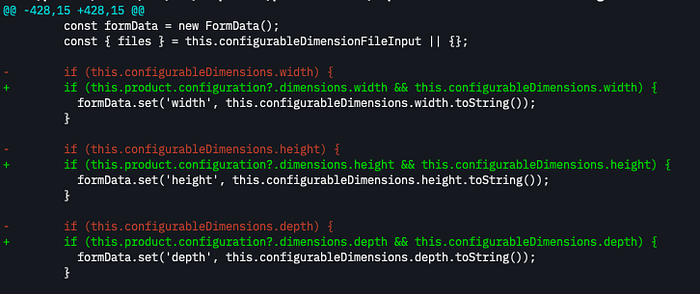
The Fix: Trust Definitions, Not State
The mistake was trusting the local state (this.formState.width) to determine what to send. In a reused component, local state is dirty.
We must validate against the definition (the prop) which is the source of truth. product
Here is the corrected submit logic:
submitOrder() {
  const payload = {};

  // THE FIX: Check if the PRODUCT allows width, ignore local state if it doesn't
  if (this.product.allowsWidth && this.formState.width) {
    payload.width = this.formState.width;
  }

  api.post('/order', payload);
}
Now, even if formState.width holds a ghost value of 500, the condition fails because this.product.allowsWidth is false. The simplified payload is sent correctly.
The Takeaway
When working with modern frontend frameworks like Vue, React, or Angular, always remember:
- Components are recyclable containers. Don't assume resets just because the URL changed.
data() - only hides the UI.
v-ifIt does not reset the variable bound to that UI element. - Gatekeeping is essential. When constructing API payloads, never rely solely on "is there a value?" Always ask "is this value valid for the current context?"
A defensive coding mindset doesn't just prevent console errors — it prevents manufacturing disasters.