

Hi everyone! My code name is knox99, and my name is saad talji. I am a cybersecurity researcher and a total computer geek. Today, let's dive into how I identified and executed a critical BOLA/IDOR attack on a web application.
Hacking isn't just about firing up automated tools; it's about deep logic and critical thinking. Here is the story of how a simple walk-through of an application turned into a critical vulnerability discovery.
Phase 1: Reconnaissance and Discovery

When I first accessed the target application, I started by creating a normal user account. For about an hour, I simply browsed around the application, exploring the user interface and mapping out its features like any ordinary user would.
While navigating, I kept a custom recon script running in the background to look for interesting subdomains, directories, endpoints, and hidden files. Once the script finished, I reviewed the results and spotted a sitemap.xml file listed in the root domain. Interestingly, this file was explicitly mentioned inside the application's robots.txt file.
A sitemap is essentially a roadmap of an application's public and hidden endpoints. As I scrolled through the listed URLs, one specific endpoint immediately caught my attention: the account deletion functionality.
Phase 2: Asking the Critical Questions

As a code-focused researcher, whenever I see a highly sensitive endpoint like account deletion, my brain immediately starts asking architectural questions:
- Does the backend blindly trust the frontend?
- Is the backend properly validating and sanitizing user input?
- Is the backend validating the request based strictly on user permissions, or just identity strings?
To find the answers, I filled out the form fields with my attacker-controlled email address and password, hit submit, and intercepted the outgoing HTTP request using Burp Suite Proxy. I immediately forwarded it to the Repeater module for a deep manual analysis.
Phase 3: Analyzing the Request Structure
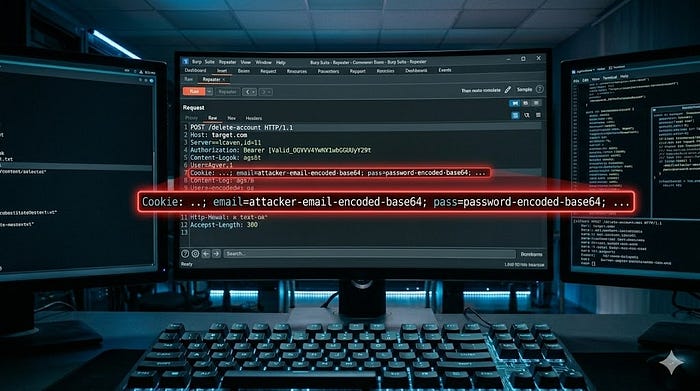
When I looked at the raw HTTP request headers inside Burp Suite, I noticed a very interesting pattern inside the Cookie header. The application was passing the user's session data along with the email and password parameters like this:
HTTP
POST /delete-account HTTP/1.1
Host: target.com
...
Cookie: mfesecure_visit=1; _hjSessionUser_2292=eyJpZCI6IjTEtNWE52LWM==; _hjSession_2211292=eyJpZCI6ImYzNDI2MjE0LWNmNzM1Y==; cookieconsent_dismissed=yes; email=attacker-email-encoded-base64; pass=password-encoded-base64; _hjDonePolls=681
The fact that the application explicitly required the parameters email= and pass= inside the cookie string—and encoded them in Base64—was a massive red flag.
In a secure architecture, the server should rely entirely on a secure session identifier (like the session tokens seen above) to know who is requesting the deletion. It should never ask the browser to pass the user's email as an object reference to execute a deletion.
Seeing this structure, I knew exactly what to test next: What happens if I change that Base64 email string to a victim's email?
Phase 4: Mapping the Infrastructure and Request Lifecycle
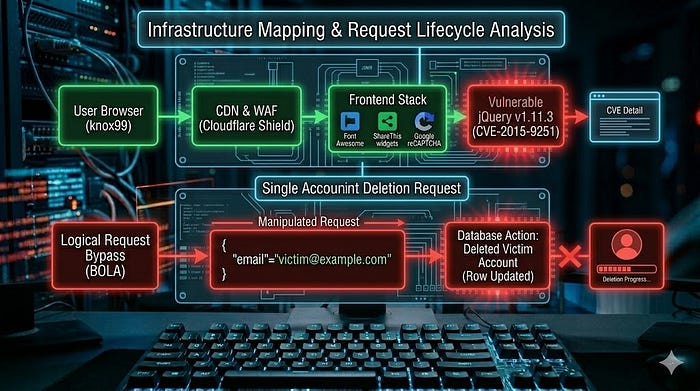
Before firing off payloads, a good researcher always maps the infrastructure to visualize how a request travels from the browser to the backend database. Using profiling tools, I uncovered the technology stack driving the target application:
- Network & Security: Cloudflare (CDN & WAF), HTTP/3, and Google reCAPTCHA.
- Frontend & Design: jQuery (v1.11.3) by the way this version is vulnerable but patched , Font Awesome, and ShareThis widgets.
- Performance: Cloudflare Rocket Loader.
Knowing that the target sat behind Cloudflare, I knew that standard network-layer attacks or brute-force flooding would likely get blocked or challenged by reCAPTCHA. However, Cloudflare and front-end protections cannot stop logical vulnerabilities. A WAF inspects how a request looks, but it doesn't know who the request is supposed to belong to.
I drew the request lifecycle in my mind to pinpoint where the breakdown happened:
Plaintext
[ User Browser ] ---> ( Cloudflare WAF / CDN ) ---> [ Backend Web Server ] ---> [ Database ]
   Manipulated            Passed through fine          Blindly executed            Victim account
  Cookie + Body         (Valid HTTP/3 Request)         SQL/NoSQL query             is deleted!
                                                      based on client email
As visualized above, the request looks completely legitimate to Cloudflare. It uses valid HTTP/3 protocols, passes standard syntax checks, and contains a valid structure. The failure happens entirely at the Backend Web Server layer, which lacks the logical checks required to validate user permissions before altering the Database.
Phase 5: Executing the Attack (The Proof of Concept)
To safely test my theory without disrupting any real users, I set up a secondary environment with two isolated test accounts that I completely controlled:
- Account A (Attacker Account): My active session, used to generate the deletion request.
- Account B (Victim Account): The target account containing test data that I wanted to see if I could unauthorizedly delete.
With Burp Suite Repeater open, I executed the following steps:
- Prepare the Payload: I took the email address of Account B (Victim) and encoded it into Base64 using Burp's built-in decoder/encoder tool.
- Modify the Cookie: Inside the intercepted
Cookieheader, I locatedemail=attacker-email-encoded-base64and replaced it with the freshly generated Base64 string of the victim's email. - Modify the Request Body: I scrolled down to the POST request body and located the plain-text email parameter. I changed the identity value to the victim's actual plain-text email address.
- Send the Payload: I hit Send to forward the manipulated request to the backend server.
Phase 6: The Impact and Results
The server immediately responded with a 200 OK success status.
To verify if the exploit actually worked, I opened a clean browser window and attempted to log into Account B (the victim account). The login failed with an error stating that the account did not exist.
The backend had completely processed the deletion against the victim's database entry, blindly following the parameters I supplied in the request body and cookie, entirely ignoring the fact that the actual authenticated network session belonged to Account A.
The Real-World Danger of BOLA
This confirmed a critical Broken Object Level Authorization (BOLA) flaw. An attacker could automate this process using a simple intruder script or custom python script, looping through a list of targeted user emails, and systematically wiping out the entire user database of the platform within minutes.
Why the Architecture Failed
The root cause of this vulnerability comes down to a fundamental security misunderstanding: confusing obfuscation with authorization.
The developers likely thought that by encoding the email string into Base64 within the cookie, they were adding a layer of security. However, Base64 is merely a data representation format, not encryption. It takes any security researcher or attacker less than a second to swap out.
Furthermore, the application's access control engine committed the ultimate flaw: it trusted client-side input as the source of truth for identification. Instead of deriving the user's identity securely from an internal, server-side session index mapping, it let the parameters provided by the user dictate which database row to execute a highly destructive query against.
Lessons Learned: Critical Takeaways from the Discovery
Every vulnerability discovery leaves behind valuable insights. Looking back at how this critical BOLA flaw was uncovered and analyzed, there are three definitive lessons we can take away:
1. Hacking is All About Business Logic
Automated vulnerability scanners are excellent for finding missing patches or known configuration flaws, but they are notoriously blind to business logic errors. My recon script pointed me to the endpoints, but it was manual curiosity and asking the right structural questions that cracked the flaw open. Never rely solely on automated tools — your analytical brain is your strongest asset.
2. Obfuscation Is Not Security
Encoding a parameter into Base64 or placing it inside a complex Cookie header does not make it secure. Base64 is merely a data representation format; it takes any attacker less than two seconds to decode, alter, and re-encode. True security relies on strong, backend authorization logic, never on making parameters "harder to see" on the frontend.
3. Always Map the Full Lifecycle
Uncovering the target's infrastructure (like discovering the vulnerable jQuery instance or identifying Cloudflare's presence) gave me a clear perspective of what wouldn't work. Mapping out the lifecycle in my mind allowed me to skip dead-end network attacks and look directly at how data flows between components, helping me isolate the exact logical gap where the server-side checks completely collapsed.