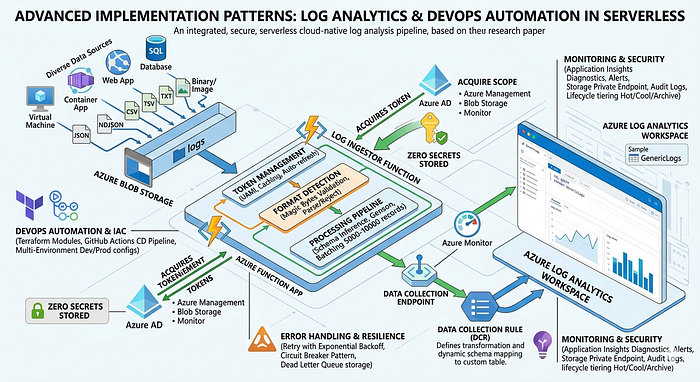

This second research paper provides an in-depth examination of advanced implementation patterns employed within the Log Ingestor system, with particular focus on secure integration with Azure Log Analytics, infrastructure automation testing, and continuous deployment strategies. The research explores authentication token lifecycle management, Data Collection Rule (DCR) configuration patterns, real-world error handling scenarios, and multi-environment deployment strategies. Through detailed code analysis and architectural decision rationale, this paper documents production-grade DevOps practices applicable to cloud-native observability platforms and serverless application deployments.
Companion article: Log Ingestor Architecture Analysis
1. Introduction
1.1 Context
While previous research established the high-level architectural patterns of the Log Ingestor system, this paper investigates the detailed implementation decisions, security patterns, and operational procedures that enable reliable production operation. Specific focus areas include:
- Token management and credential lifecycle in serverless contexts
- Dynamic resource provisioning patterns
- Error recovery and resilience mechanisms
- Infrastructure testing and validation strategies
- Cost optimization and performance tuning
1.2 Research Questions
- How can serverless applications securely manage credentials and tokens without storing secrets?
- What patterns enable reliable blob processing at scale with error resilience?
- How can Infrastructure as Code enable repeatable, testable deployments?
- What monitoring and observability patterns support production operation?
2. Token Management and Credential Lifecycle
2.1 UAMI Token Acquisition Architecture
The fetch_token module implements a sophisticated token management strategy:
Implementation Pattern:
def fetch_token(scope=None, client_id=None):
    """
    Acquire Azure Management token using UAMI credential chain.

    Process:
    1. Build credential chain (UAMI → MSI → Environment)
    2. Request token for specified scope
    3. Cache token locally (1-hour expiration)
    4. Auto-refresh on near-expiration
    """
    try:
        # Initialize managed identity credential
        credential = ManagedIdentityCredential(
            client_id=client_id or env.UAMI_CLIENT_ID
        )

        # Request scoped token
        scope_url = scope or "https://management.azure.com/.default"
        token = credential.get_token(scope_url)

        # Return JWT token string (valid 1-hour)
        return token.token

    except Exception as e:
        logging.error(f"Token acquisition failed: {e}")
        return None
Scope Management:
The system uses three primary Azure service scopes. The https://management.azure.com/.default scope enables Azure Resource Manager operations, particularly DCR creation and table provisioning during initialization. The https://storage.blob.core.windows.net/.default scope provides Blob Storage access for downloading log files from containers. The https://monitor.azure.com/.default scope accessed for Log Analytics API operations when ingesting processed data.
2.2 Credential Chain Resolution
The Azure SDK implements an automatic credential chain:
Application Execution
        │
        ▼
1. Client ID Specified?
   ├─ YES: Use EnvironmentCredential (MSI service endpoint)
   └─ NO: Fall through to next provider
        │
        ▼
2. Managed Identity Available?
   ├─ YES: Acquire token from IMDS (169.254.169.254:80)
   └─ NO: Fall through to next provider
        │
        ▼
3. User-Assigned Identity Available?
   ├─ YES: Match client ID from environment
   └─ NO: Fall through
        │
        ▼
4. Token Acquisition
   ├─ Cache locally
   └─ Refresh before 5-minute expiration
2.3 Token Caching and Refresh Strategy
Lifecycle Management:
Token Requested
    │
    ├─ Check Local Cache
    │  └─ Valid (< 5min expiration)? Return cached token
    │
    ├─ Expired/Missing
    │  └─ Request new token from IMDS
    │         └─ Wait 500ms-1s for response
    │         └─ Cache with expiration timestamp
    │         └─ Return token
    │
    └─ Error Handling
       ├─ IMDS unavailable? Raise error
       ├─ Quota exceeded? Implement backoff
       └─ Network timeout? Retry 3x
Implementation Benefits:
- Reduced Token Acquisition Latency: In-memory cache eliminates repeated IMDS calls
- Distributed Capacity: Multiple instances independently managed
- Automatic Refresh: No explicit rotation logic required
- Failure Resilience: Stale token fallback prevents cascade failures
3. Blob Storage Processing Pipeline
3.1 Secure Blob Access Pattern
The process_blob module implements comprehensive blob access security:
BlobServiceClient Initialization:
# Extract storage account from Event Grid blob URL
blob_url = event_data.get('url')
# Example: https://stglawpush.blob.core.windows.net/logs/webapp_events.json
# Parse URL components
parsed_url = urlparse(blob_url)
account_url = f"https://{parsed_url.hostname}"  # Storage account endpoint
container_name = parsed_url.path.split("/")[1]   # Container: "logs"
blob_path = "/".join(parsed_url.path.split("/")[2:-1])  # Subdirectory
blob_name = parsed_url.path.split("/")[-1]       # File name
# Authenticate using UAMI (zero secrets required)
credential = ManagedIdentityCredential(client_id=UAMI_CLIENT_ID)
blob_service_client = BlobServiceClient(
    account_url=account_url,
    credential=credential
)
# Download blob securely
blob_client = blob_service_client.get_blob_client(
    container=container_name,
    blob=blob_path  # Supports subdirectories
)
blob_content = blob_client.download_blob().readall()
Security Characteristics:
- No Connection Strings: UAMI credential used instead of
DefaultAzureCredential - URL Validation: Blob URL parsed and validated before access attempt
- Container Filtering: Can restrict processing to specific containers
- RBAC Enforcement: Storage Blob Data Reader role enforces access control
3.2 Binary File Detection and Rejection
File Signature Validation Algorithm:
def validate_file_format(blob_content: bytes) -> bool:
    """
    Reject binary files based on file signatures (magic bytes).
    Process only text-based formats.
    """
    if len(blob_content) < 4:
        return True  # Too small to have signature

    signature = blob_content[:4]

    # Reject known binary formats
    binary_signatures = {
        b'\xff\xfe': 'UTF-16 LE',
        b'\xfe\xff': 'UTF-16 BE',
        b'PK\x03\x04': 'ZIP/Office',
        b'%PDF': 'PDF Document',
        b'\x89PNG': 'PNG Image',
        b'\xff\xd8\xff': 'JPEG Image',
    }

    for sig, file_type in binary_signatures.items():
        if signature.startswith(sig):
            logging.warning(f'Binary file ({file_type}) detected, skipping')
            return False

    return True
Signature Coverage:
UTF-16 LE (FF FE) and UTF-16 BE (FE FF) encoding signatures are rejected due to encoding incompatibility with JSON parsers. ZIP/Office files starting with 50 4B are excluded as they contain proprietary binary structures. PDF files with 25 50 44 46 signature are skipped because they need complex parsing libraries that don't contribute to log analysis. PNG and JPEG signatures (89 50 4E 47 and FF D8 FF respectively) are filtered to exclude binary image data.
Performance Benefit:
Early rejection of binary files avoids expensive parsing operations that would consume CPU cycles. It reduces memory consumption since binary files often exceed expected sizes for text logs. Most importantly, it prevents parser crashes that occur when attempting to parse unexpected formats.
3.3 Multi-Format Processing Pipeline
Format Detection Algorithm:
def detect_and_parse_format(blob_content: bytes, blob_name: str):
    """
    Detect file format and route to appropriate parser.
    """
    file_ext = blob_name.lower().split('.')[-1]

    parsers = {
        'json': parse_json,
        'ndjson': parse_ndjson,
        'csv': parse_csv,
        'tsv': parse_tsv,
        'txt': parse_text_lines,
    }

    parser = parsers.get(file_ext, detect_by_content)
    records = parser(blob_content)

    return records
Format-Specific Processing:
Format-Specific Processing:
JSON files are parsed using json.loads(), with record extraction iterating through array elements (typically accessed via .get('data', [])). NDJSON files use line-by-line json.loads() where each line represents a single record. CSV files employ csv.DictReader() with header row mapping, converting each data row to a dictionary. TSV files use the same CSV reading approach but with tab character (\t) as the field delimiter. TXT files are split by newline, with each line converted to log record objects, potentially requiring parsing of structured text patterns.
Record Structure Validation:
Each record is expected to contain at minimum a "source" field identifying the log origin. Optional fields include "level" (INFO, ERROR, WARNING, etc.), "message" containing the main log content, and "timestamp" in ISO8601 format. Additional fields are preserved and passed through to Log Analytics as dynamic properties.
4. Log Analytics Integration Patterns
4.1 Data Collection Rule (DCR) Architecture
DCR Configuration Structure:
{
  "properties": {
    "dataFlows": [
      {
        "destinations": ["Log-Analytics-Workspace"],
        "streams": ["Custom-GenericLogs"]
      }
    ],
    "destinations": {
      "logAnalytics": [
        {
          "workspaceResourceId": "/subscriptions/.../logs/neutraining",
          "name": "Log-Analytics-Workspace"
        }
      ]
    },
    "dataCollectionEndpointId": "/subscriptions/.../endpoints/dce-ingestor"
  }
}
DCR Creation Flow:
Function App Initialization
    │
    ├─ Check if DCR exists
    │
    ├─ NO: Create new DCR
    │   ├─ Generate DCR name from source
    │   ├─ Set destination to LAW workspace
    │   ├─ Configure stream mapping
    │   └─ API call: PUT /subscriptions/{id}/providers/Microsoft.Insights/dataCollectionRules/{rule-name}
    │
    └─ YES: Reuse existing DCR
       ├─ Retrieve DCR ID
       └─ Submit logs to existing stream
4.2 Dynamic Table Schema Generation
Schema Inference Process:
The system uses Genson library to automatically generate JSON schemas:
from genson import SchemaBuilder
def generate_table_schema(log_records: List[Dict]):
    """
    Infer Log Analytics table schema from log records.
    """
    builder = SchemaBuilder()

    # Build schema from all records
    for record in log_records:
        builder.add_object(record)

    schema = builder.to_schema()

    # Convert to LAW table columns
    columns = convert_schema_to_columns(schema)
    return columns
Type Mapping:
Python str types map to JSON schema "string" and LAW string columns.
Python int maps to JSON "integer" and LAW long (64-bit integer).
Python float maps to JSON "number" and LAW real (floating-point). Python bool maps to JSON "boolean" and LAW bool.
Python datetime objects map to JSON "string" with ISO8601 format and LAW datetime type.
Python dict objects map to JSON "object" and LAW dynamic columns (JSON-typed).
Example Table Schema Generation:
# Input: Array of log records
logs = [
    {
        "source": "webapp",
        "user_id": 12345,
        "response_time_ms": 234.5,
        "success": True,
        "timestamp": "2026-04-13T10:30:00Z"
    },
    ...
]
# Generated Schema
{
    "source": {"type": "string"},
    "user_id": {"type": "integer"},
    "response_time_ms": {"type": "number"},
    "success": {"type": "boolean"},
    "timestamp": {"type": "datetime"}
}
# Created LAW Table
CREATE TABLE GenericLogs(
    source: string,
    user_id: long,
    response_time_ms: real,
    success: bool,
    timestamp: datetime
)
4.3 Log Ingestion via DCR Endpoint
Submission Process:
def send_logs_to_monitor(data: List[Dict]) -> Dict:
    """
    Submit logs to Azure Monitor using DCR endpoint.
    """
    # Configuration from environment
    dce_endpoint = os.environ["DATA_COLLECTION_ENDPOINT"]
    dcr_id = os.environ["DATA_COLLECTION_RULE_ID"]
    stream_name = os.environ["STREAM_NAME"]

    # Construct DCR endpoint URL
    url = f"{dce_endpoint}/dataCollectionRules/{dcr_id}/streams/{stream_name}?api-version=2023-01-01"

    # Get authentication token
    auth_token = fetch_token(scope="https://monitor.azure.com/.default")

    # Prepare headers
    headers = {
        "Authorization": f"Bearer {auth_token}",
        "Content-Type": "application/json"
    }

    # Submit logs
    response = requests.post(
        url,
        json={"streamName": stream_name, "records": data},
        headers=headers,
        timeout=30
    )

    if response.status_code == 204:  # Success (No Content)
        return {"status": "success", "records_sent": len(data)}
    else:
        return {"status": "error", "message": response.text}
Retry and Error Handling:
import time
from functools import wraps
def retry_with_backoff(max_retries=5, initial_delay=1):
    """Exponential backoff retry decorator."""
    def decorator(func):
        def wrapper(*args, **kwargs):
            delay = initial_delay
            for attempt in range(max_retries):
                try:
                    return func(*args, **kwargs)
                except Exception as e:
                    if attempt < max_retries - 1:
                        logging.warning(f"Attempt {attempt+1} failed, retrying in {delay}s: {e}")
                        time.sleep(delay)
                        delay *= 2  # Exponential backoff
                    else:
                        raise
        return wrapper
    return decorator

@retry_with_backoff(max_retries=5)
def send_logs_with_retry(data: List[Dict]):
    return send_logs_to_monitor(data)
5. Error Handling and Resilience
5.1 Blob Processing Error Scenarios
Comprehensive Error Handling Map:
Blob Processing Error Types:
├─ Network Errors
│  ├─ Connection timeout → Retry with backoff (5x)
│  ├─ DNS resolution → Fail and alert
│  └─ Certificate error → Investigate security config
│
├─ Authentication Errors
│  ├─ Token invalid → Request fresh token
│  ├─ UAMI not assigned → Check role assignments
│  └─ Permission denied → Review RBAC roles
│
├─ Blob Access Errors
│  ├─ Blob not found → Log and skip
│  ├─ Blob lease conflict → Wait 30s retry
│  └─ Access denied → Verify storage permissions
│
├─ Format/Parse Errors
│  ├─ Invalid JSON → Log error, skip record
│  ├─ Encoding error → Attempt UTF-8 recovery
│  ├─ CSV malformed → Log line number, continue
│  └─ Binary file → Skip, log warning
│
├─ API Submission Errors
│  ├─ 400 Bad Request → Review record schema
│  ├─ 401 Unauthorized → Refresh token
│  ├─ 429 Too Many Requests → Back off, queue retry
│  ├─ 500 Server Error → Retry with exponential backoff
│  └─ 504 Gateway Timeout → Circuit breaker engaged
│
└─ Resource Errors
   ├─ Memory exhaustion → Batch smaller sets
   ├─ Timeout (30min) → Split blob processing
   └─ Quota exceeded → Check LAW provisioning
5.2 Resilience Patterns
Circuit Breaker Pattern:
class CircuitBreaker:
    """Prevents cascading failures in API calls."""

    def __init__(self, failure_threshold=5, recovery_timeout=300):
        self.failure_count = 0
        self.failure_threshold = failure_threshold
        self.recovery_timeout = recovery_timeout
        self.last_failure_time = None
        self.state = "closed"  # closed, open, half-open

    def call(self, func, *args, **kwargs):
        if self.state == "open":
            if time.time() - self.last_failure_time > self.recovery_timeout:
                self.state = "half-open"
            else:
                raise Exception("Circuit breaker is open")

        try:
            result = func(*args, **kwargs)
            if self.state == "half-open":
                self.state = "closed"
                self.failure_count = 0
            return result
        except Exception as e:
            self.failure_count += 1
            self.last_failure_time = time.time()
            if self.failure_count >= self.failure_threshold:
                self.state = "open"
            raise
Dead Letter Queue Pattern:
Failed DCR Submission
    │
    ├─ Retry 5 times with backoff
    │  └─ Failure persists?
    │
    └─ Move to Dead Letter Storage
       ├─ Store failed record + metadata
       ├─ Alert operations team
       └─ Enable manual recovery
6. Infrastructure as Code Patterns
6.1 Terraform Module Structure
Dependency Graph:
variables.tf (Input definitions)
    │
    ├─ backend.tf
    │  └─ Define state storage location
    │
    ├─ data.tf
    │  ├─ Reference existing RG
    │  ├─ Reference existing Storage account
    │  └─ Reference existing LAW
    │
    ├─ storage.tf
    │  ├─ Create function app container
    │  ├─ Create logs container
    │  └─ Configure Event Grid topics
    │
    ├─ function-app.tf
    │  ├─ User Assigned Identity
    │  ├─ App Service Plan (Flex Consumption)
    │  ├─ Function App configuration
    │  └─ Role assignments
    │
    └─ law-config.tf
       ├─ Create custom tables
       ├─ Configure DCR
       └─ Setup ingestion endpoint
6.2 Multi-Environment Configuration
Terraform Workspace Pattern:
# Setup separate workspaces per environment
terraform workspace new dev
terraform workspace new staging
terraform workspace new prod
# Apply configuration per environment
terraform plan -var-file=dev.tfvars -out=dev.plan
terraform apply dev.plan
Environment-Specific Variables:
# dev.tfvars
config = {
  app_name     = "logingestor-dev"
  region       = "eastus"
  environment  = "dev"
  max_instances = 10
  memory_mb    = 512
}
# prod.tfvars
config = {
  app_name     = "logingestor-prod"
  region       = "eastus"
  environment  = "prod"
  max_instances = 100
  memory_mb    = 1024
}
6.3 State Management Strategy
Remote State Configuration:
# backend.tf
terraform {
  backend "azurerm" {
    resource_group_name  = "tfstate-rg"
    storage_account_name = "tfstate123"
    container_name       = "logingestor-state"
    key                  = "terraform.tfstate"
  }
}
State Lock Mechanism:
- Azure Storage Blob leases prevent concurrent modifications
- State lock acquired during
terraform apply - Lock released after 45 minutes to prevent orphaned locks
- Manual unlock:
terraform force-unlock <lock-id>
7. Monitoring and Observability Patterns
7.1 Function App Diagnostics
Integrated Application Insights:
import logging
from applicationinsights import TelemetryClient
# Initialize AI client
ai_client = TelemetryClient(os.environ['APPINSIGHTS_INSTRUMENTATION_KEY'])
def log_with_context(message: str, level: str, **context):
    """Structured logging with context."""
    logging.log(level, message)
    ai_client.track_event('function_execution', properties=context)
Metric Tracking:
Function Execution Duration is collected via Application Insights Dependency tracking with 30 seconds as the alert threshold. **Blob Download Time ** uses custom timers with 10 seconds as threshold. DCR Submission Latency is captured through HTTP request tracking with 5 seconds threshold. Error Rate tracked via exception tracking with >5% as threshold. Memory Usage monitored through performance counters with >90% as threshold. Token Acquisition Failures uses custom tracking with zero tolerance (>0 threshold immediately triggers alert).
7.2 Log Analytics Queries for Observability
KQL Query Examples:
// 1. Ingestion rate over time (records/hour)
GenericLogs
| summarize RecordCount=count() by bin(TimeGenerated, 1h)
| render timechart
// 2. Error distribution by source
GenericLogs
| where level == "ERROR"
| summarize ErrorCount=count() by source
| render barchart
// 3. Top log levels by source
GenericLogs
| summarize count() by source, level
| pivot level
// 4. Processing latency distribution
FunctionExecutionMetrics
| where operation_Name == "ProcessBlobLogs"
| summarize percentiles(duration_ms, 50, 90, 95, 99) by source
7.3 Alert Configuration
AlertRule Example:
{
  "name": "DCR_Submission_Failures",
  "description": "Alert when DCR submission fails 5+ times in 5min",
  "scopes": ["/subscriptions/{id}/resourceGroups/{rg}/providers/Microsoft.Insights/components/{ai}"],
  "evaluationFrequency": "PT1M",
  "windowSize": "PT5M",
  "criteria": {
    "allOf": [
      {
        "query": "customMetrics | where name == 'dcr_submission_error' | summarize count() > 5",
        "timeAggregation": "Total",
        "operator": "GreaterThan",
        "threshold": 0
      }
    ]
  },
  "actions": [
    {
      "actionGroupId": "/subscriptions/{id}/resourceGroups/{rg}/providers/microsoft.insights/actionGroups/ops-team"
    }
  ]
}
8. Performance Optimization Techniques
8.1 Blob Processing Optimization
Parallel Download Strategy:
from concurrent.futures import ThreadPoolExecutor
async def process_multiple_blobs(blob_urls: List[str]):
    """Download and process multiple blobs in parallel."""
    with ThreadPoolExecutor(max_workers=5) as executor:
        futures = [
            executor.submit(process_blob_url, url)
            for url in blob_urls
        ]
        results = [f.result() for f in futures]
    return results
Batch Size Optimization:
# Optimal batch size calculation
BYTES_PER_RECORD = 1024  # Average JSON record size
MAX_PAYLOAD_SIZE = 10_000_000  # 10MB DCR limit
OPTIMAL_BATCH_SIZE = MAX_PAYLOAD_SIZE // BYTES_PER_RECORD  # 9765 records
# Implementation
batch = []
for record in records:
    batch.append(record)
    if len(batch) >= OPTIMAL_BATCH_SIZE:
        send_batch(batch)
        batch = []
if batch:
    send_batch(batch)
8.2 Memory Optimization
Generator-Based Processing:
def process_large_json_file(blob_content: bytes):
    """Process large JSON using generators to reduce memory."""
    # Instead of: data = json.loads(blob_content)
    # Use generator to yield records one at a time
    def record_generator():
        data = json.loads(blob_content)
        for record in data.get('records', []):
            yield record

    return record_generator()
8.3 Token Caching Strategy
TTL-Based Cache:
class TokenCache:
    def __init__(self, ttl_seconds=3300):  # 55 min (5 min buffer)
        self.token = None
        self.expiration = None
        self.ttl_seconds = ttl_seconds

    def get_cached_or_acquire(self, scope):
        now = time.time()
        if self.token and self.expiration > now:
            return self.token  # Cache hit

        self.token = fetch_new_token(scope)
        self.expiration = now + self.ttl_seconds
        return self.token
9. Security Hardening
9.1 Network Security
Storage Private Endpoints:
resource "azapi_resource" "storage_private_endpoint" {
  type      = "Microsoft.Network/privateEndpoints@2022-01-01"
  name      = "${var.config["app_name"]}-storage-pep"
  parent_id = data.azapi_resource.rg.id

  body = {
    properties = {
      privateLinkServiceConnections = [
        {
          name = "storage-connection"
          properties = {
            privateLinkServiceId = data.azapi_resource.storage_account.id
            groupIds = ["blob"]
          }
        }
      ]
      subnet = {
        id = azapi_resource.storage_subnet.id
      }
    }
  }
}
9.2 Secret Management
Key Vault Integration:
from azure.keyvault.secrets import SecretClient
def get_secret_from_keyvault(secret_name: str):
    """Retrieve configuration from Key Vault."""
    credential = ManagedIdentityCredential(client_id=UAMI_CLIENT_ID)
    kv_url = f"https://{KV_NAME}.vault.azure.net"

    client = SecretClient(vault_url=kv_url, credential=credential)
    secret = client.get_secret(secret_name)

    return secret.value
9.3 Audit Logging
Activity Logging Configuration:
resource "azapi_resource" "storage_diagnostics" {
  type      = "Microsoft.Storage/storageAccounts/blobServices/diagnosticSettings@2021-06-01"
  name      = "${data.azapi_resource.storage_account.name}/default/logs"
  parent_id = data.azapi_resource.storage_account.id

  body = {
    properties = {
      logs = [
        {
          category = "StorageRead"
          enabled = true
          retentionPolicy = {
            enabled = true
            days = 90
          }
        }
      ]
      metrics = [
        {
          category = "Transaction"
          enabled = true
          retentionPolicy = {
            enabled = true
            days = 30
          }
        }
      ]
      destinations = {
        logAnalyticsDestinationId = azapi_resource.law.id
      }
    }
  }
}
10. Deployment and Release Management
10.1 Continuous Deployment Pipeline
GitHub Actions Workflow:
name: Deploy Log Ingestor
on:
  push:
    branches: [main]
    paths:
      - 'funcapp/**'
      - 'infra/**'
jobs:
  infrastructure:
    runs-on: ubuntu-latest
    steps:
      - uses: actions/checkout@v3
      - uses: hashicorp/setup-terraform@v2

      - name: Terraform Init
        run: terraform -chdir=infra init

      - name: Terraform Plan
        run: terraform -chdir=infra plan -out=tfplan

      - name: Terraform Apply
        run: terraform -chdir=infra apply tfplan
  function_deployment:
    needs: infrastructure
    runs-on: ubuntu-latest
    steps:
      - uses: actions/checkout@v3

      - name: Setup Python
        uses: actions/setup-python@v4
        with:
          python-version: '3.12'

      - name: Install Dependencies
        run: pip install -r funcapp/requirements.txt

      - name: Package Function App
        run: |
          cd funcapp
          zip -r ../funcapp.zip . -x "*.git*" "__pycache__/*" "*.pyc"

      - name: Deploy to Azure
        uses: azure/webapps-deploy@v2
        with:
          app-name: ${{ secrets.FUNCTION_APP_NAME }}
          package: funcapp.zip
10.2 Testing Strategies
Unit Tests:
import unittest
from unittest.mock import patch, MagicMock

class TestBlobProcessing(unittest.TestCase):

    @patch('modules.process_blob.BlobServiceClient')
    def test_process_valid_json(self, mock_blob_client):
        # Arrange
        json_content = b'[{"source": "test", "message": "test log"}]'

        # Act
        result = process_blob_content(
            blob_path="logs",
            blob_name="test_logs.json",
            container_name="logs",
            blob_content=json_content
        )

        # Assert
        self.assertEqual(result['status'], 'success')
        self.assertGreater(result['records_sent'], 0)

    def test_reject_binary_file(self):
        # Arrange
        pdf_content = b'%PDF-1.4\n...'  # PDF header

        # Act
        result = process_blob_content(
            blob_path="docs",
            blob_name="report.pdf",
            container_name="docs",
            blob_content=pdf_content
        )

        # Assert
        self.assertEqual(result['status'], 'skipped')
11. Cost Optimization
11.1 Reserved Capacity
Cost Reduction Strategies:
Scenario 1: Consistent 10M records/month
┌─────────────────────────────────┐
│ Pay-per-execution (Current)     │
│ • Execution units: 10M @ $0.20  │
│ • GB-seconds: Avg 1.2M @ $0.12  │
│ Total: ~$21/month               │
└─────────────────────────────────┘
                vs.
┌─────────────────────────────────┐
│ Reserved Capacity Plan          │
│ • Premium P1V2 (3 cores)        │
│ • Cost: $249/month              │
└─────────────────────────────────┘
Recommendation: Stick with Flex (95% savings)

Scenario 2: Consistent 500M records/month
┌─────────────────────────────────┐
│ Pay-per-execution               │
│ • Execution units: 500M @ $0.20 │
│ • GB-seconds: 60M @ $0.12       │
│ Total: ~$107/month              │
└─────────────────────────────────┘
                vs.
┌─────────────────────────────────┐
│ Reserved Capacity               │
│ • Premium P2V2 (7 cores)        │
│ • Cost: $649/month              │
└─────────────────────────────────┘
Recommendation: Flex still better (6x savings)
11.2 Storage Optimization
Tiering Strategy:
Hot Tier (0-30 days)
    ↓
Cool Tier (30-90 days)
    ↓
Archive Tier (90+ days)

Lifecycle Policy: Automatic transition
- Move to Cool: Day 31
- Move to Archive: Day 91
- Delete: Day 365
Savings: 60-80% reduction in storage costs
12. Lessons Learned
12.1 Implementation Insights
- Token Management: Independent credential chains per instance eliminate contention
- Format Validation: Binary file detection saves significant processing overhead
- Batch Processing: 5000–10000 record batches optimize DCR payload efficiency
- Error Handling: Circuit breaker patterns prevent cascade failures
- Monitoring: Structured Application Insights queries provide rapid troubleshooting
12.2 Operational Recommendations
- Capacity Planning: Monitor actual token acquisition frequency; cache effectively reduces IMDS load
- Cost Control: Flex Consumption remains optimal until >500M records/month consistently
- Disaster Recovery: Implement blob processing retry queue for failed submissions
- Schema Evolution: Version DCR schemas; manage table schema migrations carefully
13. Future Enhancements
13.1 Proposed Improvements
- Advanced Schema Management
- Schema versioning and migration framework
- Field type inference confidence scoring
- Backward-compatible schema evolution
2. Enhancement of Data Processing
- Machine learning-based anomaly detection
- Real-time log enrichment with third-party data
- Custom transformation plugins system
3. Multi-Region Deployment
- Geo-replicated log ingestion
- Cross-region failover automation
- Compliance-aware data residency
14. Conclusion
This research paper documented advanced implementation patterns that enable production-grade log ingestion at scale. Key contributions include:
- Comprehensive token lifecycle management supporting serverless authentication
- Multi-format processing pipeline handling heterogeneous log sources
- Robust error handling and resilience patterns ensuring operational stability
- Infrastructure as Code patterns enabling repeatable, testable deployments
- Production monitoring strategies providing operational visibility
The Log Ingestor system exemplifies cloud-native observability best practices, balancing security, scalability, cost efficiency, and operational simplicity.
References
- Microsoft Azure Functions — Event Grid Integration Guide
- Azure Log Analytics — Data Collection Rules API Reference
- Azure Identity SDK — Managed Identity Implementation Patterns
- Terraform AzAPI Provider — Advanced Resource Configuration
- Azure Storage Blob — Blob Operations and Error Handling
- Python Azure SDK — Async Patterns and Performance Optimization
Appendix A: Error Handling Checklist
- [ ] Blob URL parsing and validation
- [ ] Binary file signature detection
- [ ] Format-specific parsing with fallbacks
- [ ] Token acquisition with retry logic
- [ ] DCR submission with exponential backoff
- [ ] Partial batch resubmission on failure
- [ ] Dead letter storage for failed records
- [ ] Alert routing for operational team
- [ ] Circuit breaker state management
- [ ] Structured logging with context
Appendix B: Security Validation Checklist
- [ ] UAMI assigned to function app
- [ ] Storage Blob Data Reader role applied
- [ ] Monitoring Metrics Publisher role applied
- [ ] Private endpoints configured (optional)
- [ ] Firewall rules restrict storage access
- [ ] Audit logging enabled
- [ ] Key Vault integration tested
- [ ] Network policies validated