
If you've ever built a frontend that talks to a backend, chances are you've seen this terrifying red message in your browser console: "Blocked by CORS policy…"
And suddenly nothing works. Your API is running. Your frontend is running. Your code looks correct.
But the browser says no. So what exactly is going on? Let's understand this properly — in simple language.
First, Let Me Ask You Something
Why can't your website just fetch data from any server on the internet? I mean… it's just an HTTP request, right?
Well, technically yes. But if browsers allowed that freely, it would be a security nightmare.
Imagine this: You are logged into your banking website in one tab. In another tab, you accidentally open a malicious website. Now if browsers had no restrictions, that malicious site could silently send a request to your bank's server — using your active login session — and transfer money without you even knowing.
That's dangerous. And this is exactly why browsers introduced something called the Same-Origin Policy (SOP).
What is Same-Origin Policy?
Same-Origin Policy is a browser security rule.
It says: A website can only make requests to the same origin it was loaded from.
Now what is an origin? An origin is made up of three things:
- Protocol (http / https)
- Domain (example.com)
- Port (3000, 8080, etc.)
If even one of these changes — it becomes a different origin.
For example:
https://myapp.com→ same origin ashttps://myapp.com/apihttps://myapp.com→ NOT same origin ashttps://api.myapp.comhttp://myapp.com→ NOT same origin ashttps://myapp.comhttp://localhost:3000→ NOT same origin ashttp://localhost:5173
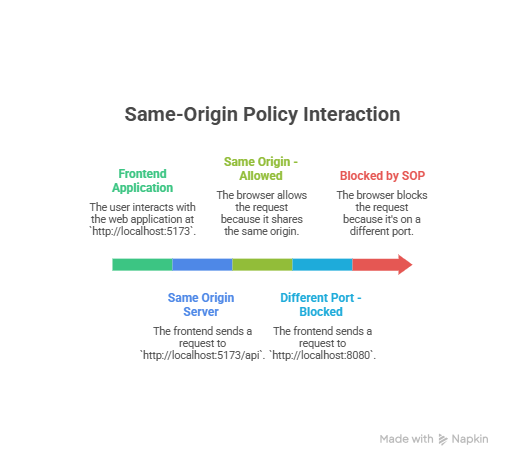
So if your frontend runs on:
http://localhost:5173And your backend runs on:
http://localhost:8080The browser says:
"Nope. Different origin. I'm blocking this." Even though both are on your machine.
Okay… But Then What is CORS?
Now here's where things get interesting. Same-Origin Policy is very strict. But in real-world development, we often want different origins to communicate.
Example:
- Frontend hosted on Vercel
- Backend hosted on Render
- Or frontend on
localhostand backend on cloud
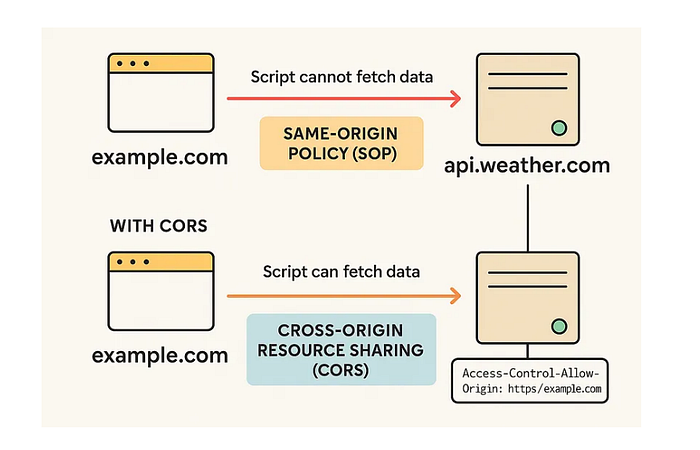
They are different origins. So how do we allow them to talk safely? That's where CORS (Cross-Origin Resource Sharing) comes in. CORS is basically: A controlled way to relax the Same-Origin Policy.
It allows servers to say: "Hey browser, it's okay. I trust this other website. You can allow the request."
How CORS Actually Works
When your frontend makes a request to another origin, the browser automatically adds a header like this:
Origin: http://localhost:5173Now the server checks this origin. If the server wants to allow it, it responds with:
Access-Control-Allow-Origin: http://localhost:5173If that header is present and matches — the browser allows the response. If it's missing — the browser blocks it. Important thing to understand:
-> The server might actually send the response. -> But the browser blocks you from reading it.
CORS is enforced by the browser — not the server.
Why Do We Mostly Notice CORS During Development?
Because during development:
- Frontend runs on one port
- Backend runs on another port
Different ports = different origins. So your browser starts blocking requests. In production, often both frontend and backend are under the same domain, so you may not see this problem.
Simple Requests vs Preflight Requests
Now don't worry — I won't go too deep here. But you should know this one important thing.
There are two types of CORS requests:
1. Simple Requests
These are normal GET or POST requests without fancy headers. If the server allows the origin, it works immediately.
2. Preflight Requests
If your request:
- Uses PUT, DELETE, PATCH
- Sends Authorization headers
- Sends custom headers
- Sends JSON content type
Then before sending the real request. The browser first sends an OPTIONS request. This is called a preflight request. It's basically the browser asking:
"Hey server, if I send this real request, will you allow it?"
If the server responds correctly with CORS headers — the browser sends the real request. If not — blocked. That's why sometimes you see an OPTIONS request in your network tab and get confused.
One Very Important Thing
If you call your API using:
- Postman
- Curl
- Command line tools
CORS will not block anything.
Why? Because CORS is a browser security feature. It does not exist outside browsers. That's why your API works perfectly in Postman. But fails in your React app.
And that's when beginners start questioning their life decisions.
So What Should we Really Remember?
Let's simplify everything:
- Browsers protect users using Same-Origin Policy.
- CORS is a controlled way to relax that rule.
- Server must explicitly allow other origins
- Browser enforces CORS — not the server.
- Preflight requests happen for complex requests.
- It's about security, not about annoying developers.
Once you understand this mental model, CORS errors stop being scary. They become predictable. And when something is predictable — it becomes easy to fix.
Final Thoughts
CORS is not a bug. It's not a backend failure. It's not your frontend being broken. It's a browser protecting the user. As developers, our job is to configure our servers correctly — not fight the browser. And once you truly understand that CORS is about trust between origins, everything starts making sense.
About the Author
Shrey Joshi — Breaking down complex concepts with clarity and context.