

Hi everyone, I'm Batuhan, and I've been working in cybersecurity and blockchain security for 6 years. I've held management positions in many companies in this field. I've founded several startups and have been doing bug bounty work in my free time for years.
Where did this article come from?
Last week I was talking to a friend who wanted to do bug bounty, and he was saying he couldn't figure out where to start, he just couldn't come up with a plan. What he said was exactly this: "I can identify vulnerabilities, I can detect them, but I'm really confused about where and how to look for them." From what I've seen, people are always very confused about this topic. Everyone understands the importance of Recon, but they don't know which tools to use or which methodology to follow.
To be honest, this varies depending on your chosen goal. When examining a web app, the first thing I look at is what technologies it uses (programming languages, libraries, external dependencies, etc.), and then I create a path accordingly. However, I'll mention some classic methods and techniques that I use and that you can also use when creating your own bounty methodology. The main reason I'm writing this is because when I mentioned these to a friend, he reacted by saying, "I really didn't know how to use these tools properly."
Understanding Recon

The most important and crucial thing to understand is that reconnaissance is fundamentally everything. Imagine an enemy you can't see, touch, or smell. Engaging in combat with this enemy is tantamount to suicide. Reconnaissance, from a bug bounty perspective, is essentially the same thing. The better you understand your target and identify its weak points, the more ammunition you have, and the greater your chance of obtaining a bounty from that target after a certain amount of work. If you don't believe me, go ask all the bounty hunters you know; most of them spend most of their time gathering information about the target. Remember, the broader the perspective we have on the target system, the wider the attack surface we can expand. Today, using my own project, academy.cladious.com (a blockchain academy, and yes, it's free), as an example, we will examine a modern reconnaissance workflow, ranging from passive scanning to active scanning and in-depth analysis.
Subdomain Enumeration: subfinder

This is my most used subdomain enumeration tool; remember that you have many options here, but the main reason I use Subfinder is because we can connect APIs very quickly.

Here, we'll encounter something that might be a bit challenging: the API_KEY collection process. Yes, I know it's tedious; you all want to quickly attack, write that report, and claim the bounty. However, the first thing you need to learn is that bug bounty work through a lot of trial and error, and the abundance of data you have will lead you to discover something. How do we get here? Below, if you have Subfinder installed on your system, you can quickly access the area where you enter the providers' API keys.
nano ~/.config/subfinder/provider-config.yamlIf you can't install subfinder (I suspect some of us don't know how to configure Go), I'll show you how to do that at the end of the article. You can skip to that part if you want, then we'll continue. Okay, I assume you've managed it. If you haven't succeeded, you can ask me for help in the comments. I'll get back to you as quickly as possible. Okay, now let's get to which parameters we entered. I assume you got the API_KEYs from provider-config.yaml. You might not get all of them; you can check here as many KEYs equals how many subdomains. Now let's see what you need to type into that damn terminal first.
subfinder -d cladious.com -all -o cladious_subdomains.txtI think you've done a great job of researching the target domain. As a result, when you look at <target>_subdomains.txt, you'll see the subdomains that subfinder quickly identified. My observation is that many people run this command, discover the subdomains, and then click on each subdomain individually. You can do that, of course, but doing so leaves things a bit more to chance.
Permutation and Mutation Scanning : alterx, shuffledns

Known subdomains alone aren't enough. Identifying hidden domain names (staging, dev, test, etc.) by predicting developers' naming habits is incredibly useful. While you might not find anything here, sometimes the subdomains you identify can hold enormous treasure chests.
We take our existing list of subdomains and generate possible variations of them (e.g., api -> api-staging, dev -> dev01). The main reason for this is that some domains haven't yet been registered with an SSL certificate or have fallen into passive resources.
Now, let's create new subdomain predictions for the subdomains we've identified using alterx.
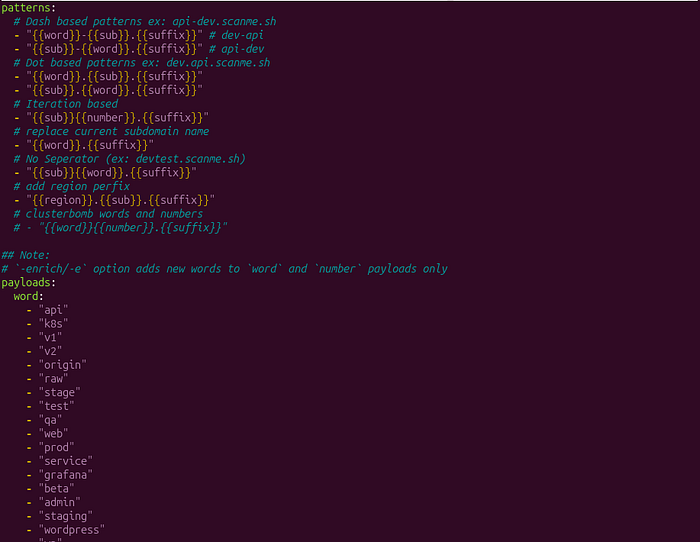
Alterx generates these estimated subdomains for us precisely thanks to this structure. If we have better estimates, we can make changes here, for example, by writing new patterns or language-specific payloads and keywords, and generate new subdomains more efficiently.
cat cladious_subdomains.txt | alterx -o alterx_domain_cladious.txtNow, let's get to my favorite, ShuffledNS. The important thing here is the quality of our resolvers. You can find that information online with a quick search. But I'll give you the resolver I typically use.
wget https://wordlists-cdn.assetnote.io/data/manual/best-dns-wordlist.txt
wget https://raw.githubusercontent.com/projectdiscovery/public-bugbounty-programs/main/resolvers.txt
As for how to use it, you can quickly do the following.
shuffledns -list cladious_subdomains.txt -r resolvers.txt -o shuffledns_cladious.txtFind Active DNS :dnsx

Now we have at best thousands of domains, and how can we know which ones are legitimate and which are just fake? That's where DNSX comes in. Its job is to check the domains we have and see if they resolve to an active IP address.
cat alterx_domain_cladious.txt | dnsx -o alive_domains.txtPort Scanning and Service Detection: naabu

Many bug bouncing agents seem genuinely afraid of port scanning. When I asked a friend I spoke to which ports he was checking, the answer I got was truly shocking. He wasn't checking ports at all. While his refusal shocked me, when I asked why, he replied, "I can't be bothered to run nmap on every subdomain I find; I don't want to wait until morning." Friends, being curious is always to your advantage. That's exactly how I discovered Naabu. Using nmap for this task seemed too slow, and instead of saying "I won't do port scanning," I started looking for an alternative and discovered Naabu. Now that I've explained it, you've probably figured out what it does: you give Naabu a list of subdomains, and it checks the ports for those addresses. It marks the open ports for you, saying, "Look, this one's open, bro."
cat alive_domains.txt | naabu -o cladious-ports.txtWeb Services Analysis: httpx

Are your terminals starting to burn out? Hopefully, you've begun to chart a good course in your mind. If you have any questions or get stuck on anything, feel free to write them in the comments. Let's continue; we've found the open ports, now it's time to look at what services are running on those ports. httpx analyzes the running web services, providing us with their titles, status codes, and much more. I could even write a separate article about this. If you want that — and yes, I've said this a lot today — you can let me know in the comments and follow me..
cat cladious-ports.txt | httpx -title -scThe best advice I can give you here is to take some time and type "httpx -h". Believe me, you'll see the results.
Deep Scanning and Crawling: katana

Simply viewing the homepage won't get you anywhere in most cases. We need to find API endpoints, JavaScript files, and hidden parameters deep within the application. That's where Katana comes in. If the system you're testing (e.g., academy.cladious.com) requires login, you can map the pages behind the login process by providing Katana with the session cookie information from your browser (auth crawl). This will increase the attack surface by 2–3 times.
katana -u academy.cladious.com -jc -jslHow do I set up the tools?
Many newbies don't understand how to export Golang (you should definitely learn Linux, by the way), and even though they install these tools with Go, they encounter an error like "command not found". To fix this, make sure you have Go installed on your computer.
go version
echo 'export PATH=$PATH:$HOME/go/bin' >> ~/.bashrc && source ~/.bashrc
echo 'export PATH=$PATH:$HOME/go/bin' >> ~/.zshrc && source ~/.zshrc
In this way, depending on whether you are using ZSH or Bash, don't forget to export the `go path`. After that, what you need to do is.
go install -v github.com/projectdiscovery/pdtm/cmd/pdtm@latest
# and
pdtm -ia -igp
The process should involve installing PDTM. You can then install all the tools I mentioned above through PDTM.
That's all from me for now. Don't forget to subscribe to the newsletter and follow me on Medium and clap so you don't miss the next article. Good hacks.
