
The program I was testing, let's call it X, is a web application that allows users to create notes and share them via email with anyone, whether they are signed up on X or not.
After creating a note and sharing it with my second email address, I received a message that looked like this:
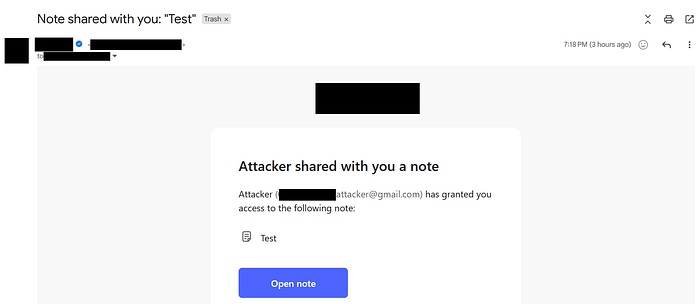
As you might be thinking right now, since the email contains my name (which I can set to any text I want) and the note name, I decided to try HTML Injection by changing my name to <h1>HTML</h1> and doing the same for the note name; unfortunately, it didn't work because the web application was correctly performing HTML encoding on the email content before sending it.
Later, I tried setting my name to special characters that can be interpreted differently by various programming technologies, changing it to something like "'`\@!?"<H1>Test</H1>, then I invited my second email to the note again, but this time something weird happened because I didn't receive an email at all!
I initially thought the application might have a rate limit on sending emails to avoid spam, perhaps only allowing an invitation email to be sent again after 5 minutes to the same email, or something similar to that. To check this, I changed my name back to a normal English name and invited my second email to the note again. Surprisingly, I received the email immediately. After trying this several times in a short duration and always receiving the email, I realized that something in the previous name ("'`@!?"<h1>Test</h1>) was causing an exception when the web application tried to send the invitation email.
I began deleting characters one by one to understand what exactly was triggering the exception, so I deleted > first, then /, but I still received nothing until I finally deleted \. When I invited my second email after removing the backslash, I finally received the email, which led me to believe the server was interpreting \ as a special character; I immediately thought of Unicode escape characters, which allow us to represent any characters as text using the format: \uXXXX.
To test this hypothesis, I changed my name to \u0061 (which represents the character a) and invited my second email, and as I expected, the email body contained a as my name instead of \u0061:
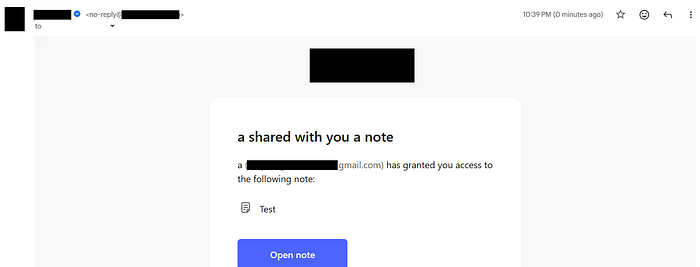
This confirmed that \uXXXX was being interpreted by the application back-end into its corresponding Unicode character (whether it was printable like a or non-printable like control characters), so knowing this, the next logical step was to try \u0000, which represents a null byte that is known to signify the end of a string in C-like programming languages; after I did that, I received an empty email because the email starts with my account name (\u0000), and since the null byte was interpreted as the end of the email body string, it truncated everything after it:
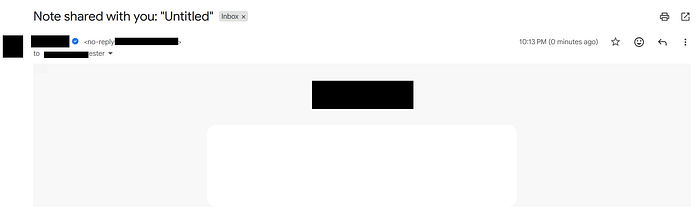
To demonstrate the impact of this vulnerability, I changed my name to a phishing message that ends with \u0000:
In order to access the "Secret" note, you must confirm your identity — Please complete the verification at the following link: https://by-0xcyborg.com/login\u0000
The result looked like this:
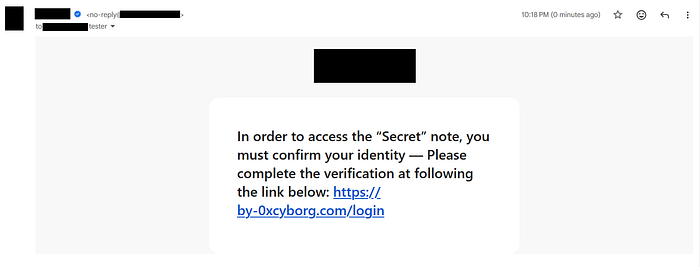
So, the final impact was that I could use the company's official, verified email address to send an email containing any text I wanted to any recipient.
Thanks for reading and I hope you enjoyed this write-up!
X (Twitter): https://x.com/user_cyborg