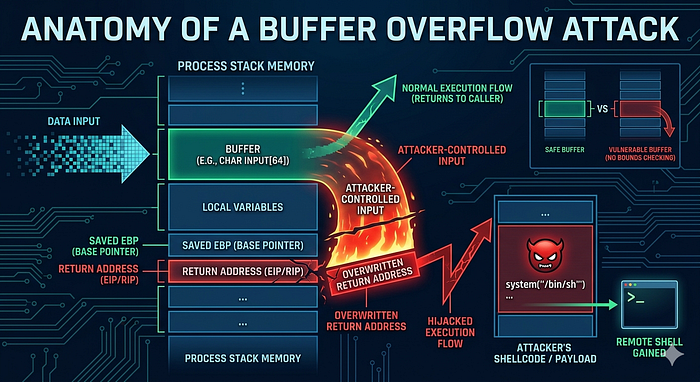

Hello Teammate! You know me, I`m a passionate student in the Cybersecurity curriculum at Holberton School Azerbaijan. In our recent project, we've been plunging headfirst into the fascinating, complex world of memory management. One vulnerability keeps popping up as both classic and incredibly powerful: the Buffer Overflow.
Whether you're a fellow student navigating these concepts or simply curious about the hidden battlegrounds of hacking and defense, this blog post is for you. Let's demystify how a simple "spill" can bring an entire system to its knees.
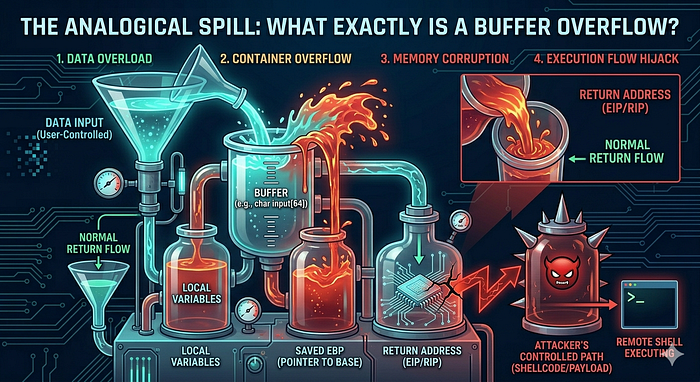
Imagine you have a small, clear glass designed to hold exactly 8 ounces of water. In computer terms, this glass is a buffer — a temporary storage area in the computer's memory (RAM). It's built for a specific job: holding data.
Now, imagine someone attempts to pour an entire gallon of water into that tiny 8-ounce glass. The glass overflows, right? The excess water doesn't just vanish; it splashes all over the table, potentially wetting other objects, creating a mess, and maybe even shorting out some electronics.
In a computer, a Buffer Overflow occurs in exactly the same way. A program tries to write more data into a buffer than it was allocated to hold. This "extra" data "spills" beyond the buffer's designated boundaries and starts overwriting adjacent memory locations. This "mess" is far from harmless — it can corrupt critical data, cause the program to crash, or, most terrifyingly, allow an attacker to seize control.

Here's the critical part that every future cyber expert needs to grasp. When a programmer defines a buffer (for example, to store a user's nickname), they assign it a fixed size, say, 12 characters. If the program fails to validate the actual size of the input, a crafty user could enter 200 characters.
The extra 188 characters don't disappear. They spill over and clobber whatever memory happens to be next to the buffer. On the stack (the part of memory where local variables and function call information live), this is particularly dangerous.
A prime target in this adjacent memory is the Return Address.
Think of the return address as the program's roadmap. When a function finishes its job, this address tells the computer precisely which instruction to execute next, guiding it back to its original path.
An attacker's goal is to carefully craft their overflowing input so that the precise characters that overwrite the return address "point" the computer to a new, malicious location. That location usually contains their own custom-written code, known as Shellcode, designed to grant them administrative access, steal information, or worse. The attacker effectively hacks the roadmap, forcing the computer to take a dangerous detour of their choosing. This is known as arbitrary code execution, and it's the ultimate prize for most attackers.
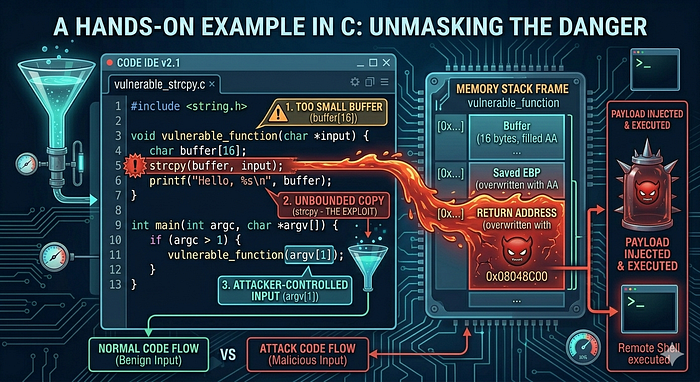
Let's dissect a simple, classic example in C, a powerful language that places memory management directly in the programmer's hands, making it a fertile ground for these types of vulnerabilities.
#include <string.h>
#include <stdio.h>

void process_login() {
    char username[8]; // WARNING: This buffer is tiny! Only 8 characters.

    printf("Welcome to SecureApp v1.0!\n");
    printf("Please enter your username: ");

    // DANGER ZONE!
    // gets() is notoriously dangerous because it has absolutely NO bounds checking.
    gets(username);

    // Some simple logic (just for demonstration)
    if (strcmp(username, "admin") == 0) {
        printf("Access Granted! Proceed with caution...\n");
    } else {
        printf("Access Denied. Incorrect username.\n");
    }
}

int main() {
    process_login();
    return 0;
}
Imagine a user enters a very long string, say 1234567890ABCDEF. The gets() function, true to its dangerous nature, will happily gobble up all those characters and try to jam them into the 8-byte username buffer.
- The first 8 characters (12345678) will fit.
- The entire rest of the string (90ABCDEF) will spill out.
These overflowing characters will brute-force their way into the adjacent memory on the stack. They might overwrite other local variables, function arguments, the stored frame pointer, and, you guessed it, the vital return address. An attacker who knows the exact layout of memory can overwrite this return address with the address of their shellcode, which they've already cunningly placed elsewhere in memory. When process_login() finishes, instead of returning to main(), the program will jump straight into the attacker's waiting code. Boom — system compromised.
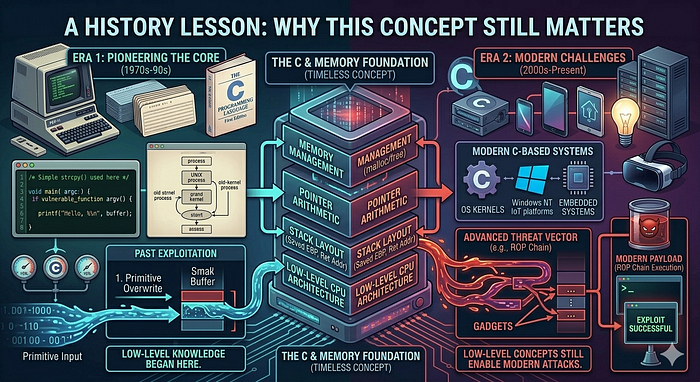
While buffer overflows seem like a foundational, "solved" problem, history proves otherwise. They have been at the heart of some of the most significant events in cyber history:
- The Morris Worm (1988): One of the very first worms to traverse the nascent internet, the Morris Worm used a buffer overflow vulnerability in the "fingerd" network service to rapidly spread and shut down thousands of computers. It was a stark wake-up call about network security.
- The Heartbleed Bug (2014): Okay, technically this was a buffer over-read, which is the mirror image of an overflow. Instead of writing too much, it allowed an attacker to read beyond the buffer's intended boundary in OpenSSL, leaking massive amounts of sensitive information (like private keys, usernames, and passwords) from a server's memory. Both types of vulnerabilities stem from incorrect memory boundary handling and underscore the massive impact a simple coding error can have.
Forging Your Shield: How to Defend Against Buffer Overflows
As future cybersecurity professionals, knowing how these attacks work is only half the battle. Our true mission is defense. Here are practical, robust methods to prevent these exploits:
- Use Safe Functions & Input Validation: This is Rule #1. Never use functions known to be dangerous like gets() or strcpy(). Replace them with their modern, safer counterparts that explicitly check input size, such as fgets() and strncpy(). Even more importantly, always validate all user input. Sanitize it, check its length, and ensure it meets expected formats. Never trust user input.
- Choose Modern, Memory-Safe Languages: Languages like Python, Java, and C# handle memory automatically. They include built-in bounds checking for arrays and strings, making classic stack-based buffer overflows nearly impossible by design. While they are not a silver bullet for all security issues, they offer built-in protection for this class of vulnerability.
- Deploy Stack Canaries: Think of this as a security guard standing watch. A special, "secret" random value (the "canary") is placed on the stack right before the return address. Before a function returns, the program checks if the canary's value has changed. If it has, the program knows a buffer overflow occurred and immediately terminates, preventing the attack from executing.
- Implement ASLR (Address Space Layout Randomization): This is like constantly rearranging the map. Every time a program starts, ASLR randomizes where key memory segments (like the stack, heap, and code libraries) are located. This makes it incredibly difficult for an attacker to predict the exact address of their shellcode or the return address they need to overwrite.
- Utilize Non-Executable (NX) Stacks: This technique marks the stack memory segment as non-executable. Even if an attacker successfully overflows the buffer and writes their shellcode onto the stack, the computer's processor will refuse to run it, neutralizing the threat.
Conclusion: The Importance of Knowing Your Memory
Diving into buffer overflows has been a profound learning experience for me. It's taught me that a seemingly trivial mistake — one single line of code, one missed input validation — can have cataclysmic security consequences. It reinforces the truth that understanding how systems work under the hood, especially how memory is managed, is not optional for cybersecurity experts; it's fundamental.
For my fellow Holberton students and colleagues, I hope this guide provides a clear foundation as we tackle our projects. Keep digging deep!
Stay curious, practice responsibly, and remember: with great knowledge comes the power to build a more secure digital world. Ethical hacking is key!