
How proctoring platforms and candidate-side AI tools are fighting an unwinnable war — and what it means for hiring
I've sat through over a hundred online technical assessments and interviews in 2025 and 2026. Somewhere around assessment number sixty, I stopped being frustrated and started being fascinated.
Both sides of the table are now running on AI. Proctoring platforms use AI to monitor candidates — flagging behavior, analyzing typing patterns, scanning code for signs of machine generation. Meanwhile, a growing ecosystem of candidate-side tools promises real-time AI assistance that proctoring can't detect.
Two AI systems. Opposing objectives. Same screen.
I research AI compliance and governance. When I see two autonomous systems locked in an adversarial loop, I don't ask who's right. I ask who has the structural advantage. This article is that analysis. No moral judgments. No sides taken. Just the technical architecture of both teams and the gaps between them.
Blue Team: The Proctoring Defense Stack
Proctoring platforms operate across multiple detection layers, each targeting a different threat vector.
At the browser level, platforms monitor tab switches via the Page Visibility API, intercept clipboard events to block copy-paste, detect focus changes when the window loses attention, and disable developer tool shortcuts. This is the first line of defense — and the most visible to candidates.
Deeper in the stack, screen capture via getDisplayMedia() records what's on the candidate's screen. Webcam feeds run through gaze estimation and face detection models, flagging sustained off-screen glances or second faces in frame. Audio monitoring listens for background voices.
The most technically interesting layer is keystroke dynamics. This doesn't analyze what you type — it analyzes how you type. The rhythm between keystrokes, the duration each key is held, pauses while thinking versus bursts of confident typing. When code appears at an unnatural cadence — too fast, too uniform, no corrections — it stands out against the candidate's baseline. Of all detection methods, this one is the hardest to evade.
Finally, post-submission code analysis looks for AI-generated patterns: high-entropy variable naming, textbook-like structure, similarity to known LLM outputs. These techniques are still maturing, with false positive rates that keep them supplementary rather than decisive.
It's a multi-layered defense. But every layer shares an assumption about where the threat comes from.
Red Team: The Candidate-Side Attack Surface
Candidate-side AI tools exploit a fundamental architectural reality: they operate outside the browser.
The simplest approach is a second device. A phone camera reads the question via OCR or a vision-capable AI model. The response appears on the phone screen or through wireless earbuds. No software touches the assessment computer. No browser APIs are triggered. The proctoring platform has zero visibility because the entire interaction happens on a physically separate machine.
More sophisticated tools use OS-level overlay windows. Both macOS and Windows provide a mechanism for windows to exclude themselves from screen capture — setSharingType(.none) on macOS, SetWindowDisplayAffinity on Windows. When this flag is set, the window renders normally on the physical display but disappears from any screen capture API. This is not an exploit. It's a production feature used by Netflix for DRM, by banking apps to protect financial data, and by password managers to hide credentials. A candidate-side AI tool uses this same mechanism to display assistance that's visible to the candidate but invisible to proctoring recordings.
For extracting the question text, these tools don't need the browser's cooperation. A native process can read screen pixels directly through OS-level capture APIs — the browser cannot prevent this. Even more reliably, every major OS exposes an accessibility layer for screen readers. This layer provides programmatic access to browser content, and disabling it would break assistive technology and violate accessibility regulations.
The browser's copy-paste restrictions, text selection blocking, and keyboard interception? Those only work within the browser's sandbox. A separate native process sits outside that sandbox entirely.
The Critical Gap: Why the Browser Sandbox Favors the Attacker
This is the structural reality that most people miss.
The browser security model was designed to protect users from websites. Its architecture prevents web pages from accessing the file system, enumerating processes, reading other windows, or interacting with the OS beyond tightly defined APIs. This is why a malicious website can't steal your bank credentials from another tab. The browser sandbox is one of the most important security boundaries in modern computing.
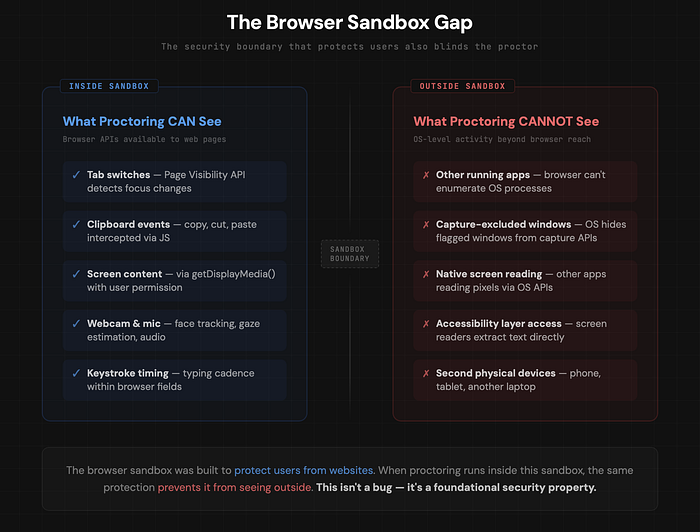
When a proctoring platform runs inside this sandbox, the protection works in reverse. The platform is the web page. The sandbox prevents it from seeing anything outside its own tab. It cannot detect other running applications, cannot identify capture-excluded overlay windows, and cannot access raw display output.
These aren't bugs to be fixed. These are foundational security properties. Removing them would compromise the security of every user on the internet.
The Escalation Ladder
Both sides can escalate, but the escalation is asymmetric.
Browser-only proctoring is defeated by a second device. Adding screen recording is defeated by capture-excluded overlays. Requiring a native desktop agent is defeated by virtual machines — the candidate runs the agent inside a VM while AI tools run on the host OS. The final level would be kernel-level anti-cheat, like Valorant's Vanguard — a driver that loads at boot with full system access. This exists in competitive gaming. For a job interview, requiring kernel-level access to a candidate's personal machine is a very different conversation.
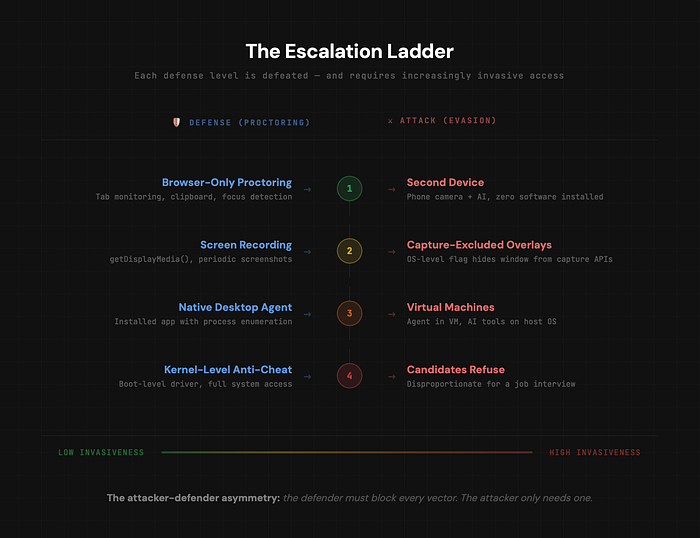
At every level, the defense requires increasingly invasive access. The attack always has one more layer of abstraction to retreat to. This is the classic attacker-defender asymmetry from cybersecurity: the defender must block every vector; the attacker only needs one that works.
So Where Does This Leave Us?
Here's what sits underneath all the technical details.
In 2026, most professional developers write code with AI assistance as a default part of their workflow. AI-powered completion, context-aware suggestions, automated refactoring — these aren't fringe tools. They're standard. Online technical assessments, by and large, still test candidates without them. The gap between skills assessed and skills used on the job is growing. And in that gap, an entire industry of tools has emerged.
If you work in AI governance, this pattern should look familiar. It's the same dynamic as AI-generated content vs content detection. Deepfakes vs deepfake detection. Synthetic academic submissions vs integrity tools. In every case, detection is fundamentally harder than generation. The detector must be correct every time. The generator only needs to succeed once.
For assessment platforms, the browser-based detection model has a structural ceiling imposed by the very security architecture that keeps the web safe. For organizations that hire through these assessments, the technical facts suggest a pragmatic question: what happens to your process when candidates have AI access? If the assessment breaks, what was it actually measuring?
I haven't declared a winner. I've laid out structural realities. The arms race will continue to escalate — that much is certain. But the more interesting question isn't who wins the technical battle. It's whether the battle itself is the right one to be fighting.
This is Part 1 of a series on adversarial AI systems in real-world applications. Part 2 goes deeper into the technical architecture of candidate-side AI tools — what building one reveals about the limits of current proctoring.
If you work in AI governance, platform integrity, or assessment design — I'd be interested to hear how your organization is thinking about this.