
When I started testing a search functionality , I didn't immediately start firing complex payloads. My first step was to understand how the application handled user input — and that patience made all the difference.
Step 1 — Finding the Reflection
I entered a simple test string like test123 and opened DevTools. The goal at this stage isn't exploitation — it's reconnaissance. I searched for my string in the page source to trace exactly where and how it was reflected.
The input appeared in multiple places, but one stood out: my value was being placed directly inside an HTML attribute.
<input value="test123">
↑ my input is reflected here, inside an attribute value
Step 2 — Understanding the Context
This is the most important step. Context determines everything in XSS — the same string that works in one context does nothing in another. In an HTML attribute context, a few things are true:
01 Script tags won't work directly

Injecting <script> tags inside an attribute value will be rendered as plain text, not executed.

02 You must escape the attribute first

To get control of the HTML structure, the attribute's closing quote must be terminated before anything else.

03 Then exit the tag entirely

After breaking out of the attribute, the containing tag must also be closed before new HTML can be injected.
The plan crystallised: Break the attribute → Close the tag → Inject a new element with an event handler.
Step 3 — The Payload
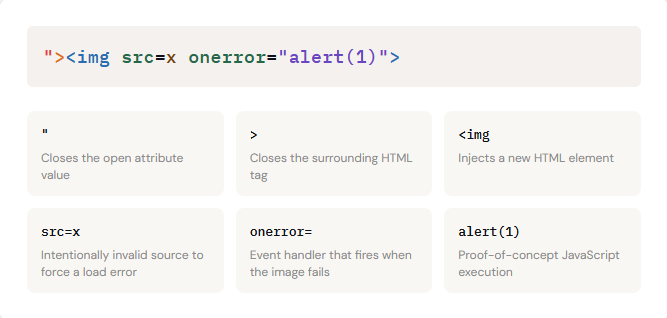
Here is the payload I used, and why each character exists:
Step 4 — Confirming Execution
After injecting the payload into the q parameter, the browser loaded the page, the image failed to load (as expected), the onerror handler fired, and the alert box appeared. XSS confirmed.
To demonstrate impact beyond a simple alert, I tested additional payloads:
// Access cookies
"><img src=x onerror="alert(document.cookie)">

// Alternative vector via iframe
"><iframe src="javascript:alert(1)"></iframe>
Both confirmed: arbitrary JavaScript execution was achievable, including access to session cookies — which demonstrates real-world severity.

The Mental Model
This is the repeatable thought process that led to the find. It works for any injection context, not just HTML attributes:
01: Find reflection
02: Map the context
03:Break structure
04:Craft payload
05:Confirm & report
XSS = Context + Grammar
Random payloads produce random results. Understanding where your input lands — and what characters have structural meaning there — is the real skill.
For a deeper dive into how injection works across different contexts (HTML, SQL, LDAP, and more), the OWASP Injection Theory page is an excellent reference: