
Most people think of mobile security threats as coming from outside the device. A hacker somewhere on the internet is trying to break through the app's defenses remotely. What they rarely consider is a threat that is already on the device, sitting quietly alongside legitimate apps, waiting for the right moment to intercept something valuable passing through.
Insecure deeplinks and intent hijacking are exactly that kind of threat. And the entry point they exploited was built into the app on purpose, designed to make the user experience smoother.
Here is the everyday version. Imagine a busy office building where different departments communicate by sending internal memos through a shared mail slot in the corridor. Each department has a name on its slot. When you drop a memo addressed to the Finance department, you assume it lands on the Finance team's desk. But one day, a new team moves in and puts up a sign on their door that also says Finance. The building has no rule against duplicate names. Your memo lands with the wrong team. They read it, copy what they need, and pass it along as if nothing happened. The system worked as designed. The gap was in how destinations were registered and trusted.
That mail slot is the Android Intent system. And that duplicate department sign is how intent hijacking works.
Deeplinks are URLs that open specific screens inside a mobile app directly, bypassing the normal navigation flow. They are used everywhere in mobile products. 1. A payment confirmation email contains a link that opens the app directly to the transaction screen. 2. A password reset message contains a link that opens the app directly to the reset form. 3. A promotional notification contains a link that takes the user directly to a specific product or feature. The convenience is genuine and the user experience benefit is real. The security problem appears when the app registers a deeplink scheme without sufficiently verifying who is allowed to respond to it, or when sensitive data is passed through the deeplink URL itself without adequate protection.
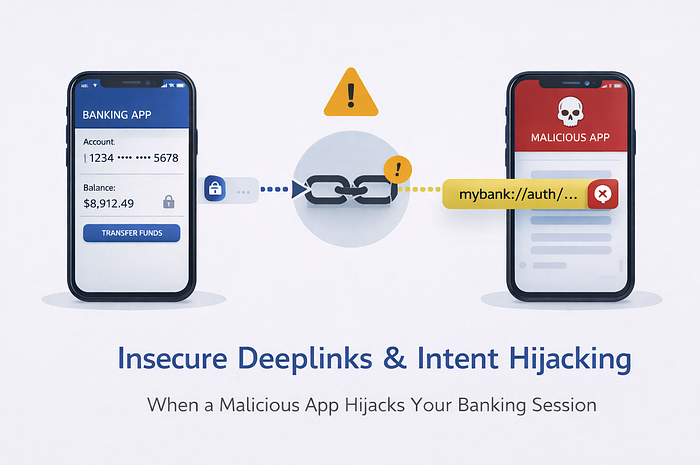
On Android, apps communicate through a system called Intents. An Intent is essentially a message that says, "I want to open this type of content" or "I want to perform this action." The Android system looks for apps registered to handle that type of content and routes the Intent to them. When multiple apps register to handle the same URL scheme or Intent type, Android may present the user with a choice, or in some cases route it automatically. A malicious app that registers itself to handle the same deeplink scheme as a banking app can intercept Intents carrying authentication tokens, OAuth callback codes, session parameters, or payment confirmation data that were meant exclusively for the legitimate banking app.
This is not limited to Android. iOS has had similar vulnerabilities in its Universal Links implementation when developers fail to properly configure the associated domains verification file, which prevents unauthorized apps from claiming a URL scheme. The pattern of passing sensitive data through navigation URLs exists across both platforms, and the risk travels with it.
In fintech, the data passing through deeplinks is often at its most sensitive at precisely the moments when deeplinks are used. 1. OAuth 2.0 callback URLs that carry authorization codes come back to the app through a deeplink after a user approves access. 2. Password reset flows deliver tokens through deeplink URLs. 3. Transaction confirmation screens are often opened directly through notification deeplinks. A malicious app that successfully intercepts any of these captures data that can be used immediately for account takeover or session hijacking.
Technically, the attack on Android requires a malicious app to be installed on the same device and to declare an Intent filter in its manifest that matches the target app's custom URL scheme. Custom URL schemes like mybank://reset or payapp://confirm are not globally registered or verified against app identity. Any app can claim them. When the legitimate app or an external trigger fires that URL scheme, Android routes it to whichever app has registered for it. If the malicious app is present and registered, it receives the Intent and everything it contains before the legitimate app ever sees it.
A realistic scenario: a fintech app uses a custom URL scheme to handle OAuth callbacks after a user connects their bank account through a third-party service. The callback URL carries an authorization code that the app exchanges for an access token. A malicious app installed on the same device registers an Intent filter for the same custom URL scheme. When the OAuth provider redirects back to the app after user approval, Android routes the Intent to the malicious app instead of the legitimate one. The malicious app captures the authorization code, makes the token exchange silently in the background, and now holds a valid access token for the user's connected bank account. The legitimate app shows an error saying the connection failed. The user tries again. The malicious app intercepts again.
Prevention requires treating the deeplink surface with the same seriousness as any other authentication boundary. 1. Migrate from custom URL schemes to verified App Links on Android and Universal Links on iOS, both of which tie URL handling to verified domain ownership rather than first-come-first-served scheme registration. 2. Never pass sensitive tokens, authorization codes, or session identifiers as plaintext parameters in deeplink URLs. 3. Validate the source and integrity of every incoming deeplink before processing its contents. 4. For OAuth flows specifically, implement PKCE, which binds the authorization code to the specific app instance that initiated the flow, making intercepted codes useless to any other party. 5. Treat any data arriving through a deeplink as untrusted input that requires validation before use, applying the same scrutiny you would to any external API input.
Mobile apps do not exist in isolation. They share a device with every other app the user has installed. Trust within that environment cannot be assumed based on what a URL looks like or which scheme it uses.
A door that any tenant in the building can claim a key to is not a secure entrance. It is a shared access point waiting to be misused.
#CyberSecurity #MobileSecurity #IntentHijacking #Deeplinks #AndroidSecurity #ApplicationSecurity #FintechSecurity #BankingAppSecurity #OWASP