A real-world authorization flaw hiding in plain sight, and what it tells us about the silent gap between "who you are" and "what you can access."
Imagine you walk into a bank. The security guard checks your ID. You pass. But instead of being shown to the regular customer area, nobody stops you from just… walking into the vault room. The door was always open. Nobody ever checked what you were allowed to do inside, only that you had an ID.
That is almost exactly what I found on a real, live e-commerce website. And it took me very less time & efforts to stumble upon it.
How it started
I was doing independent security research, the kind where you pick a random website, get permission or stay within ethical boundaries, and just poke around to see what holds up. The target was an online store built on WordPress, using WooCommerce, a setup that powers millions of shops worldwide.
I registered as a regular user. Browsed around. Added items to a cart. Did all the normal things a shopper would do. Nothing unusual so far.
Then I tried something simple. Something almost embarrassingly simple.
# Where I was:
https://[website].com/my-account/

# What I tried:
https://[website].com/wp-admin/
I manually changed the URL from /my-account/ to /wp-admin/ the standard WordPress admin panel path and hit Enter. I expected a "403 Forbidden" or a redirect to the login page. Instead, I was greeted by the WordPress admin dashboard. Wide open.
"I wasn't an admin. I hadn't done anything special. I just… asked to go there. And the website said yes."
The door was locked. The room wasn't.
Here is where it gets technically interesting, and this part is of utmost importance.
Every website that has user accounts deals with two separate security questions:
Authentication: "Who are you?" Verified by login credentials.
Authorization: "What are you allowed to do?" Controlled by your role.
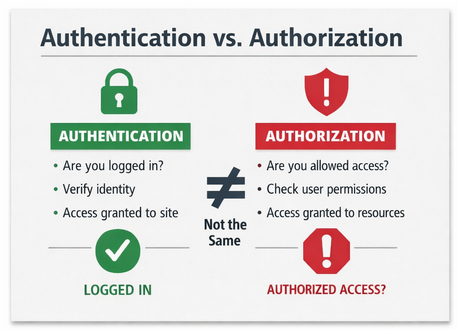
Most people think of these as the same thing. They are not. Authentication is the bouncer checking your ID at the door. Authorization is the wristband that tells the bouncer which areas of the venue you can enter.
The website I found had perfectly fine authentication. You had to be logged in. But it had broken authorization, once you were inside, it forgot to check your wristband.
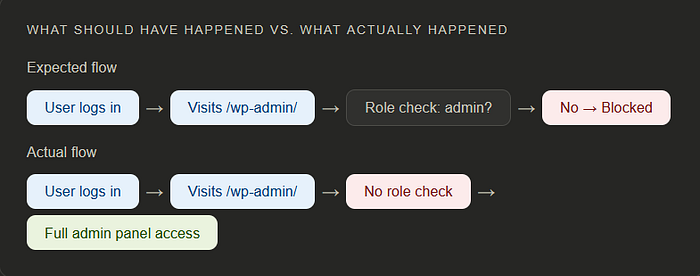
Expected flow: User logs in → Visits /wp-admin/ → Role check: admin? → No → Blocked
Actual flow: User logs in → Visits /wp-admin/ → No role check → Full admin panel access
What I could see and do
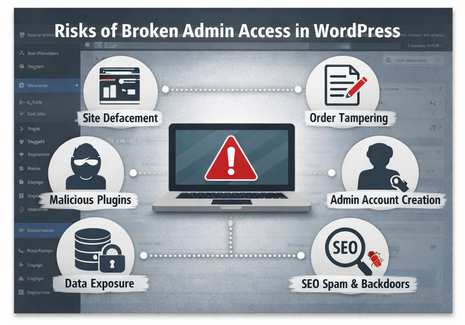
Inside the panel, I had visibility into things no regular shopper should ever see: order data, customer records, product management settings, plugin configurations. While I couldn't perform full administrative actions the way a true admin account would, I had more than enough access to cause serious damage had I been a malicious actor.
I could have modified product listings. Tampered with pricing. Interfered with ongoing orders. Exposed personal information of real customers. The impact was not hypothetical, it was a few clicks away.
⚠️ Why this is serious: This is not just a technical glitch. Unauthorized access to admin panels is a common entry point for data breaches, fraud, and ransomware attacks. In regulated sectors, this kind of exposure can carry significant legal consequences under data protection laws like GDPR.
The responsible path: report, don't exploit
Finding a vulnerability comes with a choice. You can exploit it, ignore it, or report it. I chose the third, which is what the security research community calls responsible disclosure.
I reached out to the website owner, explained what I found in plain terms, and gave them the information they needed to reproduce and fix the issue. To their credit, they acknowledged it promptly and applied a fix. The vulnerability no longer exists. That's the outcome you want a safer internet, not a compromised one.
✅ Status: Patched — The vulnerability has been acknowledged by the website owner and resolved. This article is published post-fix, following responsible disclosure practices.
What does the fix actually look like?
For anyone building on WordPress or any web platform, this is the part that matters most. The fix isn't complex. It's about making sure your platform checks both questions: not just "are they logged in?" but "are they allowed to be here?"
In WordPress's case, this means ensuring that access to /wp-admin/ and any admin-side functionality explicitly checks user roles and capabilities, not just login state. A logged-in subscriber should hit a wall the moment they attempt to reach admin territory. That wall was simply missing.
💡 For developers, three things to check:
Enforce role-based access on every admin route, not just the login gate.
Never assume a valid session means sufficient privileges.
Test your application as a low-privilege user, not just as an admin.
The bigger lesson
Security vulnerabilities are rarely about dramatic hacking scenes with scrolling green code. More often, they're about simple assumptions that nobody thought to question. In this case, someone assumed that if a user is logged in, they must be in the right place.
That one assumption left a door wide open.
If you run a website especially one that handles customer data or payments take a moment to ask yourself: have you tested what a regular user can access? Not just through the UI, but by directly visiting URLs they shouldn't see? That simple test might save you from something far more serious down the road.
"The most dangerous vulnerabilities are not the exotic ones. They're the obvious ones that nobody checked."
Security isn't just a feature you build once. It's a habit of asking uncomfortable questions and being glad you asked before someone else did.
💬 Found this helpful or relatable?
Drop a comment below or clap if this sparked an idea.
Let's grow together, one bug at a time.