
How I spent hours trying to exploit ViewState deserialization, failed spectacularly, and learned valuable lessons about ASP.NET security in the process.
Watch the Video
If you prefer visual learning, I've documented my entire journey in this video — from setup to failure to key takeaways.
Resources & Tools I Used
Before we dive in, here are the resources that helped me understand this vulnerability:
Essential Reading:
- https://cloud.google.com/blog/topics/threat-intelligence/viewstate-deserialization-zero-day-vulnerability
- https://www.microsoft.com/en-us/security/blog/2025/02/06/code-injection-attacks-using-publicly-disclosed-asp-net-machine-keys/
- https://www.zerodayinitiative.com/blog/2020/2/24/cve-2020-0688-remote-code-execution-on-microsoft-exchange-server-through-fixed-cryptographic-keys
- https://www.soroush.me/blog/exploiting-deserialisation-in-asp-net-via-viewstate
- https://book.hacktricks.wiki/en/pentesting-web/deserialization/exploiting-__viewstate-parameter.html
- https://notsosecure.com/exploiting-viewstate-deserialization-using-blacklist3r-and-ysoserial-net
- https://redcursor.com.au/exploiting-asp-net-viewstate-misconfigurations-for-remote-code-execution/
- Powershell script for detection: https://github.com/microsoft/mstic/blob/master/RapidReleaseTI/MachineKeyScan.ps1
- https://github.com/mchklt/CVE-2025-30406
Understanding ViewState: The Good, The Bad, The Vulnerable
How ViewState Actually Helps Developers
Let's be fair — ViewState wasn't created to be a security nightmare. It solves a real problem:
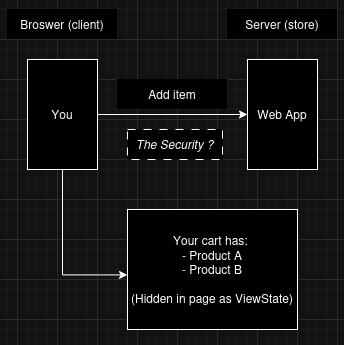
In simple terms: ViewState is ASP.NET's way of saying "I'll remember this for you" between button clicks.
Checkout the video for better clarification.
The Complete ViewState Lifecycle
Here's what happens under the hood:

The Security Mechanism (That I Tried to Break)
Machine Key:
The machineKey in web.config is what makes ViewState secure (when used properly):
<!-- This is what protects your ViewState -->
<machineKey
    validationKey="YourSecretKeyHere"
    decryptionKey="YourDecryptionKeyHere"
    validation="HMACSHA256"
    decryption="AES" />
Key Components:
- validationKey: Used to create and verify the MAC (Message Authentication Code)
- decryptionKey: Used to encrypt/decrypt the ViewState data
- validation: Hashing algorithm (SHA1, HMACSHA256, HMACSHA512)
- decryption: Encryption algorithm (AES, 3DES)
MAC Validation:
MAC isn't encryption — it's a cryptographic signature. Think of it like a tamper-evident seal:
Without MAC:
Data: "Total=$100" → Attacker changes to "Total=$1" ✅ Server accepts it

With MAC:
Data: "Total=$100" + Signature
Attacker changes to "Total=$1" + (same signature) ❌ Server rejects it!
The signature changes if the data changes, and only someone with the validation key can create a valid signature.
Checkout the video for better clarification.
The Attack Methodology (That Should Have Worked)
The Perfect Storm for Exploitation
Three things need to align for a successful ViewState deserialization attack:
- Known or Weak Machine Key
- Disabled or Bypassed MAC Validation
- Presence of Deserialization Gadget Chains
How Attackers Typically Exploit This
- RECON: Find ASP.NET app with ViewState
- KEY DISCOVERY: Extract machineKey from web.config (GitHub, backups, etc.)
- PAYLOAD GENERATION: Use ysoserial with known key
- INJECTION: Replace legitimate __VIEWSTATE with malicious payload
- RCE: Server deserializes → Code executes
The Tools Attackers Actually Use
While everyone talks about ysoserial, real attackers start with:
- Blacklist3r — Scans for common/default keys, checks MAC status
- GitHub Search — Finds hardcoded keys in source code
- Directory Traversal — Attempts to read web.config directly
- Common Key Wordlists — Tests predictable key patterns
Only after finding a valid key do they move to ysoserial for payload generation.
How to Properly Secure Your ASP.NET Applications
Immediate Fixes:
<!-- DO THIS in your web.config -->
<system.web>
    <!-- Auto-generate unique keys -->
    <machineKey
        validationKey="AutoGenerate,IsolateApps"
        decryptionKey="AutoGenerate,IsolateApps"
        validation="HMACSHA256"
        decryption="AES" />

    <!-- Enable all protections -->
    <pages enableViewStateMac="true"
           viewStateEncryptionMode="Always"
           enableEventValidation="true"
           validateRequest="true" />
</system.web>
Best Practices:
- Never Hardcode Machine Keys — Use
AutoGenerate,IsolateApps - Regularly Rotate Keys — In multi-server environments
- Minimize ViewState Usage — Disable it where not needed
- Use Session State for Sensitive Data — Never store in ViewState
- Keep .NET Framework Updated — Security improvements in each version
- Regular Security Reviews — Check for misconfigurations
Developer Checklist:
- ViewState MAC enabled (
enableViewStateMac="true") - ViewState encryption enabled (
viewStateEncryptionMode="Always") - Machine keys auto-generated
- No sensitive data in ViewState
- Event validation enabled
- Request validation enabled
For Security Professionals: Detection & Response
Signs of ViewState Tampering Attempts:
- Repeated POST requests with modified ViewState values
- Error logs showing "ViewState MAC failed" from same IP
- Large or malformed ViewState payloads
- Requests testing for
enableViewStateMac="false"
Monitoring Query (Example for SIEM):
-- Look for ViewState MAC failures
SELECT * FROM IISLogs
WHERE cs_uri_stem LIKE '%.aspx'
AND sc_status = 500
AND cs_uri_query LIKE '%__VIEWSTATE%'
AND time_generated > DATEADD(hour, -1, GETDATE())
I'm a security enthusiast who believes in learning through hands-on experimentation. Sometimes the experiments fail, but the lessons stick. Connect with me on X or LinkedIn to continue the conversation.
Disclaimer: This research was conducted in a controlled lab environment for educational purposes only. Always have proper authorization before testing security vulnerabilities.