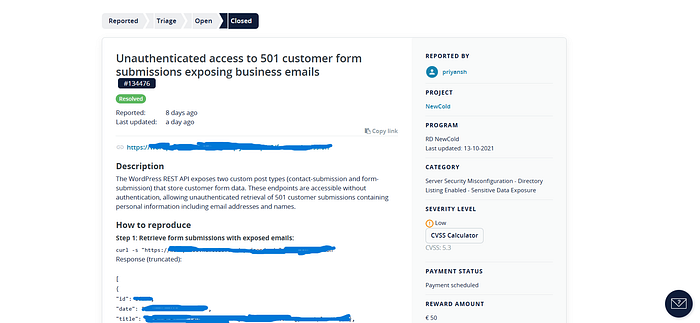

It was supposed to be an easy target. A static marketing website — no login, no signup, no user accounts. The kind of target most bug hunters scroll past because "where do you even start?" But I've learned something after years of doing this: the bugs are never where you expect them. They hide in the plumbing. Here's the full story of how a routine recon on a "boring" static site turned into a PII exposure affecting 501 customer records.
Phase 1: The Boring Part (Or So I Thought)
Every hunt starts the same way — mapping the attack surface. I ran passive subdomain enumeration and got back 52 subdomains. Most of them were exactly what you'd expect:
- VPN gateways (blocked by Cloudflare)
- Internal integration servers (BizTalk)
- B2B gateways requiring client certificates
But a few stood out:
wordpress.[target].com— A WordPress backendscim.[target].com— A 1Password SCIM bridgeportal.[target].com— Some kind of portalstaging1.[target].com— A staging environment
My thinking at this point: "Okay, there's actual infrastructure here. The main site might be static, but the backend isn't." I probed all subdomains with HTTPX to see what was actually alive. The results were… underwhelming:
- Most returned 403 behind Cloudflare
scim.[target].comwas properly secured (introspection disabled, auth required)remote.[target].comwas a SonicWALL VPN (out of scope)ncbiztalk.[target].comwas a default IIS page from 2020
But wordpress.[target].com? That returned a 200 with a full WordPress login page.
"There you are," I thought.
Phase 2: The WordPress Rabbit Hole
WordPress is one of those targets where you can spend hours going down rabbit holes. I started with the basics:
What I Checked First
- wp-config.php backup files (.bak, .save, .old) → All 403 (Cloudflare WAF)
- .env files → 403
- debug.log → 302 redirect (weird, but not exploitable)
- xmlrpc.php → 302 redirect (disabled)
- readme.html → Blocked
My thinking: "They've locked down the obvious stuff. Cloudflare is doing its job. Let me check the REST API."
The REST API Discovery
I hit the WordPress REST API:
curl -s "https://wordpress.[target].com/wp-json/wp/v2/users"
Response:
{"code":"aios_user_lists_forbidden","message":"Listing users is forbidden."}
"Interesting," I thought. "They're running All In One Security (AIOS). That plugin blocks user enumeration via REST API." I confirmed this by checking:
- Author enumeration (
?author=1) → No location header leak - Status parameter (
?status=draft) → Forbidden
AIOS was doing its job. User enumeration was locked down. My thinking at this point: "Okay, WordPress is hardened. The security team knows what they're doing. Let me check if there's anything else interesting." But then I noticed something in the HTML source of the login page:
<p style="display: none;"> <label>Enter something special:</label> <input name="aio_special_field" type="text" class="aio_special_field" value="" /> </p>
This confirmed AIOS was active with honeypot fields. Good security. I also noticed the response headers from earlier:
access-control-expose-headers: X-WP-Total, X-WP-TotalPages, X-JWT-Refresh
Wait. JWT-Refresh? That header only appears when JWT Authentication is installed. And JWT auth in WordPress usually means… GraphQL.
Phase 3: The GraphQL Pivot
I tested the GraphQL endpoint:
curl -s "https://wordpress.[target].com/graphql" \ -H "Content-Type: application/json" \ -d '{"query":"{ __schema { types { name } } }"}'
Response:
{"errors":[{"message":"GraphQL introspection is not allowed"}]}
Introspection was disabled. Good security practice. But the endpoint was alive. That was enough.
The User Enumeration That Wasn't
I tried the users query:
curl -s "https://wordpress.[target].com/graphql" \ -H "Content-Type: application/json" \ -d '{"query":"{ users { nodes { id name email slug } } }"}'
Response:
{ "data": { "users": { "nodes": [ {"id": "dXNlcjox", "name": "ad…", "email": null, "slug": "admin"}, {"id": "dXNlcjo3", "name": "Anr….", "email": null, "slug": "anna"}, {"id": "dXNlcjo0", "name": "Mirj….", "email": null, "slug": "mirjam"}, {"id": "dXNlcjoxNg==", "name": "Shala…", "email": null, "slug": "shalane-de-scande"}, {"id": "dXNlcjoxOA==", "name": "Vikto….", "email": null, "slug": "viktorija"} ] } } }
There it was. AIOS blocked the REST API, but GraphQL completely bypassed it. I found three separate enumeration vectors:
- Direct users query (listed all users)
- Login mutation error differentiation (
incorrect_passwordvsinvalid_username) - Password reset mutation response differentiation (user object returned vs null)
I was excited. This was a clean bypass of their security controls. Then I checked the scope.
Phase 4: The "Oh No" Moment
Buried in the program's out-of-scope list:
"User enumeration without any impact"
My heart sank. I'd just spent an hour finding a textbook example of exactly what they excluded. My thinking at this point: "Well, that's a waste. The GraphQL bypass is clean, but they explicitly don't want it. Time to move on." But I didn't move on immediately. I've learned to do one final check before walking away — check what other routes exist in the REST API. This is a habit I developed after missing bugs early in my career. You never know what's hiding in custom endpoints.
Phase 5: The 30-Second Check That Changed Everything
I ran a simple command to list all registered REST API routes:
curl -s "https://wordpress.[target].com/wp-json/" | jq -r '.routes | keys[]' | grep -v 'wp/v2'
Most of it was standard WordPress stuff:
/oembed/1.0/embed/batch/v1/code-snippets/v1/snippets(returned 401 — properly secured)/regenerate-thumbnails/v1(admin functionality)/yoast/v1/*(SEO plugin routes)
Then I saw it:
/contact-submission /form-submission
"Wait… what?" These weren't standard WordPress post types. These were custom. My thinking shifted: "Contact submission? Form submission? Those store actual customer data. Let me check if they're accessible."
curl -s "https://wordpress.[target].com/wp-json/wp/v2/form-submission"
The response came back:
[ { "id": 16680, "date": "2026–05–04T08:43:27", "title": {"rendered": "xyz— wiktoria@parrotplanet.xyz"}, "status": "publish" }, { "id": 16679, "date": "2026–05–04T08:13:57", "title": {"rendered": "xyz — kontakt@4hunting.xyz"}, "status": "publish" } ]
Real customer emails. Right there in the API response. No authentication required. I immediately checked the total count:
curl -s -I "https://wordpress.[target].com/wp-json/wp/v2/form-submission" | grep x-wp-total x-wp-total: 178
501 total customer submissions. Exposed. Unauthenticated.
Why This Worked (And What I Learned)
The Mistake The Developers Made
When they created custom post types for form submissions, they left show_in_rest set to true. This is actually the default in modern WordPress — it's designed to make it easy to build headless setups.
The problem? They also set the post status to publish instead of private.
Public status + REST API enabled = publicly accessible data.
Why The Security Controls Failed
- AIOS only protects standard WordPress endpoints (users, author queries)
- Cloudflare WAF blocks known malicious patterns, not custom API routes
- The GraphQL security was focused on introspection and user queries
- Nobody thought to check if the custom post types were exposed
The Bug Hunter's Mindset That Found This
- "Check everything, even when you think you're done" — I almost moved on after the GraphQL enumeration was deemed out of scope
- "Custom post types are always worth checking" — This is a lesson I've learned the hard way
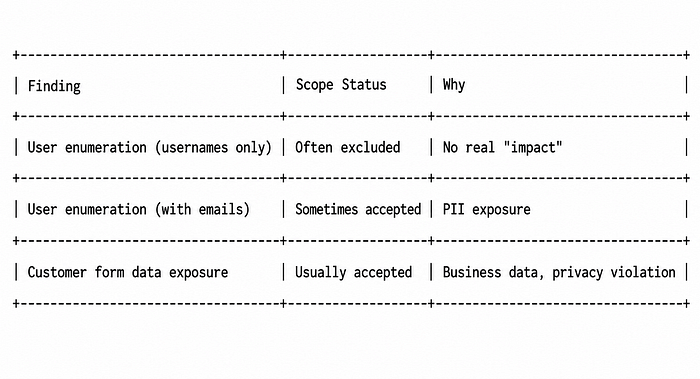
- "The scope says user enumeration, not data exposure" — Understanding the difference between "listing usernames" and "leaking customer PII" was crucial
- "Always check /wp-json/ routes" — Standard recon, but it paid off
Technical Takeaways for Bug Hunters
1. Always Check Custom Post Types
# Get all registered routes curl -s "https://target.com/wp-json/" | jq -r '.routes | keys[]' # Look for anything that's not wp/v2, oembed, batch, or standard plugin routes
2. Test Every Custom Endpoint Without Auth
# For each custom route you find curl -s "https://target.com/wp-json/wp/v2/CUSTOM-TYPE" | head -50 curl -s -I "https://target.com/wp-json/wp/v2/CUSTOM-TYPE" | grep x-wp-total
3. Understand The Difference In Impact
4. Don't Stop At The First "Blocked"
If AIOS blocks /wp-json/wp/v2/users, don't assume everything is secured. Check:
- GraphQL endpoints
- Custom REST routes
- Individual post IDs (try
/wp-json/wp/v2/posts/1,/wp-json/wp/v2/pages/1) - Custom taxonomies (
/wp-json/wp/v2/CUSTOM-TAXONOMY)