Attackers are often improving their strategies to get around network defenses and create secure communication channels. An adversary can redirect attack traffic between a target network and an external attack host by using a technique called **port forwarding**. Attackers can obtain unauthorized access, change networks, and steal data without setting off alarms right away by taking advantage of configuration errors, compromised devices, or tunneling techniques. This article examines the hazards that port forwarding presents to companies, how it is used in cyberattacks, and possible defenses against these threats.
Walkthrough:
For this walkthrough, we have compromised a target, gaining full access to their credentials. In this proposed setup, this target can communicate with the attacking machine and another target on their internal network (target #2). In the case that we want to compromise target #2 as well (via RDP in this example), attempting to connect to it from our initial machine will fail, however we can use target #1 as a proxy for our traffic.
Step # 1: Connect to target #1
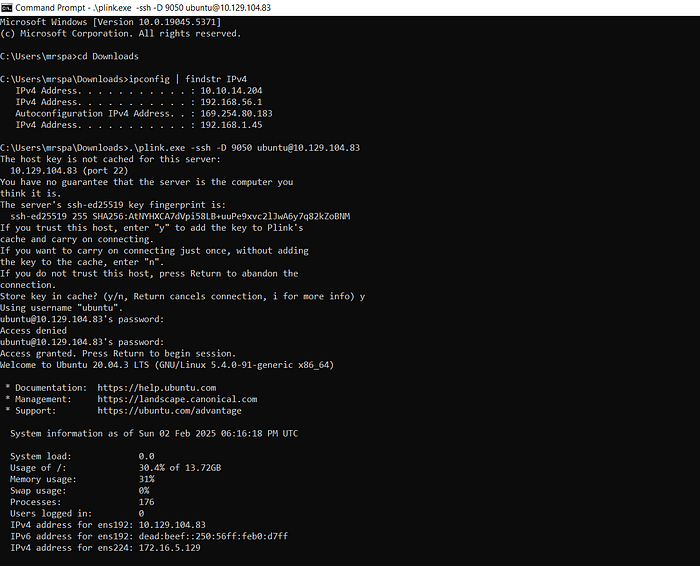
As you can see above, I use the command ".\plink.exe -ssh -D 9050 ubuntu@10.129.104.83" to dynamically forward all data on localhost:9050 to/through ubuntu@10.129.104.83 (target #1).
Step #2: Setting up Proxifier
The next step is to ensure that data (connection request from our attacking machine to target #2) is forwarded to localhost:9050. We can use Proxifier for this. Proxifier is a tool that forces applications to send their traffic through a proxy (like a SOCKS proxy), even if those applications don't natively support proxies. In attacks and labs, it's commonly used to route tools like RDP or browsers through an SSH tunnel or a compromised host.
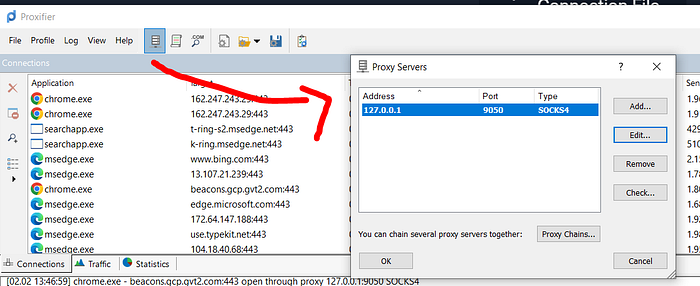
We can now attempt to connect to target #2 (in this case, via RDP). Our traffic will be routed due to our Proxifier settings.
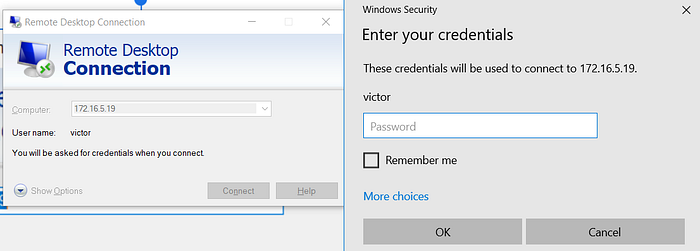
Once we enter the credentials, we now have access to target #2 through a proxy (target #1)
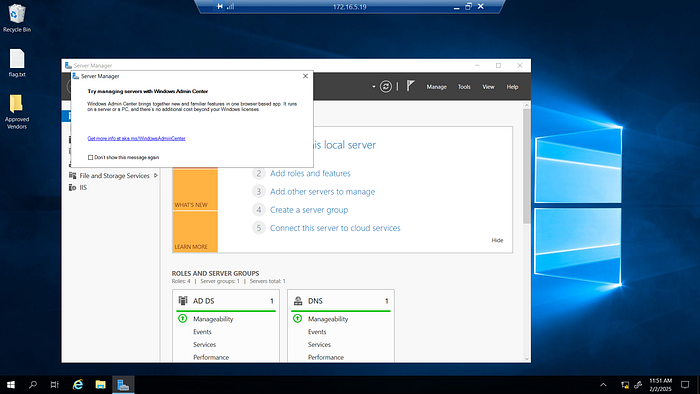
Things to Consider
- Remember that Proxifer will redirect traffic to the proxy server only if it can find the target port in the HTTP(S) ports list. This means that if the HTTP(S) ports list does not contain entries, traffic will not be forwarded to the proxy server (our dynamic port forwarding via ssh).
Wrapping Up
The sort of pivoting demonstrated here is possible when internal networks trust compromised hosts and allow unrestricted outbound connections. To reduce risk, organizations should restrict SSH connection capability, flagging connections that indicate port forwarding and the usage of tools not native to the compromised device. It is important to note that in this case, enforcing strong network segmentation was not enough. Having a device that bridges the outside world to an internal network will always introduce room for exploitation, and thus it is important to ensure that these devices are monitored strictly. Network/system actions such as SOCKS tunnels (frequent traffic from common proxy ports such as 9050 or 1080) or local port bindings should always raise a red flag, potentially indicating lateral movement.