

My name is Parth Narula, A penetration tester, bug hunter, red teamer and overall a security researcher. I live for those moments where a bit of out-of-the-box thinking cracks open a critical vulnerability.
I'm back with something I've been sitting on for a while. In today's writeup, I'm going to walk you through 5 real-world PII (Personally Identifiable Information) disclosure bugs I discovered across different targets, each found using a different technique.
PII disclosures are often underrated in the bug bounty world. People chase XSS and RCE, but leaking someone's email address, phone number, home address, or internal IDs at scale can be just as impactful, sometimes more. The GDPR fines alone tell the story :)
These five cases cover a range of attack surfaces: API fuzzing, static file hunting, server-side scripts, web archive digging, and good old-fashioned browser curiosity. Let's get into it.
Case Study 1: API Fuzzing: When /api/v1/reviews Gives Away the Whole Employee Directory
It started the way most things do, poking at an API. The target had a pretty standard-looking REST API structure at https://reviews.[REDACTED]/api/v1. I decided to fuzz the endpoint paths using ffuf to see what was hiding beyond what the application surface exposed.
ffuf -u https://reviews.[REDACTED]/api/FUZZ -w /usr/share/seclists/Discovery/Web-Content/api/api-endpoints.txt -mc 200

ffuf -u https://reviews.[REDACTED]/api/v1/FUZZ -w /usr/share/seclists/Discovery/Web-Content/common.txt -mc 200
You can use any wordlist here. SecLists has solid API-specific ones. The goal is to find endpoints the developer never intended to be public, or simply forgot to lock down.
What I Found
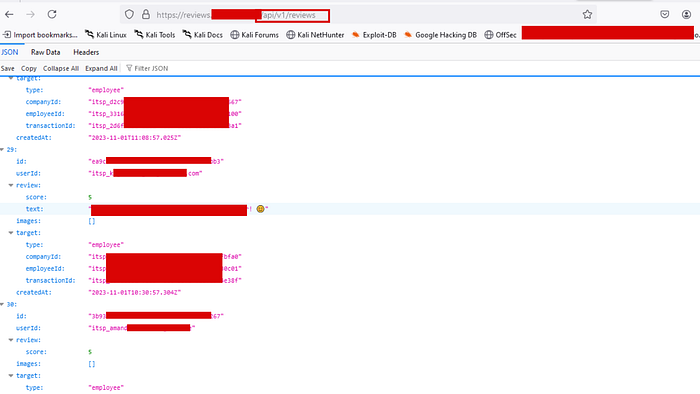
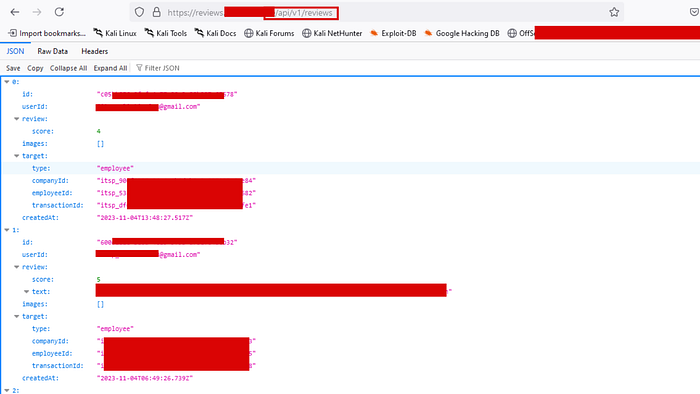
Among the results, /api/v1/reviews came back with a 200 OK. I opened it in the browser, and instead of a neat paginated UI, I got a raw JSON dump. And it wasn't just review scores.
Each object in the array contained:
id: a UUID uniquely identifying the review entryuserId: employee email addresses (e.g.,something@gmail.com)review.scoreandreview.text: internal performance or service review contenttarget.type:"employee", confirming this was internal HR/review datatarget.companyId,employeeId,transactionId: multiple unique identifiers per employeecreatedAt: timestamps of each review submission
The endpoint was unauthenticated. No token, no cookie, no auth header required. Just hit the URL and scroll through the entire review history of the company's workforce.
Lesson Learned
The classic mistake here is treating internal API endpoints as "hidden" rather than "protected." Discovery through fuzzing is trivial. Any endpoint that returns sensitive data needs authentication and proper authorization checks. Full stop. The fix is simple: require a valid session token and verify that the requesting user has permission to read that data.
Case Study 2: Static File Hunting: A PDF That Leaked a Diplomatic Contact List
Static files are a goldmine that hunters often overlook once they move past basic recon.
Things like .pdf, .xls, .csv, .json, .doc, .xlsx, .txt, .xml are frequently indexed by crawlers and archived by tools like Wayback Machine and GAU long after the organization thought they'd cleaned house.
My workflow here:
# Pull all known URLs
gau target.com | tee all_urls.txt
waybackurls target.com >> all_urls.txt
cat all_urls.txt | sort -u | tee unique_urls.txt
# Filter for juicy static file extensions
cat unique_urls.txt | grep -iE "\.(pdf|xls|xlsx|csv|doc|docx|json|xml|txt|bak|sql)(\?|$)"
Then I visit each one manually or use a small script to check which ones still return 200 OK.
What I Found
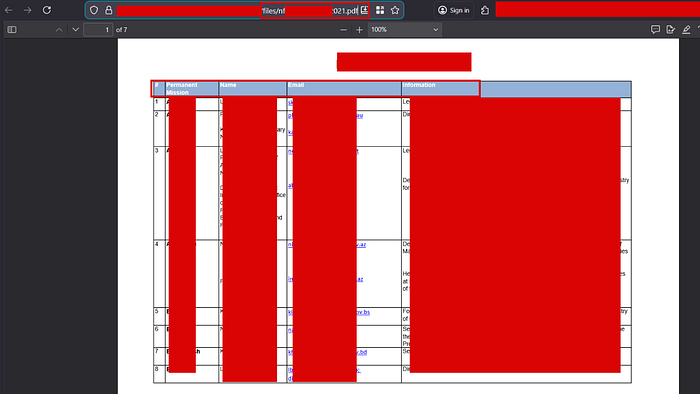
One PDF hit immediately stood out. It was a 7-page document sitting openly at /files/nf[REDACTED]021.pdf on the target's server.
- Permanent Mission: The organization or mission these individuals represented
- Name: Full names, some entries with multiple delegates listed
- Email: Direct email addresses (
.gov,.int,.orgdomains) - Information: Job titles and roles (Director, Secretary, Head of Mission, etc.)
This was a contact registry, essentially a diplomatic or institutional staff directory that had no business being publicly accessible.
The second document was even more alarming. It was a 4-page internal security audit report that included a numbered vulnerability tracking table with columns for vulnerability name, description, status (Resolved, Patched, Removed, Not a Vulnerability, To be checked and tested), and dates. Some vulnerabilities were listed as unresolved or still needing testing.

Lesson Learned
Files don't disappear just because you remove the link from your website. If Google, Wayback Machine, or any crawler indexed it first, it's preserved. Sensitive documents should never live on publicly accessible web servers without authentication. And internal security reports with open/unresolved vulnerabilities? That's essentially handing an attacker a roadmap.
Case Study 3: Server-Side Script Files: getAllInformations.php Does Exactly What It Says
This one came down to targeted file and directory fuzzing with a specific extension filter. Most fuzzing runs use generic wordlists, but when you add -e .php (or .jsp, .asp, .aspx) to your ffuf or dirsearch run, you start uncovering backend scripts that developers left exposed.
# Using ffuf with PHP extension filter
ffuf -u https://[REDACTED]/FUZZ -w /usr/share/seclists/Discovery/Web-Content/directory-list-2.3-medium.txt -e .php -mc 200
# Or with dirsearch
dirsearch -u https://[REDACTED]/ -e php,asp,aspx,jsp -t 40
You can also use Google dorks for this:
site:target.com ext:php
site:target.com ext:php inurl:admin OR inurl:lib OR inurl:api
What I Found
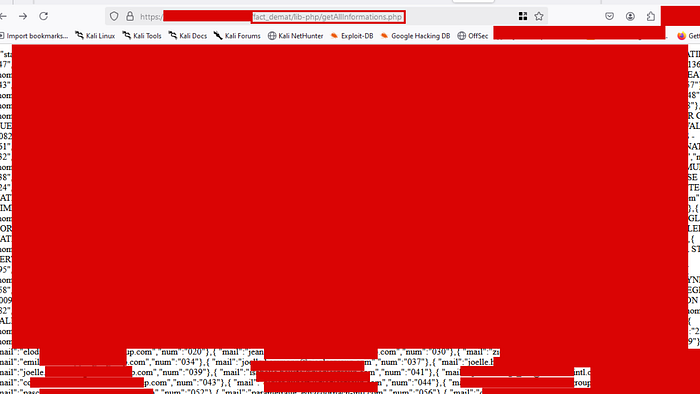
The endpoint that surfaced was https://[REDACTED]/fact_demat/lib-php/getAllInformations.php. The name alone was a red flag. getAllInformations isn't subtle.
Hitting it in the browser returned a raw, unpaginated data dump. The response was a dense JSON-like structure containing what appeared to be records for dozens of individuals and entities, including:
- Full email addresses (personal
@gmail.com,@yahoo.comand corporate domain emails) - Numeric IDs (
numfield per entry, sequential identifiers) - Names and organizational affiliations
The page rendered as raw text, completely unstyled, a backend data-fetching script that was never meant to be directly accessible via the browser but had no access controls at all.
Lesson Learned
PHP and other server-side script files that perform database queries should never be directly accessible from the web if they're not part of a proper API with authentication. These files often exist in utility or library folders (/lib-php/, /includes/, /helpers/) which developers assume won't be guessed, but they will be, eventually. The fix is a combination of proper .htaccess rules, web server configuration to block direct script access, and most importantly, authentication middleware on anything that touches a database.
Case Study 4: Web Archive Digging: Access Tokens and Personal Data Hidden in Archived URLs
The Wayback Machine and similar services don't just archive web pages; they archive API responses, URL parameters, and query strings. This makes them a passive recon treasure chest. The CDX API in particular lets you pull every archived URL for a domain programmatically.
waybackurls target.com | tee wayback_output.txt
gau --subs target.com | tee gau_output.txt
# Then grep for patterns of interest
cat wayback_output.txt | grep -iE "(api|uuid|token|key|auth|admin|register|user)"
What I Found
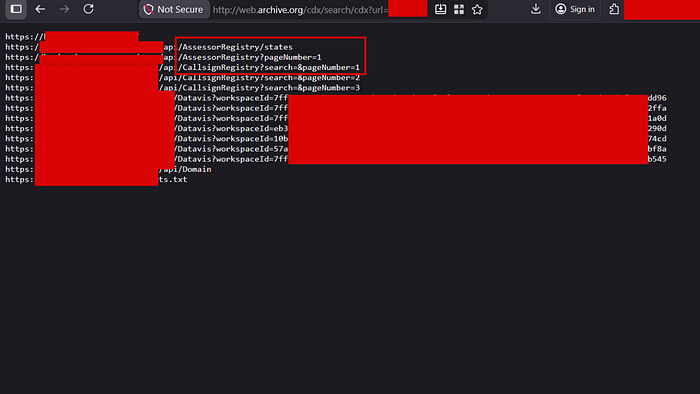
Running the CDX search against the target surfaced a list of archived URLs that immediately caught my attention:
/api/AssessorRegistry/states
/api/AssessorRegistry?pageNumber=1
/api/CallsignRegistry?search=&pageNumber=1
/api/CallsignRegistry?search=&pageNumber=2
/Datavis?workspaceId=7ffb2a9e-0bec...
/Datavis?workspaceId=eb3...
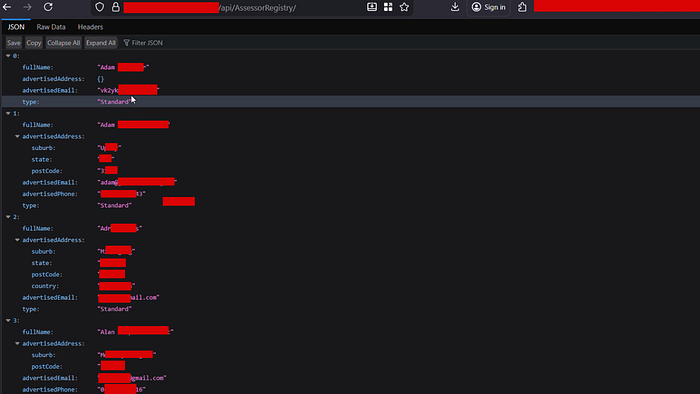
Two things stood out. First, the AssessorRegistry and CallsignRegistry endpoints looked like public-facing registries, but visiting them revealed full PII dumps. The /api/AssessorRegistry/ endpoint returned a paginated list of individuals with:
fullName: complete namesadvertisedAddress: full home or business addresses (suburb, state, postCode, country)advertisedEmail: personal and business email addressesadvertisedPhone: direct phone numberstype: account classification
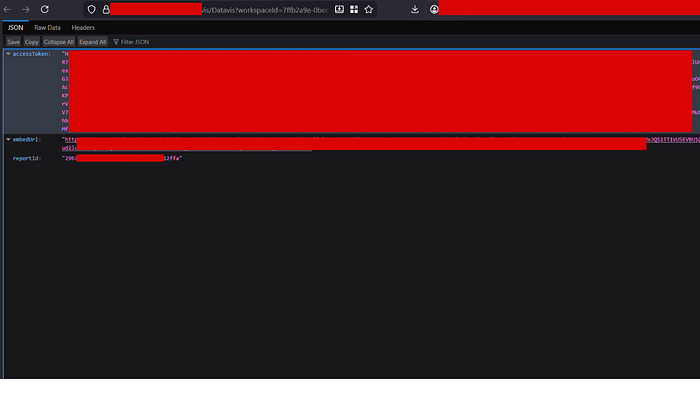
Second, the /Datavis?workspaceId= parameter with UUIDs looked like it might be for dashboard sharing. Hitting one of the archived workspace IDs returned a JSON response containing a live access token, a long bearer token that could be used to authenticate against other parts of the platform, along with an embedUrl and reportId.
Lesson Learned
The web archive doesn't forget. Even if an organization rotates tokens or takes down an endpoint, the archived URL with a token embedded in it or returned in a response can still be valid, or at least reveal the structure of how authentication worked. UUID-based workspace IDs with no additional authorization are an IDOR waiting to happen. And registries exposing full contact details with no auth? That's a direct GDPR concern at minimum.
Case Study 5: Browser Curiosity and Pattern Recognition: A University's Student Data Hiding in Plain Sight
The Discovery
This one is less about tools and more about paying attention. I was browsing a subdomain of a well-known university and landed on a page at /dictaten. It rendered as a clean, card-based UI listing what looked like course or module names: datab1, datab2, DataEngineeringWorkshops, DesignPatterns1, Engelsjaar3, English5, English6, FAQdataanalyse... the list went on.
Each card had a URL beneath it following the pattern:
[REDACTED]/dictaten/datab1
[REDACTED]/dictaten/english5
I clicked on a few. They loaded some frontend course content, nothing sensitive. Normal stuff. But the naming convention triggered a thought: if there's a datab1 with some kind of frontend UI, does this system have participant or enrollment data somewhere?
The word that came to mind was participants. Survey platforms, competition systems, e-learning tools all almost universally have a concept of participants. So I tried:
[REDACTED]/dictaten/datab1/participants
[REDACTED]/dictaten/english5/participants
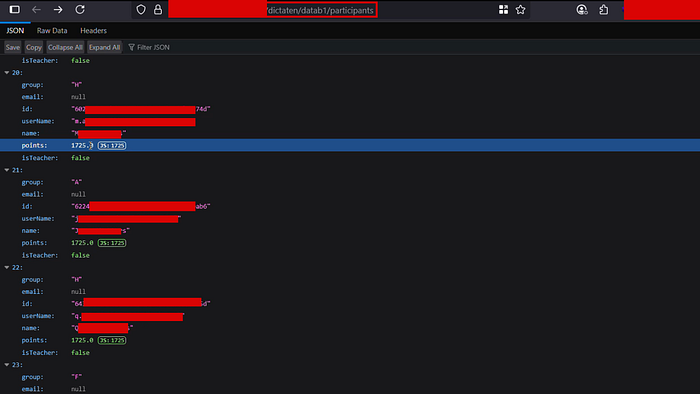
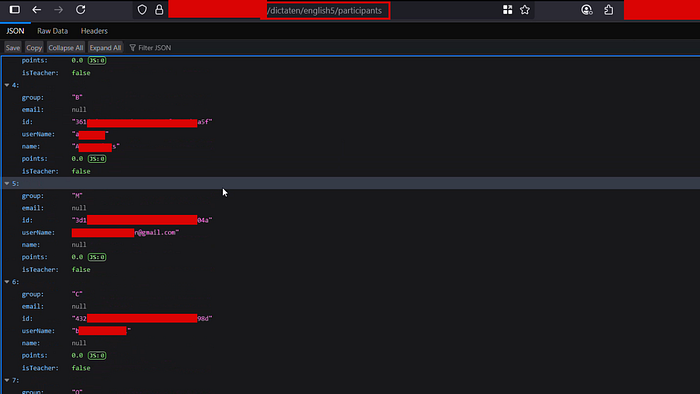
Both returned JSON. No authentication prompt. No redirect to a login page. Just raw, open API responses.
The response structure for each course included:
id: UUID per studentname: full student nameuserName: student username (some exposed as email addresses directly, e.g.,n@gmail.com)email: email field (some null, some populated)group: class or study group assignment (A, B, C, F, H, M...)points: numeric score for the courseisTeacher: boolean (confirming student vs. staff distinction)
This endpoint was enumerating every single participant across every single course, for what appeared to be a university with a significant student body.

Lesson Learned
No tool found this. A wordlist didn't find this. Logical inference did. When you understand how applications are structured, that a course management system probably has users, and users in a course are probably called participants, you can manually construct endpoints that the developer implemented but never exposed through the UI. This is exactly the class of bugs that automated scanners miss entirely.
Mitigation (For Developers)
Across all five cases, the root causes came down to the same few mistakes:
- No authentication on API endpoints: Every endpoint returning user data must require a valid, verified session.
- Sensitive files on public web servers: Documents containing PII or internal security data should never be served directly from a web root without access control.
- Direct access to server-side scripts: Backend scripts should not be accessible via the browser. Use routing middleware and block direct file access at the web server level.
- Tokens and IDs in URLs: Access tokens embedded in URLs get archived, logged, and leaked. Use POST bodies and Authorization headers instead.
- Missing authorization on sub-resources: Authentication (proving who you are) is not enough; authorization (proving you're allowed to see this data) must be enforced per resource.
If this writeup gave you one new technique to try in your next recon session, that's a win. Part 2 is in the works if you'd like to see more. Drop a comment or a clap if you want it.
Need expert pentesting services? visit https://scriptjacker.in or let's collaborate on your next project! 🤝
Want to learn from my experiences? Check out my articles on https://blogs.scriptjacker.in
Stay curious. Happy hunting.
All vulnerabilities disclosed responsibly. Targets and identifying information have been redacted.