Introduction
Server-Side Request Forgery (SSRF) is a vulnerability that may seem straightforward at first but can lead to serious consequences. In this writeup, I'll walk through how I discovered a Blind SSRF on a Sony domain by paying close attention to a custom HTTP header that most hunters would overlook.
This is not a story about finding a bug in a text field or a URL parameter. It's about reading JavaScript source code, understanding how the backend works, and turning a seemingly harmless header into a confirmed server-side interaction with an attacker-controlled host.
Reconnaissance
While browsing the target [redacted].sony.com, I opened Burp Suite and started mapping out the application. The platform appeared to be a cloud API management system for device management — registering devices, uploading assets, managing APKs, and controlling device settings remotely.
The first thing I did was look for JavaScript source files. Most hunters skip this step, but JS files are goldmines. They reveal:
- API endpoints that aren't visible in the UI
- Authentication mechanisms
- How the frontend communicates with the backend
- Hidden parameters and headers
I found a file called app.js and started reading through it carefully.

Deep inside app.js, I found this function:
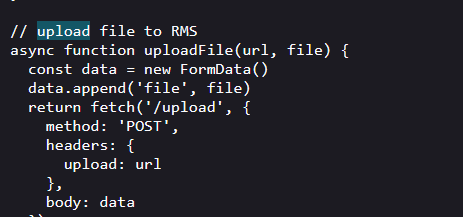
So the flow was:
- Frontend creates an asset → gets uploadUrl from server 2. Frontend passes uploadUrl in the Upload header 3. Backend reads the Upload header and pushes file to that URL
Step 1 — Capture the Request
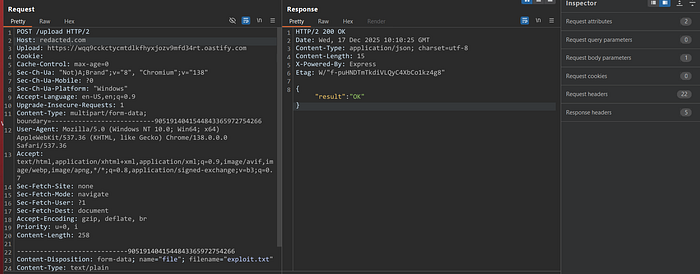
I intercepted the upload request in Burp Suite. The original request looked like this:
Step 2 — Replace the Upload Header
I replaced the legitimate URL in the Upload header with my Burp Collaborator URL:
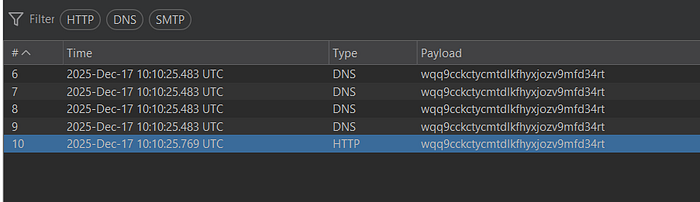
Step 3 — DNS Interaction Confirmed
Within seconds, I received DNS interactions in Burp Collaborator from multiple AWS IP addresses:
Key Takeaways for Bug Hunters
1. Always Read JavaScript Source Files
Most hunters focus on visible input fields and URL parameters. JS files reveal hidden endpoints, authentication flows, and — as in this case — custom headers that reach server-side fetch calls.
2. Custom Headers Are Underrated Attack Surface
The Upload header is not a standard HTTP header. It was a custom implementation by the developers. Custom headers are often added without the same security scrutiny applied to query parameters or request bodies. Always test them.
3. DNS Interaction is Just the Beginning
Getting a DNS ping proves the server resolves your domain. But for a valid high-severity bug, you need to upgrade to full HTTP interaction. Set up a Python server or use Burp Collaborator's HTTP tab to capture full requests including headers and body.
4. Source Code Confirms Vulnerability
Finding the vulnerable uploadFile() function in app.js was critical. It explained exactly why the bug existed, how the server used the header, and helped build a stronger proof of concept. Always correlate your findings with source code when available.
5. Impact Framing Matters
A confirmed HTTP callback with file content being forwarded to an attacker-controlled server is a High severity finding. You don't always need to dump credentials or access internal services to prove impact. Confirmed server-side request forgery with data exfiltration is real impact.
Conclusion
This finding is a good reminder that SSRF doesn't always live in the obvious places. While most hunters focus on url=, redirect=, or src= parameters, the real gems are often hiding in custom HTTP headers that developers add without thinking about the security implications.
The combination of reading JavaScript source code, intercepting custom headers, and using out-of-band interaction techniques turned what could have been a missed finding into a confirmed, high-severity SSRF with real impact.
Happy hunting