
Hunt Forward Lab #005 — Threat Hunting for Registry Run Keys, Scheduled Tasks & Startup Folders | MITRE ATT&CK T1547.001 | T1053.005 | T1060
🔬 Difficulty: Intermediate — Estimated Time: 90 minutes
Get Elastic SIEM Access on hunt-forward.com — 7-day free trial no credit card needed, then $5/month — Please let me know what I can improve to get you the best experience in the comment section.
How to use this lab: Read the story to understand the attack. Then follow the Hunt section to find it yourself in Elastic SIEM. Complete each milestone in your Hunt Notebook, then build the Sigma detection rule in Part 7 to add to your GitHub portfolio.
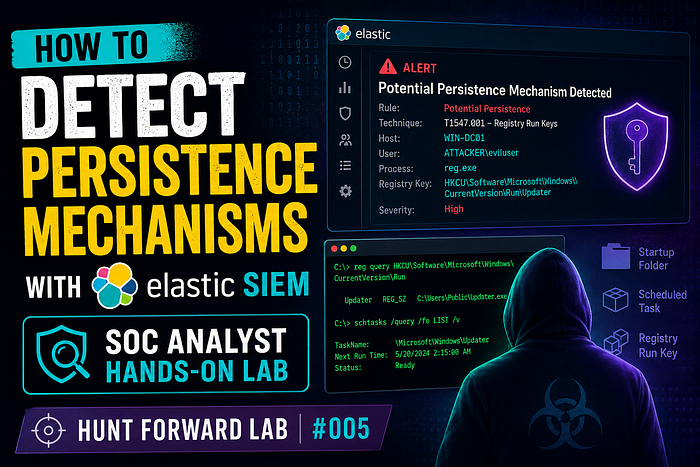
📖 Part 1: The Scenario
Tuesday, 9:18 AM. CartFlow Commerce, Seattle.
Alex Chen is ten months in. CartFlow runs a mid-market e-commerce platform — 180,000 active merchants, payment processing, order management, customer PII. The holiday season starts in six weeks. If an attacker is already in the network when Black Friday hits, the damage could be catastrophic.
Dana drops a ticket on Alex's desk before he's finished his first coffee. Three days ago, a merchant portal server threw a registry modification alert. IT looked at it, noted it was an unusual value name but decided it was a software deployment artifact. They closed it.
Dana doesn't think it's a deployment artifact.
"Whoever wrote this," she says, tapping the ticket, "did it at 2 AM. Your IT team deploys at 2 AM?"
Alex opens the logs.
2024-04-07T02:14:33  reg add HKCU\Software\Microsoft\Windows\CurrentVersion\Run
                     /v "WindowsUpdateHelper" /t REG_SZ
                     /d "C:\Users\k.oduya\AppData\Roaming\update_svc.exe" /f
2024-04-07T02:17:41  schtasks /create /tn "MicrosoftEdgeUpdate"
                     /tr "C:\ProgramData\edgeupd.exe"
                     /sc ONLOGON /ru SYSTEM /f
2024-04-07T02:19:58  copy "C:\ProgramData\edgeupd.exe"
                     "C:\Users\k.oduya\AppData\Roaming\Microsoft\Windows\Start Menu\Programs\Startup\edgeupd.exe"
Three persistence mechanisms in five minutes. All named to impersonate Microsoft software. All at 2 AM.
Dana is still standing there. "How far back does it go?"
10:44 AM. Same desk. Three monitors.
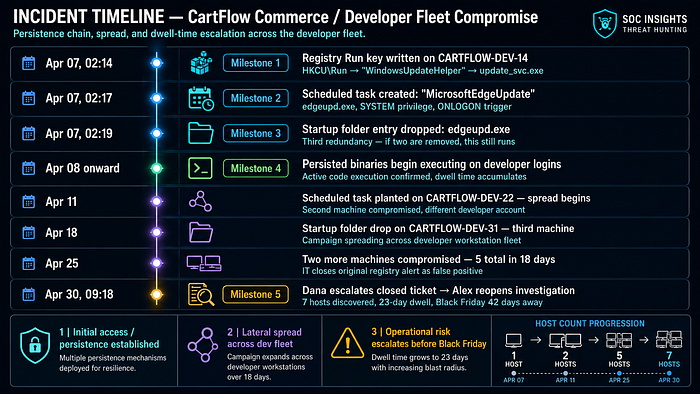
Alex has been pulling threads for 90 minutes. The registry key was the first drop. The scheduled task was planted on a different machine four days later — a different developer workstation, different user, same binary in C:\ProgramData\. The startup folder entry showed up on a third machine the week before Easter.
The attacker didn't plant all three mechanisms at once. They spread the compromise across the fleet gradually — one machine every few days, testing whether each mechanism triggered alerts. It didn't. Each binary name looked like a Microsoft update service. Each file lived exactly where legitimate Windows update components live.
CartFlow processes credit card transactions for 180,000 merchants. Every persistence mechanism that fires is the attacker's code running inside that infrastructure, waiting for the right moment to skim, redirect, or exfiltrate.
"How many machines?" Dana asks from behind him.
Alex is still counting.
12:07 PM. Conference room.
Seven machines. The campaign started April 7th and is still active. The attacker has had 23 days of quiet access. No lateral movement logged yet — they appear to be maintaining footholds across the developer fleet, possibly waiting for a high-value window. Black Friday is 42 days away.
Alex slides the timeline across the table to Dana and the CISO. "The Sigma rule I'm building today would have caught the first one in real time. We're deploying it before I leave tonight."
He opens his Hunt Notebook.
How Persistence Mechanisms Work — Simply Explained
Step 1: Why attackers need persistence
Breaking into a network is hard. Staying in is harder. Every time a machine reboots, a session ends, or a credential expires, the attacker's connection drops. Without persistence, they have to re-exploit the same vulnerability every time they want access — noisy, risky, inefficient.
Persistence solves this: plant something that automatically re-executes the attacker's code every time the machine starts, a user logs in, or a scheduled time arrives. The attacker can disappear for weeks and their malware will still be running when they return.
Step 2: The three mechanisms we're hunting
Mechanism Where it lives Triggers on MITRE ID Registry Run Key HKCU…\Run or HKLM…\Run User login T1547.001 Scheduled Task Windows Task Scheduler Time / event / login T1053.005 Startup Folder %APPDATA%…\Startup\ User login T1060
Step 3: How the attack works
Normal Windows boot:
  HKCU\Run → executes "OneDrive.exe" → legitimate cloud sync
Attacker's Run key:
  HKCU\Run → executes "C:\Users\k.oduya\AppData\Roaming\update_svc.exe"
           → looks like a Windows update, runs the RAT instead
Attacker's scheduled task:
  Task: "MicrosoftEdgeUpdate" → runs SYSTEM-level → edgeupd.exe
      → executes every login, with admin rights, looks like Edge maintenance
Attacker's startup folder:
  edgeupd.exe copied to Startup\ → executes on every login for every user
      → third redundancy: if registry key is removed, this still runs
Step 4: Why security tools miss it
┌──────────────────────────────────────────────────────────────────────────────┐
│  Tool sees: Registry write to HKCU\Run                                        │
│             → Thousands of legitimate apps do this (Slack, Teams, OneDrive)  │
│                                                                               │
│  Tool sees: Scheduled task created named "MicrosoftEdgeUpdate"               │
│             → Looks identical to a real Microsoft maintenance task            │
│                                                                               │
│  The attack is designed to blend. The binary names, task names, and          │
│  registry value names are all chosen to look like real Microsoft software.   │
│  Detection requires hunting the CONTEXT — who wrote it, from where,          │
│  at what hour, and what binary does it point to.                              │
└──────────────────────────────────────────────────────────────────────────────┘
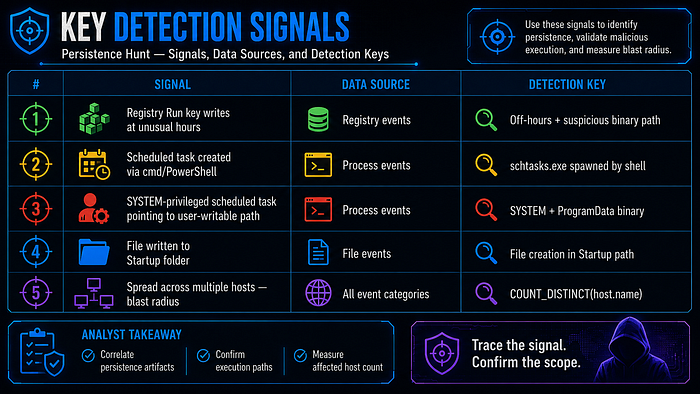
Step 5: Five signals we'll hunt
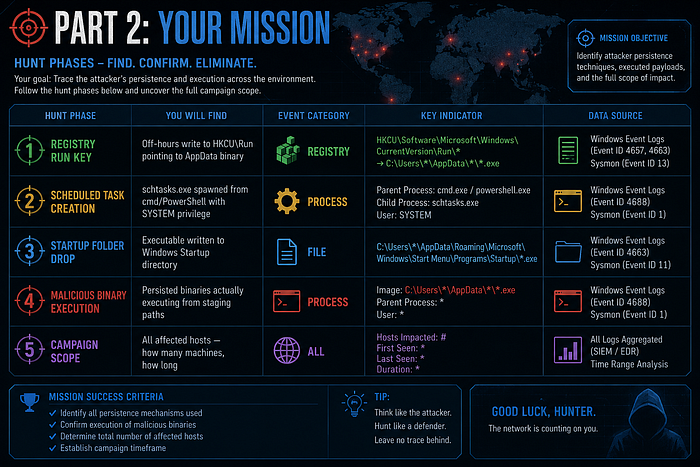
🎯 Part 2: Your Mission
🔧 Part 3: Lab Setup
You'll need a Hunt Forward account for this lab. Your Elastic SIEM environment has the persistence-lab-logs dataset pre-loaded — 30 days of endpoint telemetry from CartFlow Commerce's developer fleet, with attacker persistence activity buried in legitimate developer workstation traffic.
👉 Sign up at huntforward.com — 7-day free trial, then $5/month
Once you're in Click Here or:
- Open Kibana → hamburger menu → Discover
- Select index
persistence-lab-logs - Set time range: April 1–30, 2024 — the full 30-day campaign window
A Quick Word on ES|QL
Throughout this lab we use ES|QL — Elasticsearch Query Language. Every query starts with FROM and pipes through commands using |.
To run ES|QL: Click the language selector (top left in Discover) → select ES|QL → paste → Run (▶)
🔍 Part 4: The Hunt
Hunt 1 — Registry Run Key Persistence
Kill chain position:
[ RUN KEY ] → scheduled task → startup folder → execution → campaign scope
The Registry Run key is the attacker's first persistence mechanism. Written at 2 AM on April 7th, three weeks before anyone noticed. The key adds a value that Windows will execute automatically every time the target user logs in.
The signal: a registry write to a \Run key path, at an unusual hour, pointing to a binary in a user-writable location rather than a legitimate system path.
FROM persistence-lab-logs
| WHERE event.category == "registry"
  AND event.type == "change"
  AND registry.path RLIKE ".*CurrentVersion.Run.*"
| EVAL hour = DATE_EXTRACT("HOUR_OF_DAY", @timestamp)
| EVAL time_flag = CASE(
    hour >= 22 OR hour <= 5, "OFF_HOURS",
    "BUSINESS_HOURS"
  )
| EVAL path_risk = CASE(
    registry.data.strings RLIKE ".*AppData.*",  "SUSPICIOUS — AppData",
    registry.data.strings RLIKE ".*Temp.*",     "SUSPICIOUS — Temp",
    registry.data.strings RLIKE ".*ProgramData.*", "SUSPICIOUS — ProgramData",
    "EXPECTED"
  )
| WHERE time_flag == "OFF_HOURS" OR path_risk != "EXPECTED"
| KEEP @timestamp, host.name, user.name,
    registry.path, registry.value, registry.data.strings,
    time_flag, path_risk
| SORT @timestamp ASC
What each line does:
WHERE registry.path RLIKE ".*CurrentVersion.Run.*"— targets the Run key paths where both HKCU and HKLM persistence lives.RLIKEhandles the backslash issue cleanlyEVAL hour = DATE_EXTRACT("HOUR_OF_DAY", @timestamp)— extracts the hour so we can flag off-hours writesEVAL time_flag— classifies writes as OFF_HOURS (10 PM–5 AM) or business hoursEVAL path_risk— checks what binary the Run key points to. Legitimate software points toProgram Files. Attackers point toAppDataorProgramData— user-writable, no admin rights neededWHERE time_flag == "OFF_HOURS" OR path_risk != "EXPECTED"— either condition alone is suspicious; both together is near-certain malicious
What you're looking for: A Run key write in the early hours of April 7th, value pointing to a binary in AppData\Roaming\, value name designed to look like a Microsoft process.
📝 Hunt Notebook checkpoint: Record the full registry path, the value name, the binary path it executes, the hostname, the username, and the timestamp. Note the
path_risklabel and the hour — these are computed by your query, not raw log fields.
✅ Registry Run key persistence confirmed.
🏁 Milestone 1 of 5 — Registry Run Key Identified Open your Hunt Notebook and paste this template.
## 🗝️ Milestone 1: Registry Run Key Persistence
**Date of Hunt:** [today's date]
**Lab:** Hunt Forward #005 — Persistence Mechanisms
**Analyst:** [your name]
### Finding
| Field                | Value          |
|----------------------|----------------|
| Registry path        | [your finding] |
| Value name           | [your finding] |
| Binary executed      | [your finding] |
| Hostname             | [your finding] |
| Username             | [your finding] |
| Timestamp            | [your finding] |
| time_flag (computed) | OFF_HOURS      |
| path_risk (computed) | [your finding] |
**Note:** `time_flag` and `path_risk` are computed by `EVAL CASE()`.
The raw log fields are `@timestamp`, `registry.path`, and
`registry.data.strings`. The labels are analyst classifications.
**Severity:** High | **Confidence:** High
Hunt 2 — Scheduled Task Creation
Kill chain position:
run key → [ SCHEDULED TASK ] → startup folder → execution → campaign scope
Four days after the Run key, the attacker planted a scheduled task on a different machine. Scheduled tasks are more powerful than Run keys — they can run as SYSTEM, execute on a timer rather than just on login, and survive even if the user account is disabled.
The signal: schtasks.exe spawned from a command-line interpreter, with /ru SYSTEM privileges, pointing to a binary outside of System32.
FROM persistence-lab-logs
| WHERE event.category == "process"
  AND event.type == "start"
  AND process.name == "schtasks.exe"
  AND process.command_line RLIKE ".*(/create|/Create|/CREATE).*"
| EVAL privilege_level = CASE(
    process.command_line RLIKE ".*/ru.SYSTEM.*", "SYSTEM",
    process.command_line RLIKE ".*/ru.NETWORK SERVICE.*", "NETWORK_SERVICE",
    "USER"
  )
| EVAL suspicious_binary = CASE(
    process.command_line RLIKE ".*ProgramData.*" AND
    NOT process.command_line RLIKE ".*Microsoft.*", "SUSPICIOUS",
    process.command_line RLIKE ".*AppData.*",       "SUSPICIOUS",
    process.command_line RLIKE ".*Temp.*",          "SUSPICIOUS",
    "EXPECTED"
  )
| EVAL spawned_by_shell = CASE(
    process.parent.name IN ("cmd.exe", "powershell.exe",
                            "pwsh.exe", "wscript.exe"),
    "YES — SHELL SPAWNED",
    "NO"
  )
| KEEP @timestamp, host.name, user.name,
    process.command_line, process.parent.name,
    privilege_level, suspicious_binary, spawned_by_shell
| WHERE suspicious_binary == "SUSPICIOUS"
    OR (privilege_level == "SYSTEM" AND spawned_by_shell == "YES — SHELL SPAWNED")
| SORT @timestamp ASC
What each line does:
AND process.command_line RLIKE ".*(/create).*"— only task creation commands, not list or deleteEVAL privilege_level— extracts what account the task runs as. SYSTEM privilege from a shell-spawnedschtasks.exeis a critical signal — legitimate admin tools use GUI or Group Policy, not raw command-line SYSTEM task creationEVAL suspicious_binary— checks where the task's binary lives. Real Microsoft tasks point toSystem32. Attackers useProgramDataorAppDatabecause any user can write thereEVAL spawned_by_shell— legitimate scheduled task creation comes from installers or management tools. Attackers create tasks fromcmd.exeorpowershell.exe— this field captures that
What you're looking for: A SYSTEM-privileged task creation on April 11th, spawned from PowerShell, pointing to C:\ProgramData\edgeupd.exe — a binary designed to impersonate the Edge update service.
📝 Hunt Notebook checkpoint: Record the full command line (it contains the task name, binary path, trigger, and privilege level — all in one field), the parent process that spawned
schtasks.exe, the hostname, and the timestamp. The command line is your richest single field.
🏁 Milestone 2 of 5 — Scheduled Task Persistence Detected
## ⏰ Milestone 2: Scheduled Task Creation
### Finding
| Field                   | Value          |
|-------------------------|----------------|
| Task name               | [your finding] |
| Binary path             | [your finding] |
| Trigger                 | [your finding] |
| Privilege (computed)    | [your finding] |
| Parent process          | [your finding] |
| Hostname                | [your finding] |
| Timestamp               | [your finding] |
| spawned_by_shell (comp) | [your finding] |
**Severity:** Critical | **Confidence:** High
Hunt 3 — Startup Folder File Drop
Kill chain position:
run key → scheduled task → [ STARTUP FOLDER ] → execution → campaign scope
The third mechanism is the simplest — copy a binary into the Windows Startup folder and it executes every time any user logs in. No registry writes, no task scheduler events — just a file copy. This is the attacker's failsafe: if the Run key is deleted and the scheduled task is removed, the Startup folder entry still runs.
FROM persistence-lab-logs
| WHERE event.category == "file"
  AND event.type == "creation"
  AND file.path RLIKE ".*Startup.*"
| EVAL file_risk = CASE(
    file.extension IN ("exe", "bat", "cmd", "vbs", "ps1", "js", "lnk"),
    "EXECUTABLE — HIGH RISK",
    file.extension IN ("dll", "scr", "pif"),
    "EXECUTABLE — CRITICAL",
    "NON-EXECUTABLE"
  )
| EVAL written_by_shell = CASE(
    process.name IN ("cmd.exe", "powershell.exe", "pwsh.exe",
                     "xcopy.exe", "robocopy.exe", "copy"),
    "YES — SHELL DROP",
    "NO"
  )
| WHERE file_risk != "NON-EXECUTABLE"
| KEEP @timestamp, host.name, user.name,
    file.path, file.name, file.extension, file.size,
    process.name, file_risk, written_by_shell
| SORT @timestamp ASC
What each line does:
file.path RLIKE ".*Startup.*"— matches both user Startup folder (\AppData\Roaming\Microsoft\Windows\Start Menu\Programs\Startup\) and the All Users variantEVAL file_risk— classifies the file type. An.exeor.lnkfile in the Startup folder that was created by a shell process is nearly always malicious..dlland.scrare even higher risk as they're less expectedEVAL written_by_shell— legitimate software installs things to Startup via their installer, not viacmd.exe copyorrobocopy.exe. Shell-written startup entries are suspiciousWHERE file_risk != "NON-EXECUTABLE"— filter out config files or logs that legitimately land in Startup-adjacent directories
What you're looking for: An .exe file dropped to the Startup folder on April 18th by cmd.exe, with a filename designed to impersonate Edge updates.
📝 Hunt Notebook checkpoint: Record the full file path, filename, extension, size in bytes, the process that wrote it, and the timestamp. Cross-reference: does this binary name match the one from the scheduled task in Milestone 2?
🏁 Milestone 3 of 5 — Startup Folder Persistence Located
## 📂 Milestone 3: Startup Folder File Drop
### Finding
| Field                    | Value          |
|--------------------------|----------------|
| File path                | [your finding] |
| Filename                 | [your finding] |
| File extension           | [your finding] |
| File size (bytes)        | [your finding] |
| Writing process          | [your finding] |
| Hostname                 | [your finding] |
| Timestamp                | [your finding] |
| file_risk (computed)     | [your finding] |
| written_by_shell (comp)  | [your finding] |
**Same binary as Milestone 2?** [yes / no / different variant]
**Severity:** High | **Confidence:** High
Hunt 4 — Malicious Binary Execution
Kill chain position:
run key → scheduled task → startup folder → [ EXECUTION ] → campaign scope
Planting persistence is preparation. The real threat is when those persistence mechanisms fire — when the malicious binary actually executes. This hunt confirms the persistence worked and that the attacker has achieved ongoing code execution.
FROM persistence-lab-logs
| WHERE event.category == "process"
  AND event.type == "start"
| EVAL exec_risk = CASE(
    process.executable RLIKE ".*AppData.Roaming.*" AND
      NOT process.executable RLIKE ".*(Slack|Teams|Zoom|OneDrive|Spotify).*",
    "SUSPICIOUS — AppData non-standard",
    process.executable RLIKE ".*ProgramData.*" AND
      NOT process.executable RLIKE ".*(Microsoft|Windows Defender|CrowdStrike|Elastic).*",
    "SUSPICIOUS — ProgramData non-vendor",
    "EXPECTED"
  )
| EVAL hour = DATE_EXTRACT("HOUR_OF_DAY", @timestamp)
| EVAL time_context = CASE(
    hour >= 22 OR hour <= 5, "OFF_HOURS",
    "BUSINESS_HOURS"
  )
| WHERE exec_risk != "EXPECTED"
| STATS
    execution_count = COUNT(),
    unique_hosts    = COUNT_DISTINCT(host.name),
    unique_users    = COUNT_DISTINCT(user.name),
    first_exec      = MIN(@timestamp),
    last_exec       = MAX(@timestamp)
    BY process.name, process.executable, exec_risk
| SORT execution_count DESC
What each line does:
EVAL exec_risk— classifies process executions by where the binary lives. The exclusion list (Slack,Teams,Zoom, etc.) removes known-legitimate apps fromAppData. What remains is genuinely unusualEVAL time_context— flags off-hours executions. A binary running from AppData at 2 AM is far more suspicious than the same binary running at 10 AMSTATS COUNT(), COUNT_DISTINCT(host.name/user.name)— aggregates across the full 30-day window. This tells you how many times the persistence mechanism has fired, and critically: has it spread beyond the first machine?BY process.name, process.executable— groups so you see each unique binary separately
What you're looking for: The persisted binaries (update_svc.exe, edgeupd.exe) appearing in the results with execution counts spanning multiple weeks. The unique_hosts count will tell you how wide the campaign has spread.
📝 Hunt Notebook checkpoint: Record the execution count,
unique_hosts,unique_users,first_exec, andlast_execfor each suspicious binary. The date range betweenfirst_execandlast_execis the attacker's confirmed dwell time in your environment.
✅ Active code execution confirmed across multiple hosts.
🏁 Milestone 4 of 5 — Persistent Binary Execution Confirmed
## ⚡ Milestone 4: Malicious Binary Execution
### Execution Summary
| Binary name    | Exec count | Unique hosts | Unique users | First exec | Last exec |
|----------------|-----------|--------------|--------------|------------|-----------|
| [your finding] | [N]       | [N]          | [N]          | [date]     | [date]    |
| [your finding] | [N]       | [N]          | [N]          | [date]     | [date]    |
### Dwell Time
First persistence planted: [date from Milestone 1]
Last execution observed:   [date from this hunt]
Total dwell time:          [X] days
**Severity:** Critical | **Confidence:** High
Hunt 5 — Campaign Scope: How Many Machines?
Kill chain position:
run key → scheduled task → startup folder → execution → [ CAMPAIGN SCOPE ]
The most important question in any persistence investigation is not "what did the attacker do?" — it's "how far have they gone?" This final hunt correlates all three persistence mechanism signals across the entire 30-day window to produce a comprehensive host risk score.
FROM persistence-lab-logs
| WHERE (
    (event.category == "registry" AND registry.path RLIKE ".*CurrentVersion.Run.*")
    OR
    (event.category == "process" AND process.name == "schtasks.exe"
     AND process.command_line RLIKE ".*/create.*")
    OR
    (event.category == "file" AND file.path RLIKE ".*Startup.*"
     AND file.extension IN ("exe","bat","cmd","vbs","ps1","lnk"))
  )
| EVAL mechanism = CASE(
    event.category == "registry",  "RUN_KEY",
    process.name   == "schtasks.exe", "SCHED_TASK",
    event.category == "file",      "STARTUP_FOLDER",
    "OTHER"
  )
| STATS
    total_events     = COUNT(),
    mechanisms_used  = COUNT_DISTINCT(mechanism),
    run_key_events   = COUNT(CASE(mechanism == "RUN_KEY", 1, null)),
    schtask_events   = COUNT(CASE(mechanism == "SCHED_TASK", 1, null)),
    startup_events   = COUNT(CASE(mechanism == "STARTUP_FOLDER", 1, null)),
    first_seen       = MIN(@timestamp),
    last_seen        = MAX(@timestamp)
    BY host.name
| EVAL risk_score = CASE(
    mechanisms_used == 3, "CRITICAL — All 3 mechanisms",
    mechanisms_used == 2, "HIGH — 2 mechanisms",
    mechanisms_used == 1, "MEDIUM — 1 mechanism",
    "LOW"
  )
| WHERE risk_score != "LOW"
| SORT mechanisms_used DESC, total_events DESC
What each line does:
- The
WHEREunion — one query catches all three mechanism types simultaneously using OR logic EVAL mechanism— labels each event by which persistence technique it representsSTATS COUNT_DISTINCT(mechanism)— counts how many different techniques were used on each host. A host with all 3 is the most compromisedCOUNT(CASE(mechanism == "RUN_KEY", 1, null))— counts per-mechanism events per host, giving you a breakdown without needing separate queriesEVAL risk_score— risk-tiers hosts by mechanism count. Three mechanisms = attacker specifically planted redundancy on this machine
What you're looking for: A table of all affected hosts ranked by risk. The top entries will have mechanisms_used = 3 — these are the priority containment targets.
📝 Hunt Notebook checkpoint: Record every host in the results with its risk score, mechanism breakdown, and date range. This table becomes the scope section of your incident report and drives the containment order.
🕵️ Mystery Question — drop your answer in the Medium comments
Your Hunt 5 query produces a ranked table of all affected hosts. One host will show
mechanisms_used = 3— all three persistence mechanisms planted on the same machine.
Why would an attacker bother planting all three mechanisms on a single machine rather than just one? What does redundant persistence tell you about the attacker's level of sophistication — and which mechanism would they most likely rely on as their primary fallback?
Comment below with: "Lab 005 — primary fallback mechanism: [run key / scheduled task / startup folder] — reasoning: [one sentence]"
No single right answer. The best security arguments win a shoutout in the next lab.
🏁 Milestone 5 of 5 — Campaign Scope Mapped
## 🗺️ Milestone 5: Campaign Scope
### Affected Hosts
| Hostname | Risk Score | RK events | ST events | SF events | First seen | Last seen |
|----------|-----------|-----------|-----------|-----------|------------|-----------|
| [host]   | CRITICAL  | [N]       | [N]       | [N]       | [date]     | [date]    |
| [host]   | HIGH      | [N]       | [N]       | 0         | [date]     | [date]    |
### Campaign Summary
| Metric                  | Value          |
|-------------------------|----------------|
| Total hosts affected    | [your finding] |
| Hosts with all 3 mechs  | [your finding] |
| Campaign start date     | [your finding] |
| Campaign end date       | [your finding] |
| Total dwell days        | [your finding] |
### Recommended Containment Order
1. [Hostname with CRITICAL score] — isolate first
2. [Next host] — isolate second
...
### Recommended Immediate Actions
- [ ] Isolate all CRITICAL-scored hosts immediately
- [ ] Remove Run key values from HKCU\...\Run on all affected machines
- [ ] Delete scheduled tasks created by attacker on all affected machines
- [ ] Remove files from Startup folders on all affected machines
- [ ] Block update_svc.exe and edgeupd.exe by hash at EDR level
- [ ] Hunt for C2 connections from affected hosts (outbound on unusual ports)
- [ ] Force password reset for all users on affected machines
- [ ] Notify payment processor — PCI scope assessment required
- [ ] Assess whether persisted binaries had access to payment pipeline
- [ ] Notify merchant-facing team — Black Friday preparations may be at risk
📋 Part 5: Building Your Timeline
📝 Part 6: Export Your Hunt Notebook → GitHub Portfolio
Five milestones covering three persistence mechanisms, binary execution confirmation, and full campaign scope mapping. Two paths to GitHub:
Option A — Merge all five milestone blocks, add a cover section (executive summary, IOC table, affected host list), push as hunt-005-persistence-detection.md.
Option B — Download the pre-written reference report from your Hunt Forward dashboard.
Write your own. The scope mapping in Milestone 5 — a ranked host list with per-mechanism event counts and a containment order — is the kind of output a hiring manager would ask you to produce in a technical interview. The ES|QL that generated it (COUNT(CASE(mechanism == "RUN_KEY", 1, null))) is non-obvious and shows real analytic depth. Write the explanation of that pattern in your own words. That's the differentiator.
Push as: hunt-005-persistence-detection.md
🔴 Part 7: Build Your Sigma Detection Rule
This is new to the Hunt Forward lab series. Hunting finds threats in historical data. Detection rules catch them in real time — the moment they happen, not weeks later.
Sigma is an open, vendor-neutral rule format for SIEM detections. A Sigma rule written once can be converted to ES|QL, Splunk SPL, Microsoft Sentinel KQL, or any other SIEM query language. It's the standard language for sharing detection logic across the security community — and a Sigma rule in your GitHub portfolio proves you can operationalise a hunt, not just run it.
What You'll Build
A Sigma rule that detects the Run key persistence pattern from Hunt 1 — specifically, the combination of an off-hours write to a Run key pointing to a user-writable binary path. This rule, deployed to your SIEM, would have caught the CartFlow attack on April 7th in real time instead of 23 days later.
The Rule
title: Suspicious Registry Run Key Persistence — Off-Hours AppData Binary
id: b4e1f3a2-7c8d-4f9e-a1b2-c3d4e5f60001
status: experimental
description: >
  Detects a write to a Windows Registry Run key that points to a binary in
  a user-writable location (AppData, ProgramData, Temp) outside of normal
  business hours. This pattern is consistent with APT persistence mechanisms
  designed to mimic legitimate Windows update processes.
  Investigated in Hunt Forward Lab 005 — CartFlow Commerce developer fleet compromise.
references:
  - https://attack.mitre.org/techniques/T1547/001/
  - https://hunt-forward.com
author: "[Your Name]"
date: 2024-04-30
modified: 2024-04-30
tags:
  - attack.persistence
  - attack.t1547.001
  - attack.defense_evasion
logsource:
  category: registry_event
  product: windows
detection:
  selection_run_key:
    EventType: SetValue
    TargetObject|contains:
      - '\Software\Microsoft\Windows\CurrentVersion\Run\'
      - '\Software\Microsoft\Windows NT\CurrentVersion\Run\'
      - '\SOFTWARE\Microsoft\Windows\CurrentVersion\Run\'
  selection_suspicious_path:
    Details|contains:
      - '\AppData\Roaming\'
      - '\AppData\Local\'
      - '\ProgramData\'
      - '\Users\Public\'
      - '\Windows\Temp\'
  filter_legitimate:
    Details|contains:
      - '\Microsoft\OneDrive\'
      - '\Microsoft\Teams\'
      - '\Slack\slack.exe'
      - '\Zoom\bin\Zoom.exe'
      - '\Spotify\Spotify.exe'
  condition: selection_run_key AND selection_suspicious_path AND NOT filter_legitimate
timeframe: 24h
falsepositives:
  - Legitimate software installers that use AppData for executables
  - Corporate-deployed applications that use ProgramData locations
  - Developer tools (e.g. nvm, pyenv) that install to user-writable paths
  - Test by running in alert-only mode for 2 weeks before blocking
level: high
Breaking Down the Rule Structure
logsource tells Sigma what data source to look at. registry_event + windows maps to Sysmon Event ID 13 (registry value set), Elastic Defend registry events, or Windows Security Event 4657.
detection is where the logic lives, built from named conditions:
selection_run_key— matches writes to any Run key path (HKCU and HKLM variants)selection_suspicious_path— matches the binary path pointing to user-writable locationsfilter_legitimate— excludes known-good software to reduce false positives
condition — the logical combination: all three selection conditions must match, minus the legitimate filter. This is the AND/NOT logic from your Hunt 1 ES|QL query, translated to Sigma syntax.
level: high — Sigma severity scale: informational → low → medium → high → critical. A Run key write to AppData warrants high — investigate immediately, don't auto-block without the time filter.
Convert to ES|QL for Elastic
Use sigma-cli to convert this rule to your target SIEM:
# Install sigma-cli
pip install sigma-cli
pip install pysigma-backend-elasticsearch
# Convert to ES|QL
sigma convert -t esql -p ecs_windows persistence_run_key.yml
# Convert to Elasticsearch Query DSL
sigma convert -t eql -p ecs_windows persistence_run_key.yml
Or paste the rule at https://uncoder.io/ for a browser-based conversion with no installation.
Add to Your GitHub Portfolio
Save the file as sigma/persistence_run_key_appdatapath.yml in your repository. Add a README.md to the sigma/ folder explaining what the rule detects and which lab it came from. Your GitHub now contains:
github.com/yourusername/threat-hunting-portfolio/
├── hunts/
│   ├── hunt-001-c2-beaconing-detection.md
│   ├── hunt-002-lolbas-detection.md
│   ├── hunt-003-dns-tunneling-detection.md
│   ├── hunt-004-credential-dumping-detection.md
│   └── hunt-005-persistence-detection.md
└── sigma/
    └── persistence_run_key_appdatapath.yml   ← NEW
A portfolio that contains both documented hunts and deployable Sigma rules demonstrates the full analyst skill stack: finding threats AND operationalising the detection.
🛡️ Part 7b: What Alex Did Next
Seven machines isolated by 3 PM. The CISO notified the payment processor and launched a PCI scope assessment — if any of the persisted binaries had touched the payment processing pipeline, a mandatory breach assessment would follow. Preliminary forensics showed the malware had been executing silently for 23 days but appeared to be in a reconnaissance phase; no evidence of payment data access was found.
The Sigma rule Alex built during the investigation was deployed to Elastic Security as a live detection rule before end of day. It fired on an eighth machine at 7:14 AM the next morning — a developer laptop that had been offline during containment. The rule caught in 12 seconds what the team had missed for three weeks.
Black Friday was 41 days away. They had time — barely.
🎓 The Takeaway
┌──────────────────────────────────────────────────────────────────────────────────────────────────┐
│  DETECTION TECHNIQUES — Hunt Forward Lab #005: Persistence Mechanisms                             │
├────────────────────────────┬──────────────────────────────────────┬─────────────────────────────┤
│  Technique                 │  What It Finds                        │  ES|QL Pattern              │
├────────────────────────────┼──────────────────────────────────────┼─────────────────────────────┤
│  Hunt 1                    │  Off-hours Run key writes to          │  EVAL hour =                │
│  Registry Run key          │  user-writable binary paths          │    DATE_EXTRACT(...)        │
│                            │                                       │  | EVAL path_risk = CASE    │
├────────────────────────────┼──────────────────────────────────────┼─────────────────────────────┤
│  Hunt 2                    │  Shell-spawned schtasks.exe with      │  WHERE process.name ==      │
│  Scheduled task creation   │  SYSTEM privilege + unusual path     │    "schtasks.exe"           │
│                            │                                       │  | EVAL privilege_level     │
├────────────────────────────┼──────────────────────────────────────┼─────────────────────────────┤
│  Hunt 3                    │  Executable written to Windows        │  WHERE file.path            │
│  Startup folder drop       │  Startup directory by shell process  │    RLIKE ".*Startup.*"      │
│                            │                                       │  | EVAL file_risk = CASE    │
├────────────────────────────┼──────────────────────────────────────┼─────────────────────────────┤
│  Hunt 4                    │  Persisted binaries executing from    │  EVAL exec_risk = CASE(     │
│  Binary execution          │  AppData/ProgramData paths           │    executable RLIKE          │
│                            │                                       │    ".*AppData.*")           │
├────────────────────────────┼──────────────────────────────────────┼─────────────────────────────┤
│  Hunt 5                    │  All affected hosts scored by         │  STATS COUNT(CASE(          │
│  Campaign scope            │  mechanism count across 30 days      │    mechanism == "RUN_KEY"   │
│                            │                                       │    , 1, null)) BY host.name │
├────────────────────────────┼──────────────────────────────────────┼─────────────────────────────┤
│  Sigma Rule                │  Real-time detection of Run key +     │  condition: run_key AND     │
│  Operationalised detection │  AppData path combination            │    suspicious_path AND      │
│                            │                                       │    NOT filter_legitimate    │
└────────────────────────────┴──────────────────────────────────────┴─────────────────────────────┘
The lesson persistence hunting teaches: a single event is an alert. A pattern across time and hosts is an incident. The analyst who closed the original ticket saw an alert. This lab taught you to see the pattern.
🚀 Ready for the Next Lab?
- Lab #006: Lateral Movement — Pass-the-Hash and Token Impersonation
- Lab #007: Data Exfiltration — Detecting Bulk File Transfer and Archive Creation
- Lab #008: Living off the Cloud — Abusing Cloud Storage for C2 and Exfiltration
👉 Access all labs at huntforward.com — 7-day free trial, then $5/month
Hunt Forward Lab #005 — Persistence Mechanisms Detection MITRE ATT&CK: T1547.001 (Registry Run Keys) | T1053.005 (Scheduled Tasks) | T1060 (Startup Folder) Dataset: persistence-lab-logs | Difficulty: Intermediate