
I hear this all the time. The idea is simple: if the code is public, someone must have reviewed it. Vulnerabilities would be caught. The community would fix them.
I decided to test this assumption with real data.
I took 10 popular open-source Android apps from F-Droid — apps that millions of people use every day — and ran them through my static analysis security scanner. Then I manually verified every single finding against the decompiled APK code.
The results were eye-opening.
The Apps
I intentionally picked well-known, actively maintained apps across different categories:
- AntennaPod — Podcast manager
- Bitcoin Wallet — Cryptocurrency wallet
- DAVx5 — CalDAV/CardDAV sync
- GnuCash Android— Financial accounting
- K-9 Mail — Email client
- KeePassDX — Password manager
- NewPipe — YouTube frontend
- Nextcloud — Cloud storage client
- Signal — Encrypted messenger
- VLC — Media player
These aren't abandoned side projects. They're mature, popular apps with active developer communities. Some of them handle extremely sensitive data — passwords, cryptocurrency, private messages, financial records.
Methodology
For each app I:
1. Downloaded the APK from F-Droid 2. Ran my static analysis scanner (automated SAST covering manifest analysis, smali code analysis, native library inspection, taint analysis, and cryptographic checks) 3. Decompiled the APK using apktool to get the smali code, manifest, and resources 4. Manually verified every finding against the actual decompiled code — checking whether the flagged code was truly vulnerable or a false positive
This last step is critical. Automated scanners are noisy. Without manual verification, you're just generating a report full of noise.
The Numbers
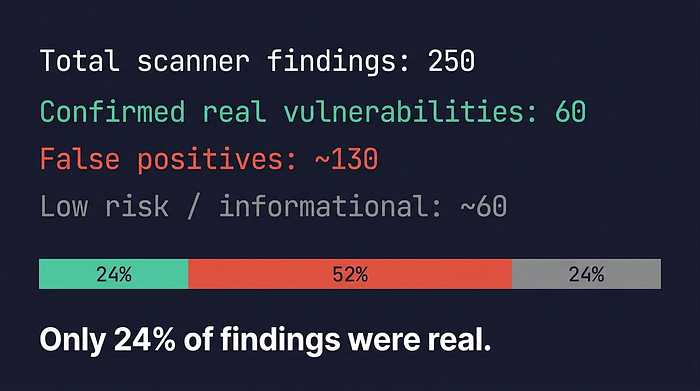
The other 76% were false positives, informational findings, or noise. This is exactly why automated scanning without expert verification is dangerous — it either overwhelms you with noise or, worse, gives you false confidence that you're secure because the "real" findings get buried.
What I Found: The 5 Most Common Real Vulnerabilities
After manually verifying all 250 findings across 10 apps, clear patterns emerged. The same mistakes appeared again and again — regardless of the app's popularity or the sensitivity of the data it handles.
1. Exported Components Without Permission Guards
Found in: 9 out of 10 apps
Android components (activities, services, receivers, content providers) that are declared as `exported="true"` without requiring any permission to interact with them. This means any app installed on the same device can launch these components, send them data, or receive data from them.
What makes this dangerous: in a financial app, this could mean a malicious app can launch the "send money" screen. In a password manager, it could trigger the database unlock flow. In an email client, it could launch the compose screen with pre-filled data.
The fix is straightforward — either set `exported="false"` for components that don't need external access, or add an `android:permission` attribute to restrict who can interact with them.
2. Overly Broad FileProvider Paths
Found in: 4 out of 10 apps
Android's `FileProvider` is designed to securely share files between apps. But when the provider's path configuration includes `<root-path path="." />` or `<external-path path="." />`, it effectively grants access to the entire filesystem or all of external storage through content URIs.
I found apps where the FileProvider configuration would allow access to `/storage/` (all external storage), the entire app internal directory, and in the worst case, the entire device filesystem.
Even though these providers are typically non-exported, they use `grantUriPermissions="true"` — so if any exported activity forwards URI permissions (a common Android pattern), the broad paths become exploitable.
3. Cleartext Traffic Permitted + User CA Trust
Found in: 6 out of 10 apps
Many apps had `cleartextTrafficPermitted="true"` in their network security config, allowing unencrypted HTTP connections. Several also explicitly trusted user-installed CA certificates with `<certificates src="user" />`.
For apps connecting to self-hosted servers (CalDAV, email, cloud storage), this is partially intentional — users need to connect to their own servers, which may use HTTP or self-signed certificates. But the configuration applies globally, not just to self-hosted endpoints. Every connection the app makes — including API calls, analytics, update checks — defaults to allowing interception.
One particularly concerning case: a media player downloaded update files over plaintext HTTP. A man-in-the-middle attacker on the same network could serve a malicious APK as a legitimate update.
4. Weak Cryptographic Implementations
Found in: 3 out of 10 apps
These ranged from the dangerous to the archaic:
- SSL validation completely disabled — one app called a method that literally accepts ALL certificates without any validation. In a financial app. Handling real money.
- ECB cipher mode — a media player's remote access feature used AES in ECB mode, where identical plaintext blocks produce identical ciphertext blocks. This is a textbook crypto mistake.
- `java.util.Random` in cryptographic context — instead of `SecureRandom`, making the output predictable.
- Trust-On-First-Use (TOFU) without pinning — once a server certificate is accepted, it's trusted forever, even if the certificate changes (which could indicate a MITM attack).
5. Missing Tapjacking (Overlay Attack) Protection
Found in: 8 out of 10 apps
Almost none of the apps set `filterTouchesWhenObscured="true"` on sensitive UI elements. This means a malicious app with overlay permission could draw an invisible layer on top of the app and capture user taps — or trick users into tapping buttons they didn't intend to.
This is especially concerning for: - Password managers (capturing master password input) - Cryptocurrency wallets (confirming transactions) - Certificate trust dialogs (accepting malicious certificates) - OAuth/login screens (authorizing access)
The False Positive Problem
Just as interesting as what I found was what I *didn't* find. Here are the most common false positive patterns my scanner flagged:
"Hardcoded secrets" in native crypto libraries — The scanner found suspicious strings in libraries like `libconscrypt_jni.so`, `libsignal_jni.so`, `libargon2.so`, and `libaes.so`. These are all well-known cryptographic libraries. The "secrets" were binary artifacts — internal data structures, not API keys or passwords.
IMAP protocol constants flagged as hardcoded keys — In the email client, strings like `\Answered`, `\Flagged`, `\Seen`, and `\Deleted` were flagged as hardcoded authentication keys. These are standard IMAP protocol flags defined in RFC 3501.
TLS cipher suite names mistaken for secrets — Strings like `TLS_ECDHE_RSA_WITH_AES_256_GCM_SHA384` were flagged as hardcoded secrets. They're cipher suite identifiers — the app is specifying which encryption algorithms to use, not storing credentials.
One app generated over 90 findings. After manual verification: roughly 3 were potentially real. The rest were protocol constants, library strings, and standard Android patterns. This is why the human element in security assessment isn't optional — it's the entire point.
What This Means
Open source doesn't automatically mean secure. It means the code is available for review — not that it has been reviewed. These are popular, well-maintained apps with active communities, and they still have security issues that a systematic review can catch.
This isn't about shaming developers. Open-source maintainers are often volunteers doing incredible work. The point is that security requires dedicated, focused attention. It's a different skill set from building features, and it benefits from dedicated tooling and expertise.
If your Android app handles sensitive data — financial information, credentials, personal communications, health data — it deserves a security review. Not just an automated scan that generates hundreds of findings and calls it a day, but a proper assessment where every finding is verified and contextualized.
Key Takeaways
1. Automated scanners are necessary but not sufficient. They find candidates for investigation, not confirmed vulnerabilities. Without manual verification, you're drowning in noise.
2. The same 5 vulnerability patterns appear across almost every app. Exported components, broad file providers, cleartext traffic, weak crypto, and missing overlay protection. These are low-hanging fruit that any security review should catch.
3. Context matters enormously. Cleartext traffic in a media player streaming public videos is a different risk than cleartext traffic in a banking app. A security finding without context is just a line in a report.
4. Open source enables security review — it doesn't replace it. The code being public is a prerequisite for thorough analysis, not a guarantee that the analysis has happened.
I'm a mobile security researcher specializing in Android application security assessments. If you'd like to discuss your app's security posture, feel free to reach out at yehor.mamaiev@gmail.com.