
In this article, I solve and explain four Information Disclosure labs from the PortSwigger Web Security Academy. These labs demonstrate how sensitive information can be unintentionally exposed through error handling, debug functionality, backup files, and authentication logic.
Lab 1: Information Disclosure in Error Messages
Lab Description
This lab contains an information disclosure vulnerability caused by verbose error messages. When invalid input is provided, the application returns a detailed server error that exposes internal implementation details.
The goal of this lab is to identify sensitive information leaked through error messages.
Exploitation
Product details are accessed using a request similar to:
/product?productId=1When the productId parameter is modified to a non-numeric value, for example:
/product?productId=salamthe application returns an Internal Server Error.
The error response includes a full Java stack trace, revealing internal class names, method calls, and the underlying framework version.
At the bottom of the error message, the application discloses the server technology:

This confirms that sensitive internal information is exposed through error handling.
Why This Works
The application does not handle invalid input securely and returns verbose error messages to the client. Instead of displaying a generic error page, the server exposes stack traces and framework details, resulting in information disclosure.
Lab 2: Information Disclosure on Debug Page
Lab Description
This lab contains an information disclosure vulnerability caused by an exposed debug page. The debug functionality reveals sensitive internal information that should not be accessible to users.
The goal of this lab is to obtain and submit the SECRET_KEY environment variable.
Exploitation
While inspecting the application's source code, a commented-out debug link is discovered:
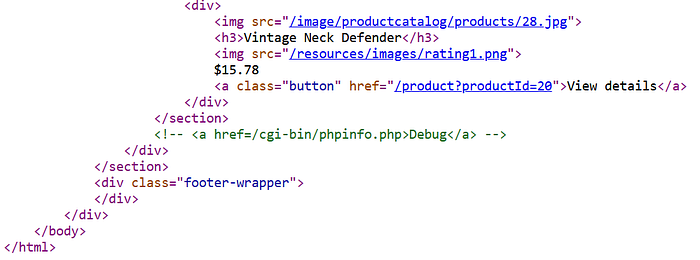
Accessing this endpoint directly loads a phpinfo() debug page, which displays detailed configuration and environment information about the server.
By reviewing the debug output, environment variables are exposed. Among them, the following sensitive value is disclosed:

Submitting the leaked SECRET_KEY value successfully solves the lab.
Why This Works
The application exposes a debug endpoint in a production environment.
Debug pages such as phpinfo() reveal extensive internal details, including environment variables, configuration values, and server metadata.
Failing to restrict access to such functionality results in critical information disclosure.
Lab 3: Source Code Disclosure via Backup Files
Lab Description
This lab contains an information disclosure vulnerability caused by exposed backup files. The application leaks its source code through a hidden directory, allowing sensitive information to be accessed.
The goal of this lab is to identify and submit the database password hard-coded in the leaked source code.
Exploitation
By accessing the robots.txt file, a disallowed directory is revealed:

Navigating to this directory exposes backup files containing application source code. One of the available files includes a Java source code backup:
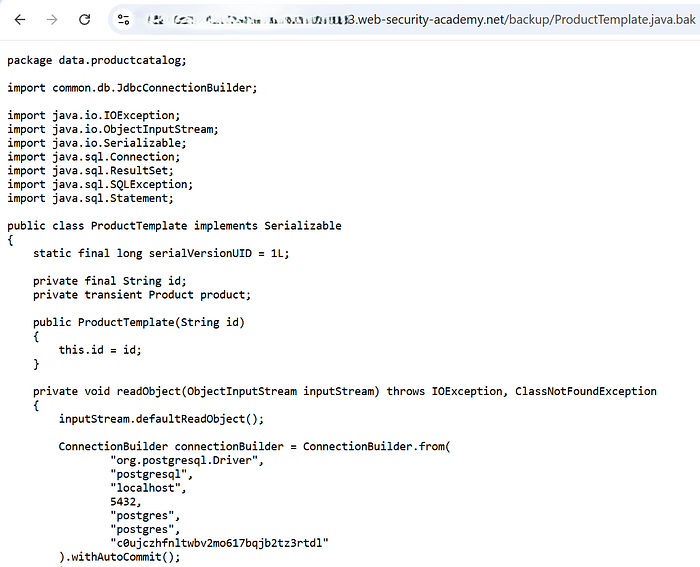
Opening this file reveals the application's internal implementation, including database connection details.
Within the source code, the database credentials are hard-coded, and the database password is clearly visible.
Submitting the extracted password successfully solves the lab.
Why This Works
The application stores backup files in a web-accessible directory without proper access restrictions. Backup files often contain sensitive information such as credentials, secrets, and internal logic, making them a common source of information disclosure.
Lab 4: Authentication Bypass via Information Disclosure
Lab Description
This lab demonstrates how information disclosure can lead to an authentication bypass. The application exposes internal logic that allows attackers to spoof a trusted internal IP address using a custom HTTP header.
The objective is to access the admin panel and perform an admin-only action.
Identifying the Vulnerability
When attempting to access the admin panel (/admin) directly, the application responds that the page is only accessible to administrators or requests originating from a local IP address.
By sending a TRACE /admin request using Burp Suite, the server reflects the full request back in the response.
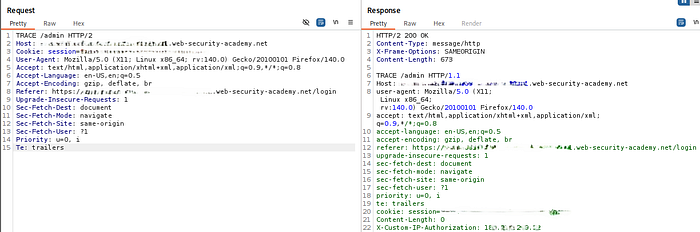
This response discloses the presence of a custom header:
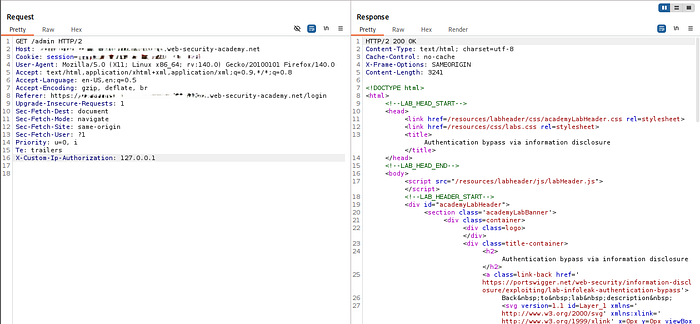
X-Custom-IP-AuthorizationThis header is used by the application to determine whether a request originates from 127.0.0.1 (localhost).
Exploitation
Since the application trusts the value of this client-controlled header, we can spoof a local request.
Using Burp Suite, we configure Proxy → Match and Replace to automatically add the following header to all outgoing requests:
X-Custom-IP-Authorization: 127.0.0.1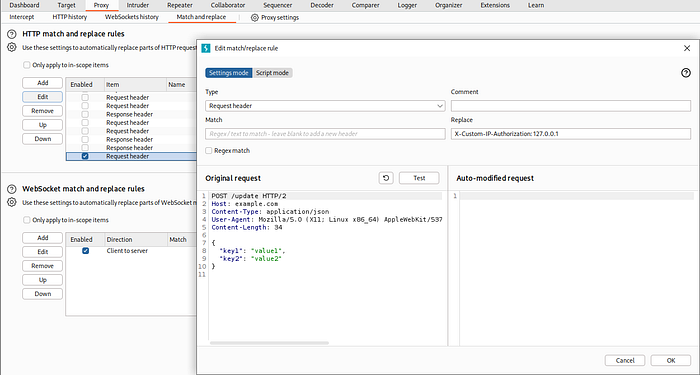
Note: When configuring the Match and Replace rule in Burp Suite, ensure that Regex match is enabled. Without this option, the header may not be added correctly to outgoing requests.
Once this rule is enabled, we browse the application normally through the proxy.
Accessing the Admin Panel
After the header is applied globally, the application treats our requests as if they originated from localhost.
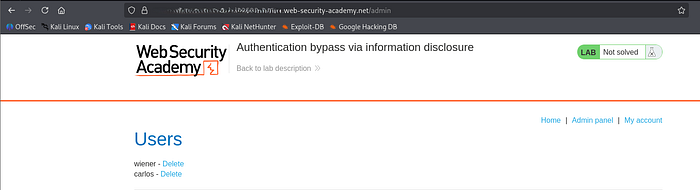
Navigating to /admin now returns a 200 OK response and reveals the admin interface, including the list of users and delete functionality.
At this point, we can perform admin-only actions such as deleting the carlos user, successfully completing the lab.
Why This Works
The application makes authorization decisions based on a client-supplied HTTP header, rather than a trusted server-side attribute.
Because this header is not validated or restricted, an attacker can spoof it to bypass authentication checks entirely.
These labs demonstrate how information disclosure vulnerabilities, even when they appear low-risk, can directly enable more serious attacks such as authentication bypass, privilege escalation, and full system compromise.
Across the four scenarios, we observed that sensitive information was exposed through:
- verbose error messages revealing technology stacks and framework versions
- hidden debug functionality leaking environment variables and secrets
- forgotten backup files disclosing application source code and credentials
- internal authorization logic exposed via reflected headers and HTTP methods
From a defensive and SOC perspective, these issues highlight several critical lessons:
- error handling should never expose stack traces, versions, or internal paths
- debug pages and backup files must not be accessible in production environments
- sensitive secrets should never be hard-coded or exposed via environment output
- access control decisions must not rely on client-controlled headers or request metadata
Information disclosure is often treated as a minor finding, but these labs clearly show how it can act as an entry point for more impactful attacks when combined with weak validation and trust assumptions.
Proper hardening, strict access controls, and continuous monitoring for unintended data exposure are essential to preventing attackers from chaining these weaknesses into a full compromise.