
Application vulnerabilities appear when software has the potential to interact with hardware memory in unintended ways, or when the logical sequence of operations is poorly designed.
1. Buffer Overflows
I've covered this topic extensively in THIS ARTICLE. I recommend reading it for more information.
2. Memory Injection
You are familiar with malware that is distributed as standalone .exe files. But attackers can inject their code into the memory of a legitimate process and hide it there.
DLL Injection:
A Dynamic Link Library (DLL) is a Windows library file that contains functions and variables used by multiple programs simultaneously to perform tasks.
The attacker places a malicious DLL on your local disk(or maybe you just downloaded it from the internet). Then the attacker forces a trusted process to load this DLL, and this DLL can now run code in the trusted process's address space!
Once loaded, the malicious code runs as part of the target process.
DLL injection is a very dangerous attack. It can cause privilege escalation if a DLL is injected into a process running with high-level privileges (e.g., SYSTEM).
3. Race Conditions
A race condition occurs when the output of a program depends on the timing or sequence of multiple threads or processes that are accessing and modifying shared resources. It is a product of asynchronous programming.
TOCTOU (Time-of-Check to Time-of-Use)
TOCTOU is a type of race condition where an attacker exploits the tiny gap between when a system checks something and when it uses it.
Imagine a program checks whether a file is safe, but before it uses the file, a hacker can swap it with a malicious one. In this case, the hacker exploits the tiny gap between the system checking the file's safety and the system using the file.
This exact type of TOCTOU flaw allowed researchers to gain root access to a Tesla Model 3 via its Bluetooth infotainment system at Pwn2Own 2023.
I wrote an example code for this:
import os
import time
import threading

#Target Files:
SAFE_FILE ="safe.txt"
SENSITIVE_FILE ="sensitive.txt"

#Vulnerable function
def write_to_file(filename, data):
    # CHECK:
    if os.access(filename, os.W_OK):
        print(f"[VICTIM] Passing the check. {filename} is writable.")


        time.sleep(0.1)  #Manually making a gap

        # USE:
        with open(filename, 'w') as f:
            f.write(data)
        print(f"[VICTIM] Wrote in: {filename}")
    else:
        print(f"[VICTIM] Access Denied: {filename}")


def attacker():
    time.sleep(0.05)  # TOC = 0  &  TOU = 0.1 so TOCTOU is in range (0 , 0.1) lets choose the middle: 0.05

    if os.path.exists(SAFE_FILE): #if safe.txt exists
        os.remove(SAFE_FILE) #remove it
        print("[ATTACKER] safe.txt removed")
        os.symlink(SENSITIVE_FILE, SAFE_FILE) #and make a symlink with name:safe.txt that shows the sensitive.txt
        print("[ATTACKER] symlink to sensitive.txt created")


#prepare the environment for simulating:
with open(SAFE_FILE, "w") as f:
    f.write("safe.txt data")
with open(SENSITIVE_FILE, "w") as f:
    f.write("sensitive.txt data.")


print("****Simulating TOCTOU Attack****")

#make a thread for attacker function. write_to_file function will be executed on the main thread at the same time:
t = threading.Thread(target=attacker)

#start the race:
t.start()
write_to_file(SAFE_FILE, "write_to_file function wrote the data here!")


t.join()

#RESULTS
print("\n\n****RESULT CONTROL****")
with open(SENSITIVE_FILE , "r") as f:
    print(f"Content of sensitive.txt: {f.read()}")
Some mitigation methods:
- Check and use the data in a single, uninterrupted step (Atomic Operations)
- Use an environmental locking mechanism.
- Recheck the resource after using it to confirm that no interruption occurred.
4. Malicious Updates
A fundamental rule of system administration is to keep software updated to patch known vulnerabilities. But are updates really that safe? It is good to know that updates are also a threat vector for us. Always install from a trusted source!
Modern operating systems and applications rely on digital signatures to verify that an update comes directly from the legitimate developer. If the application downloads an update and the cryptographic signature matches the developer's public key, the system installs it without question.
The Supply Chain Attack through application vulnerability
Nothing is completely safe! What happens when the developer's own environment is compromised?
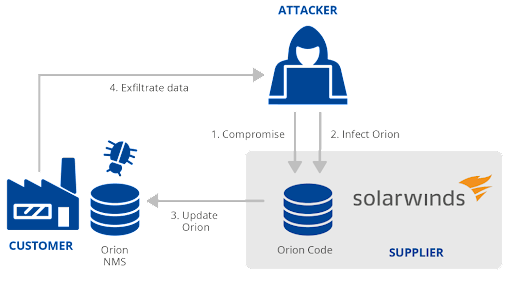
The SolarWinds Orion breach in December 2020 demonstrated this perfectly. Attackers did not try to hack thousands of separate government agencies and Fortune 500 companies. Instead, they infiltrated the build environment of SolarWinds, the company that developed the network monitoring software that those targets used.
The attackers injected their malicious code directly into the SolarWinds update pipeline. When SolarWinds compiled and digitally signed their next update, they inadvertently signed the attacker's code as well.
Because the update was completely legitimate and correctly signed, the target systems downloaded and installed the malware automatically. This shows us that even internal, signed updates carry risk.
To prevent this, use defense in depth and always have backups!