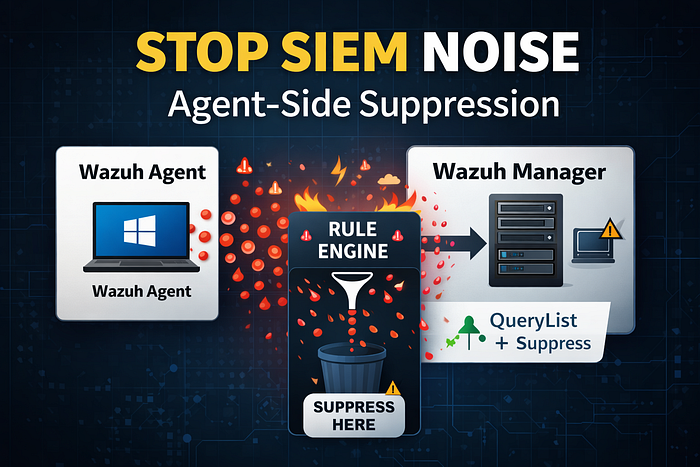
And here's the part many teams miss: If you're filtering noise on the Wazuh manager, you're still paying the cost of that noise.
The manager still has to receive, parse, decode, and evaluate every event against your ruleset (in my lab, ~6,500 rules). Even if a rule later drops the event, it already consumed resources.
In this post, I'm going to show you a more performant approach:
✅ Suppress noisy Windows Security events directly on the Wazuh agent ✅ So they're never shipped to the Wazuh manager in the first place ✅ Meaning less network traffic, less rule evaluation, less indexing, less overhead
Manager-side exclusions don't scale
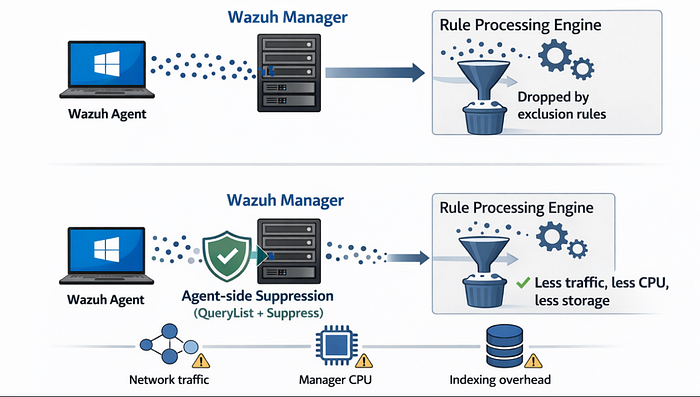
The traditional flow looks like this:
Wazuh Agent → Wazuh Manager → Decode → Rule Engine → Drop (maybe)
Even if you "drop" an event via a manager-side suppression rule, the manager still did the work.
At scale (more endpoints, more Security logs, more event volume), you can end up burning CPU and pipeline capacity on data you already know you don't want.
So the best performance move is simple:
If you already know you don't want certain events, don't send them at all.
Wazuh gives us two ways to filter Windows EventChannel logs
Wazuh supports filtering Windows eventchannel logs using a query field inside a <localfile> block.
Option A: XPath query format
Wazuh documentation shows examples using an XPath-style query. It works well for simple filters (like "only EventID X").
But in my testing, once the logic became more complex — multiple excludes, multiple conditions, field/value checks — I didn't get consistent results.
<localfile>
  <location>Security</location>
  <log_format>eventchannel</log_format>
  <query>Event[System/EventID = 4624 and (EventData/Data[@Name='LogonType'] = 2 or EventData/Data[@Name='LogonType'] = 10)]</query>
</localfile>
Option B: QueryList + Suppress (recommended for complex logic)
This is the "Windows-native" style query format:
- Start by selecting all events (
<Select>*</Select>) - Then suppress specific things with
<Suppress>blocks
This ended up being much more robust and easier to reason about when building real-world suppression logic.
<localfile>
  <location>System</location>
  <log_format>eventchannel</log_format>
   <query>
     \<QueryList\>
       \<Query Id="0" Path="System"\>
         \<Select Path="System"\>*[System[(Level<=3)]]\</Select\>
          \</Query\>
        \</QueryList\>
  </query>
</localfile>
Demo: Build a predictable test event (4688) so you can validate suppression
Before suppressing anything, you need a reliable way to generate and inspect an event.
Step 1 — Generate a Security event 4688 ("process created")
From PowerShell on the endpoint:
cmd /c whoamiThat produces Event ID 4688 in the Security channel (process creation).
Step 2 — Pull the raw event XML so you know the exact field names
This is critical: Wazuh filtering relies on correct field names inside the event schema.
Use wevtutil:
wevtutil qe Security /q:"*[System[(EventID=4688)]]" /c:1 /rd:true /f:xml
In the XML output you'll see values like:
- NewProcessName → C:\Windows\SysWOW64\whoami.exe
- ParentProcessName → C:\Windows\SysWOW64\cmd.exe
This XML view is the source of truth when you build your suppressions.
Important gotchas I hit (so you don't waste hours)
1) Wazuh agent is very sensitive to query syntax
If your query is malformed, the agent may fail to subscribe to the Security channel.
The telltale symptom is in ossec.log: it will show the agent trying to subscribe and failing.
Use this as your quick validation:
Agent restarts cleanly + subscribes to Security = query syntax is valid.
2) QueryList formatting inside agent.conf requires escaping
In Wazuh configs, you can embed QueryList XML inside <query>, but it needs to be escaped like:
- \<QueryList\>
- \</QueryList\>
3) Windows file paths should use double backslashes
This tripped me up until I found confirmation in a Wazuh GitHub issue thread.
Example:
✅ C:\\Windows\\System32\\services.exe
not
❌ C:\Windows\System32\services.exe
The working configuration (QueryList + Suppress)
Below is a working <localfile> config that:
- Collects all Security events
- Suppresses specific noisy event IDs entirely
- Suppresses known noisy 4688 patterns
- Includes a manual test suppression for cmd /c whoami
Note: this belongs in your agent group config (for example under /var/ossec/etc/shared/<group>/agent.conf) or directly on the agent if you're not using centralized group configs.
<localfile>
  <location>Security</location>
  <log_format>eventchannel</log_format>
  <query>
    \<QueryList\>
      \<Query Id="0" Path="Security"\>
        \<Select Path="Security"\>*\</Select\>

        <!-- Suppress these Event IDs completely (no matter the fields/values) -->
        \<Suppress Path="Security"\>*[System[(EventID=5145)]]\</Suppress\>
        \<Suppress Path="Security"\>*[System[(EventID=4634)]]\</Suppress\>
        \<Suppress Path="Security"\>*[System[(EventID=4647)]]\</Suppress\>
        \<Suppress Path="Security"\>*[System[(EventID=4661)]]\</Suppress\>
        \<Suppress Path="Security"\>*[System[(EventID=4689)]]\</Suppress\>

        <!-- Suppress known noisy 4688 patterns (SYSTEM logon IDs + specific parent processes) -->
        \<Suppress Path="Security"\>
          *[System[(EventID=4688)]]
          and *[EventData[(Data[@Name='SubjectLogonId'] and (Data='0x3e7' or Data='0x3e4' or Data='0x3e5'))]]
          and *[EventData[(Data[@Name='ParentProcessName'] and (Data='C:\\Windows\\System32\\svchost.exe'))]]
        \</Suppress\>

        \<Suppress Path="Security"\>
          *[System[(EventID=4688)]]
          and *[EventData[(Data[@Name='SubjectLogonId'] and (Data='0x3e7' or Data='0x3e4' or Data='0x3e5'))]]
          and *[EventData[(Data[@Name='ParentProcessName'] and (Data='C:\\Windows\\System32\\services.exe'))]]
        \</Suppress\>

        <!-- Manual test suppression: cmd /c whoami (SysWOW64) -->
        \<Suppress Path="Security"\>
          *[System[(EventID=4688)]]
          and *[EventData[(Data[@Name='NewProcessName'] and (Data='C:\\Windows\\SysWOW64\\whoami.exe'))]]
          and *[EventData[(Data[@Name='ParentProcessName'] and (Data='C:\\Windows\\SysWOW64\\cmd.exe'))]]
        \</Suppress\>

        <!-- Example: Suppress noisy firewall rule not applied -->
        \<Suppress Path="Security"\>*[System[(EventID=4957)]]\</Suppress\>

      \</Query\>
    \</QueryList\>
  </query>
</localfile>
Validate it's working (prove suppression is agent-side)
1) Confirm the agent received the new config
On the endpoint, Wazuh stores shared config content locally. You can inspect it to confirm the agent pulled the updated agent.conf.
2) Confirm the agent subscribes cleanly
Check the agent ossec.log for Security subscription lines and ensure there are no errors.
3) Run the test again
Run:
cmd /c whoamiExpected result:
- You should still see the cmd.exe process creation (PowerShell launching cmd)
- You should not see the whoami.exe process creation event, because it matched the suppression and never left the agent
Then run a different command:
cmd /c hostnameExpected result:
- You should see both process creation events (cmd.exe and hostname.exe) because hostname is not suppressed
This is the easiest way to prove to yourself:
✅ suppression is working
✅ suppression is happening on the agent
✅ your pipeline is cleaner
One more note: Wazuh Web UI bug (Agent config editor)
Oddly enough, when I tried pasting Wazuh's own QueryList example into the Wazuh Web UI agent configuration editor, I got syntax errors.
But when I edited the group config directly from the manager CLI (under /var/ossec/etc/shared/<group>/agent.conf), the manager accepted it and the agents applied it correctly.
I have opened an issue on Wazuh's repo here: https://github.com/wazuh/wazuh/issues/34132
If you're running into this:
- Don't assume your QueryList is wrong
- Try applying it through the manager CLI first
Key takeaways
Filtering noise at the manager is better than nothing — but it's not optimal.
If you want to scale:
- reduce EPS
- reduce indexing/storage
- reduce rule evaluation load
- reduce "pipeline pain"
…then suppressing at the agent is one of the cleanest performance optimizations you can make.
Tips before you roll this into production
- Start small: suppress one thing at a time
- Validate each suppression with wevtutil first
- Add comments so future you (or your team) knows why it exists
- Store group configs in Git so you can track changes and roll back safely
- Be careful not to suppress events that support detections you care about
Need Help?
The functionality discussed in this post, and so much more, are available via the SOCFortress platform. Let SOCFortress help you and your team keep your infrastructure secure.
Website: https://www.socfortress.co/
Contact Us: https://www.socfortress.co/contact_form.html