
Introduction
In today's digital world, understanding what lies behind a domain name is more important than ever, whether you're launching a website, troubleshooting email issues, or investigating a suspicious link. I assume every security investigator knows one or more tools for domain investigation. However, no single tool will yield exact results, which is why two or more tools are used in domain investigation. While following Aaron Robert on LinkedIn, he posts weekly OSINT tools. Domain digger caught my attention, and I found it amazing. Domain digger serves more than 2 domain investigation tools at the same time.
About the tool
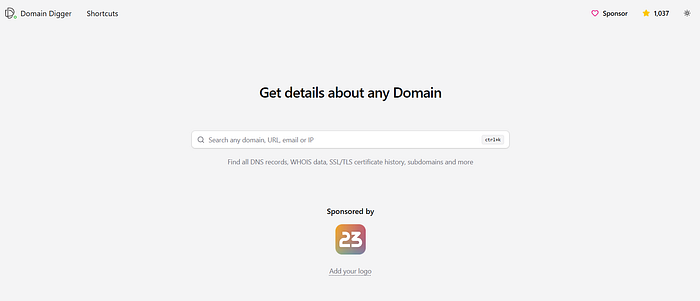
Domain Digger is a modern, web‑based toolkit that lets you quickly inspect almost every technical detail behind a domain name, from DNS records and IP geolocation to WHOIS data and SSL/TLS certificate history. It's designed as a one‑stop interface for anyone who wants to "dig" beneath a domain, used by developers, security folks, sysadmins, and even curious website owners. The tool is free, open‑source‑inspired, and runs directly in the browser, so you don't need to install anything or run command‑line utilities.
What Domain Digger does
Domain Digger aggregates several domain‑intelligence tools into one dashboard so you don't have to jump between dig, nslookup, WHOIS clients, and IP‑lookup sites. At a high level, it lets you:
- Perform DNS lookups (A, AAAA, MX, CNAME, TXT, etc.) with multiple resolvers and global‑server options.
- View IP details and geolocation tied to a domain, including hosting‑infrastructure hints.
- Run WHOIS lookups (full and quick) to see registration data, contacts, and name‑server configuration.
- Explore SSL/TLS certificate history to see which certificates a domain has used over time.
- Use visual DNS maps and organized views to better understand how records and IPs are related.
Who this tool is for
Domain Digger is especially useful for:
- Developers and sysadmins who need to debug DNS, verify SPF/DKIM/DMARC records, or audit DNS‑setup changes.
- Security researchers and bug‑hunters who want to map a target's infrastructure, find related domains, or pivot from IP to certificate history.
- Digital‑forensics and incident‑response folks who rely on WHOIS and DNS history to trace domain ownership and abuse patterns.
- Website owners and marketers who want to double‑check that DNS and SSL are configured correctly before going live.
Because it avoids caching and queries live DNS servers, Domain Digger is handy whenever you need the current state of a domain, not old or stale snapshots.
Key features in practice
Here are a few ways you can use Domain Digger in real workflows:
- Quick DNS sanity‑check: Paste a domain and instantly see all basic records; if MX or TXT records look wrong, you can spot configuration mistakes before email or verification breaks.
- Infrastructure mapping: By combining DNS records, IP geolocation, and visual DNS maps, you can see how many hosting providers or CDNs are involved and how services are split.
- WHOIS investigation: One‑click WHOIS gives you registrar, creation/expiry dates, and contact info, which helps with domain research or abuse‑report investigations.
- Certificate‑history checks: If a domain recently changed certificates (e.g., after an incident), viewing past certificates can reveal issuers or domains that were previously linked.
Why does it stand out from basic dig/whois?
Compared with running dig or whois from the terminal, Domain Digger offers:
- A unified UI where DNS, WHOIS, IP info, and certificate data live on one screen instead of separate commands.
- Visualizations (like DNS maps) that help you "see" record relationships, which is harder to grasp in raw terminal output.
- Multiple resolvers and global‑lookup options so you can cross‑check DNS answers from different points on the internet.
- Time‑saving workflows, such as bookmarklets or quick‑search shortcuts, reduce the friction of repeatedly typing commands.
How to get started
To write a practical step‑by‑step guide in your blog post, you can structure it like this:
- Go to **https://digger.tools/** in any modern browser.
- Enter a domain (e.g.,
example.com) and click "Dig" or the equivalent lookup button. - Switch between tabs/sections such as DNS, WHOIS, IP details, and Certificate history to inspect each layer.
- Experiment with different DNS record types (MX, TXT, etc.) and use the bookmarklet (if offered) to quickly dig any domain you're viewing in the browser.
Conclusion
Domain Digger streamlines tasks that would otherwise require multiple command‑line tools and separate lookups, bringing DNS, WHOIS, IP geolocation, and certificate history into one easy‑to‑use platform. Whether you're a developer double‑checking DNS settings, a security researcher mapping out an infrastructure, or simply curious about where a website lives on the internet, Domain Digger makes "digging" beneath a domain fast, visual, and reliable. As long as you keep it in your browser toolbox, it becomes a go‑to stop for almost any domain‑related question you come across.
Till I come your way again in the next 2 weeks, Tuesday, #BeCyberSmart
Cyberliza writes TuesdayTool