

In a world where penetration testing tools are often expensive, cloud-heavy, or overly complex, a new open-source project is quietly making waves in the offensive security community: **PHALANX v3**.
https://github.com/webxos/phalanx
Built entirely for local execution on Debian-based Linux systems, PHALANX combines traditional recon tools (nmap, nikto, sqlmap, etc.) with an intelligent LLM gateway powered by Ollama, dynamic web scraping with Playwright, polyglot tool execution (Python, Rust, C, WebAssembly, Go, and more), and even a full LangGraph-based autonomous agent.
Whether you're a red teamer, bug bounty hunter, security researcher, or ethical hacker who prefers running everything offline and air-gapped, PHALANX aims to be your all-in-one local pentesting companion.
What is PHALANX?
PHALANX is a complete autonomous penetration testing framework written in Python 3. It acts as both a smart gateway to Ollama LLMs and a powerful orchestrator for dozens of industry-standard security tools.
Key highlights:
- **Local-first design** — Everything runs on your machine. No cloud APIs, no data exfiltration. - **Ollama Integration** — Uses local models (default: qwen2.5:7b) for analysis, planning, and natural language interaction. - **Agentic Mode** — A ReAct-style autonomous agent that decides which tools to run next based on scan results. - **LangGraph Autonomous Engine** — Full researcher → planner → executor → reflector loop for hands-off scanning. - **Polyglot Tool Support** — Execute tools written in Python, JavaScript, Rust, C/C++, Java, OCaml, Go, Bash, and even WebAssembly. - **Advanced Web Scraping** — BeautifulSoup + Playwright for JS-rendered pages, extracting emails, links, forms, and robots.txt. - **Persistent Memory** — "Soul" SQLite FTS5 database + ChromaDB vector memory for long-term learning. - **Database Tracking** — Full session history, vulnerabilities, exploits, and fixes stored in SQLite (or MariaDB).
Core Use Cases
**1. Authorized Internal Pentesting** Perfect for corporate red team exercises or client engagements where you need to stay fully offline and controlled. Run full autonomous scans on internal networks without sending data anywhere.
**2. Bug Bounty Recon** Quickly enumerate subdomains (subfinder), harvest emails (theHarvester), probe web apps (whatweb, gobuster, ffuf), and analyze findings with local LLM — all without relying on paid services.
**3. CTF & Learning Environment** Great for students and newcomers to offensive security. The interactive REPL lets you chat with the AI, ask for explanations, and get step-by-step guidance while the tools do the heavy lifting.
**4. Air-Gapped / High-Security Environments** Ideal for government, defense, or highly regulated industries where internet access or external tool calls are prohibited.
**5. Custom Tool Development** The polyglot engine allows you to write new tools in your favorite language and drop them into `~/.phalanx/tools/`. PHALANX automatically discovers, compiles (when needed), and executes them.
Getting Started with PHALANX
Prerequisites

- Debian/Ubuntu-based Linux (or compatible) - Python 3.10+ - Ollama installed and running with models like `qwen2.5:7b` - Common pentest tools: `nmap`, `nikto`, `gobuster`, `ffuf`, `sqlmap`, etc.
#### Installation (Super Simple) ```bash git clone https://github.com/webxos/phalanx.git cd phalanx chmod +x run.sh ./run.sh ```
The `run.sh` script handles virtual environment creation, dependency installation, and launches the framework.
Launching the Framework - `./run.sh` → Interactive REPL (recommended for learning) - `./run.sh — tui` → Terminal UI mode (if `phalanx_tui.py` is available) - `./run.sh — scan 192.168.1.1` → Fully autonomous scan - `./run.sh — scrape https://example.com` → Quick web scraping
How to Use the Interactive REPL
Once inside, you'll see the cool ASCII logo and a `PHALANX>` prompt.
**Essential Commands:** - `/help` — Shows all available commands - `/scan <target>` — Starts the autonomous LangGraph pentest - `/scrape <url>` — Scrapes a website (supports JS rendering) - `/tools` — Lists all built-in pentest tools - `/model <name>` — Switch Ollama model - `/personality pentest` — Sets a more technical offensive security tone - `/soul <query>` — Search your past scan memory - `/skills` — View which tools you're getting better at using
**Example Workflow:** 1. `/scrape https://target.com` — Gather initial intel 2. Chat with PHALANX about the results 3. `/scan target.com` — Let the autonomous agent take over 4. Review the generated report with vulnerabilities, risk scores, and remediation steps
The Autonomous Agent in Action
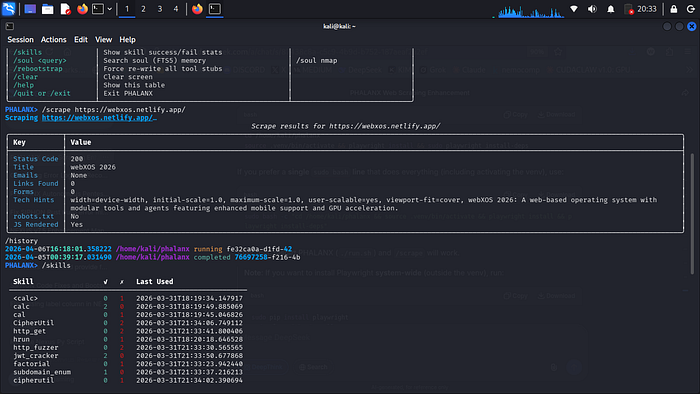
The most impressive part is the LangGraph-powered autonomous mode. It follows a cycle: - **Researcher** — Runs initial recon (nmap, http_probe, whois) - **Planner** — Uses the LLM to create an attack plan - **Executor** — Runs the planned steps (with Docker fallback for isolation) - **Reflector** — Decides whether to continue or generate a final report
All findings are automatically saved to the PentestDB with full traceability.
Technical Strengths
- **Smart Scraping**: Falls back gracefully between Playwright (JS) and requests+BeautifulSoup. - **Memory Systems**: Combines traditional SQLite + vector embeddings for contextual recall. - **Skill Tracking**: Learns which tools you use successfully over time. - **Extensibility**: Drop new tools in any supported language into the tools directory. - **Safety Focus**: Emphasizes authorization and includes clear warnings.
Who Should Try PHALANX?
- **Beginners** wanting a guided, AI-assisted introduction to pentesting - **Experienced pentesters** tired of fragmented toolchains - **Researchers** who value local, reproducible, and auditable workflows - **Developers** interested in building LLM-augmented security tools
Final Thoughts

PHALANX v3 represents an exciting evolution in open-source offensive security tooling. By combining battle-tested tools with modern local LLMs and autonomous agent capabilities, it lowers the barrier to effective pentesting while maintaining full user control and privacy.
If you value running powerful security assessments completely on your own hardware — without telemetry, subscriptions, or external dependencies — PHALANX is worth exploring.
**GitHub**: https://github.com/webxos/phalanx **License**: MIT (open source)
Have you tried PHALANX yet? What's your favorite feature so far — the autonomous agent, the polyglot tools, or the local LLM integration? Drop your thoughts in the comments!
*Disclaimer: PHALANX is for authorized penetration testing only. Always obtain explicit written permission before testing any system you do not own.*