

Last May, I discovered a stored XSS vulnerability in "wpForo Forum", a WordPress plugin with over 20,000 active installations. Similar to other forum software like XenForo and phpBB, wpForo Forum allows users to create boards and topics for discussions on various subjects.
The vulnerability I found was in the avatar upload functionality. A user can upload an SVG file containing malicious Javascript because the sanitization was improperly implemented.
"wpForo Forum" uses WordPress' built-in HTML sanitizer wp_kses() to perform sanitization. The problem is that wp_kses() only strips the javascript: protocol from thehref attribute, but not from xlink:href. I discovered this by accident while experimenting around with the wp_kses() function.
I reported this issue with wp_kses() to WordPress' bug bounty program, but the WordPress team stated that this was not an issue since wp_kses() is not intended for XML sanitization.
If you're interested in doing security research on WordPress plugins like me, here are some really good resources to get started:
- WordPress Security Research: A Beginner's Series: This series of articles discusses the basics of how WordPress works, how to setup a testing environment, and techniques for identifying vulnerabilities in WordPress plugins. These articles are written by the team at WordFence, who run the most popular WordPress firewall plugin as well as a bug bounty program for WordPress plugins.
- Patchstack Academy: This website teaches the basics of WordPress security and how to find common vulnerabilities in WordPress plugins. Patchstack also runs a popular firewall plugin and a popular bug bounty program for WordPress plugins.
Proof of Concept
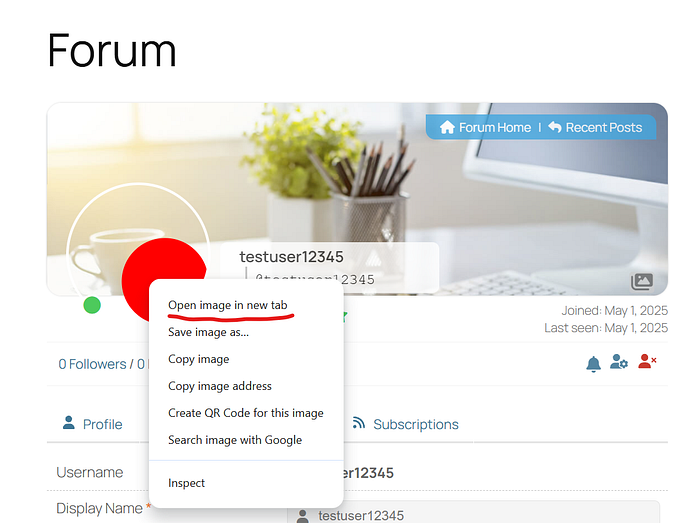
- Register as a forum user on a website with a vulnerable version of "wpForo Forum".
- Submit 3 posts and have them all approved by a moderator. You will need to do this to be able to edit your profile.
- Once you gain the permission to edit your profile, upload the SVG below as an avatar. This SVG is just a red circle which triggers
javascript:alert('XSS')when clicked. Note that this value is emplaced in thexlink:hrefattribute.
<svg xmlns="http://www.w3.org/2000/svg" xmlns:xlink="http://www.w3.org/1999/xlink">
 <a xlink:href="javascript:alert('XSS')">
 <circle r="45" cx="100" cy="100" fill="red" />
 </a>
</svg>
4. When the SVG has been uploaded successfully, right-click on the profile picture and click "Open image in new tab".
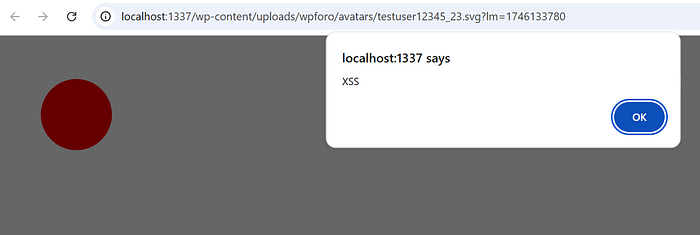
5. Click on the red circle. An "XSS" popup should show up.
Root Cause Analysis
The upload_avatar() function calls a function wpforo_check_for_svg() to validate SVG files.
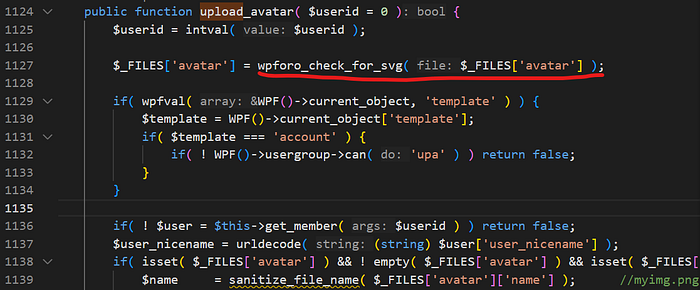
upload_avatar()wpforo_check_for_svg() verifies that the uploaded file's extension belongs to an image and that the MIME type is either image/svg+xml or image/svg. If these checks are passed, wpforo_sanitize_svg() is called.
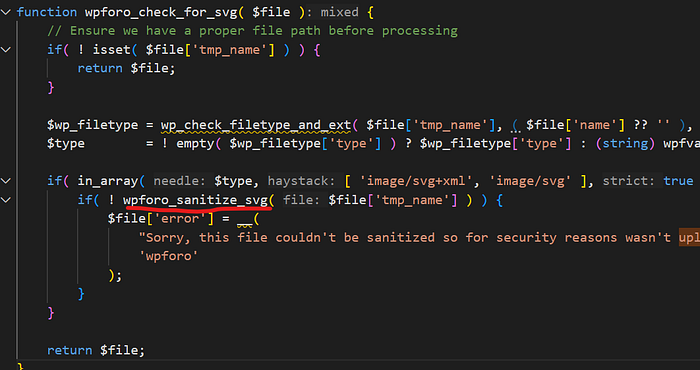
wpforo_check_for_svg()wpforo_sanitize_svg() gzip decodes the SVG if it's gzipped, then passes the SVG to wp_foro_kses() for sanitization.
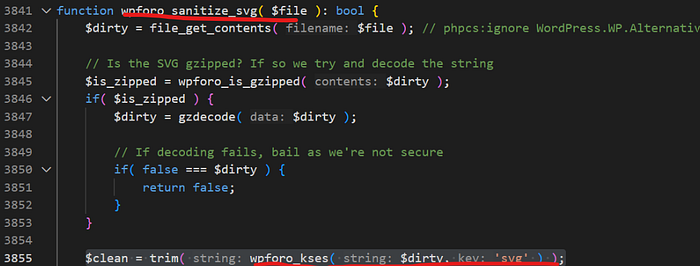
wpforo_sanitize_svg()wpforo_kses() sets the allowed HTML tags and attributes depending on what is passed in the $keyargument (in this case 'svg'). Finally wp_kses() (Note: not the same function as wpforo_kses()) is called, which sanitizes the data.
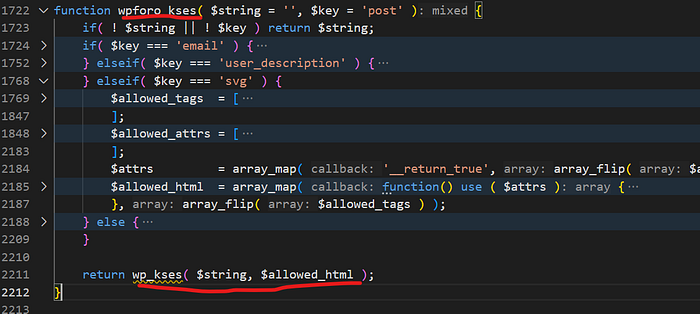
In the case of SVGs, the list of allowed attributes includes xlink:href. But as we noted earlier, this is bad because wp_kses() does not strip the javascript: protocol from the xlink:href attribute! This is the root cause of the XSS vulnerability.

If you enjoyed this article, follow me on LinkedIn where I frequently post tips and tricks which have helped me be a better security engineer: https://www.linkedin.com/in/muhan-luo-620259171/
I also am currently working on projects on GitHub, some related to WordPress security, which you can find here: https://github.com/muhanLuo