
Day 10 of my SC-900 / Microsoft Security learning journey was one of those days where separate concepts started connecting into a bigger picture.
Up to this point, I had been learning about security tools in pieces: identity protection here, endpoint security there, email defense somewhere else. But this session helped me understand something much more important: modern attacks do not happen in neat, isolated categories, so modern defense cannot stay siloed either.
This day focused on the Microsoft Defender ecosystem and how Microsoft Defender XDR brings different security capabilities together into a more unified security operations model. Instead of seeing each Defender product as a standalone tool, I started seeing them as parts of a larger defense strategy built around shared signals, coordinated response, threat hunting, exposure reduction, and operational visibility.
What stood out most to me is that the value of the Defender ecosystem is not just in what each tool does individually, but in how they work together to tell the full story of an attack.
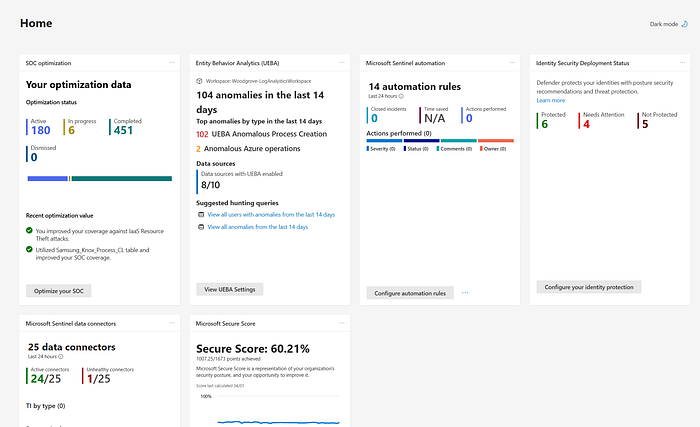
Microsoft Defender XDR
The biggest concept from Day 10 was Microsoft Defender XDR itself.
What makes XDR important is that it reflects how real attacks actually unfold. A threat might begin with a phishing email, move into a compromised identity, spread to an endpoint, and then reach cloud apps or sensitive data. If security teams are using disconnected tools, they may see fragments of the attack without understanding the full chain.
Microsoft Defender XDR is designed to solve that problem. It unifies signals across identities, endpoints, email, and cloud apps so security teams can detect, investigate, and respond from a single platform. That unified approach felt like the real heart of today's learning.
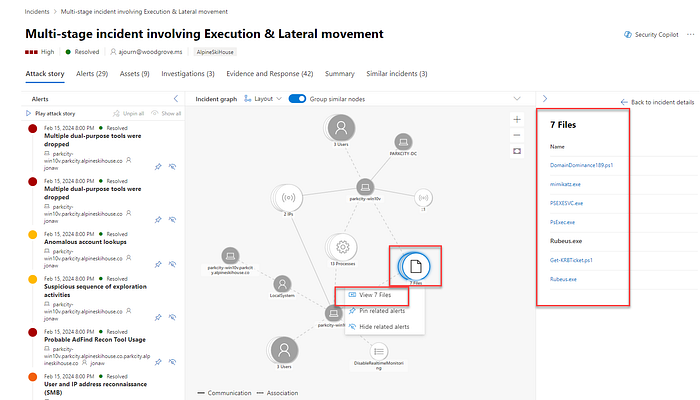
I also learned that Defender XDR is not just about collecting alerts in one place. It adds cross-product capabilities that make the platform stronger than isolated tools. Related alerts can be grouped into a single incident. Threat intelligence can be shared automatically across products. Response actions can happen across workloads. Analysts can hunt across multiple data sources. In other words, XDR is not just a dashboard strategy. It is an operational strategy.
That was a major mindset shift for me.
Microsoft Defender for Office 365
Microsoft Defender for Office 365 helped me better understand how much of modern security still begins at the communication layer.
Email remains one of the most common attack entry points, but Office 365 protection goes beyond basic spam filtering. It covers phishing, spoofing, malicious links, unsafe attachments, and threats that can spread through collaboration tools like Teams, Outlook, SharePoint, and more. That widened my view. I used to think of email security as mostly inbox protection, but this made it clear that collaboration platforms are also part of the attack surface.
Features like Safe Links, Safe Attachments, quarantine policies, threat tracking, and zero-hour auto purge show that this solution is built not only to block threats before delivery, but also to respond after delivery if something is discovered later. That post-delivery response capability felt especially practical because real-world environments are messy, and not every threat is caught at the first stage.
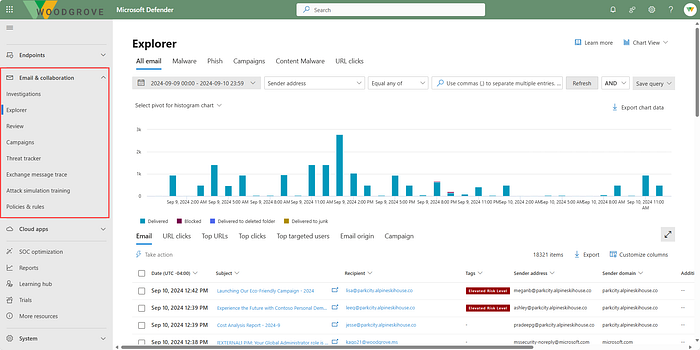
I also found the investigation side interesting. Message trace, Threat Explorer, campaign views, and automated investigation and response make this feel much more like an active security operations tool than just a filtering service.
Microsoft Defender for Endpoint
Microsoft Defender for Endpoint expanded my understanding of endpoint security beyond antivirus.
What I learned here is that endpoint protection today is layered. It starts with prevention, but it also includes behavioral monitoring, cloud analytics, threat intelligence, detection and response, automated remediation, and risk visibility. That makes it far more dynamic than the older idea of just installing endpoint protection and hoping for the best.

I liked how Defender for Endpoint combines attack surface reduction, next-generation protection, EDR, and automated investigation. It reflects the reality that endpoints are one of the most valuable places to detect attacker behavior because they are often where execution, persistence, and lateral movement become visible.
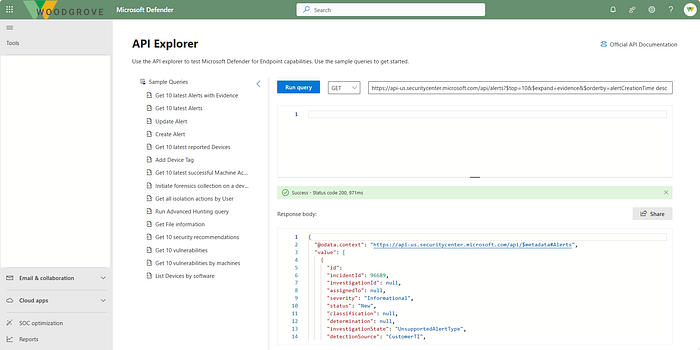
Another important takeaway for me was how closely endpoint security and vulnerability management are linked. Defender for Endpoint is not only about identifying malicious behavior; it also helps reveal weaknesses attackers could exploit in the first place. That connection between active defense and proactive risk reduction made a lot of sense.
Microsoft Defender for Cloud Apps
Defender for Cloud Apps showed me how security has to follow users and data into SaaS environments.
In hybrid and cloud-first organizations, users are constantly working in external applications, often outside the traditional network perimeter. That means security teams need visibility not just into devices and identities, but also into the apps people are using, the data stored there, the permissions granted to third-party apps, and the risky behavior happening across cloud services.
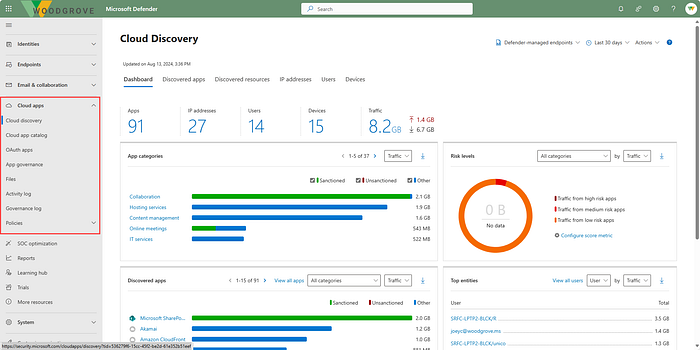
What stood out to me is that Defender for Cloud Apps combines CASB functionality with posture management and threat protection. It helps discover shadow IT, assess app risk, enforce data controls, monitor suspicious activity, and secure OAuth-connected applications. That makes it more than a monitoring tool. It is a control layer for SaaS risk.

I also found the app governance and AI agent protection pieces especially relevant. As organizations rely more on app integrations and AI-based workflows, the attack surface grows in less obvious ways. This part of the Defender ecosystem helped me see that modern security must account for machine-to-machine access and emerging AI risks, not just human behavior.
Microsoft Defender for Identity
Defender for Identity deepened my understanding of identity as both a target and a pathway in an attack.
Attackers often do not stop after compromising one account. They escalate privileges, move laterally, abuse trust relationships, and try to take control of high-value systems. Defender for Identity focuses on those patterns, especially in hybrid environments that still depend on on-premises Active Directory alongside cloud identity systems.
What I found most useful is that this solution is about identity threat detection and response, not just authentication management. It looks for suspicious behavior such as reconnaissance, compromised credentials, lateral movement, and signs of domain dominance. That gives identity a much more active role in security operations.

It also helped me appreciate how identity posture connects to investigation. Understanding which accounts are sensitive, risky, or exposed through lateral movement paths can make the difference between reacting to an alert and truly understanding attacker intent.
Microsoft Defender Vulnerability Management
Defender Vulnerability Management helped me think more clearly about the difference between simply finding vulnerabilities and prioritizing them intelligently.
In theory, every vulnerability matters. In practice, security teams need to know what matters most right now. That is where risk-based prioritization becomes so important. Defender Vulnerability Management does not just produce a long list of weaknesses. It adds context using threat intelligence, business importance, exploit likelihood, and device exposure so teams can focus on the issues most likely to matter in a real breach.
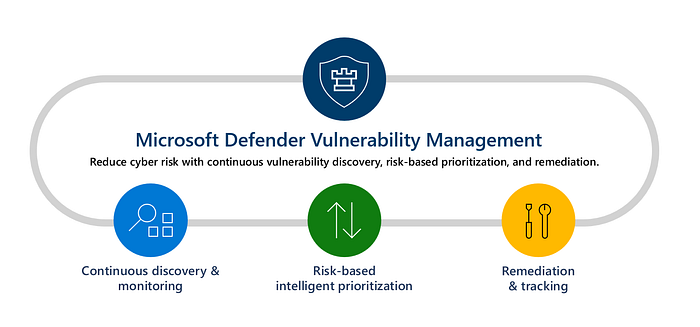
I liked how the product is built around three ideas: continuous discovery, intelligent prioritization, and remediation tracking. That structure made the concept feel practical. First, you need visibility. Then you need prioritization. Then you need a way to get things fixed and measure progress.
This part of the module also reinforced something I am increasingly seeing across security: good operations depend on strong collaboration between security and IT. Vulnerability management is not just about identifying risk. It is about turning findings into remediation workflows that actually reduce exposure.
Microsoft Defender Threat Intelligence
Defender Threat Intelligence helped me understand the value of external context in security operations.
Analysts often need more than internal alerts. They need to know whether an IP, domain, vulnerability, or threat actor has known malicious associations. Defender TI pulls together that kind of intelligence so analysts spend less time piecing information together manually and more time making decisions.
What stood out here was how threat intelligence supports multiple stages of security work. It helps with triage, incident response, threat hunting, and vulnerability management. It is not just research material; it is operational context.
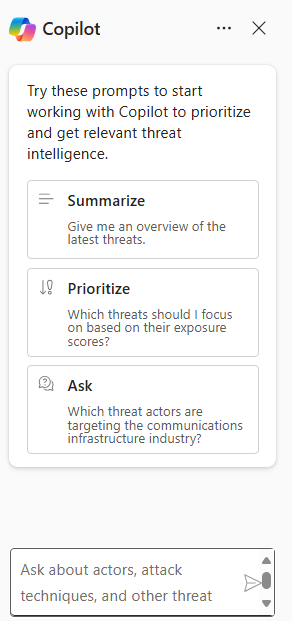
I also found it interesting that threat analytics can show which threats are most relevant to an organization based on actual exposure and activity. That moves threat intelligence from being passive background information to something much more actionable.
Microsoft Security Exposure Management
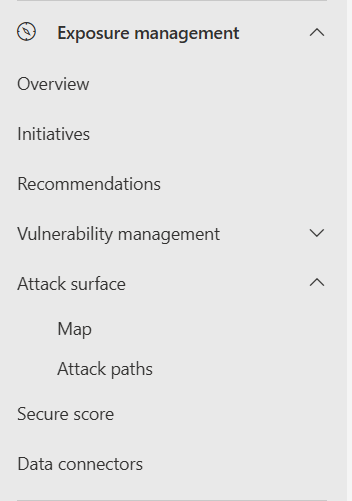
Security Exposure Management may have been one of the most strategic topics from the entire day.
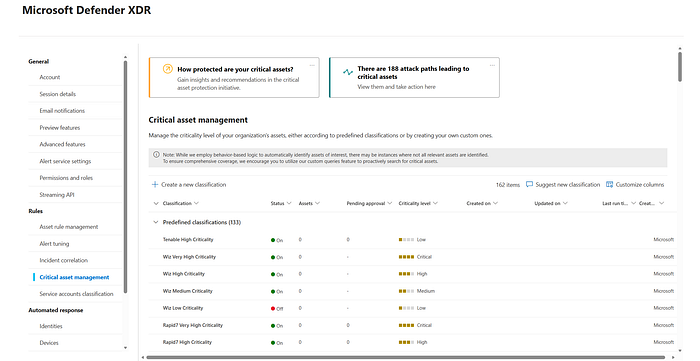
While Defender Vulnerability Management focuses more directly on vulnerabilities and misconfigurations, Security Exposure Management zooms out to answer broader questions. What does the overall attack surface look like? Which assets are most critical? What attack paths exist across endpoints, identities, cloud resources, and apps? Where are the choke points that would disrupt multiple attacker routes?
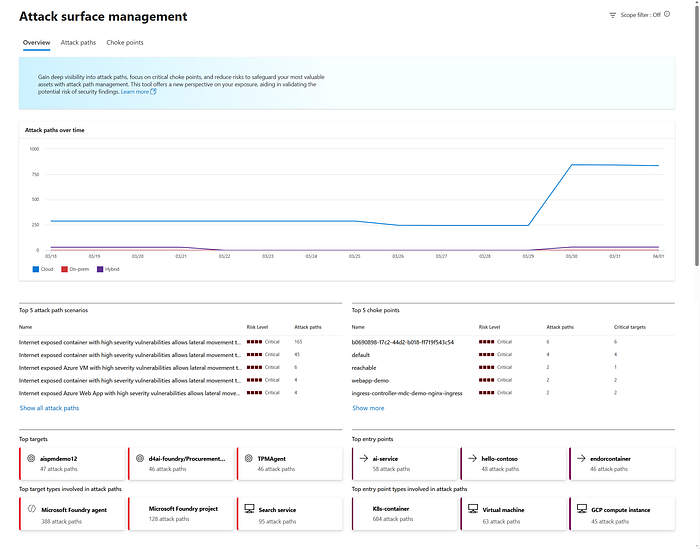
That broader perspective was powerful.
The ideas of the enterprise exposure graph, attack surface map, and attack paths helped me better understand that risk is not only about individual weaknesses. It is also about relationships between weaknesses. A single vulnerability might not seem catastrophic on its own, but when combined with an overprivileged identity or a cloud misconfiguration, it can become part of a serious attack path.
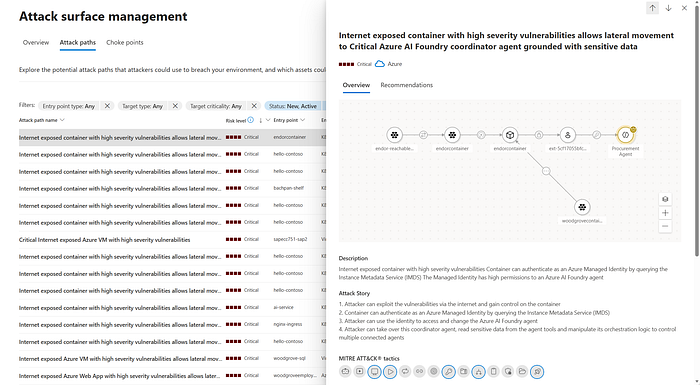
This section made me think more like a defender trying to anticipate attacker movement, not just respond to isolated findings.
Microsoft Defender portal
The Microsoft Defender portal tied everything together.
Rather than treating each security product as a separate place to work, the portal acts as a unified security operations platform. That matters because operational fragmentation creates delay, and delay gives attackers room to move.
I learned that the portal brings together incidents, alerts, assets, exposure insights, hunting, actions, submissions, reports, and more across Microsoft Defender XDR, Microsoft Sentinel, and Microsoft Defender for Cloud. From a learning perspective, this helped me see how security teams can work from a central location instead of constantly pivoting between consoles.
I also liked the role-based and customizable design. That may seem like a small detail, but it reflects operational reality. Security leaders, analysts, and administrators do not all need the same views. A unified platform still has to adapt to different responsibilities.
Microsoft Security Copilot integration with Defender XDR
One of the most exciting parts of Day 10 was seeing how Microsoft Security Copilot fits into Defender XDR.
What made this feel meaningful is that Copilot is not presented as a replacement for analysts. It is more like an accelerator.

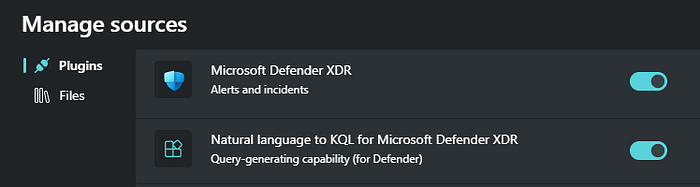
It can summarize incidents, recommend guided responses, generate KQL queries from natural language, analyze files and scripts, create incident reports, and provide device or identity summaries. That can reduce the time it takes to move from alert to understanding.

For a learner like me, the natural-language-to-KQL capability was especially interesting because threat hunting can feel intimidating when you are still growing your confidence. The idea that AI can help bridge that gap without removing the need to understand the investigation itself feels both practical and empowering.
I was also interested in the autonomous agents, especially the Phishing Triage Agent and Threat Intelligence Briefing Agent. They show how AI can take on repetitive, high-volume work while still keeping human analysts in control of the bigger decisions.
How It All Connects
The most valuable lesson from Day 10 was that the Microsoft Defender ecosystem makes the most sense when viewed as a connected defense platform.
Defender for Office 365 helps stop and investigate threats that enter through email and collaboration tools. Defender for Endpoint protects and monitors devices where attacker activity often becomes visible. Defender for Identity focuses on compromised accounts, privilege escalation, and lateral movement. Defender for Cloud Apps extends visibility and protection into SaaS environments and app integrations. Defender Vulnerability Management identifies exploitable weaknesses and helps prioritize remediation. Defender Threat Intelligence adds external context. Security Exposure Management reveals the broader attack surface, critical assets, and attack paths. The Defender portal provides the operational center where all of this comes together.
Microsoft Defender XDR is what turns those capabilities into a coordinated ecosystem.
That coordination shows up in several important ways. Alerts from different workloads can be grouped into a single incident so analysts see one attack story instead of multiple disconnected notifications.
Signals can be shared across services so one detection strengthens protection elsewhere. Automated actions can isolate devices, disable accounts, purge malicious messages, or support recovery. Analysts can use advanced hunting across cross-product data to investigate more deeply. Exposure data helps teams move from pure detection toward prevention and resilience.
This is what made the architecture click for me: each Defender solution protects a different part of the environment, but XDR is what gives defenders the visibility to connect cause, impact, and response.
My Key Takeaways
One of my biggest takeaways from Day 10 is that modern security operations depend on correlation. A phishing email, a suspicious sign-in, a compromised endpoint, and unusual cloud app activity may look like separate events until they are connected. Defender XDR is valuable because it connects them.
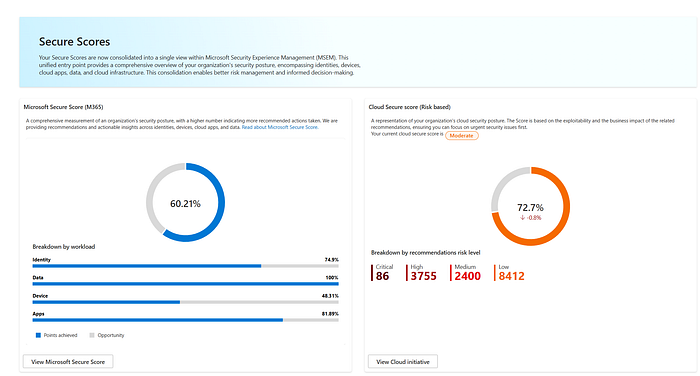
Another key lesson is that defense is not only about detecting bad things. It is also about reducing exposure before attacks succeed. That is where vulnerability management and exposure management become essential. Detection and response matter, but so does understanding what an attacker could exploit next.
I also came away with a stronger appreciation for the Microsoft Defender portal as an operational workspace, not just an interface. A unified portal can reduce friction, improve visibility, and help security teams move faster when seconds matter.
And finally, I saw Microsoft Security Copilot as a practical force multiplier. Its real value is not that it sounds advanced, but that it can shorten the path from raw signals to actionable understanding.
Personal Reflection
Day 10 felt like a turning point in how I think about security operations.
Earlier in my learning journey, it was easier to think about security tools in categories: identity tools, endpoint tools, email tools, cloud tools. But this module pushed me to think more like an attacker and, because of that, more like a defender. Attackers do not care how an organization labels its tools. They move through whatever paths are open. So defenders need visibility that crosses those boundaries.
That is why this day stood out so much for me.
It deepened my understanding of how security shifts from isolated protection controls to an ecosystem model built on shared intelligence, automation, posture awareness, and cross-product investigation. It also gave me a better appreciation for why security operations is both technical and strategic. It is not just about chasing alerts. It is about understanding systems, relationships, priorities, and response flow.
As someone growing in cloud security, threat detection, vulnerability management, and security operations, this was one of the clearest examples yet of how modern security platforms are designed to work in the real world. The more I learn, the more I realize that effective defense is not about having the most tools. It is about having tools that work together in a meaningful way.
Day 10 helped me move beyond learning product names and features into understanding how a real security ecosystem functions.
The Microsoft Defender suite showed me how organizations can protect email, devices, identities, cloud apps, and vulnerabilities as connected parts of one environment. Microsoft Defender XDR showed me how those signals become a unified defense story. The Microsoft Defender portal showed me where that story becomes operational. And Microsoft Security Copilot showed me how AI can help analysts work faster and smarter without removing the need for human judgment.
I am leaving this day with a stronger understanding of what modern security operations really looks like: connected, contextual, proactive, and increasingly intelligent. And that makes me even more motivated for the next stage of this learning journey.