

Don't be intimated by words and numbers on a screen. If you're interested in hiding private data such as addresses, emails, names, phone numbers and much more, this article will provide that utility for your experiment :)
Summary
OpenAI's Privacy Filter model presents a promising information security feature set that automatically recognizes and redacts private information from provided text.
The model is ideal for experimentation, customization, and commercial deployment due to its permissive Apache 2.0 license. It is small sized and capable of running on a web browser or laptop while also being fine-tunable, and has a long context window.
How it Works
Its basic level of operation is through what is called token classification and prediction to perform detection across eight (8) privacy feature categories:
account_numberprivate_addressprivate_emailprivate_personprivate_phoneprivate_urlprivate_datesecret
As a bidirectional token classification model, OpenAI's Privacy Filter uses a pre-trained language model, modified and post-trained for token classification, with constrained sequence decoding for coherent span labels.
Let's Try It
I wanted to get straight into some testing and try this model so my initial investigation was to look into the sample code provided on the model's page on Hugging Face.
If this is new to you, we can consider Hugging Face as a platform like GitHub but for open-source AI models.
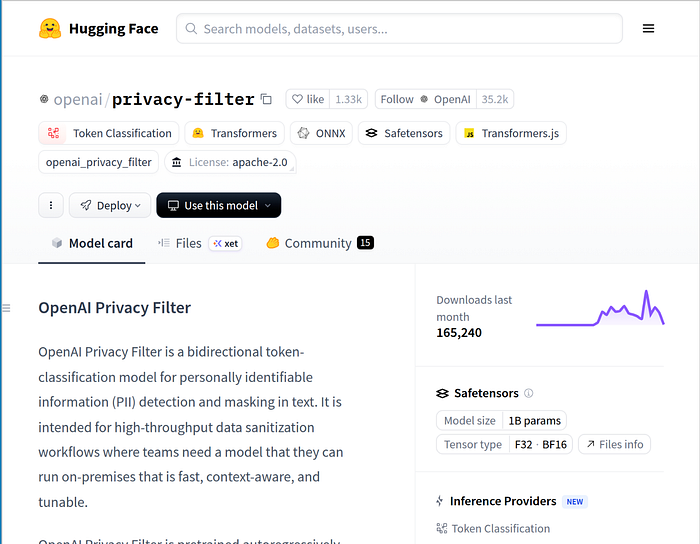
The following sample Python code allows us to use the model to predict and mask private data which the model was trained to recognize, then we output the text so we review how the model performed.
Before you go, you can also test the model on Google Colab and experiment with it on Google's servers without installing Python on your system :)
def redact_info(input_text):
    inputs = tokenizer(
        input_text,
        return_tensors="pt",
        return_offsets_mapping=True,
        return_special_tokens_mask=True
    )

    offset_mapping = inputs.pop("offset_mapping")[0]
    special_tokens_mask = inputs.pop("special_tokens_mask")[0]

    inputs = {k: v.to(model.device) for k, v in inputs.items()}

    with torch.no_grad():
        outputs = model(**inputs)

    predicted_ids = outputs.logits.argmax(dim=-1)[0]
    predicted_labels = [model.config.id2label[i.item()] for i in predicted_ids]

    words = input_text.split()
    masked_words = []

    current_pos = 0

    for word in words:
        start = input_text.find(word, current_pos)
        end = start + len(word)
        current_pos = end

        word_label = "O"

        for label, offset, is_special in zip(predicted_labels, offset_mapping, special_tokens_mask):
            if is_special:
                continue

            token_start, token_end = offset.tolist()

            # Check if this token overlaps the word
            if token_start < end and token_end > start:
                if label != "O":
                    word_label = label
                    break

        if word_label != "O":
            masked_words.append(word_label)
        else:
            masked_words.append(word)

    masked_text = " ".join(masked_words)
    return masked_text
Using the provided function in the following manner, we have observed the given output.
redacted_output = redact_info("My name is Alice Smith")
print(redacted_output)
Output > My name is B-private_person E-private_person
We have observed successful behavior of the model in this use case.
Are you bored Yet?
I wanted to take this further and try this on a text file having 219 lines of text content which resembles fake leaked data that you would typically see online if someone doxxed you or your data was leaked on the dark web.
The following code example builds upon the previously provided redact_info code function. If you want to execute this on a text file, you will need to run the previous code example for this to work as well:
import os

def redact_private_info_from_file(input_filename):
    """Reads a file, redacts private information, and writes to a new _redacted.txt file."""
    try:
        with open(input_filename, 'r', encoding='utf-8') as f:
            input_text = f.read()
    except FileNotFoundError:
        print(f"Error: File '{input_filename}' not found.")
        return
    except Exception as e:
        print(f"Error reading file '{input_filename}': {e}")
        return

    redacted_text = redact_info(input_text)

    # Construct the output filename
    base, ext = os.path.splitext(input_filename)
    output_filename = f"{base}_redacted.txt"

    try:
        with open(output_filename, 'w', encoding='utf-8') as f:
            f.write(redacted_text)
        print(f"Redacted content written to '{output_filename}'")
    except Exception as e:
        print(f"Error writing to file '{output_filename}': {e}")

# Example usage (you would replace 'your_input_file.txt' with an actual file path)
# Create a dummy file for demonstration
# with open('test_input.txt', 'w') as f:
#     f.write('My name is Alice Smith, and my email is alice.smith@example.com. My phone number is 123-456-7890.')
#
# redact_private_info_from_file('test_input.txt')
The Results
Upon running the code on Google Colab's CPU configuration, not GPU, the 219 line text file took approximately two (2) minutes to be processed.
I'll show you a snippet of output which was observed from the test.
# ============================================================ # This file contains fake credential-like, doxx-like, and payment-like data. # Intended for privacy/PII filtering tests only. # No real persons, accounts, cards, or services are represented. # ============================================================ URL: https://example.com/login USERNAME: B-private_email PASSWORD: B-secret NAME: B-private_person E-private_person PHONE: B-private_phone ADDRESS: B-private_address I-private_address I-private_address I-private_address I-private_address I-private_address I-private_address CARD: B-account_number I-account_number I-account_number I-account_number EXP: 04/29 CVV: 123 IP: B-private_url
Interestingly, the model performed well here. I suppose that my credit card's expiry date and my CVV digits are up for sale by now on the dark web though.
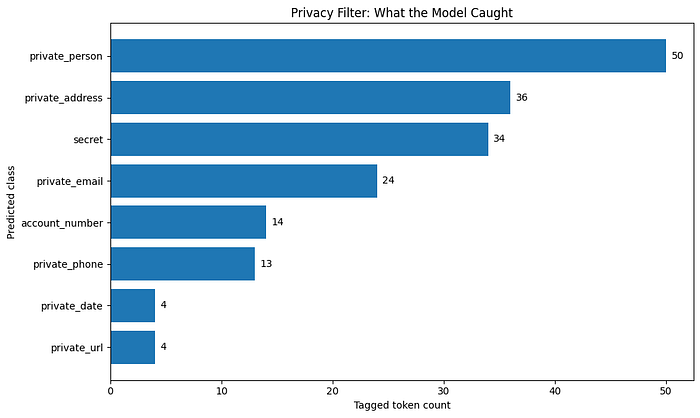
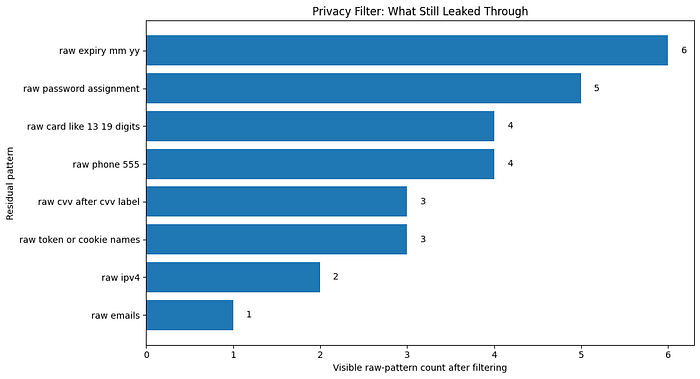
This was enough for me to understand the base model's strengths and weaknesses. Its also an opportunity for us to decide if we should fine-tune the model to enhance performance and/or behavior of what the model is able to capture for us to redact/hide.
The Disadvantages/Downsides and Cons
It should be noted that performance of the model may drop on non-English text, non-Latin scripts, protected-group naming patterns, or domains that are out of distribution compared to the model's training.
Additionally, Privacy Filter is best used as one of multiple layers in a holistic end-to-end privacy-by-design approach rather than a overall anonymization, compliance and safety tool.
"Over-reliance on the tool as a blanket anonymization claim would risk missing desired privacy objectives." ~ OpenAI, HuggingFace
Stay happy, Stay experimenting :)