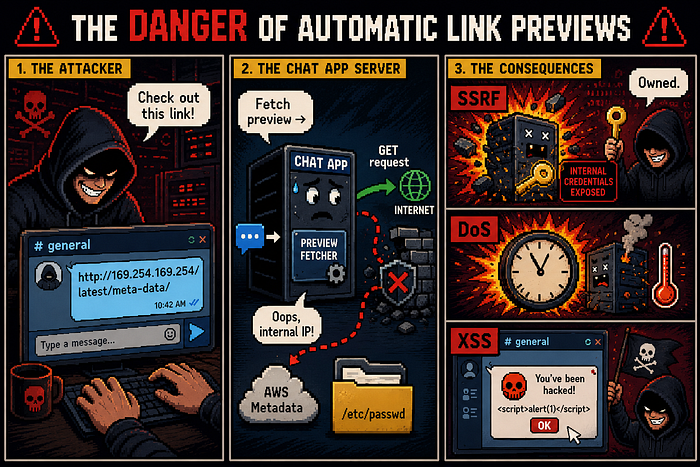
June 5, 2026
Secure Implementation Of Link Previews In Chat Applications
Don’t let link previews pwn your infrastructure — a complete security guide.

23
8 min read
Abstract
Link previews in chat applications — where the system automatically fetches a title, description, and image from a user‑supplied URL — introduce significant security risks. Attackers can exploit this functionality to perform Server‑Side Request Forgery (SSRF), Denial of Service (DoS), Cross‑Site Scripting (XSS), privacy leakage, and data exfiltration. This report analyzes these threat vectors and presents a defense‑in‑depth mitigation strategy. The recommended approach combines strict application‑level controls (URL scheme whitelisting, private IP blocklisting, timeouts, size limits, safe HTML parsing, output sanitization, IP Pinning, and aggressive caching) with network segmentation — specifically placing the preview fetcher inside a Demilitarized Zone (DMZ). The DMZ isolates the fetcher from internal networks, preventing lateral movement in case of compromise. Firewall rules allow only outbound HTTP/HTTPS requests from the DMZ to the internet and deny any direct inbound internet access or internal network connections. Additional mitigations include using a forward proxy with IP blocklists, sandboxed containers, rate limiting, and client‑side safe rendering (plain text, not HTML). This layered architecture ensures that even if the fetcher contains unknown vulnerabilities, the overall system remains resilient. The report concludes that automatic link previews can be implemented securely only when both application‑level hardening and network‑level isolation (DMZ) are enforced together.
Introduction
Modern chat applications (Telegram, Slack, WhatsApp, Microsoft Teams) enhance user experience by showing a rich preview when a user sends a link. However, the automatic fetching of arbitrary URLs expands the attack surface significantly. An attacker can craft a malicious link that, when previewed, compromises the chat server, leaks internal data, or attacks the client.
Threat Landscape: Link Preview Vulnerabilities
1. Server‑Side Request Forgery (SSRF):
1.1) Description: The preview server is tricked into making requests to internal IP addresses, localhost, cloud metadata endpoints, or internal APIs. The attacker controls the target URL.
1.2) Real word example:
CVE‑2022‑25876 (link-preview-js npm package) — SSRF due to flawed DNS rebinding protection, enabling local network scanning.
1.3) Impacts:
a) Reading cloud metadata (e.g., AWS 169.254.169.254) → credential theft.
b) Port scanning internal services.
c) Accessing internal admin panels or APIs.
d) Using file:// protocol (if allowed) to read local files and …
2. Denial of Service (DOS):
2.1) Description: Resource exhaustion caused by slow responses, huge payloads, decompression bombs, or redirect loops.
2.2) Real word example:
CVE-2023–5969(Denial of Service via Link Preview in /api/v4/redirect_location) allowing attackers to send specially crafted requests that exploit caching of large objects, leading to excessive memory consumption.
2.3) Impacts:
a) Chat service becomes unresponsive.
b) Increased cloud costs due to autoscaling triggered by many stuck requests.
3. Cross Site Scripting(XSS):
3.1) Description: The metadata (title, description) fetched from the link is rendered unsafely in the chat client, allowing script injection.
3.2) Real word example:
CVE‑2025‑11987 (WordPress Visual Link Preview) — Stored XSS due to insufficient sanitization of link preview data.
3.3) Impact:
Session hijacking, defacement, credential theft, or malware distribution.
4. Privacy Leakage And Data Exfiltration:
4.1) Description: The act of fetching a preview leaks information (IP address, User‑Agent, time) to the link owner. Additionally, sensitive data can be exfiltrated via the preview process.
4.2) Real word example:
CVE‑2018‑20436 (Telegram Secret Chat) — GET requests sent before the message is actually sent, creating a side‑channel to detect when a user views a link.
4.3) Impact:
Leak of user online status, geolocation (approximate), or private conversation snippets.
5. Protocol Smuggling & Phishing:
5.1 ) Protocol abuse — javascript://, data://, file://, gopher:// can bypass validation or lead to client‑side execution.
5.2 ) Content spoofing — Preview shows a legitimate domain (e.g., google.com) while the actual destination is evil.com. Users trust the preview and click.
6. XXE (XML External Entity):
If the link preview service processes an XML-based format (e.g., SVG, RSS, or XHTML) without disabling external entities, an attacker can inject a malicious entity that reads local files (e.g., file:///etc/passwd), performs SSRF to internal endpoints, or triggers a denial of service (e.g., Billion Laughs attack). In link previews, this commonly occurs when fetching SVG images or XML feeds that the server parses to extract metadata.
7.DNS Rebinding:
A domain is validated as safe (public IP), but after validation the DNS is changed to resolve to an internal address, tricking the fetcher into attacking internal hosts. Impact: Bypasses IP blocklists, enables SSRF on previously validated domains. Mitigation: Pin the IP after initial DNS resolution; reject any domain where the resolved IP changes between validation and fetch; use a DNS resolver that disables rebinding and do this manual (IP Pinning Method For Preparing Important Security Measurement) (e.g., by ignoring TTL=0).
Secure Implementation Architecture
A secure link preview system must be designed with defense in depth. The core principle: never trust the URL or its content.
High Level Design:
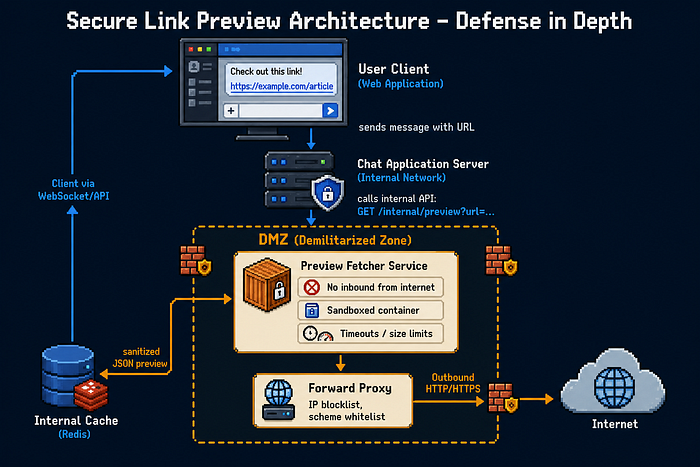
Role Of The DMZ:
A DMZ is a network segment isolated from both the internet and the internal network by two firewalls.
1) Why a DMZ for link previews?
-
The preview fetcher must initiate connections to arbitrary user‑controlled URLs — this is inherently dangerous.
-
If the fetcher is compromised (e.g., via a buffer overflow in an HTML parser), the attacker lands in the DMZ, not on your core application or database servers.
-
From the DMZ, lateral movement to the internal network is blocked by firewall rules (only established/related responses allowed back, no new connections).
Application‑Level Defenses (Inside the Fetcher):
Even with a DMZ, the fetcher must implement strict controls:
1.URL Validation & Scheme Whitelist:
-
Allow only http:// and https://.
-
Reject file://, javascript://, data://, gopher://, ftp://.
-
Normalize and re‑validate after each redirect.
2.Block Internal IPs & Reserved Ranges:
-
Deny requests to: 127.0.0.0/8, 10.0.0.0/8, 172.16.0.0/12, 192.168.0.0/16, 169.254.0.0/16, ::1, fc00::/7.
-
Use a DNS resolver that rejects internal hostnames (localhost, internal‑api).
3.Timeouts & Size Limits:
-
Connection timeout: 5 seconds
-
Read timeout: 10 seconds total
-
Max download size: 2 MB for HTML, 10 MB for images (then compress/resize)
-
Max redirects: 5 (re‑validate each target)
-
Disable compression (gzip, deflate) to avoid decompression bombs.
4.Safe HTTP Fetching:
-
Use HEAD request first to check Content‑Length and Content‑Type.
-
Never send cookies, authentication headers, or custom User‑Agent. Use (User‑Agent: LinkPreviewBot/1.0)
-
Ignore Set‑Cookie responses.
5.HTML & Metadata Sanitization:
-
Parse HTML with a non‑JavaScript parser (e.g., lxml with defusedxml, Go's html.Parse).
-
Extract only: og:title, og:description, og:image, twitter:card,
, first <meta name="description">.</p> </li> <li> <p>Strip all scripts, event handlers, and CSS expressions.</p> </li> <li> <p>Escape output: treat title/description as plain text, apply HTML escaping (< etc.) before embedding in JSON.</p> </li> </ol> <p><strong>6.Caching:</strong></p> <ol> <li> <p>Cache preview results keyed by normalized URL for 7–30 days.</p> </li> <li> <p>Benefits: reduces load, prevents attackers from re‑probing internal IPs via the same URL, limits timing‑based privacy leaks.</p> </li> </ol> <h3 id="client-side-security">Client Side Security</h3> <ol> <li> <p>Never use innerHTML with preview data. Use textContent or framework‑safe bindings.</p> </li> <li> <p>Proxy image URLs through your server (or use referrerpolicy="no-referrer" and crossorigin="anonymous").</p> </li> <li> <p>Display the actual destination domain alongside the preview to mitigate phishing.</p> </li> </ol> <h3 id="additional-hardening">Additional Hardening</h3> <p><strong>1) Rate limiting — Per user / per IP:</strong></p> <p>limit the number of preview requests to prevent abuse.</p> <p><strong>2) Logging & monitoring:</strong></p> <p>Log all fetched URLs (anonymized user ID) to detect scanning patterns. Ship logs to a SIEM.</p> <p><strong>3) Regular updates:</strong></p> <p>DMZ containers should be rebuilt weekly with the latest security patches.</p> <p><strong>4) Preventing SSRF with IP Obfuscation:</strong></p> <p>An attacker may bypass security filters by using different address representation formats. Many network libraries automatically convert these formats to numeric addresses, so validation must be done after full normalization.</p> <p><strong>Warning</strong>: Any host that is converted to any format of IP (IPv4/IPv6) after normalization should be rejected for preview generation.</p> <p><strong>Address formats that need to be recognized and normalized:</strong></p> <p>• 127.0.0.1 → 2130706433 :Decimal</p> <p>• 127.0.0.1 → 0x7f000001 :Hex</p> <p>• 127.0.0.1 → 0177.0.0.1 :Octal</p> <p>• 127.0.0.1 → 127.1 :Partial</p> <p>• 127.0.0.1 → ::ffff:127.0.0.1 :IPv6-mapped IPv4</p> <p>• 0:0:0:0:0:0:1 → ::1 :IPv6 shorthand</p> <p><strong>5) Safely managing SVG files and preventing XXE:</strong></p> <p>SVG files can contain external references (<image xlink:href>) or external XML entities, which can lead to XXE or secondary attacks.</p> <p><strong>Implementation Requirements:</strong></p> <ol> <li> <p>Safe Option: Block SVG completely — The easiest way is to reject any URL that ends in .svg or has a Content-Type of image/svg+xml.</p> </li> <li> <p>Advanced Option: Sanitizer If SVG support is required:</p> </li> </ol> <p>a) Completely disable External Entities in the XML parser.</p> <p>b) Strip all external references: <use>, <image>, xlink:href.</p> <p>c) Validate SVG structure with a strict Schema.</p> <p>d) Limit SVG file size.</p> <p><strong>6) Prevent Path Traversal in Internal URL Construction:</strong></p> <p>If parts of the destination URL are constructed from user input, an attacker may be able to redirect to sensitive endpoints by injecting ../.</p> <p><strong>Implementation Requirements:</strong></p> <ol> <li> <p>Do not construct URLs with String Concatenation: Never construct URL path parts by concatenating a string from user input.</p> </li> <li> <p>Path normalization: If path concatenation is required, use standard functions such as Path.normalize() and check the result.</p> </li> <li> <p>Explicitly reject "..": Any user input containing ".." must be rejected before being used in URL construction.</p> </li> <li> <p>Use Allowlist pattern: Instead of constructing a dynamic path, use a fixed set of allowed endpoints.</p> </li> </ol> <p><strong>7) Security of internal communications between services:</strong></p> <ol> <li> <p>Authentication: Use JWT with a specific Audience for inter-service requests.</p> </li> <li> <p>Network Isolation: Fetch service in Private Subnet and access only from the chat service.</p> </li> <li> <p>Encryption and Rate Limiting: Traffic over HTTPS and request rate limiting.</p> </li> </ol> <p><strong>8) Message processing flow and behavior:</strong></p> <ol> <li> <p>Get the link from the user's message.</p> </li> <li> <p>Apply security filters (SSRF, DNS Rebinding, Parser Confusion, etc.).</p> </li> <li> <p>If the initial filters pass, the request is forwarded asynchronously to the Fetch service.</p> </li> <li> <p>On success: After extracting and refining the metadata, a message edit request is sent to attach the preview card.</p> </li> <li> <p>On any error or blocking: No error, warning, or status message is displayed to the user. The message remains as plain, clickable text.</p> </li> </ol> <p><strong>Key point: The default behavior is "silent." The user should not know that the preview was not generated — this approach both preserves the user experience and does not provide information to the attacker.</strong></p> <h3 id="final-implementation-checklist">Final Implementation checklist</h3> <ol> <li> <p>Limit protocol acceptance to http and https only.</p> </li> <li> <p>Any host that is converted to an IP format after normalization is rejected for preview.</p> </li> <li> <p>All sensitive IP ranges and internal domain patterns (such as *.cluster.local) are blacklisted.</p> </li> <li> <p>All A/AAAA records returned from DNS are checked, not just the first one.</p> </li> <li> <p>Redirect tracking is disabled in the HTTP client.</p> </li> <li> <p>Network connections are established directly to the verified IP (IP Pinning).</p> </li> <li> <p>Response download size is limited to just enough to extract metadata.</p> </li> <li> <p>Connection and data read timeouts are set to short values.</p> </li> <li> <p>Use a standard parser throughout the flow and do not perform reparsing after validation.</p> </li> <li> <p>Control characters (Tab, Newline, Null) are definitely detected and rejected.</p> </li> <li> <p>Every URL extracted from the HTML response (images, favicon…) should go through the entire validation pipeline again.</p> </li> <li> <p>The extracted values should be sanitized before being sent to the client.</p> </li> <li> <p>In outbound requests, sensitive headers (Authorization, Cookie, X-Forwarded) should be stripped.</p> </li> <li> <p>SVG files should be either blocked or processed with a secure sanitizer and external entity deactivation.</p> </li> <li> <p>Avoid building URLs with String Concatenation and user input; Canonicalize paths and ".." should be rejected.</p> </li> <li> <p>The service should communicate with a dedicated token and be encrypted.</p> </li> <li> <p>If the preview fails, the message should remain in plain text without any notification.</p> </li> </ol> <h3 id="validation-against-attack-vectors">Validation Against Attack Vectors</h3> <picture> <source media="(max-width: 768px)" srcset="/img/700/1*mOZYNWWNppmAz7E-c5N3mw.png 1x"> <source media="(min-width: 769px)" srcset="/img/2000/1*mOZYNWWNppmAz7E-c5N3mw.png 1x"> <img src="/img/700/1*mOZYNWWNppmAz7E-c5N3mw.png" alt="None" width="1122" height="1402" loading="lazy" data-zoom-src="/img/4000/1*mOZYNWWNppmAz7E-c5N3mw.png" class="prose-image"/> </picture> <h3 id="realworld-precedent-telegram--signal">Real‑World Precedent: Telegram & Signal</h3> <p><strong>Telegram's link preview system:</strong></p> <ol> <li> <p>Uses a separate bot (@preview) running in isolated infrastructure.</p> </li> <li> <p>Metadata is fetched server‑side, sanitized, and cached.</p> </li> <li> <p>Clients render previews as plain text (no HTML).</p> </li> </ol> <p><strong>Signal's approach:</strong></p> <ol> <li> <p>Previews are generated client‑side by default (privacy preserving).</p> </li> <li> <p>For high‑security mode, previews can be disabled entirely.</p> </li> </ol> <p>Both demonstrate that automatic unfurling is a design choice with trade‑offs. For maximum security, consider allowing users to disable previews globally or requiring an explicit click to generate a preview.</p> <h3 id="conclusion">Conclusion</h3> <p>The best way to implement link previews securely is a defense‑in‑depth architecture:</p> <ol> <li> <p>Place the preview fetcher in a DMZ with strict firewalls preventing inbound internet access and outbound connections to internal networks.</p> </li> <li> <p>Apply application‑level controls: whitelist schemes, block private IPs, enforce timeouts and size limits, sanitize all metadata, and cache results.</p> </li> <li> <p>Never trust user input — treat every URL as hostile.</p> </li> <li> <p>Render safely on the client — use plain text, not HTML.</p> </li> <li> <p>Monitor and log all fetching activity.</p> </li> </ol> <p>This combination stops SSRF, DoS, XSS, and data exfiltration attacks even if the fetcher software contains unknown vulnerabilities. While a DMZ adds operational complexity, it is the only way to ensure that a compromised preview service cannot pivot to internal assets. For chat applications handling sensitive data, this architecture is non‑negotiable.</p> <picture> <source media="(max-width: 768px)" srcset="/img/700/1*f0VzEq9270qjX0-DAWkLLA.png 1x"> <source media="(min-width: 769px)" srcset="/img/2000/1*f0VzEq9270qjX0-DAWkLLA.png 1x"> <img src="/img/700/1*f0VzEq9270qjX0-DAWkLLA.png" alt="None" width="1024" height="1536" loading="lazy" data-zoom-src="/img/4000/1*f0VzEq9270qjX0-DAWkLLA.png" class="prose-image"/> </picture> <h3 id="references">References</h3> <ol> <li>CVE‑2022‑25876 (link-preview-js npm package)</li> </ol> <p><a href="https://www.miggo.io/vulnerability-database/cve/CVE-2022-25876" rel="nofollow" target="_blank">https://www.miggo.io/vulnerability-database/cve/CVE-2022-25876<span><svg width="1em" height="1em" viewBox="0 0 24 24" class="inline-block ml-0.5 size-3 align-baseline relative -top-px" stroke="currentColor" fill="none" stroke-width="2" aria-hidden="true" xmlns="http://www.w3.org/2000/svg"><path fill="none" stroke="currentColor" stroke-linecap="round" stroke-linejoin="round" stroke-width="1.5" d="M13.5 6H5.25A2.25 2.25 0 0 0 3 8.25v10.5A2.25 2.25 0 0 0 5.25 21h10.5A2.25 2.25 0 0 0 18 18.75V10.5m-10.5 6L21 3m0 0h-5.25M21 3v5.25"/></svg></span></a></p> <ol start="2"> <li> <p>CVE-2023–5969(Denial of Service via Link Preview in /api/v4/redirect_location) <a href="https://cve.imfht.com/detail/CVE-2023-5969?lang=en" rel="nofollow" target="_blank">https://cve.imfht.com/detail/CVE-2023-5969?lang=en<span><svg width="1em" height="1em" viewBox="0 0 24 24" class="inline-block ml-0.5 size-3 align-baseline relative -top-px" stroke="currentColor" fill="none" stroke-width="2" aria-hidden="true" xmlns="http://www.w3.org/2000/svg"><path fill="none" stroke="currentColor" stroke-linecap="round" stroke-linejoin="round" stroke-width="1.5" d="M13.5 6H5.25A2.25 2.25 0 0 0 3 8.25v10.5A2.25 2.25 0 0 0 5.25 21h10.5A2.25 2.25 0 0 0 18 18.75V10.5m-10.5 6L21 3m0 0h-5.25M21 3v5.25"/></svg></span></a></p> </li> <li> <p>CVE‑2025‑11987 (WordPress Visual Link Preview) <a href="https://www.incibe.es/index.php/en/incibe-cert/early-warning/vulnerabilities/cve-2025-11987" rel="nofollow" target="_blank">https://www.incibe.es/index.php/en/incibe-cert/early-warning/vulnerabilities/cve-2025-11987<span><svg width="1em" height="1em" viewBox="0 0 24 24" class="inline-block ml-0.5 size-3 align-baseline relative -top-px" stroke="currentColor" fill="none" stroke-width="2" aria-hidden="true" xmlns="http://www.w3.org/2000/svg"><path fill="none" stroke="currentColor" stroke-linecap="round" stroke-linejoin="round" stroke-width="1.5" d="M13.5 6H5.25A2.25 2.25 0 0 0 3 8.25v10.5A2.25 2.25 0 0 0 5.25 21h10.5A2.25 2.25 0 0 0 18 18.75V10.5m-10.5 6L21 3m0 0h-5.25M21 3v5.25"/></svg></span></a></p> </li> <li> <p>CVE‑2018‑20436 (Telegram Secret Chat) <a href="https://vi.loginsoft.com/cve/CVE-2018-20436?utm_source=loginsoft&utm_medium=article&utm_id=M9IJGMpHsK" rel="nofollow" target="_blank">https://vi.loginsoft.com/cve/CVE-2018-20436?utm_source=loginsoft&utm_medium=article&utm_id=M9IJGMpHsK<span><svg width="1em" height="1em" viewBox="0 0 24 24" class="inline-block ml-0.5 size-3 align-baseline relative -top-px" stroke="currentColor" fill="none" stroke-width="2" aria-hidden="true" xmlns="http://www.w3.org/2000/svg"><path fill="none" stroke="currentColor" stroke-linecap="round" stroke-linejoin="round" stroke-width="1.5" d="M13.5 6H5.25A2.25 2.25 0 0 0 3 8.25v10.5A2.25 2.25 0 0 0 5.25 21h10.5A2.25 2.25 0 0 0 18 18.75V10.5m-10.5 6L21 3m0 0h-5.25M21 3v5.25"/></svg></span></a></p> </li> <li> <p>OWASP SSRF Prevention Cheat <a href="https://cheatsheetseries.owasp.org/cheatsheets/Server_Side_Request_Forgery_Prevention_Cheat_Sheet.html" rel="nofollow" target="_blank">https://cheatsheetseries.owasp.org/cheatsheets/Server_Side_Request_Forgery_Prevention_Cheat_Sheet.html<span><svg width="1em" height="1em" viewBox="0 0 24 24" class="inline-block ml-0.5 size-3 align-baseline relative -top-px" stroke="currentColor" fill="none" stroke-width="2" aria-hidden="true" xmlns="http://www.w3.org/2000/svg"><path fill="none" stroke="currentColor" stroke-linecap="round" stroke-linejoin="round" stroke-width="1.5" d="M13.5 6H5.25A2.25 2.25 0 0 0 3 8.25v10.5A2.25 2.25 0 0 0 5.25 21h10.5A2.25 2.25 0 0 0 18 18.75V10.5m-10.5 6L21 3m0 0h-5.25M21 3v5.25"/></svg></span></a></p> </li> </ol> <p>Happy Hacking, Special thanks for reading. by <a href="https://x.com/0X23XO" rel="nofollow" target="_blank">https://x.com/0X23XO<span><svg width="1em" height="1em" viewBox="0 0 24 24" class="inline-block ml-0.5 size-3 align-baseline relative -top-px" stroke="currentColor" fill="none" stroke-width="2" aria-hidden="true" xmlns="http://www.w3.org/2000/svg"><path fill="none" stroke="currentColor" stroke-linecap="round" stroke-linejoin="round" stroke-width="1.5" d="M13.5 6H5.25A2.25 2.25 0 0 0 3 8.25v10.5A2.25 2.25 0 0 0 5.25 21h10.5A2.25 2.25 0 0 0 18 18.75V10.5m-10.5 6L21 3m0 0h-5.25M21 3v5.25"/></svg></span></a></p><!----><!--]--></div></div> <div data-nosnippet="" class="border-t border-gray-200 dark:border-zinc-700"><nav class="flex items-center gap-2 p-4"><button type="button" aria-label="Go back" title="Go back" class="flex items-center justify-center transition bg-white rounded-full shadow-md text-primary hover:text-primary/90 size-8 shadow-zinc-800/5 ring-1 ring-zinc-900/5 dark:border dark:border-zinc-700/50 dark:bg-zinc-800 dark:ring-0 dark:ring-white/10 dark:hover:border-zinc-700 dark:hover:ring-white/20"><svg viewBox="0 0 20 20" width="1.2em" height="1.2em" class="size-5"><path fill="currentColor" fill-rule="evenodd" d="M17 10a.75.75 0 0 1-.75.75H5.612l4.158 3.96a.75.75 0 1 1-1.04 1.08l-5.5-5.25a.75.75 0 0 1 0-1.08l5.5-5.25a.75.75 0 1 1 1.04 1.08L5.612 9.25H16.25A.75.75 0 0 1 17 10" clip-rule="evenodd"></path></svg><!----></button> <div class="flex items-center gap-2 ml-auto"><button type="button" aria-label="Share article" title="Share article" class="flex items-center justify-center transition bg-white rounded-full shadow-md text-primary hover:text-primary/90 size-8 shadow-zinc-800/5 ring-1 ring-zinc-900/5 dark:border dark:border-zinc-700/50 dark:bg-zinc-800 dark:ring-0 dark:ring-white/10 dark:hover:border-zinc-700 dark:hover:ring-white/20"><svg viewBox="0 0 20 20" width="1.2em" height="1.2em" class="size-5"><path fill="currentColor" d="M13 4.5a2.5 2.5 0 1 1 .702 1.737L6.97 9.604a2.5 2.5 0 0 1 0 .792l6.733 3.367a2.5 2.5 0 1 1-.671 1.341l-6.733-3.367a2.5 2.5 0 1 1 0-3.475l6.733-3.366A2.5 2.5 0 0 1 13 4.5"></path></svg><!----></button> <!--[--><a href="https://thisis23.medium.com/secure-implementation-of-link-previews-in-chat-applications-07ddbd02e6ec" target="_blank" rel="noopener noreferrer" aria-label="Open original article" title="Open original article" class="flex items-center justify-center transition bg-white rounded-full shadow-md text-primary hover:text-primary/90 size-8 shadow-zinc-800/5 ring-1 ring-zinc-900/5 dark:border dark:border-zinc-700/50 dark:bg-zinc-800 dark:ring-0 dark:ring-white/10 dark:hover:border-zinc-700 dark:hover:ring-white/20"><svg viewBox="0 0 20 20" width="1.2em" height="1.2em" class="size-5"><g fill="currentColor" fill-rule="evenodd" clip-rule="evenodd"><path d="M4.25 5.5a.75.75 0 0 0-.75.75v8.5c0 .414.336.75.75.75h8.5a.75.75 0 0 0 .75-.75v-4a.75.75 0 0 1 1.5 0v4A2.25 2.25 0 0 1 12.75 17h-8.5A2.25 2.25 0 0 1 2 14.75v-8.5A2.25 2.25 0 0 1 4.25 4h5a.75.75 0 0 1 0 1.5z"></path><path d="M6.194 12.753a.75.75 0 0 0 1.06.053L16.5 4.44v2.81a.75.75 0 0 0 1.5 0v-4.5a.75.75 0 0 0-.75-.75h-4.5a.75.75 0 0 0 0 1.5h2.553l-9.056 8.194a.75.75 0 0 0-.053 1.06"></path></g></svg><!----></a><!--]--></div></nav><!----></div></article><!--]--><!--]--><!--]--></div></main> <footer class="svelte-1we6wus"><div class="left svelte-1we6wus">By Freedium. <span class="built svelte-1we6wus">— made with care.</span></div> <nav class="svelte-1we6wus"><a href="/about" class="svelte-1we6wus">About</a> <a href="/privacy" class="svelte-1we6wus">Privacy</a> <a href="/terms" class="svelte-1we6wus">Terms</a> <a href="/rss" class="svelte-1we6wus">RSS</a> <a href="https://github.com/Freedium-cfd" target="_blank" rel="noopener noreferrer" class="svelte-1we6wus">GitHub</a> <a href="https://codeberg.org/Freedium-cfd" target="_blank" rel="noopener noreferrer" class="svelte-1we6wus">Codeberg</a></nav> <div class="icons svelte-1we6wus"><!--[--><a data-slot="button" class="focus-visible:border-ring focus-visible:ring-ring/50 aria-invalid:ring-destructive/20 dark:aria-invalid:ring-destructive/40 aria-invalid:border-destructive inline-flex shrink-0 items-center justify-center gap-2 rounded-md text-sm font-medium whitespace-nowrap transition-all outline-none focus-visible:ring-[3px] disabled:pointer-events-none disabled:opacity-50 aria-disabled:pointer-events-none aria-disabled:opacity-50 [&_svg]:pointer-events-none [&_svg]:shrink-0 [&_svg:not([class*='size-'])]:size-4 hover:bg-accent hover:text-accent-foreground dark:hover:bg-accent/50 size-9" href="https://github.com/Freedium-cfd" target="_blank" rel="noopener noreferrer" aria-label="GitHub"><svg viewBox="0 0 24 24" width="1.2em" height="1.2em" class="size-4"><path fill="currentColor" d="M12 .297c-6.63 0-12 5.373-12 12c0 5.303 3.438 9.8 8.205 11.385c.6.113.82-.258.82-.577c0-.285-.01-1.04-.015-2.04c-3.338.724-4.042-1.61-4.042-1.61C4.422 18.07 3.633 17.7 3.633 17.7c-1.087-.744.084-.729.084-.729c1.205.084 1.838 1.236 1.838 1.236c1.07 1.835 2.809 1.305 3.495.998c.108-.776.417-1.305.76-1.605c-2.665-.3-5.466-1.332-5.466-5.93c0-1.31.465-2.38 1.235-3.22c-.135-.303-.54-1.523.105-3.176c0 0 1.005-.322 3.3 1.23c.96-.267 1.98-.399 3-.405c1.02.006 2.04.138 3 .405c2.28-1.552 3.285-1.23 3.285-1.23c.645 1.653.24 2.873.12 3.176c.765.84 1.23 1.91 1.23 3.22c0 4.61-2.805 5.625-5.475 5.92c.42.36.81 1.096.81 2.22c0 1.606-.015 2.896-.015 3.286c0 .315.21.69.825.57C20.565 22.092 24 17.592 24 12.297c0-6.627-5.373-12-12-12"></path></svg><!----></a><!--]--><!----> <!--[--><a data-slot="button" class="focus-visible:border-ring focus-visible:ring-ring/50 aria-invalid:ring-destructive/20 dark:aria-invalid:ring-destructive/40 aria-invalid:border-destructive inline-flex shrink-0 items-center justify-center gap-2 rounded-md text-sm font-medium whitespace-nowrap transition-all outline-none focus-visible:ring-[3px] disabled:pointer-events-none disabled:opacity-50 aria-disabled:pointer-events-none aria-disabled:opacity-50 [&_svg]:pointer-events-none [&_svg]:shrink-0 [&_svg:not([class*='size-'])]:size-4 hover:bg-accent hover:text-accent-foreground dark:hover:bg-accent/50 size-9" href="https://codeberg.org/Freedium-cfd" target="_blank" rel="noopener noreferrer" aria-label="Codeberg"><svg viewBox="0 0 24 24" width="1.2em" height="1.2em" class="size-4"><path fill="currentColor" d="M11.999.747A11.974 11.974 0 0 0 0 12.75c0 2.254.635 4.465 1.833 6.376L11.837 6.19c.072-.092.251-.092.323 0l4.178 5.402h-2.992l.065.239h3.113l.882 1.138h-3.674l.103.374h3.86l.777 1.003h-4.358l.135.483h4.593l.695.894h-5.038l.165.589h5.326l.609.785h-5.717l.182.65h6.038l.562.727h-6.397l.183.65h6.717A12 12 0 0 0 24 12.75A11.977 11.977 0 0 0 11.999.747m3.654 19.104l.182.65h5.326c.173-.204.353-.433.513-.65zm.385 1.377l.18.65h3.563c.233-.198.485-.428.712-.65zm.383 1.377l.182.648h1.203c.356-.204.685-.412 1.042-.648z"></path></svg><!----></a><!--]--><!----></div></footer><!----></div><!--]--><!----><!----></div><!----><!--]--> <!--[!--><!--]--><!--]--> <script> { __sveltekit_pqxnqu = { base: "", env: {"PUBLIC_API_BASE_URL":"http://backend:7080","PUBLIC_API_URL":"http://backend:7080/api"} }; const element = document.currentScript.parentElement; Promise.all([ import("/_app/immutable/entry/start.DwmcuzH9.js"), import("/_app/immutable/entry/app.BtREQhPm.js") ]).then(([kit, app]) => { kit.start(app, element, { node_ids: [0, 3], data: [null,{type:"data",data:{slug:"https:/medium.com/p/07ddbd02e6ec",eager:{html:"\u003Ch3 id=\"abstract\">\u003Cstrong>Abstract\u003C/strong>\u003C/h3>\n\u003Cp>\u003Cstrong>Link previews\u003C/strong> in chat applications — where the system automatically fetches a title, description, and image from a \u003Cstrong>user‑supplied URL\u003C/strong> — introduce significant security risks. Attackers can exploit this functionality to perform \u003Cstrong>Server‑Side Request Forgery (SSRF), Denial of Service (DoS), Cross‑Site Scripting (XSS), privacy leakage, and data exfiltration\u003C/strong>. This report analyzes these threat vectors and presents a \u003Cstrong>defense‑in‑depth mitigation strategy.\u003C/strong> The recommended approach combines strict application‑level controls (\u003Cstrong>URL scheme whitelisting, private IP blocklisting, timeouts, size limits, safe HTML parsing, output sanitization, IP Pinning, and aggressive caching)\u003C/strong> with network segmentation — specifically placing the preview fetcher inside a \u003Cstrong>Demilitarized Zone\u003C/strong> (\u003Cstrong>DMZ\u003C/strong>). The DMZ isolates the fetcher from internal networks, preventing lateral movement in case of compromise. Firewall rules allow only outbound HTTP/HTTPS requests from the DMZ to the internet and deny any direct inbound internet access or internal network connections. Additional mitigations include using a forward proxy with IP blocklists, sandboxed containers, rate limiting, and client‑side safe rendering (plain text, not HTML). This layered architecture ensures that even if the fetcher contains unknown vulnerabilities, the overall system remains resilient. The report concludes that automatic link previews can be implemented securely only when both application‑level hardening and network‑level isolation (DMZ) are enforced together.\u003C/p>\n\u003Ch3 id=\"introduction\">Introduction\u003C/h3>\n\u003Cp>Modern chat applications (Telegram, Slack, WhatsApp, Microsoft Teams) enhance user experience by showing a rich preview when a user sends a link. However, the automatic fetching of arbitrary URLs expands the attack surface significantly. An attacker can craft a malicious link that, when previewed, compromises the chat server, leaks internal data, or attacks the client.\u003C/p>\n\u003Ch3 id=\"threat-landscape-link-preview-vulnerabilities\">Threat Landscape: Link Preview Vulnerabilities\u003C/h3>\n\u003Cp>\u003Cstrong>1. Server‑Side Request Forgery (SSRF):\u003C/strong>\u003C/p>\n\u003Cp>1.1) Description:\nThe preview server is tricked into making requests to internal IP addresses, localhost, cloud metadata endpoints, or internal APIs. The attacker controls the target URL.\u003C/p>\n\u003Cp>1.2) Real word example:\u003C/p>\n\u003Cp>CVE‑2022‑25876 (link-preview-js npm package) — SSRF due to flawed DNS rebinding protection, enabling local network scanning.\u003C/p>\n\u003Cp>1.3) Impacts:\u003C/p>\n\u003Cp>a) Reading cloud metadata (e.g., AWS 169.254.169.254) → credential theft.\u003C/p>\n\u003Cp>b) Port scanning internal services.\u003C/p>\n\u003Cp>c) Accessing internal admin panels or APIs.\u003C/p>\n\u003Cp>d) Using file:// protocol (if allowed) to read local files and …\u003C/p>\n\u003Cp>\u003Cstrong>2. Denial of Service (DOS):\u003C/strong>\u003C/p>\n\u003Cp>2.1) Description:\nResource exhaustion caused by slow responses, huge payloads, decompression bombs, or redirect loops.\u003C/p>\n\u003Cp>2.2) Real word example:\u003C/p>\n\u003Cp>CVE-2023–5969(Denial of Service via Link Preview in /api/v4/redirect_location) allowing attackers to send specially crafted requests that exploit caching of large objects, leading to excessive memory consumption.\u003C/p>\n\u003Cp>2.3) Impacts:\u003C/p>\n\u003Cp>a) Chat service becomes unresponsive.\u003C/p>\n\u003Cp>b) Increased cloud costs due to autoscaling triggered by many stuck requests.\u003C/p>\n\u003Cp>\u003Cstrong>3. Cross Site Scripting(XSS):\u003C/strong>\u003C/p>\n\u003Cp>3.1) Description:\nThe metadata (title, description) fetched from the link is rendered unsafely in the chat client, allowing script injection.\u003C/p>\n\u003Cp>3.2) Real word example:\u003C/p>\n\u003Cp>CVE‑2025‑11987 (WordPress Visual Link Preview) — Stored XSS due to insufficient sanitization of link preview data.\u003C/p>\n\u003Cp>3.3) Impact:\u003C/p>\n\u003Cp>Session hijacking, defacement, credential theft, or malware distribution.\u003C/p>\n\u003Cp>\u003Cstrong>4. Privacy Leakage And Data Exfiltration:\u003C/strong>\u003C/p>\n\u003Cp>4.1) Description:\nThe act of fetching a preview leaks information (IP address, User‑Agent, time) to the link owner. Additionally, sensitive data can be exfiltrated via the preview process.\u003C/p>\n\u003Cp>4.2) Real word example:\u003C/p>\n\u003Cp>CVE‑2018‑20436 (Telegram Secret Chat) — GET requests sent before the message is actually sent, creating a side‑channel to detect when a user views a link.\u003C/p>\n\u003Cp>4.3) Impact:\u003C/p>\n\u003Cp>Leak of user online status, geolocation (approximate), or private conversation snippets.\u003C/p>\n\u003Cp>\u003Cstrong>5. Protocol Smuggling & Phishing:\u003C/strong>\u003C/p>\n\u003Cp>5.1 ) Protocol abuse — javascript://, data://, file://, gopher:// can bypass validation or lead to client‑side execution.\u003C/p>\n\u003Cp>5.2 ) Content spoofing — Preview shows a legitimate domain (e.g., google.com) while the actual destination is evil.com. Users trust the preview and click.\u003C/p>\n\u003Cp>\u003Cstrong>6. XXE (XML External Entity):\u003C/strong>\u003C/p>\n\u003Cp>If the link preview service processes an XML-based format (e.g., SVG, RSS, or XHTML) without disabling external entities, an attacker can inject a malicious entity that reads local files (e.g., file:///etc/passwd), performs SSRF to internal endpoints, or triggers a denial of service (e.g., Billion Laughs attack). In link previews, this commonly occurs when fetching SVG images or XML feeds that the server parses to extract metadata.\u003C/p>\n\u003Cp>\u003Cstrong>7.DNS Rebinding:\u003C/strong>\u003C/p>\n\u003Cp>A domain is validated as safe (public IP), but after validation the DNS is changed to resolve to an internal address, tricking the fetcher into attacking internal hosts.\nImpact: Bypasses IP blocklists, enables SSRF on previously validated domains.\nMitigation: Pin the IP after initial DNS resolution; reject any domain where the resolved IP changes between validation and fetch; use a DNS resolver that disables rebinding and do this manual (IP Pinning Method For Preparing Important Security Measurement) (e.g., by ignoring TTL=0).\u003C/p>\n\u003Ch3 id=\"secure-implementation-architecture\">Secure Implementation Architecture\u003C/h3>\n\u003Cp>A secure link preview system must be designed with defense in depth. The core principle: never trust the URL or its content.\u003C/p>\n\u003Cp>\u003Cstrong>High Level Design:\u003C/strong>\u003C/p>\n\u003Cpicture>\n \u003Csource media=\"(max-width: 768px)\" srcset=\"/img/700/1*5L3VE5eWRgIlhx7hVECrgg.png 1x\">\n \u003Csource media=\"(min-width: 769px)\" srcset=\"/img/2000/1*5L3VE5eWRgIlhx7hVECrgg.png 1x\">\n \u003Cimg src=\"/img/700/1*5L3VE5eWRgIlhx7hVECrgg.png\" alt=\"None\" width=\"1536\" height=\"1024\" loading=\"lazy\" data-zoom-src=\"/img/4000/1*5L3VE5eWRgIlhx7hVECrgg.png\" class=\"prose-image\"/>\n\u003C/picture>\n\u003Cp>\u003Cstrong>Role Of The DMZ:\u003C/strong>\u003C/p>\n\u003Cp>A \u003Cstrong>DMZ\u003C/strong> is a network segment isolated from both the internet and the internal network by two firewalls.\u003C/p>\n\u003Cp>\u003Cstrong>1) Why a DMZ for link previews?\u003C/strong>\u003C/p>\n\u003Col>\n\u003Cli>\n\u003Cp>The preview fetcher must initiate connections to arbitrary user‑controlled URLs — this is inherently dangerous.\u003C/p>\n\u003C/li>\n\u003Cli>\n\u003Cp>If the fetcher is compromised (e.g., via a buffer overflow in an HTML parser), the attacker lands in the DMZ, not on your core application or database servers.\u003C/p>\n\u003C/li>\n\u003Cli>\n\u003Cp>From the DMZ, lateral movement to the internal network is blocked by firewall rules (only established/related responses allowed back, no new connections).\u003C/p>\n\u003C/li>\n\u003C/ol>\n\u003Cp>\u003Cstrong>Application‑Level Defenses (Inside the Fetcher):\u003C/strong>\u003C/p>\n\u003Cp>Even with a DMZ, the fetcher must implement strict controls:\u003C/p>\n\u003Cp>\u003Cstrong>1.URL Validation & Scheme Whitelist:\u003C/strong>\u003C/p>\n\u003Col>\n\u003Cli>\n\u003Cp>Allow only http:// and https://.\u003C/p>\n\u003C/li>\n\u003Cli>\n\u003Cp>Reject file://, javascript://, data://, gopher://, ftp://.\u003C/p>\n\u003C/li>\n\u003Cli>\n\u003Cp>Normalize and re‑validate after each redirect.\u003C/p>\n\u003C/li>\n\u003C/ol>\n\u003Cp>\u003Cstrong>2.Block Internal IPs & Reserved Ranges:\u003C/strong>\u003C/p>\n\u003Col>\n\u003Cli>\n\u003Cp>Deny requests to: 127.0.0.0/8, 10.0.0.0/8, 172.16.0.0/12, 192.168.0.0/16, 169.254.0.0/16, ::1, fc00::/7.\u003C/p>\n\u003C/li>\n\u003Cli>\n\u003Cp>Use a DNS resolver that rejects internal hostnames (localhost, internal‑api).\u003C/p>\n\u003C/li>\n\u003C/ol>\n\u003Cp>\u003Cstrong>3.Timeouts & Size Limits:\u003C/strong>\u003C/p>\n\u003Col>\n\u003Cli>\n\u003Cp>Connection timeout: 5 seconds\u003C/p>\n\u003C/li>\n\u003Cli>\n\u003Cp>Read timeout: 10 seconds total\u003C/p>\n\u003C/li>\n\u003Cli>\n\u003Cp>Max download size: 2 MB for HTML, 10 MB for images (then compress/resize)\u003C/p>\n\u003C/li>\n\u003Cli>\n\u003Cp>Max redirects: 5 (re‑validate each target)\u003C/p>\n\u003C/li>\n\u003Cli>\n\u003Cp>Disable compression (gzip, deflate) to avoid decompression bombs.\u003C/p>\n\u003C/li>\n\u003C/ol>\n\u003Cp>\u003Cstrong>4.Safe HTTP Fetching:\u003C/strong>\u003C/p>\n\u003Col>\n\u003Cli>\n\u003Cp>Use HEAD request first to check Content‑Length and Content‑Type.\u003C/p>\n\u003C/li>\n\u003Cli>\n\u003Cp>Never send cookies, authentication headers, or custom User‑Agent. Use (User‑Agent: LinkPreviewBot/1.0)\u003C/p>\n\u003C/li>\n\u003Cli>\n\u003Cp>Ignore Set‑Cookie responses.\u003C/p>\n\u003C/li>\n\u003C/ol>\n\u003Cp>\u003Cstrong>5.HTML & Metadata Sanitization:\u003C/strong>\u003C/p>\n\u003Col>\n\u003Cli>\n\u003Cp>Parse HTML with a non‑JavaScript parser (e.g., lxml with defusedxml, Go's html.Parse).\u003C/p>\n\u003C/li>\n\u003Cli>\n\u003Cp>Extract only: og:title, og:description, og:image, twitter:card, \u003Ctitle>, first \u003Cmeta name=\"description\">.\u003C/p>\n\u003C/li>\n\u003Cli>\n\u003Cp>Strip all scripts, event handlers, and CSS expressions.\u003C/p>\n\u003C/li>\n\u003Cli>\n\u003Cp>Escape output: treat title/description as plain text, apply HTML escaping (< etc.) before embedding in JSON.\u003C/p>\n\u003C/li>\n\u003C/ol>\n\u003Cp>\u003Cstrong>6.Caching:\u003C/strong>\u003C/p>\n\u003Col>\n\u003Cli>\n\u003Cp>Cache preview results keyed by normalized URL for 7–30 days.\u003C/p>\n\u003C/li>\n\u003Cli>\n\u003Cp>Benefits: reduces load, prevents attackers from re‑probing internal IPs via the same URL, limits timing‑based privacy leaks.\u003C/p>\n\u003C/li>\n\u003C/ol>\n\u003Ch3 id=\"client-side-security\">Client Side Security\u003C/h3>\n\u003Col>\n\u003Cli>\n\u003Cp>Never use innerHTML with preview data. Use textContent or framework‑safe bindings.\u003C/p>\n\u003C/li>\n\u003Cli>\n\u003Cp>Proxy image URLs through your server (or use referrerpolicy=\"no-referrer\" and crossorigin=\"anonymous\").\u003C/p>\n\u003C/li>\n\u003Cli>\n\u003Cp>Display the actual destination domain alongside the preview to mitigate phishing.\u003C/p>\n\u003C/li>\n\u003C/ol>\n\u003Ch3 id=\"additional-hardening\">Additional Hardening\u003C/h3>\n\u003Cp>\u003Cstrong>1) Rate limiting — Per user / per IP:\u003C/strong>\u003C/p>\n\u003Cp>limit the number of preview requests to prevent abuse.\u003C/p>\n\u003Cp>\u003Cstrong>2) Logging & monitoring:\u003C/strong>\u003C/p>\n\u003Cp>Log all fetched URLs (anonymized user ID) to detect scanning patterns. Ship logs to a SIEM.\u003C/p>\n\u003Cp>\u003Cstrong>3) Regular updates:\u003C/strong>\u003C/p>\n\u003Cp>DMZ containers should be rebuilt weekly with the latest security patches.\u003C/p>\n\u003Cp>\u003Cstrong>4) Preventing SSRF with IP Obfuscation:\u003C/strong>\u003C/p>\n\u003Cp>An attacker may bypass security filters by using different address representation formats. Many network libraries automatically convert these formats to numeric addresses, so validation must be done after full normalization.\u003C/p>\n\u003Cp>\u003Cstrong>Warning\u003C/strong>: Any host that is converted to any format of IP (IPv4/IPv6) after normalization should be rejected for preview generation.\u003C/p>\n\u003Cp>\u003Cstrong>Address formats that need to be recognized and normalized:\u003C/strong>\u003C/p>\n\u003Cp>• 127.0.0.1 → 2130706433 :Decimal\u003C/p>\n\u003Cp>• 127.0.0.1 → 0x7f000001 :Hex\u003C/p>\n\u003Cp>• 127.0.0.1 → 0177.0.0.1 :Octal\u003C/p>\n\u003Cp>• 127.0.0.1 → 127.1 :Partial\u003C/p>\n\u003Cp>• 127.0.0.1 → ::ffff:127.0.0.1 :IPv6-mapped IPv4\u003C/p>\n\u003Cp>• 0:0:0:0:0:0:1 → ::1 :IPv6 shorthand\u003C/p>\n\u003Cp>\u003Cstrong>5) Safely managing SVG files and preventing XXE:\u003C/strong>\u003C/p>\n\u003Cp>SVG files can contain external references (\u003Cimage xlink:href>) or external XML entities, which can lead to XXE or secondary attacks.\u003C/p>\n\u003Cp>\u003Cstrong>Implementation Requirements:\u003C/strong>\u003C/p>\n\u003Col>\n\u003Cli>\n\u003Cp>Safe Option: Block SVG completely — The easiest way is to reject any URL that ends in .svg or has a Content-Type of image/svg+xml.\u003C/p>\n\u003C/li>\n\u003Cli>\n\u003Cp>Advanced Option: Sanitizer If SVG support is required:\u003C/p>\n\u003C/li>\n\u003C/ol>\n\u003Cp>a) Completely disable External Entities in the XML parser.\u003C/p>\n\u003Cp>b) Strip all external references: \u003Cuse>, \u003Cimage>, xlink:href.\u003C/p>\n\u003Cp>c) Validate SVG structure with a strict Schema.\u003C/p>\n\u003Cp>d) Limit SVG file size.\u003C/p>\n\u003Cp>\u003Cstrong>6) Prevent Path Traversal in Internal URL Construction:\u003C/strong>\u003C/p>\n\u003Cp>If parts of the destination URL are constructed from user input, an attacker may be able to redirect to sensitive endpoints by injecting ../.\u003C/p>\n\u003Cp>\u003Cstrong>Implementation Requirements:\u003C/strong>\u003C/p>\n\u003Col>\n\u003Cli>\n\u003Cp>Do not construct URLs with String Concatenation: Never construct URL path parts by concatenating a string from user input.\u003C/p>\n\u003C/li>\n\u003Cli>\n\u003Cp>Path normalization: If path concatenation is required, use standard functions such as Path.normalize() and check the result.\u003C/p>\n\u003C/li>\n\u003Cli>\n\u003Cp>Explicitly reject \"..\": Any user input containing \"..\" must be rejected before being used in URL construction.\u003C/p>\n\u003C/li>\n\u003Cli>\n\u003Cp>Use Allowlist pattern: Instead of constructing a dynamic path, use a fixed set of allowed endpoints.\u003C/p>\n\u003C/li>\n\u003C/ol>\n\u003Cp>\u003Cstrong>7) Security of internal communications between services:\u003C/strong>\u003C/p>\n\u003Col>\n\u003Cli>\n\u003Cp>Authentication: Use JWT with a specific Audience for inter-service requests.\u003C/p>\n\u003C/li>\n\u003Cli>\n\u003Cp>Network Isolation: Fetch service in Private Subnet and access only from the chat service.\u003C/p>\n\u003C/li>\n\u003Cli>\n\u003Cp>Encryption and Rate Limiting: Traffic over HTTPS and request rate limiting.\u003C/p>\n\u003C/li>\n\u003C/ol>\n\u003Cp>\u003Cstrong>8) Message processing flow and behavior:\u003C/strong>\u003C/p>\n\u003Col>\n\u003Cli>\n\u003Cp>Get the link from the user's message.\u003C/p>\n\u003C/li>\n\u003Cli>\n\u003Cp>Apply security filters (SSRF, DNS Rebinding, Parser Confusion, etc.).\u003C/p>\n\u003C/li>\n\u003Cli>\n\u003Cp>If the initial filters pass, the request is forwarded asynchronously to the Fetch service.\u003C/p>\n\u003C/li>\n\u003Cli>\n\u003Cp>On success: After extracting and refining the metadata, a message edit request is sent to attach the preview card.\u003C/p>\n\u003C/li>\n\u003Cli>\n\u003Cp>On any error or blocking: No error, warning, or status message is displayed to the user. The message remains as plain, clickable text.\u003C/p>\n\u003C/li>\n\u003C/ol>\n\u003Cp>\u003Cstrong>Key point: The default behavior is \"silent.\" The user should not know that the preview was not generated — this approach both preserves the user experience and does not provide information to the attacker.\u003C/strong>\u003C/p>\n\u003Ch3 id=\"final-implementation-checklist\">Final Implementation checklist\u003C/h3>\n\u003Col>\n\u003Cli>\n\u003Cp>Limit protocol acceptance to http and https only.\u003C/p>\n\u003C/li>\n\u003Cli>\n\u003Cp>Any host that is converted to an IP format after normalization is rejected for preview.\u003C/p>\n\u003C/li>\n\u003Cli>\n\u003Cp>All sensitive IP ranges and internal domain patterns (such as *.cluster.local) are blacklisted.\u003C/p>\n\u003C/li>\n\u003Cli>\n\u003Cp>All A/AAAA records returned from DNS are checked, not just the first one.\u003C/p>\n\u003C/li>\n\u003Cli>\n\u003Cp>Redirect tracking is disabled in the HTTP client.\u003C/p>\n\u003C/li>\n\u003Cli>\n\u003Cp>Network connections are established directly to the verified IP (IP Pinning).\u003C/p>\n\u003C/li>\n\u003Cli>\n\u003Cp>Response download size is limited to just enough to extract metadata.\u003C/p>\n\u003C/li>\n\u003Cli>\n\u003Cp>Connection and data read timeouts are set to short values.\u003C/p>\n\u003C/li>\n\u003Cli>\n\u003Cp>Use a standard parser throughout the flow and do not perform reparsing after validation.\u003C/p>\n\u003C/li>\n\u003Cli>\n\u003Cp>Control characters (Tab, Newline, Null) are definitely detected and rejected.\u003C/p>\n\u003C/li>\n\u003Cli>\n\u003Cp>Every URL extracted from the HTML response (images, favicon…) should go through the entire validation pipeline again.\u003C/p>\n\u003C/li>\n\u003Cli>\n\u003Cp>The extracted values should be sanitized before being sent to the client.\u003C/p>\n\u003C/li>\n\u003Cli>\n\u003Cp>In outbound requests, sensitive headers (Authorization, Cookie, X-Forwarded) should be stripped.\u003C/p>\n\u003C/li>\n\u003Cli>\n\u003Cp>SVG files should be either blocked or processed with a secure sanitizer and external entity deactivation.\u003C/p>\n\u003C/li>\n\u003Cli>\n\u003Cp>Avoid building URLs with String Concatenation and user input; Canonicalize paths and \"..\" should be rejected.\u003C/p>\n\u003C/li>\n\u003Cli>\n\u003Cp>The service should communicate with a dedicated token and be encrypted.\u003C/p>\n\u003C/li>\n\u003Cli>\n\u003Cp>If the preview fails, the message should remain in plain text without any notification.\u003C/p>\n\u003C/li>\n\u003C/ol>\n\u003Ch3 id=\"validation-against-attack-vectors\">Validation Against Attack Vectors\u003C/h3>\n\u003Cpicture>\n \u003Csource media=\"(max-width: 768px)\" srcset=\"/img/700/1*mOZYNWWNppmAz7E-c5N3mw.png 1x\">\n \u003Csource media=\"(min-width: 769px)\" srcset=\"/img/2000/1*mOZYNWWNppmAz7E-c5N3mw.png 1x\">\n \u003Cimg src=\"/img/700/1*mOZYNWWNppmAz7E-c5N3mw.png\" alt=\"None\" width=\"1122\" height=\"1402\" loading=\"lazy\" data-zoom-src=\"/img/4000/1*mOZYNWWNppmAz7E-c5N3mw.png\" class=\"prose-image\"/>\n\u003C/picture>\n\u003Ch3 id=\"realworld-precedent-telegram--signal\">Real‑World Precedent: Telegram & Signal\u003C/h3>\n\u003Cp>\u003Cstrong>Telegram's link preview system:\u003C/strong>\u003C/p>\n\u003Col>\n\u003Cli>\n\u003Cp>Uses a separate bot (@preview) running in isolated infrastructure.\u003C/p>\n\u003C/li>\n\u003Cli>\n\u003Cp>Metadata is fetched server‑side, sanitized, and cached.\u003C/p>\n\u003C/li>\n\u003Cli>\n\u003Cp>Clients render previews as plain text (no HTML).\u003C/p>\n\u003C/li>\n\u003C/ol>\n\u003Cp>\u003Cstrong>Signal's approach:\u003C/strong>\u003C/p>\n\u003Col>\n\u003Cli>\n\u003Cp>Previews are generated client‑side by default (privacy preserving).\u003C/p>\n\u003C/li>\n\u003Cli>\n\u003Cp>For high‑security mode, previews can be disabled entirely.\u003C/p>\n\u003C/li>\n\u003C/ol>\n\u003Cp>Both demonstrate that automatic unfurling is a design choice with trade‑offs. For maximum security, consider allowing users to disable previews globally or requiring an explicit click to generate a preview.\u003C/p>\n\u003Ch3 id=\"conclusion\">Conclusion\u003C/h3>\n\u003Cp>The best way to implement link previews securely is a defense‑in‑depth architecture:\u003C/p>\n\u003Col>\n\u003Cli>\n\u003Cp>Place the preview fetcher in a DMZ with strict firewalls preventing inbound internet access and outbound connections to internal networks.\u003C/p>\n\u003C/li>\n\u003Cli>\n\u003Cp>Apply application‑level controls: whitelist schemes, block private IPs, enforce timeouts and size limits, sanitize all metadata, and cache results.\u003C/p>\n\u003C/li>\n\u003Cli>\n\u003Cp>Never trust user input — treat every URL as hostile.\u003C/p>\n\u003C/li>\n\u003Cli>\n\u003Cp>Render safely on the client — use plain text, not HTML.\u003C/p>\n\u003C/li>\n\u003Cli>\n\u003Cp>Monitor and log all fetching activity.\u003C/p>\n\u003C/li>\n\u003C/ol>\n\u003Cp>This combination stops SSRF, DoS, XSS, and data exfiltration attacks even if the fetcher software contains unknown vulnerabilities. While a DMZ adds operational complexity, it is the only way to ensure that a compromised preview service cannot pivot to internal assets. For chat applications handling sensitive data, this architecture is non‑negotiable.\u003C/p>\n\u003Cpicture>\n \u003Csource media=\"(max-width: 768px)\" srcset=\"/img/700/1*f0VzEq9270qjX0-DAWkLLA.png 1x\">\n \u003Csource media=\"(min-width: 769px)\" srcset=\"/img/2000/1*f0VzEq9270qjX0-DAWkLLA.png 1x\">\n \u003Cimg src=\"/img/700/1*f0VzEq9270qjX0-DAWkLLA.png\" alt=\"None\" width=\"1024\" height=\"1536\" loading=\"lazy\" data-zoom-src=\"/img/4000/1*f0VzEq9270qjX0-DAWkLLA.png\" class=\"prose-image\"/>\n\u003C/picture>\n\u003Ch3 id=\"references\">References\u003C/h3>\n\u003Col>\n\u003Cli>CVE‑2022‑25876 (link-preview-js npm package)\u003C/li>\n\u003C/ol>\n\u003Cp>\u003Ca href=\"https://www.miggo.io/vulnerability-database/cve/CVE-2022-25876\" rel=\"nofollow\" target=\"_blank\">https://www.miggo.io/vulnerability-database/cve/CVE-2022-25876\u003Cspan>\u003Csvg width=\"1em\" height=\"1em\" viewBox=\"0 0 24 24\" class=\"inline-block ml-0.5 size-3 align-baseline relative -top-px\" stroke=\"currentColor\" fill=\"none\" stroke-width=\"2\" aria-hidden=\"true\" xmlns=\"http://www.w3.org/2000/svg\">\u003Cpath fill=\"none\" stroke=\"currentColor\" stroke-linecap=\"round\" stroke-linejoin=\"round\" stroke-width=\"1.5\" d=\"M13.5 6H5.25A2.25 2.25 0 0 0 3 8.25v10.5A2.25 2.25 0 0 0 5.25 21h10.5A2.25 2.25 0 0 0 18 18.75V10.5m-10.5 6L21 3m0 0h-5.25M21 3v5.25\"/>\u003C/svg>\u003C/span>\u003C/a>\u003C/p>\n\u003Col start=\"2\">\n\u003Cli>\n\u003Cp>CVE-2023–5969(Denial of Service via Link Preview in /api/v4/redirect_location) \u003Ca href=\"https://cve.imfht.com/detail/CVE-2023-5969?lang=en\" rel=\"nofollow\" target=\"_blank\">https://cve.imfht.com/detail/CVE-2023-5969?lang=en\u003Cspan>\u003Csvg width=\"1em\" height=\"1em\" viewBox=\"0 0 24 24\" class=\"inline-block ml-0.5 size-3 align-baseline relative -top-px\" stroke=\"currentColor\" fill=\"none\" stroke-width=\"2\" aria-hidden=\"true\" xmlns=\"http://www.w3.org/2000/svg\">\u003Cpath fill=\"none\" stroke=\"currentColor\" stroke-linecap=\"round\" stroke-linejoin=\"round\" stroke-width=\"1.5\" d=\"M13.5 6H5.25A2.25 2.25 0 0 0 3 8.25v10.5A2.25 2.25 0 0 0 5.25 21h10.5A2.25 2.25 0 0 0 18 18.75V10.5m-10.5 6L21 3m0 0h-5.25M21 3v5.25\"/>\u003C/svg>\u003C/span>\u003C/a>\u003C/p>\n\u003C/li>\n\u003Cli>\n\u003Cp>CVE‑2025‑11987 (WordPress Visual Link Preview) \u003Ca href=\"https://www.incibe.es/index.php/en/incibe-cert/early-warning/vulnerabilities/cve-2025-11987\" rel=\"nofollow\" target=\"_blank\">https://www.incibe.es/index.php/en/incibe-cert/early-warning/vulnerabilities/cve-2025-11987\u003Cspan>\u003Csvg width=\"1em\" height=\"1em\" viewBox=\"0 0 24 24\" class=\"inline-block ml-0.5 size-3 align-baseline relative -top-px\" stroke=\"currentColor\" fill=\"none\" stroke-width=\"2\" aria-hidden=\"true\" xmlns=\"http://www.w3.org/2000/svg\">\u003Cpath fill=\"none\" stroke=\"currentColor\" stroke-linecap=\"round\" stroke-linejoin=\"round\" stroke-width=\"1.5\" d=\"M13.5 6H5.25A2.25 2.25 0 0 0 3 8.25v10.5A2.25 2.25 0 0 0 5.25 21h10.5A2.25 2.25 0 0 0 18 18.75V10.5m-10.5 6L21 3m0 0h-5.25M21 3v5.25\"/>\u003C/svg>\u003C/span>\u003C/a>\u003C/p>\n\u003C/li>\n\u003Cli>\n\u003Cp>CVE‑2018‑20436 (Telegram Secret Chat) \u003Ca href=\"https://vi.loginsoft.com/cve/CVE-2018-20436?utm_source=loginsoft&utm_medium=article&utm_id=M9IJGMpHsK\" rel=\"nofollow\" target=\"_blank\">https://vi.loginsoft.com/cve/CVE-2018-20436?utm_source=loginsoft&utm_medium=article&utm_id=M9IJGMpHsK\u003Cspan>\u003Csvg width=\"1em\" height=\"1em\" viewBox=\"0 0 24 24\" class=\"inline-block ml-0.5 size-3 align-baseline relative -top-px\" stroke=\"currentColor\" fill=\"none\" stroke-width=\"2\" aria-hidden=\"true\" xmlns=\"http://www.w3.org/2000/svg\">\u003Cpath fill=\"none\" stroke=\"currentColor\" stroke-linecap=\"round\" stroke-linejoin=\"round\" stroke-width=\"1.5\" d=\"M13.5 6H5.25A2.25 2.25 0 0 0 3 8.25v10.5A2.25 2.25 0 0 0 5.25 21h10.5A2.25 2.25 0 0 0 18 18.75V10.5m-10.5 6L21 3m0 0h-5.25M21 3v5.25\"/>\u003C/svg>\u003C/span>\u003C/a>\u003C/p>\n\u003C/li>\n\u003Cli>\n\u003Cp>OWASP SSRF Prevention Cheat \u003Ca href=\"https://cheatsheetseries.owasp.org/cheatsheets/Server_Side_Request_Forgery_Prevention_Cheat_Sheet.html\" rel=\"nofollow\" target=\"_blank\">https://cheatsheetseries.owasp.org/cheatsheets/Server_Side_Request_Forgery_Prevention_Cheat_Sheet.html\u003Cspan>\u003Csvg width=\"1em\" height=\"1em\" viewBox=\"0 0 24 24\" class=\"inline-block ml-0.5 size-3 align-baseline relative -top-px\" stroke=\"currentColor\" fill=\"none\" stroke-width=\"2\" aria-hidden=\"true\" xmlns=\"http://www.w3.org/2000/svg\">\u003Cpath fill=\"none\" stroke=\"currentColor\" stroke-linecap=\"round\" stroke-linejoin=\"round\" stroke-width=\"1.5\" d=\"M13.5 6H5.25A2.25 2.25 0 0 0 3 8.25v10.5A2.25 2.25 0 0 0 5.25 21h10.5A2.25 2.25 0 0 0 18 18.75V10.5m-10.5 6L21 3m0 0h-5.25M21 3v5.25\"/>\u003C/svg>\u003C/span>\u003C/a>\u003C/p>\n\u003C/li>\n\u003C/ol>\n\u003Cp>Happy Hacking, Special thanks for reading. by \u003Ca href=\"https://x.com/0X23XO\" rel=\"nofollow\" target=\"_blank\">https://x.com/0X23XO\u003Cspan>\u003Csvg width=\"1em\" height=\"1em\" viewBox=\"0 0 24 24\" class=\"inline-block ml-0.5 size-3 align-baseline relative -top-px\" stroke=\"currentColor\" fill=\"none\" stroke-width=\"2\" aria-hidden=\"true\" xmlns=\"http://www.w3.org/2000/svg\">\u003Cpath fill=\"none\" stroke=\"currentColor\" stroke-linecap=\"round\" stroke-linejoin=\"round\" stroke-width=\"1.5\" d=\"M13.5 6H5.25A2.25 2.25 0 0 0 3 8.25v10.5A2.25 2.25 0 0 0 5.25 21h10.5A2.25 2.25 0 0 0 18 18.75V10.5m-10.5 6L21 3m0 0h-5.25M21 3v5.25\"/>\u003C/svg>\u003C/span>\u003C/a>\u003C/p>",markdown:"### **Abstract**\n\n**Link previews** in chat applications — where the system automatically fetches a title, description, and image from a **user‑supplied URL** — introduce significant security risks. Attackers can exploit this functionality to perform **Server‑Side Request Forgery (SSRF), Denial of Service (DoS), Cross‑Site Scripting (XSS), privacy leakage, and data exfiltration**. This report analyzes these threat vectors and presents a **defense‑in‑depth mitigation strategy.** The recommended approach combines strict application‑level controls (**URL scheme whitelisting, private IP blocklisting, timeouts, size limits, safe HTML parsing, output sanitization, IP Pinning, and aggressive caching)** with network segmentation — specifically placing the preview fetcher inside a **Demilitarized Zone** (**DMZ**). The DMZ isolates the fetcher from internal networks, preventing lateral movement in case of compromise. Firewall rules allow only outbound HTTP/HTTPS requests from the DMZ to the internet and deny any direct inbound internet access or internal network connections. Additional mitigations include using a forward proxy with IP blocklists, sandboxed containers, rate limiting, and client‑side safe rendering (plain text, not HTML). This layered architecture ensures that even if the fetcher contains unknown vulnerabilities, the overall system remains resilient. The report concludes that automatic link previews can be implemented securely only when both application‑level hardening and network‑level isolation (DMZ) are enforced together.\n\n### Introduction\n\nModern chat applications (Telegram, Slack, WhatsApp, Microsoft Teams) enhance user experience by showing a rich preview when a user sends a link. However, the automatic fetching of arbitrary URLs expands the attack surface significantly. An attacker can craft a malicious link that, when previewed, compromises the chat server, leaks internal data, or attacks the client.\n\n### Threat Landscape: Link Preview Vulnerabilities\n\n**1. Server‑Side Request Forgery (SSRF):**\n\n1.1) Description:\nThe preview server is tricked into making requests to internal IP addresses, localhost, cloud metadata endpoints, or internal APIs. The attacker controls the target URL.\n\n1.2) Real word example:\n\nCVE‑2022‑25876 (link-preview-js npm package) — SSRF due to flawed DNS rebinding protection, enabling local network scanning.\n\n1.3) Impacts:\n\na) Reading cloud metadata (e.g., AWS 169.254.169.254) → credential theft.\n\nb) Port scanning internal services.\n\nc) Accessing internal admin panels or APIs.\n\nd) Using file:// protocol (if allowed) to read local files and …\n\n**2. Denial of Service (DOS):**\n\n2.1) Description:\nResource exhaustion caused by slow responses, huge payloads, decompression bombs, or redirect loops.\n\n2.2) Real word example:\n\nCVE-2023–5969(Denial of Service via Link Preview in /api/v4/redirect_location) allowing attackers to send specially crafted requests that exploit caching of large objects, leading to excessive memory consumption.\n\n2.3) Impacts:\n\na) Chat service becomes unresponsive.\n\nb) Increased cloud costs due to autoscaling triggered by many stuck requests.\n\n**3. Cross Site Scripting(XSS):**\n\n3.1) Description:\nThe metadata (title, description) fetched from the link is rendered unsafely in the chat client, allowing script injection.\n\n3.2) Real word example:\n\nCVE‑2025‑11987 (WordPress Visual Link Preview) — Stored XSS due to insufficient sanitization of link preview data.\n\n3.3) Impact:\n\nSession hijacking, defacement, credential theft, or malware distribution.\n\n**4. Privacy Leakage And Data Exfiltration:**\n\n4.1) Description:\nThe act of fetching a preview leaks information (IP address, User‑Agent, time) to the link owner. Additionally, sensitive data can be exfiltrated via the preview process.\n\n4.2) Real word example:\n\nCVE‑2018‑20436 (Telegram Secret Chat) — GET requests sent before the message is actually sent, creating a side‑channel to detect when a user views a link.\n\n4.3) Impact:\n\nLeak of user online status, geolocation (approximate), or private conversation snippets.\n\n**5. Protocol Smuggling & Phishing:**\n\n5.1 ) Protocol abuse — javascript://, data://, file://, gopher:// can bypass validation or lead to client‑side execution.\n\n5.2 ) Content spoofing — Preview shows a legitimate domain (e.g., google.com) while the actual destination is evil.com. Users trust the preview and click.\n\n**6. XXE (XML External Entity):**\n\nIf the link preview service processes an XML-based format (e.g., SVG, RSS, or XHTML) without disabling external entities, an attacker can inject a malicious entity that reads local files (e.g., file:///etc/passwd), performs SSRF to internal endpoints, or triggers a denial of service (e.g., Billion Laughs attack). In link previews, this commonly occurs when fetching SVG images or XML feeds that the server parses to extract metadata.\n\n**7.DNS Rebinding:**\n\nA domain is validated as safe (public IP), but after validation the DNS is changed to resolve to an internal address, tricking the fetcher into attacking internal hosts.\nImpact: Bypasses IP blocklists, enables SSRF on previously validated domains.\nMitigation: Pin the IP after initial DNS resolution; reject any domain where the resolved IP changes between validation and fetch; use a DNS resolver that disables rebinding and do this manual (IP Pinning Method For Preparing Important Security Measurement) (e.g., by ignoring TTL=0).\n\n### Secure Implementation Architecture\n\nA secure link preview system must be designed with defense in depth. The core principle: never trust the URL or its content.\n\n**High Level Design:**\n\n\u003Cpicture>\n \u003Csource media=\"(max-width: 768px)\" srcset=\"/img/700/1*5L3VE5eWRgIlhx7hVECrgg.png 1x\">\n \u003Csource media=\"(min-width: 769px)\" srcset=\"/img/2000/1*5L3VE5eWRgIlhx7hVECrgg.png 1x\">\n \u003Cimg src=\"/img/700/1*5L3VE5eWRgIlhx7hVECrgg.png\" alt=\"None\" width=\"1536\" height=\"1024\" loading=\"lazy\" data-zoom-src=\"/img/4000/1*5L3VE5eWRgIlhx7hVECrgg.png\" class=\"prose-image\"/>\n\u003C/picture>\n\n**Role Of The DMZ:**\n\nA **DMZ** is a network segment isolated from both the internet and the internal network by two firewalls.\n\n**1) Why a DMZ for link previews?**\n\n1) The preview fetcher must initiate connections to arbitrary user‑controlled URLs — this is inherently dangerous.\n\n2) If the fetcher is compromised (e.g., via a buffer overflow in an HTML parser), the attacker lands in the DMZ, not on your core application or database servers.\n\n3) From the DMZ, lateral movement to the internal network is blocked by firewall rules (only established/related responses allowed back, no new connections).\n\n**Application‑Level Defenses (Inside the Fetcher):**\n\nEven with a DMZ, the fetcher must implement strict controls:\n\n**1.URL Validation & Scheme Whitelist:**\n\n1) Allow only http:// and https://.\n\n2) Reject file://, javascript://, data://, gopher://, ftp://.\n\n3) Normalize and re‑validate after each redirect.\n\n**2.Block Internal IPs & Reserved Ranges:**\n\n1) Deny requests to: 127.0.0.0/8, 10.0.0.0/8, 172.16.0.0/12, 192.168.0.0/16, 169.254.0.0/16, ::1, fc00::/7.\n\n2) Use a DNS resolver that rejects internal hostnames (localhost, internal‑api).\n\n**3.Timeouts & Size Limits:**\n\n1) Connection timeout: 5 seconds\n\n2) Read timeout: 10 seconds total\n\n3) Max download size: 2 MB for HTML, 10 MB for images (then compress/resize)\n\n4) Max redirects: 5 (re‑validate each target)\n\n5) Disable compression (gzip, deflate) to avoid decompression bombs.\n\n**4.Safe HTTP Fetching:**\n\n1) Use HEAD request first to check Content‑Length and Content‑Type.\n\n2) Never send cookies, authentication headers, or custom User‑Agent. Use (User‑Agent: LinkPreviewBot/1.0)\n\n3) Ignore Set‑Cookie responses.\n\n**5.HTML & Metadata Sanitization:**\n\n1) Parse HTML with a non‑JavaScript parser (e.g., lxml with defusedxml, Go's html.Parse).\n\n2) Extract only: og:title, og:description, og:image, twitter:card, \u003Ctitle>, first \u003Cmeta name=\"description\">.\n\n3) Strip all scripts, event handlers, and CSS expressions.\n\n4) Escape output: treat title/description as plain text, apply HTML escaping (< etc.) before embedding in JSON.\n\n**6.Caching:**\n\n1) Cache preview results keyed by normalized URL for 7–30 days.\n\n2) Benefits: reduces load, prevents attackers from re‑probing internal IPs via the same URL, limits timing‑based privacy leaks.\n\n### Client Side Security\n\n1) Never use innerHTML with preview data. Use textContent or framework‑safe bindings.\n\n2) Proxy image URLs through your server (or use referrerpolicy=\"no-referrer\" and crossorigin=\"anonymous\").\n\n3) Display the actual destination domain alongside the preview to mitigate phishing.\n\n### Additional Hardening\n\n**1) Rate limiting — Per user / per IP:**\n\nlimit the number of preview requests to prevent abuse.\n\n**2) Logging & monitoring:**\n\nLog all fetched URLs (anonymized user ID) to detect scanning patterns. Ship logs to a SIEM.\n\n**3) Regular updates:**\n\nDMZ containers should be rebuilt weekly with the latest security patches.\n\n**4) Preventing SSRF with IP Obfuscation:**\n\nAn attacker may bypass security filters by using different address representation formats. Many network libraries automatically convert these formats to numeric addresses, so validation must be done after full normalization.\n\n**Warning**: Any host that is converted to any format of IP (IPv4/IPv6) after normalization should be rejected for preview generation.\n\n**Address formats that need to be recognized and normalized:**\n\n• 127.0.0.1 → 2130706433 :Decimal\n\n• 127.0.0.1 → 0x7f000001 :Hex\n\n• 127.0.0.1 → 0177.0.0.1 :Octal\n\n• 127.0.0.1 → 127.1 :Partial\n\n• 127.0.0.1 → ::ffff:127.0.0.1 :IPv6-mapped IPv4\n\n• 0:0:0:0:0:0:1 → ::1 :IPv6 shorthand\n\n**5) Safely managing SVG files and preventing XXE:**\n\nSVG files can contain external references (\u003Cimage xlink:href>) or external XML entities, which can lead to XXE or secondary attacks.\n\n**Implementation Requirements:**\n\n1) Safe Option: Block SVG completely — The easiest way is to reject any URL that ends in .svg or has a Content-Type of image/svg+xml.\n\n2) Advanced Option: Sanitizer If SVG support is required:\n\na) Completely disable External Entities in the XML parser.\n\nb) Strip all external references: \u003Cuse>, \u003Cimage>, xlink:href.\n\nc) Validate SVG structure with a strict Schema.\n\nd) Limit SVG file size.\n\n**6) Prevent Path Traversal in Internal URL Construction:**\n\nIf parts of the destination URL are constructed from user input, an attacker may be able to redirect to sensitive endpoints by injecting ../.\n\n**Implementation Requirements:**\n\n1) Do not construct URLs with String Concatenation: Never construct URL path parts by concatenating a string from user input.\n\n2) Path normalization: If path concatenation is required, use standard functions such as Path.normalize() and check the result.\n\n3) Explicitly reject \"..\": Any user input containing \"..\" must be rejected before being used in URL construction.\n\n4) Use Allowlist pattern: Instead of constructing a dynamic path, use a fixed set of allowed endpoints.\n\n**7) Security of internal communications between services:**\n\n1) Authentication: Use JWT with a specific Audience for inter-service requests.\n\n2) Network Isolation: Fetch service in Private Subnet and access only from the chat service.\n\n3) Encryption and Rate Limiting: Traffic over HTTPS and request rate limiting.\n\n**8) Message processing flow and behavior:**\n\n1) Get the link from the user's message.\n\n2) Apply security filters (SSRF, DNS Rebinding, Parser Confusion, etc.).\n\n3) If the initial filters pass, the request is forwarded asynchronously to the Fetch service.\n\n4) On success: After extracting and refining the metadata, a message edit request is sent to attach the preview card.\n\n5) On any error or blocking: No error, warning, or status message is displayed to the user. The message remains as plain, clickable text.\n\n**Key point: The default behavior is \"silent.\" The user should not know that the preview was not generated — this approach both preserves the user experience and does not provide information to the attacker.**\n\n### Final Implementation checklist\n\n1) Limit protocol acceptance to http and https only.\n\n2) Any host that is converted to an IP format after normalization is rejected for preview.\n\n3) All sensitive IP ranges and internal domain patterns (such as *.cluster.local) are blacklisted.\n\n4) All A/AAAA records returned from DNS are checked, not just the first one.\n\n5) Redirect tracking is disabled in the HTTP client.\n\n6) Network connections are established directly to the verified IP (IP Pinning).\n\n7) Response download size is limited to just enough to extract metadata.\n\n8) Connection and data read timeouts are set to short values.\n\n9) Use a standard parser throughout the flow and do not perform reparsing after validation.\n\n10) Control characters (Tab, Newline, Null) are definitely detected and rejected.\n\n11) Every URL extracted from the HTML response (images, favicon…) should go through the entire validation pipeline again.\n\n12) The extracted values should be sanitized before being sent to the client.\n\n13) In outbound requests, sensitive headers (Authorization, Cookie, X-Forwarded) should be stripped.\n\n14) SVG files should be either blocked or processed with a secure sanitizer and external entity deactivation.\n\n15) Avoid building URLs with String Concatenation and user input; Canonicalize paths and \"..\" should be rejected.\n\n16) The service should communicate with a dedicated token and be encrypted.\n\n17) If the preview fails, the message should remain in plain text without any notification.\n\n### Validation Against Attack Vectors\n\n\u003Cpicture>\n \u003Csource media=\"(max-width: 768px)\" srcset=\"/img/700/1*mOZYNWWNppmAz7E-c5N3mw.png 1x\">\n \u003Csource media=\"(min-width: 769px)\" srcset=\"/img/2000/1*mOZYNWWNppmAz7E-c5N3mw.png 1x\">\n \u003Cimg src=\"/img/700/1*mOZYNWWNppmAz7E-c5N3mw.png\" alt=\"None\" width=\"1122\" height=\"1402\" loading=\"lazy\" data-zoom-src=\"/img/4000/1*mOZYNWWNppmAz7E-c5N3mw.png\" class=\"prose-image\"/>\n\u003C/picture>\n\n### Real‑World Precedent: Telegram & Signal\n\n**Telegram's link preview system:**\n\n1) Uses a separate bot (@preview) running in isolated infrastructure.\n\n2) Metadata is fetched server‑side, sanitized, and cached.\n\n3) Clients render previews as plain text (no HTML).\n\n**Signal's approach:**\n\n1) Previews are generated client‑side by default (privacy preserving).\n\n2) For high‑security mode, previews can be disabled entirely.\n\nBoth demonstrate that automatic unfurling is a design choice with trade‑offs. For maximum security, consider allowing users to disable previews globally or requiring an explicit click to generate a preview.\n\n### Conclusion\n\nThe best way to implement link previews securely is a defense‑in‑depth architecture:\n\n1) Place the preview fetcher in a DMZ with strict firewalls preventing inbound internet access and outbound connections to internal networks.\n\n2) Apply application‑level controls: whitelist schemes, block private IPs, enforce timeouts and size limits, sanitize all metadata, and cache results.\n\n3) Never trust user input — treat every URL as hostile.\n\n4) Render safely on the client — use plain text, not HTML.\n\n5) Monitor and log all fetching activity.\n\nThis combination stops SSRF, DoS, XSS, and data exfiltration attacks even if the fetcher software contains unknown vulnerabilities. While a DMZ adds operational complexity, it is the only way to ensure that a compromised preview service cannot pivot to internal assets. For chat applications handling sensitive data, this architecture is non‑negotiable.\n\n\u003Cpicture>\n \u003Csource media=\"(max-width: 768px)\" srcset=\"/img/700/1*f0VzEq9270qjX0-DAWkLLA.png 1x\">\n \u003Csource media=\"(min-width: 769px)\" srcset=\"/img/2000/1*f0VzEq9270qjX0-DAWkLLA.png 1x\">\n \u003Cimg src=\"/img/700/1*f0VzEq9270qjX0-DAWkLLA.png\" alt=\"None\" width=\"1024\" height=\"1536\" loading=\"lazy\" data-zoom-src=\"/img/4000/1*f0VzEq9270qjX0-DAWkLLA.png\" class=\"prose-image\"/>\n\u003C/picture>\n\n### References\n\n1) CVE‑2022‑25876 (link-preview-js npm package)\n\n[https://www.miggo.io/vulnerability-database/cve/CVE-2022-25876](https://www.miggo.io/vulnerability-database/cve/CVE-2022-25876)\n\n2) CVE-2023–5969(Denial of Service via Link Preview in /api/v4/redirect_location) [https://cve.imfht.com/detail/CVE-2023-5969?lang=en](https://cve.imfht.com/detail/CVE-2023-5969?lang=en)\n\n3) CVE‑2025‑11987 (WordPress Visual Link Preview) [https://www.incibe.es/index.php/en/incibe-cert/early-warning/vulnerabilities/cve-2025-11987](https://www.incibe.es/index.php/en/incibe-cert/early-warning/vulnerabilities/cve-2025-11987)\n\n4) CVE‑2018‑20436 (Telegram Secret Chat) [https://vi.loginsoft.com/cve/CVE-2018-20436?utm_source=loginsoft&utm_medium=article&utm_id=M9IJGMpHsK](https://vi.loginsoft.com/cve/CVE-2018-20436?utm_source=loginsoft&utm_medium=article&utm_id=M9IJGMpHsK)\n\n5) OWASP SSRF Prevention Cheat [https://cheatsheetseries.owasp.org/cheatsheets/Server_Side_Request_Forgery_Prevention_Cheat_Sheet.html](https://cheatsheetseries.owasp.org/cheatsheets/Server_Side_Request_Forgery_Prevention_Cheat_Sheet.html)\n\nHappy Hacking, Special thanks for reading. by [https://x.com/0X23XO](https://x.com/0X23XO)",article:{title:"Secure Implementation Of Link Previews In Chat Applications",subtitle:"Don’t let link previews pwn your infrastructure — a complete security guide.",author:{name:"23",avatar:"/img/700/1*u-61Z4Q2jz9mLW9Ehk3pRw.jpeg",role:"8 min read"},date:"2026-06-05T23:17:59.353Z",publishedAt:"2026-06-05T23:17:59.353Z",updatedAt:"2026-06-06T00:00:47.715Z",isFree:true,postImage:"/img/700/1*XQ0aqEAXnXFL9WVs-C_dVw.png",postImageZoom:"/img/4000/1*XQ0aqEAXnXFL9WVs-C_dVw.png",postImageCaption:void 0,url:"https://thisis23.medium.com/secure-implementation-of-link-previews-in-chat-applications-07ddbd02e6ec",tableOfContents:[{id:"abstract",level:3,title:"Abstract"},{id:"introduction",level:3,title:"Introduction"},{id:"threat-landscape-link-preview-vulnerabilities",level:3,title:"Threat Landscape: Link Preview Vulnerabilities"},{id:"secure-implementation-architecture",level:3,title:"Secure Implementation Architecture"},{id:"client-side-security",level:3,title:"Client Side Security"},{id:"additional-hardening",level:3,title:"Additional Hardening"},{id:"final-implementation-checklist",level:3,title:"Final Implementation checklist"},{id:"validation-against-attack-vectors",level:3,title:"Validation Against Attack Vectors"},{id:"realworld-precedent-telegram--signal",level:3,title:"Real‑World Precedent: Telegram & Signal"},{id:"conclusion",level:3,title:"Conclusion"},{id:"references",level:3,title:"References"}]},cacheStatus:"l2_hit_cdn",renderTimeMs:19,error:null},streamed:null},uses:{params:["slug"]}}], form: null, error: null }); }); } </script> </div> </body> </html>