Something Strange Just Happened…
Imagine you visit your favorite online forum. You log in, check some posts, and suddenly — your account starts posting things you never wrote. Your session gets hijacked. Someone is now using your account.
You never clicked anything suspicious. You never downloaded anything. You just… visited a website.
How did this happen?
The answer is three letters — XSS.
What is XSS in Plain English?
XSS stands for Cross-Site Scripting.
Here is the simplest way to think about it:
Imagine a public notice board in your school. Anyone can pin a note. Now imagine someone pins a fake note that says "Principal's orders: Everyone go home early." The board is trusted. The note looks real. People follow it.
XSS is exactly this an attacker sneaks malicious code into a trusted website, and when other users visit that website, their browser executes that code without question.
The website becomes the attacker's weapon without the website owner even knowing.
Technical definition: XSS is a vulnerability where an attacker injects malicious JavaScript into a webpage, which then executes in the browser of other users who visit that page.
How XSS Actually Works — Step by Step
Let us walk through a real scenario slowly.
Step 1 — The Setup There is a website with a comment section. Users can post comments and others can read them.
Step 2 — The Injection An attacker posts this as a "comment":
<script>alert('You have been hacked!')</script>Step 3 — The Website Fails The website does not check or filter what users submit. It just saves this comment directly into the database.
Step 4 — The Execution Now every user who visits that page — their browser reads the comment. But instead of displaying it as text, the browser sees a <script> tag and executes it as code.
Every visitor sees a popup Or worse their cookies get stolen silently.
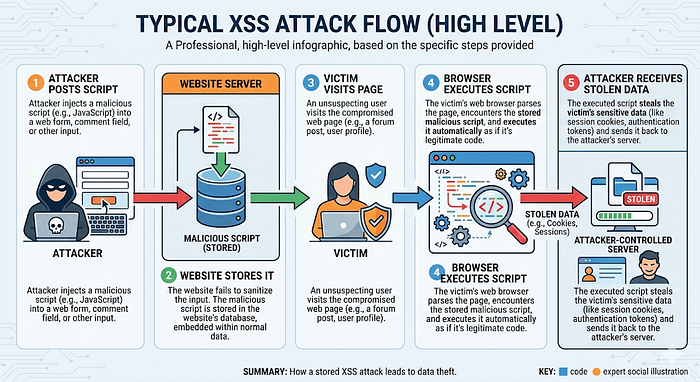
The victim did nothing wrong. The website was the problem.
Three Types of XSS — Simply Explained
Stored XSS — The Permanent Trap
Simple explanation: The malicious script is permanently saved on the server in a database, comment section, or profile field.
Real life analogy: Someone writes graffiti on a wall. Every person who walks past that wall sees it forever, until someone paints over it.
Example: An attacker puts a malicious script in their profile bio. Every user who views that profile gets affected.
This is the most dangerous type it affects every visitor automatically.
Reflected XSS — The Trick Link
Simple explanation: The malicious script is not stored anywhere. It travels inside a specially crafted URL and reflects off the server back to the victim.
Real life analogy: Someone sends you a letter that says "Read this message aloud" — and the message itself is the harmful thing. The moment you read it, it affects you.
Example: An attacker sends you this link:
https://website.com/search?q=<script>stealCookies()</script>You click it. The website reflects your search query back onto the page. The script executes. Your cookies are gone.
This type spreads through phishing emails and fake links.
DOM-Based XSS — The Client Side Attack
Simple explanation: This happens entirely in the browser — the server is not even involved. The malicious script manipulates the page's DOM (Document Object Model) directly.
Real life analogy: Instead of changing the notice board — someone changes what your glasses show you. The board is fine. Your perception is manipulated.
This is the most technical type and harder to detect.
What Can Attackers Do With XSS?
This is where it gets serious.
Cookie Theft: Cookies store your login session. Steal the cookie — steal the account. No password needed.
Session Hijacking: The attacker uses your stolen session to log in as you — on banking sites, social media, email.
Keylogging: A script can silently record everything you type on that page — passwords, credit card numbers, messages.
Website Defacement: Change what users see on the page — fake alerts, fake login forms, misleading content.
Redirecting Users: Send victims to phishing websites that look identical to the real one.
All of this — from one unfiltered input field.
A Simple Harmless Example
Here is the most basic XSS payload used in learning environments:
<script>alert('XSS')</script>What this does: When this executes in a browser, it shows a simple popup alert saying "XSS."
Security researchers use this to confirm that a field is vulnerable — if the popup appears, the website is not filtering input properly.
This is called a Proof of Concept — it proves the vulnerability exists without causing any actual harm.
In real bug bounty reports, this simple payload is enough to demonstrate XSS and get paid.
Why Beginners Should Care About XSS
XSS is consistently in the OWASP Top 10 — the list of most critical web vulnerabilities.
For bug bounty hunters: XSS is one of the most commonly found and rewarded vulnerabilities. Even a basic reflected XSS on a major website can earn $500 to $5,000.
For developers: Understanding XSS helps you build safer applications from day one.
For career: Every web security job interview includes XSS questions. Knowing it deeply sets you apart.
How to Prevent XSS
Input Validation: Never trust user input. Check and reject anything that looks like code before processing it.
Output Encoding: When displaying user input on a page, encode special characters so the browser treats them as text, not code.
< becomes <
> becomes >
Now even if someone submits a script tag, the browser displays it as text instead of executing it.
Content Security Policy (CSP): A security header that tells the browser which scripts are allowed to run — blocking unauthorized scripts automatically.
Use Modern Frameworks: React, Angular, and Vue automatically escape output by default — making XSS much harder.
Pro Tips to Start Learning XSS
Practice here — legally and for free:
- PortSwigger Web Academy — has dedicated XSS labs, completely free
- TryHackMe — XSS focused rooms for beginners
- HackTheBox — intermediate XSS challenges
Learning path:
- Understand how HTML and JavaScript work first
- Learn what the DOM is
- Do PortSwigger XSS labs in order
- Practice finding XSS in bug bounty programs
Mindset tip: Look at every input field as a question — "Does this website trust what I send it too much?"
Forms, search bars, URL parameters, comment sections — all potential XSS entry points.
Conclusion
XSS is not just a vulnerability — it is a reminder that trust is dangerous without verification.
A website that trusts user input blindly becomes a weapon against its own users.
Now you understand not just what XSS is — but how it works, why it matters, and how to start learning it properly.
The next time you see a search bar or a comment section — you will think differently. That is the mindset of a security researcher.
Start with PortSwigger Web Academy today. Do the first XSS lab. That single lab will teach you more than ten articles ever could.
You already understand XSS better than most beginners. Now go prove it.